





SoloLab
Members
-
Joined
-
Last visited
Everything posted by SoloLab
-
I just recently updated to 6.12.0, and before that added some RAM and a new SSD. But as the title says, my docker install, or even the web-Gui has been noticeable slower. I believe i configured all the dockers right but SOm helpful eyes are needed. tower-diagnostics-20230617-1405.zip
-
What did you run? Im running into the same issue on the import
-
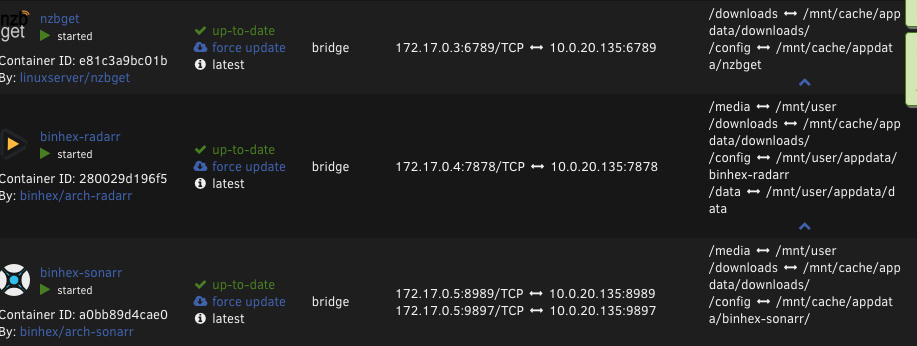
@Squid I am running to a similar issue, only with Radarr. It recently happened after 6.11.5 update I notice if I ssh into the docker, create the folder and change the permission to 777. I get the import to run correctly. tower-diagnostics-20221201-0655.zip
-
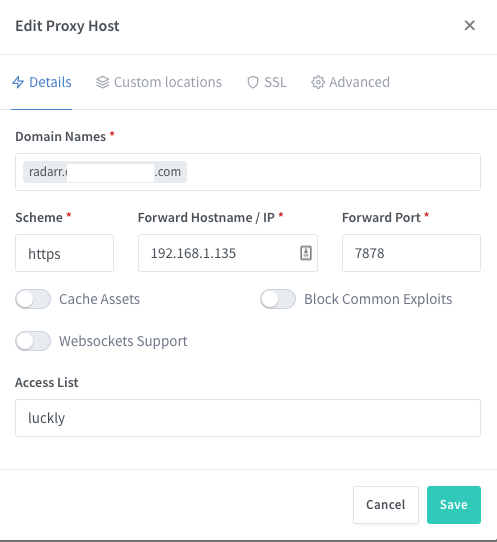
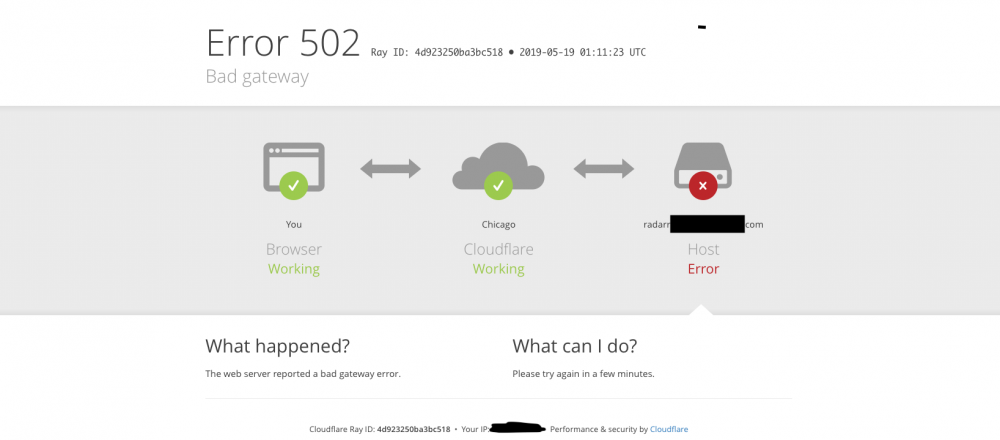
First off sorry for the really late reply, hope someone can still help. This setup will not work. I get The following error But if I change the Scheme to HTTP: I can externally access it, but if I go to the nav bar and directly add the `s` to the URL, it still works.
-
Yep.
-
I did some re-arrange and made the folders, I changed the script to something like 30 mins and ran the upload script, to watch the log. I didn't see them being upload. Is there something else i should check? The rclone_mount log says 23.03.2019 14:11:41 INFO: mounting rclone vfs. 23.03.2019 14:11:46 INFO: Check rclone gdrive vfs mount success. fuse: mountpoint is not empty fuse: if you are sure this is safe, use the 'nonempty' mount option 23.03.2019 14:11:46 CRITICAL: unionfs Remount failed. Script Finished Sat, 23 Mar 2019 14:11:46 -0700 Update: That error in the log was because the mountcheck file was missing in the gdrive vfs. But still can't seem to get the files I moved into mount_unionfs to upload. Update: March 25 - decided just to disabled all the scripts, delete all the folders and go through from scratch, now the folders are uploading I think the error was before known where to create the folders (Overlooked it in the tutorial ), I used krusder to edit and create folders in the wrong area and messed up the sync. Thanks again.
-
Thank you, your walk through it helps a lot.
-
DO I then move over the media files once they show up there? , to their correct path after been uploaded and encrypted in google.
-
If i try to enable "https" on the schema for a route, then navigate to that page it errors out. But if I use normal HTTP and go it works. can even manually change it to https at that point and it still works, but not when I set it in the UI.
-
Hello, So, I have this setup, thank you very much. But I have a question about my where I create the subdirectories `movies` & `shows`, etc? If I create those folders in the upload directory, once done there deleted.
-
First off, I will like to say thank you for the docker the redirects, for my containers was a step I always have trouble with. But reading over the thread, has there been any news why I can't use the "Force SSL" or the "https" option in the scheme without errors?
-
No real support needed, Just wanted to say thanks. this was so simple to use subdomains. I had to remember to add a new record to my Cloudflare DNS, SO thanks again. update: haven't tried everything yet but some simply sub domains for ombi, and organizer docker.
-
Thanks i got it.
-
Unraid v 6.5.3 when i access the Web Gui, i cant login i get 401 unauthorized, issue from earlier in this thread. check the logs "boot/logs/controlr.log" . and i see the following error whenever i attempt to login " Unknown encryption type: ()"
-
Hi, I just installed the docker tool and is unable to go to the WEBUI. I have the android app installed and able to see the tower using IP fine. get ERR_INVALID_HTTP_RESPONSE Jun 30 15:40:05 Tower ool www[30608]: /usr/local/emhttp/plugins/controlr/scripts/stop Jun 30 15:40:18 Tower ool www[30608]: /usr/local/emhttp/plugins/controlr/scripts/stop Jun 30 15:42:19 Tower login[3752]: ROOT LOGIN on '/dev/pts/0' Jun 30 15:43:24 Tower ool www[30608]: /usr/local/emhttp/plugins/controlr/scripts/start Jun 30 15:43:24 Tower sudo: root : TTY=unknown ; PWD=/usr/local/emhttp ; USER=root ; COMMAND=/usr/bin/bash -c /usr/local/emhttp/plugins/controlr/controlr -port 2378 -certdir '/boot/config/ssl/certs' -showups
-
I'm receiving this error in the letsencrpyt logfile but can't find a solution. nginx: [emerg] PEM_read_bio_X509_AUX("/config/keys/letsencrypt/fullchain.pem") failed (SSL: error:09FFF06C:PEM routines:CRYPTO_internal:no start line:Expecting: TRUSTED CERTIFICATE)


