lishpy
Members
-
Joined
-
Last visited
-
Has anyone been able to get fan control working with this board through unRaid and NOT IPMI (for those of us who have the non Ipmi boards)? I'm not pleased with the drive temps I'm seeing and want to ramp up my fans a bit.
-
The copy completed and now I was given the ability to start the data rebuild. The SOP should be updated to reflect the reboot in step 5 being an issue if that's truly the cause. Since it's before the copy procedure is initiated it's still not clear that's the issue. Otherwise there's a bug here considering the two threads that followed the SOP to a T and failed in the same way only to be successful on the redo.
-
Exactly, the only time I shut down was before I initiated the copy procedure. Plus if you see above the logs say the copy succeeded, but then seemed to not work correctly.
-
I just kicked off a new copy so we'll see, I'll report back. I did power down at Step 5 because I pulled the data drive I'm replacing and put the new parity in it's drive bay.
-
Interestingly enough, I just posted a thread with exact same results because I'm going through the same process.
-
I initiated a parity swap yesterday following this procedure: https://docs.unraid.net/legacy/FAQ/parity-swap-procedure/ I checked on the progress this morning and it was at 96% for the copy procedure, so I expected things to be done shortly there after and initiate the disk rebuild. I just checked progress in the array again, and the array operation page is now back to where I started, saying I can initiate the copy again. According to the documentation, that COPY button should be a START button to start the array and initialize the data rebuild. What's even more confusing, checking my server notifications, about the time I expected the copy function to complete, I have a notification saying the following: "Disk 4, is being reconstructed and is available for normal operation" Disk 4 is the old parity drive that is being turned into a data disk. I can't see any indication that disk 4 is actually being reconstructed though, I have no ability to start the array, and the array devices page shows the new parity drive and new disk as new devices. Did this somehow not complete successfully and I need to run the copy again? I don't see any indication of any failures and the notification message this morning makes me think it completed successfully, but now I don't know what state the array is in. I don't see anything in the logs out of the ordinary right now, the disks are spun down. Log says the copy completed successfully, but below says slot 0 is wrong import. Sep 24 12:29:29 Tower emhttpd: copy: disk4 to disk0 completed Sep 24 12:29:55 Tower kernel: md: unRAID driver removed Sep 24 12:29:55 Tower emhttpd: shcmd (39876): /sbin/modprobe md-mod super=/boot/config/super.dat Sep 24 12:29:55 Tower kernel: md: unRAID driver 2.9.27 installed Sep 24 12:29:55 Tower kernel: mdcmd (1): import 0 sdf 64 13672382412 0 WDC_WUH721414ALE6L1_Y6G3NGSC Sep 24 12:29:55 Tower kernel: md: import disk0: (sdf) WDC_WUH721414ALE6L1_Y6G3NGSC size: 13672382412 Sep 24 12:29:55 Tower kernel: md: import_slot: 0 wrong Sep 24 12:29:55 Tower kernel: mdcmd (2): import 1 sdd 64 7814026532 0 WDC_WD80EDAZ-11TA3A0_VGGYLR9G Sep 24 12:29:55 Tower kernel: md: import disk1: (sdd) WDC_WD80EDAZ-11TA3A0_VGGYLR9G size: 7814026532 Sep 24 12:29:55 Tower kernel: mdcmd (3): import 2 sdc 64 7814026532 0 WDC_WD80EFAX-68LHPN0_7SGLHX6C Sep 24 12:29:55 Tower kernel: md: import disk2: (sdc) WDC_WD80EFAX-68LHPN0_7SGLHX6C size: 7814026532 Sep 24 12:29:55 Tower kernel: mdcmd (4): import 3 sdh 64 3907018532 0 ST4000DM000-1F2168_Z304H4Z2 Sep 24 12:29:55 Tower kernel: md: import disk3: (sdh) ST4000DM000-1F2168_Z304H4Z2 size: 3907018532 Sep 24 12:30:05 Tower kernel: mdcmd (5): import 4 sdg 64 7814026532 0 WDC_WD80EFAX-68LHPN0_7SGLWD9C Sep 24 12:30:05 Tower kernel: md: import disk4: (sdg) WDC_WD80EFAX-68LHPN0_7SGLWD9C size: 7814026532 Sep 24 12:30:05 Tower kernel: md: import_slot: 4 replaced Also probably unrelated, but if you hover over the orange triangle on the array operation page, it says "Started, array unprotected" but on the dashboard I see all disks as offline. Looking for next steps to help troubleshoot. Array operation: https://imgur.com/id9jLUc Array disks: https://imgur.com/hukGTbI
-
I also just had an 8TB WD Red get stuck on cycle 2's post read at 95%, pegging a CPU core at 100%. I used gfjardim-0.8.9-beta. Is there no known fix for this? A little frustrating to see all these posts go back months but no definitive script updates or answers. Thanks everyone for the help.
-
Check out the unBALANCE plugin in the 6.1 plugins section.
-
Thanks for this, seems to work great. One suggestion. In my case, when I tried to open unBALANCE from the plugins page, I clicked "Open webUI 1.30" and it took me to "tower:6237" which didn't load. Unfortunately on OS X, to access my server over the network you need to type in tower.local, not just tower. Would it be easy for you to change this link to access via the unRAID IP address instead of via hostname? That way regardless of hostname it will just load the IP:port and should work on any OS.
-
Thanks! Yeah a reboot of the server is necessary. Although everything from the Flash was removed, it was still in memory like you said.
-
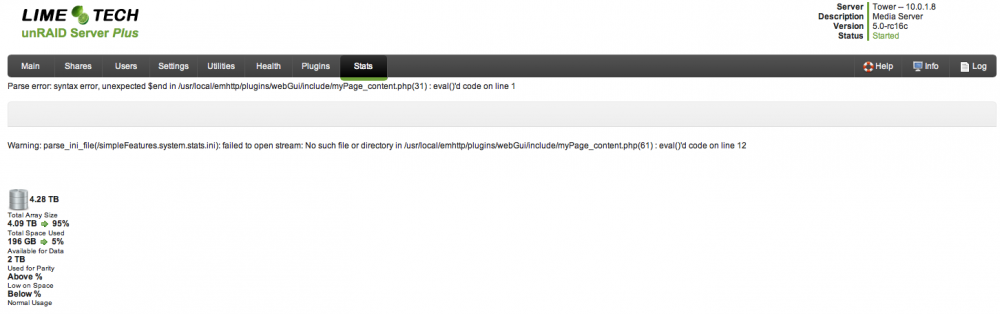
I'm having issues with the "stats" page. Here's the error: Parse error: syntax error, unexpected $end in /usr/local/emhttp/plugins/webGui/include/myPage_content.php(31) : eval()'d code on line 1 Warning: parse_ini_file(/simpleFeatures.system.stats.ini): failed to open stream: No such file or directory in /usr/local/emhttp/plugins/webGui/include/myPage_content.php(61) : eval()'d code on line 12 Screenshot attached. "Health" page is similar and also has parse errors.