





bobobeastie
Members
-
Joined
-
Last visited
Everything posted by bobobeastie
-
Nov 3 14:48:45 Tower unassigned.devices: Adding disk '/dev/mapper/HGST_HDN726060ALE614_K1H90MAD'... Nov 3 14:48:46 Tower unassigned.devices: luksOpen error: Device HGST_HDN726060ALE614_K1H90MAD already exists. Nov 3 14:48:46 Tower unassigned.devices: Partition 'HGST_HDN726060ALE614_K1H90MAD' could not be mounted... I was able to run some sort of filesystem check using the terminal, I think -L, it fixed some issues, after and I think beofre fixing it, I get this this when I use the web ui and I'm not sure what it means: FS: crypto_LUKS /sbin/fsck /dev/mapper/HGST_HDN726060ALE614_K1H90MAD 2>&1 fsck from util-linux 2.33.2 If you wish to check the consistency of an XFS filesystem or repair a damaged filesystem, see xfs_repair(8). I used "/sbin/fsck /dev/mapper/HGST_HDN726060ALE614_K1H90MAD" from above to figure out which disk to tell it top check/fix.
-
Same boot after trying to mount. tower-diagnostics-20191103-2152.zip
-
Diagnostics attached, post reboot without touching UD, and it isn't set to auto mount. tower-diagnostics-20191103-2036.zip
-
Thanks, see attached.
-
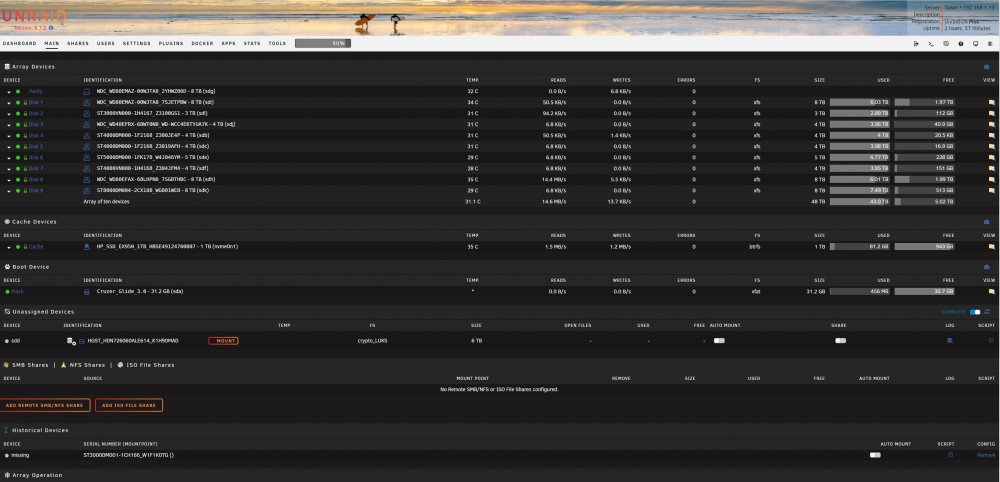
That works, it shows my passphrase. My assumption was that this issue was caused by this drive having been already in the array because of this bit of the log from when I try to mount: Nov 3 03:00:05 Tower unassigned.devices: Adding disk '/dev/mapper/HGST_HDN726060ALE614_K1H90MAD'... Nov 3 03:00:05 Tower unassigned.devices: luksOpen error: Device HGST_HDN726060ALE614_K1H90MAD already exists. Nov 3 03:00:05 Tower unassigned.devices: Partition 'HGST_HDN726060ALE614_K1H90MAD' could not be mounted... Specifically the already exists part. Can I either make it ignore this safely, or can I make it realize that there are no disks in the array with the same serial? I could off course be wrong, I'm not an expert on any of this.
-
I can't figure out how to get a keyfile, Krusader won't allow me to place a file in root, and I can't copy a keyfile that I created in appdata. Figuring it needed escalated priveledges, I tried mc from the terminal, but I can't figure out mc, command line file editors/browsers are beyond me. I'm assuming I could copy the appdata keyfile to root on the command line if I had the right command. I do see a keyfile in root in mc which thankfully defaults to root, but I can't figure out how to view it. I'm not sure any of that matters, because I can most definitely start my array and access shares and files on them, docker starts fine. edit: Is the missing key bit in the syslog just from after a reboot when it is waiting for me to provide the key maybe? I think there are two different methods to unlock encryption, using a file and using a passphrase, and I'm using passphase, because I thought it would be more secure.
-
I don't have a keyfile as far as I know, and I don't see it in root using Krusader. I enter my key in to a text field before starting my array, which works with no issues that I am aware of. This is the same arrangement where I mounted another encrypted drive. It it would help I could temporarily use a keyfile, do I simply create the file and then enter my encryption password as the only text in the file?
-
I'm trying to mount an encrypted xfs drive that had been part of my array but I was having issues, maybe due to a bad SATA card/cable, so I ended up replacing the drive after installing a SAS card. I suspect there might be files on it that are not on the array, so I have been trying to mount it in unasigned devices to find out, and if so recover them. I was able to mount a another encrypted drive in a similar situation and recover files. The drive I'm having issues with won't mount when server is freshly booted and the array is off, but there's probably no mechanism to read an inputted key at this point, and it won't mount when array has been started and stopped either. I see this in the logs when I try to mount: Nov 3 03:00:05 Tower unassigned.devices: Adding disk '/dev/mapper/HGST_HDN726060ALE614_K1H90MAD'... Nov 3 03:00:05 Tower unassigned.devices: luksOpen error: Device HGST_HDN726060ALE614_K1H90MAD already exists. Nov 3 03:00:05 Tower unassigned.devices: Partition 'HGST_HDN726060ALE614_K1H90MAD' could not be mounted... I'm ready to give up on the drive if there's nothing I can do, just want to check. Maybe unrelated, but after attempting to mount the disk, I started my array ack up and a parity check started, despite running successfully to completion yesterday. Attached is fresh diagnostics from after the newest parity chjeck was started and canceled. If it helps I have been getting some excellent help from ti-ti jorge regarding the lead up to this situation on this thread: tower-diagnostics-20191103-1117.zip
-
rtorrent has been much better at connecting to the web ui since I ungraded to 6.7.1 official from 6.7.1 rc2. It is still timing out frequently though.
-
Good idea, I have edited my post with the attached diagnostics file. Thank you.
-
I have been having issues with rtorrentvpn, and maybe with unraid, I can't get the web ui for rtorrent to load reliably, and when it does load it only connects briefly. My unraid issues, which I'm mentioning in case it's related, is that pages load slowly, settings change slowly, I give up waiting and relaod whichever page and sometimes the changes took, sometimes they didn't. When I try to initiate a shutdown or restart I am used to seeing a new page with a countdown, I'm not seeing that anymore. Here's some maybe pertinent backstory. This is my second current unraid box using leftovers from upgrades, built because the first box is out of bays and running out of space. I started it with drives pre-cleared 3 times, with encrytped xfs, and initially did not set up a parity drive. With the array running, I started to get Current pending sectors on one of the drives in the array. I waited for a drive that was pre-clearing at the time to finish and then had it build parity with that drive, the drive with errors, and 2 others. Then I replaced the drive with errors and let it rebuild. This morning I added a cache drive and set things up to use it, including app data (preferred) and my download directory (yes). I also ran and xfs check of the drive that replaced the drive with errors, and a btrfs check on the cache drive. I had been using a copy of the openvpn folder from my other box which is running the same container successfully, I just tried overwriting the contents with a fresh download from PIA and that doesn't seem to have made a difference. Thank you for any help, log file is attached. edit: As suggested I have attached my unraid diagnostics. supervisord-sending.log flags-diagnostics-20190622-2223.zip
