





bobobeastie
Members
-
Joined
-
Last visited
Everything posted by bobobeastie
-
I have two instances of rTorrentVPN running, each on a different box, last week they both started having periods where nothing was uploading/downloading, starting yesterday morning I have not seen anything upload/download. Since yesterday, I tried different PIA wiregurad endpoints by modifying wg0.conf, and I removed "wireguard" from Container Variable: VPN_CLIENT: to try using openvpn, which seemed to have worked except no uploading./downloading. It always seems to get connected in the log with no errors, as far as I can tell. The fact that 2 instances suggest it's not something random that broke on my end, on one instance I only tried different endpoints. ...was still working on providing more info and my rtorrent instance set to use uk-london.privacy.network on wireguard started actively downloading. I don't see any chatter on PIA's discussion page or reddit about massive issues. supervisord.log
-
Thank you so much, my pause updates for 7 days just ran out and my computer updated this morning, had a bunch of red X's on my shares, one wasn't red and it was trying to connect for a minute, saw your post, disabled PIA, and it connected immediately, along with the ones that were red. I think it might have been a long time before I thought of disabling PIA.
-
Just updated my PC to 20H2 and now I can't access my shares. One unriad box is on a P2P 10gbe link, I thought that configuration was the issue, but my other unriad box which is connected normally through my router is also not connecting. I don't see the registry setting found here: "Computer\HKEY_LOCAL_MACHINE\SYSTEM\CurrentControlSet\Services\LanmanWorkstation\Parameters" so maybe Windows isn't suing that anymore. EDIT: Bit of a false alarm, 1 restart fixed the normal 1gbe router shares, and a couple more restarts and reconfiguring the 10gbe settings in Windows fixed that. EDIT 2: Been dealing with the issue all morning, issue sometimes only happened with 10gbe share, I uninstalled 20H2, that didn't work, then I uninstalled KB4586781 which had been installed at the same time as 20H2, and now everything works!
-
I did a bunch of stuff, including uninstalling unraid-api and MQTT, had a response here half writtten for half of today, after doing some other home assistant stuff I got back to this. I don't know if it was my issue before, but where you have Container Variable: MQTTBroker and the default is hassio (I think), I just figured out that that was supposed to be the IP address, in this case of my unraid box. If you are open to suggestions from people who don't know anything about MQTT, I would put "broker_hostname-or-ip", or something to that effect, instead of broker, as the default I forgot I had changed that to the IP, went in to home assistant a little later and MQTT had a bunch of entities. Thank you very much for your help! I see that there is a entity for switch.server_name_power_off, I'm hoping/guessing that this is a graceful shutdown? I also want to have buttons to pause docker containers, I see that I can turn them on or off, but pause was in the webui for unraid-api, so I probably just have to change something to enable pausing? Maybe I'm better off stopping and starting, but still want to learn. Thank you.
-
Thank you, I tried deleting the default username and password from unraid api, because I wasn't using any in the MQTT container, I didn't know that's how it worked. After clearing out the username and password, if I go back to edit the container the defaults are back. So I tried setting up a real username and password, which I also placed in a passwords.txt file in the MQTT appdata folder. That file disappears when I restart the container so I believe it worked. I deleted 2 prior configs in unraid api using manual config on the left, then re-set it up, and this brings me back to something that confused me. The box called "Setup Unraid Server", I fill it out with the IP of unraid, login=root, and my root password, but then there's a popup asking for username and password. That seems redundant, am I supposed to put something else in one of those places, because I have ben using root and my root password? I updated configuration.yaml to have this for MQTT: mqtt: broker: 192.168.1.10 port: 1883 discovery: true discovery_prefix: homeassistant username: username password: password Username and password have been changed by me, they are the ones used in unraid api and mqtt... and when I restart home assistant I get this in the log: 2020-08-02 08:35:00 ERROR (Thread-4) [homeassistant.components.mqtt] Unable to connect to the MQTT broker: Connection Refused: not authorised. 2020-08-02 08:35:00 WARNING (Thread-4) [homeassistant.components.mqtt] Disconnected from MQTT server 192.168.1.10:1883 (5) I used the updated username and password in MQTT Explorer and I believe it is working as a see that there are messages, I can't figure out what is in them though.
-
I left your setting as default, so base topic is homeassistant, I then set up MQTT with Broker equal to my unraid server IP address, where all this lives, the default port, and your default username and password. I do see good information ion unraid API. I see a bunch of messages like this in it's log: Get Main Details for ip: http://192.168.1.10:8123/ Failed Request failed with status code 500 I see sent and received messages in the log for mqtt. In home assistant I can listen to homeassistant in the mqtt config, and then publish on homeassistant and it logs that. Not sure if either of those means anything. Thank you very much for your response, I appreciate it.
-
I'm pretty confused, just playing with home assistant today for the first time, using the container homeassistant/home-assistant. Trying to get this to work, I installed electricbrainuk/unraidapi, installed spants/mqtt and I think both are working? I installed MQTT-Explorer in windows and it saw messages. Every time I go to the web gui it makes me fill out username and password in a popup, and the username/password on the left isn't persistent. The instructions mention this: Add the following custom repository: https://github.com/ElectricBrainUK/HA-Addons Build the Addon Fill in the config section Start I don't understand what this means. I can see docker and unraid server details in the unraid-api after I fill out the info in the popup, but I am not getting any discovered devices in MQTT in home assistant. I have the following in configuration.yaml: mqtt: broker: 192.168.1.10 discovery: true discovery_prefix: homeassistant
-
That's a good point, I guess I was incorrectly thinking of files moving in to unriad, but these are moving withing unraid internally, or only semi internal, because they are mostly files created in docker containers. If rtorrent says it wants to create a file, I guess the size on disk starts at 0kb, but I think the other size is the eventual whole, does unraid know those values? I thought if it was bigger than available it would choose to write to the array vs cache. If there is a wiki that explains all of this I'd be happy to study it. Thank you.
-
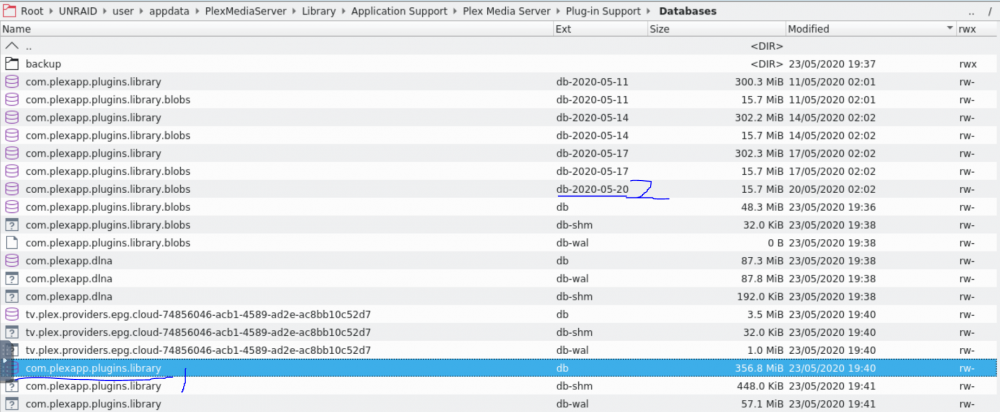
Did some googling and got it fixed. In case anyone else has the same issue, my database was corrupt, probably because it wasn't able to get written to. First I stopped plex, and moved the file labeled 1 in the below image to a backup folder that I created. Then plex was able to start , but it was a fresh install, I thought maybe it would grab a backup, no luck, but at least plex would start. Then I stopped plex again, deleted the tiny version of file #1 that had just been created, copied file number 2, because it was the most recent date, to the backup folder, then renamed the original copy to not have the date. That worked and now plex has only forgotten the last 3 days. Too bad plex will only create a copy every 3 days. I was waiting on winrar opening CA_Backup.tar, and it looks like I have a newer version in there, so that's even better. Thanks for the help @trurl !
-
I was aware of the fact that unraid would try to write files that were too large for the destination but never looked for a setting to prevent it or did any research. I guess I don't understand why unraid doesn't just look at the current file size and determine that it won't fit, and then write it to the array? I have put some values in for this on my shares the write to cache and hopefully it will help prevent this issue in the future. First I tried removing the plex docker, no dice, then I stopped docker in settings and removed the image, added plex back alone and still no dice, same error message, I haven't seen any issues before or after with any of my other containers, they all added back fine. I'm attaching a fresh diagnostics from after re-setting up docker, just in case. nastheripper-diagnostics-20200523-1726.zip
-
Thanks, diagnostics are attached. nastheripper-diagnostics-20200523-1146.zip
-
Woke up to plex not working and the log is full of "Starting Plex Media Server". I have tried restarting the docker and rebooted unraid, neither worked. My cache drive became 100% full at some point last night I think, this might be related. Usually when that causes docker issues a reboot solves it. User uid: 99 User gid: 100 ------------------------------------- [cont-init.d] 10-adduser: exited 0. [cont-init.d] 40-chown-files: executing... [cont-init.d] 40-chown-files: exited 0. [cont-init.d] 45-plex-claim: executing... [cont-init.d] 45-plex-claim: exited 0. [cont-init.d] 50-gid-video: executing... [cont-init.d] 50-gid-video: exited 0. [cont-init.d] 60-plex-update: executing... No update required [cont-init.d] 60-plex-update: exited 0. [cont-init.d] 99-custom-scripts: executing... [custom-init] no custom files found exiting... [cont-init.d] 99-custom-scripts: exited 0. [cont-init.d] done. [services.d] starting services Starting Plex Media Server. [services.d] done. No update required [cont-init.d] 60-plex-update: exited 0. [cont-init.d] 99-custom-scripts: executing... [custom-init] no custom files found exiting... [cont-init.d] 99-custom-scripts: exited 0. [cont-init.d] done. [services.d] starting services Starting Plex Media Server. [services.d] done. Starting Plex Media Server. After that the last message just repeats.
-
Happy to help, that's similar to my day yesterday.
-
My preset is named Custom1 and in the docker config in unraid I have "General/Custom1", so it looks like you can just remove the first part, "Custom/". When I said I wasn't getting the same error that was referring to the message from @08deanr which @Djoss said didn't matter. The error I got was just that the conversion failed, nothing about presets.
-
I was having an issue where the update caused my watch folder to stop being processed, I was getting different errors, but changing the preset I use to have "General/" before it fixed it. Question, all of the files that failed to convert because of this issue will now not process, I know changing their names will make them appear to be new, is there a better solution where I don't have to rename them? Some file I can delete that logs failures? edit: Looks like failed_conversions in the base of the appdata handbrake folder does it (allows files to be re-tried), still waiting for handbrake to go through all of the files that were already processed, because I deleted my appdata earlier today and therefore it doesn't have a list of those in successful_conversions.
-
Don't know, do a CTRL-F on "Container Variable: STRICT_PORT_FORWARD". If it isn't there I have no idea.
-
Yes, that's what I did.
-
Looks like the PIA issue has been fixed, at least for now.
-
Looks like I'm having the same issue: Event: Preclear on xxxxxxxx Subject: FAIL! Invalid unRAID`s MBR signature on xxxxxxxxx (/dev/sdu) Description: FAIL! Invalid unRAID`s MBR signature on xxxxxxxxxx (/dev/sdu). Importance: alert Invalid unRAID`s MBR signature on xxxxxxxx (/dev/sdu) - Aborted Drive is a 12 TB WD easystore shucked. WDC_WD120EMFZ-11A6JA0
-
That worked, it mounted while my array is started, thank you. Looks like the first step wasn't needed, it said the device already exists. For some reason I didn't see sdd under device in UD. Thank you very much for the help.
-
How do I tell what X should be in sdX1? Is this telling it that the encryption key is the same as the array?
-
Not sure if this should go in my thread, but could this just be due to a duplicate UUID? I understand that that issue is usually caused by a bad file system, but now that that is fixed and the UUID issue remains, should it be addressed? Even if I can get around it now, I'm guessing I might have the same issue when I'm done with the drive and will want to add it as a new drive to my array, so might as well try to deal with it now. I could try running "xfs_admin -U generate /dev/mapper/mdX" on the array drive that is a duplicate of the UD drive, or probably better, try changing the UUID of the UD drive.
-
Thanks, it works now for me. The drive will not mount while the array is started normally, xfs_repair through your tool was also ran with array mounted normally. I think I already have the file in lost and found, so I'm going to work on verifying that and if there are any files I need I can transfer them while the array isn't mounted to a secondary location, and then back to the array. However if it would help you make any changes I'd be more then happy to help test them in this situation, please let me know. Perhaps it would be useful in your xfs_repair kicking off tool to be able to pass it different flags? Log when I try to mount: Nov 5 06:52:40 Tower unassigned.devices: Mount of '/dev/mapper/HGST_HDN726060ALE614_K1H90MAD' failed. Error message: mount: /mnt/disks/HGST_HDN726060ALE614_K1H90MAD: wrong fs type, bad option, bad superblock on /dev/mapper/HGST_HDN726060ALE614_K1H90MAD, missing codepage or helper program, or other error. Your tool when I click on "Run with correct flag: FS: crypto_LUKS /sbin/xfs_repair /dev/mapper/HGST_HDN726060ALE614_K1H90MAD 2>&1 Phase 1 - find and verify superblock... Phase 2 - using internal log - zero log... - scan filesystem freespace and inode maps... - found root inode chunk Phase 3 - for each AG... - scan and clear agi unlinked lists... - process known inodes and perform inode discovery... - agno = 0 - agno = 1 - agno = 2 - agno = 3 - agno = 4 - agno = 5 - agno = 6 - agno = 7 - agno = 8 - agno = 9 - agno = 10 - agno = 11 - process newly discovered inodes... Phase 4 - check for duplicate blocks... - setting up duplicate extent list... - check for inodes claiming duplicate blocks... - agno = 4 - agno = 6 - agno = 7 - agno = 2 - agno = 3 - agno = 8 - agno = 5 - agno = 9 - agno = 0 - agno = 1 - agno = 11 - agno = 10 Phase 5 - rebuild AG headers and trees... - reset superblock... Phase 6 - check inode connectivity... - resetting contents of realtime bitmap and summary inodes - traversing filesystem ... - traversal finished ... - moving disconnected inodes to lost+found ... Phase 7 - verify and correct link counts... done
-
I was able to get it mounted and have files in lost+found, but only while in maintenance mode which might be normal. Ideally I would be able to mount with the array mounted so I could transfer to the array. I suspect the reason I can't mount it at the same time is a duplicate UUID, which I hear is due to something wrong with the file system, but it looks like a previous -L check worked based on the presence of the lost+found folder, although I do see this in the log: Nov 5 04:31:41 Tower unassigned.devices: Mount of '/dev/mapper/HGST_HDN726060ALE614_K1H90MAD' failed. Error message: mount: /mnt/disks/HGST_HDN726060ALE614_K1H90MAD: wrong fs type, bad option, bad superblock on /dev/mapper/HGST_HDN726060ALE614_K1H90MAD, missing codepage or helper program, or other error. I did try using UD built in check, but it didn't seem to do anything: FS: crypto_LUKS /sbin/fsck /dev/mapper/HGST_HDN726060ALE614_K1H90MAD 2>&1 fsck from util-linux 2.33.2 If you wish to check the consistency of an XFS filesystem or repair a damaged filesystem, see xfs_repair(8). tower-diagnostics-20191105-1259.zip blkid.txt
-
I did that, that's what this part is from: FS: crypto_LUKS /sbin/fsck /dev/mapper/HGST_HDN726060ALE614_K1H90MAD 2>&1 fsck from util-linux 2.33.2 If you wish to check the consistency of an XFS filesystem or repair a damaged filesystem, see xfs_repair(8). I'm guessing it didn't work.

