





emersonicus
Members
-
Joined
-
Apparently is has something to do with i801_smbus si there a possible to fix this by deactivating i801_smbus? root@NAS:/mnt/user/Downloads# dmesg | grep 'Flags mismatch' [ 153.614390] genirq: Flags mismatch irq 16. 00000000 (vfio-intx(0000:01:00.0)) vs. 00000080 (i801_smbus) EDIT: I added this to Syslinux cfg intel_iommu=on modprobe.blacklist=i2c_i801,i2c_smbus nows its working.
-
I tried to update the FW and still the same problem prevails. Can i just use the NICs without passthrough? will there be any major differences?
-
Output: root@NAS:~# lspci -vs 1:00.0 01:00.0 Ethernet controller: Mellanox Technologies MT27520 Family [ConnectX-3 Pro] Subsystem: Mellanox Technologies MT27520 Family [ConnectX-3 Pro] Flags: fast devsel, IRQ 16, IOMMU group 10 Memory at 81200000 (64-bit, non-prefetchable) [disabled] Memory at 6016800000 (64-bit, prefetchable) [disabled] Expansion ROM at 81100000 [disabled] Capabilities: [40] Power Management version 3 Capabilities: [48] Vital Product Data Capabilities: [9c] MSI-X: Enable- Count=128 Masked- Capabilities: [60] Express Endpoint, MSI 00 Capabilities: [c0] Vendor Specific Information: Len=18 <?> Capabilities: [100] Alternative Routing-ID Interpretation (ARI) Capabilities: [148] Device Serial Number e4-1d-53-03-00-37-b6-bf Capabilities: [108] Single Root I/O Virtualization (SR-IOV) Capabilities: [154] Advanced Error Reporting Capabilities: [18c] Secondary PCI Express Kernel driver in use: vfio-pci Kernel modules: mlx4_core
-
Yes, according to the logs it’s bound successfully and the 01:00.0 is the Mellanox dual nic card which I want to passthrough.
-
Hi, Indeed, it was on PCI_E3. I switched it now to PCI_E1 and now im getting error when trying to start the VM with the card. Thanks!
-
Hi guys, I tried guides here and tried to search for a solution, but all are not working. When I try to bind only the Mellanox card it auto selects the Realtek NIC also. I tried to edit the vfio-pci.cfg manually and delete the Realtek NIC but when unraid boots, no NIC available only loopback using 'ifconfig'. I also tried ACS settings but still the same cant passthrough the Mellanox card. Do i miss something or does it not work mit my setup? MOBO: MAG B460M MORTAR CPU: i5-10400 Thanks! tower-diagnostics-20230108-1836.zip

-
Hi guys, I have a problem with Fan Auto Control. My MB: MSI B460m with community driver installed for nct6687. Unraid: 6.9.2 When I press detect it shows: How can I make this control work? Fans are in full power. Regards.
-
I had this problem I changed the domain to Unraid ip and port in order to show the images PHOTOVIEW_PUBLIC_ENDPOINT: http://IP:8694/
-
Thank you this worked well!
-
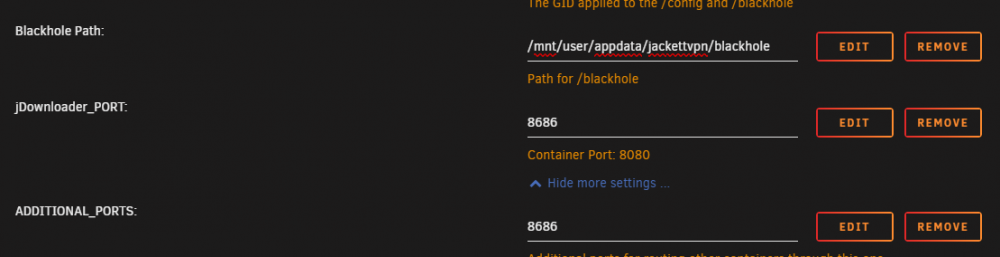
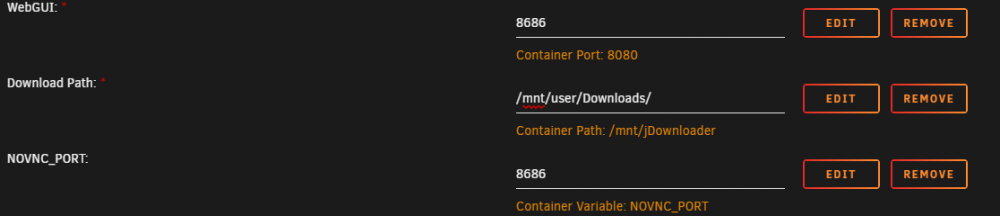
I already tried this but somehow the port still does not change. jDownloader jackettVPN: It only works when I use in jackett the 8080 port.

-
Hi, I installed the jDownloader2 and tried to route it to the VPN container through --net=container:jackettvpn everything works but the only issue I have is how can I change the jDownloader port from 8080 to 8686 while routing it to another container? I tried to search for a solution but somehow I cannot change the jDownloader port. Regards!
-
Hey, Sorry, I could not update you sooner as I was preoccupied but all I can say as for now its holding and no crashes at all. I will keep monitoring thank you again!
-
Thanks, this solved the problem
-
Yes, i tried it with heaven benchmark for 20-30 minutes and didnt crash once. I am willing to test a custom image with the drivers builtin if there is a guide or hint how to do so. TY!
-
Hi, yes i am not running both at the same time only run VM once with out the nvidia plugin just to check if the GPU is faulty after I checked that is not a GPU problem, I deleted the VM and installed nvidia plugin and or docker transcoding in plex and it works. I observed when plex is transcoding and tdarr also then suddenly the random crashes appears. Maybe that is correlated to the problem?




