rbh00723
Members
-
Joined
-
Last visited
Everything posted by rbh00723
-
BUMP!!! I haven't bought one yet but I'd like to and want to know more as well. I do believe you can buy any LSI HAB that has been flashed to "IT mode". Since you mentioned the IOM6 you'll want a SAS 6gbps. This guy called "The ART of Server" has an awesome ebay store and I assume he can advise you on what you need. This should be what you'd need I think. https://www.ebay.com/itm/LSI-9200-8e-6Gbps-8-lane-external-SAS-HBA-P20-IT-Mode-ZFS-FreeNAS-unRAID-NoROM-/163534822734?mkcid=16&mkevt=1&_trksid=p2349624.m46890.l49286&mkrid=711-127632-2357-0 Sent from my SM-N975U using Tapatalk
-
So at the moment none of the containers works each one of them says Execution error : Bad Parameters ( I assumed it was because of the permissions/ownership issue) Am I incorrect about this? How do I check logs regarding the error in more detail.
-
So I have been racking by brain about it...I though what if I move everything out of appdata, then go out and reinstall a fresh copy of each container, then see what it perms and ownership get set to then make all those changes to each of the previously copied folders then move them back into the actual appdata folder so I don't loose all my configs and plex meta data and stuff...I have worked really hard (for me anyway) to get everything set up just right...I would hate to have to redo it all. Also squid may I have permission to PM you regarding this? Sent from my SM-N975U using Tapatalk
-
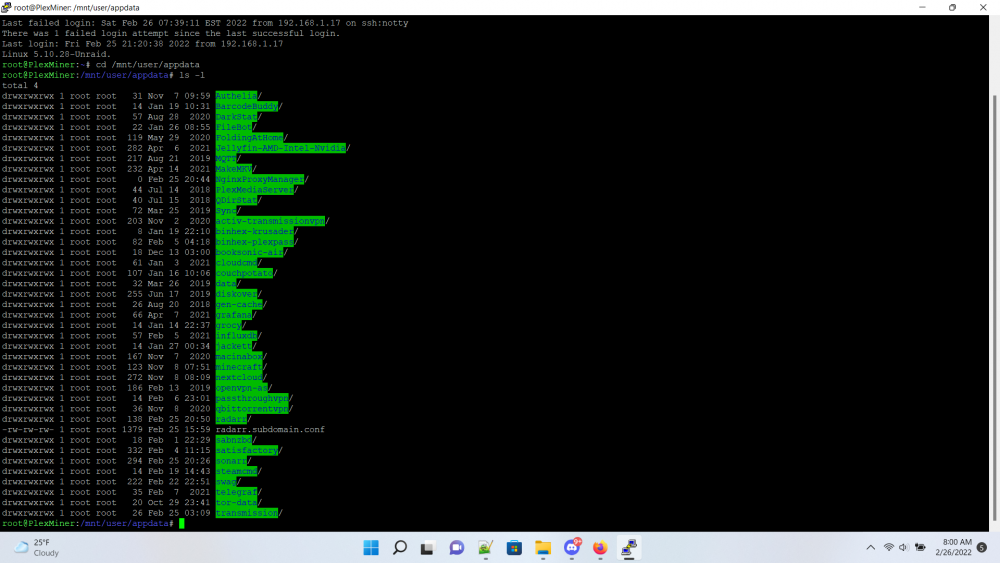
So I made a mistake by changing the ownership GUID and PUID of all of these folders . Shouldn't I just be able to chown these back but idk what to set them to
-
This should work but if you search for Intel quick sync docker plex on YouTube you'll find a bunch I've got mine working (I forget how has to do with downloading drivers and setting a path through to plex container) Sent from my SM-N975U using Tapatalk
-
So here is where plex will point you to regarding change logs https://support.plex.tv/articles/221755547-changelogs-and-release-notes/ And here is a list of the releases binhex puts out to show you what version number of plex you'll be getting. https://github.com/binhex/arch-plexpass/releases Beyond that he (binhex) states that basically you'll get whatever version is currently available on through the arch repo. "Arch User Repository (AUR) is vast! - AUR has packages for nearly every popular linux application out there, and using a helper app like packer means simple and quick deployment of virtually any application as a docker. " Feel free to ask any more if you don't understand something. I always hated when someone responded in a forum and made me feel bad when I didn't understand something. Sent from my SM-N975U using Tapatalk
-
Hey guys so I'm getting an error in my logs and I'm not to sure what it means or what to do about it could someone take a look and at least try to give me somewhere to start. I put the log files in a Google drive link https://drive.google.com/file/d/1PRnphVhkaILDKQbBm2jkN5sNy0cnqelS/view?usp=drivesdk I tried my best to use find and replace to anonymize things if you need me to fix something I replaced with xxx let me know.log for Plex Media Server.txt Sent from my SM-N975U using Tapatalk
-
Hey wanted to let you know your donate button isn't working in tapatalk (I think it has to do with them trying to redirect the page) Sent from my SM-N975U using Tapatalk
-
Hi guys so I had briefly played around with grocy and barcode buddy. I forgot my password for grocy so I had to nuke it...now I'm getting an error from barcode buddy's webUI but don't know what to do about it. it says "Could not connect to Grocy server: Could not lookup Grocy product info Please check your URL and API key in the settings menu!" Can anyone tell me what directory I should place a new api key from grocy into? EDIT*** I figured it out by just removing the container and deleteing the appdata folder. but how would i fix this in the future
-
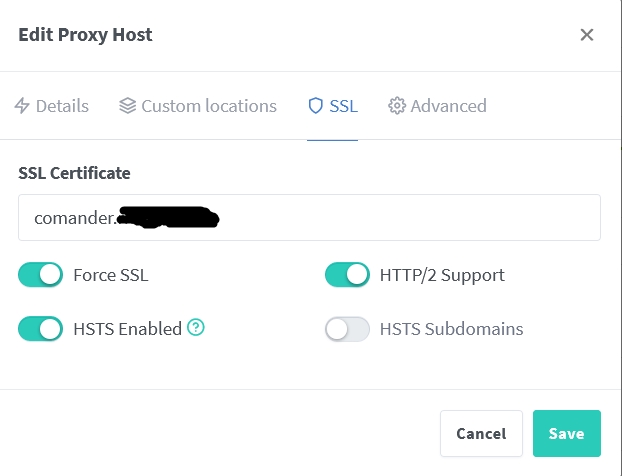
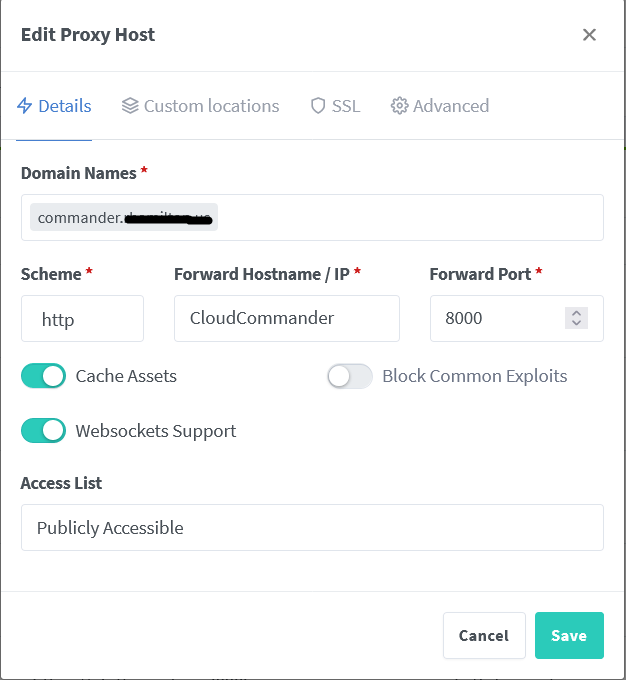
So if you look at these two pics you'll see the details tab, you need to set this to match whatever the service your trying to forward uses. so if when you open the web UI and you get to a http site you need to choose HTTP, if you open it up and it uses https you need to choose HTTPS. It's under the SSL tab where you set up whether you want the page served to the client device as HTTP or HTTPS. If you want HTTPS you'll need to set up a cert. I personally use the cloudflare API for a DNS challenge. I honestly don't exactly understand how all that stuff works with SSL and what not I mean yes I use it but it was a confusing worm hole for me to learn how to do it but that doesn't mean I understand how it works exactly...Feel free to send me a PM if you need help I can try to help you out the best I can. I am a noob myself but we'll make it happen.
-
So I feel like this must have been covered by someone in here, but when I'm connected to my home wifi I can't access any of my domains. I know it has something to do with NAT and DNS or something like that but I don't understand it. I use PfSense so if someone could point me in a direction I'd really appreciate it. Thanks guys for all your help btw I'm getting a lot of stuff up and running here and it's really cool to me to be able to set up access like this.
-
So it hadn't stopped and I was in a hurry so i pressed the computer power button and it just ran a shutdown sequence then I started it back up so...ya i guess it stopped.but no I didnt have any terminal open.
-
So I am not sure really I mean should I have stopped docker containers first or something? It's not like I was actively/knowingly trying to access anything when I pressed stop array. So to your point what plugin or docker can I or should I use to check if and what is accessing shares at any given time. I do from time to time see some interesting activity that I can't always explain and would be nice to know what it is if for nothing more than peace of mind.
-
Nov 1 08:18:51 PlexMiner root: rmdir: failed to remove '/mnt/user': Device or resource busy Nov 1 08:18:51 PlexMiner emhttpd: shcmd (3151677): exit status: 1 Nov 1 08:18:51 PlexMiner emhttpd: shcmd (3151679): /usr/local/sbin/update_cron Nov 1 08:18:51 PlexMiner emhttpd: Retry unmounting user share(s)... Nov 1 08:18:56 PlexMiner emhttpd: shcmd (3151680): umount /mnt/user Nov 1 08:18:56 PlexMiner root: umount: /mnt/user: target is busy. Nov 1 08:18:56 PlexMiner emhttpd: shcmd (3151680): exit status: 32 Nov 1 08:18:56 PlexMiner emhttpd: shcmd (3151681): rmdir /mnt/user So I Tried to stop the array and something is keeping it alive and I don't know what exactly. I will attach a log file but this above is basically what its saying over and over... So I just wanted to do a reboot but every time i try that unraid fails to reboot correctly and i have to mess with it a bunch to get it back up. So i thought I would try stopping array first then do shutdown then power back up rather than just doing a reboot function I have no idea whats wrong with my server but its been acting a bit funky for a while now. syslog edited.txt
-
What about his LAN address? Shouldn't it be 10.10.20.0/24 Sent from my SM-N975U using Tapatalk
-
hmmm....I do only have the ca.rsa.2048 file in my conf dir thanks for the help. So you know I did search around a bit on forum first b4 writing the post Thanks
-
okay @Dyon now what did I do wrong?? dos2unix: converting file /config/openvpn/CAToronto.ovpn to Unix format... 2020-11-08 16:22:46.588105 [INFO] VPN remote line defined as 'ca-toronto.privateinternetaccess.com 1198' 2020-11-08 16:22:46.605509 [INFO] VPN_REMOTE defined as 'ca-toronto.privateinternetaccess.com' 2020-11-08 16:22:46.622703 [INFO] VPN_PORT defined as '1198' 2020-11-08 16:22:46.640564 [INFO] VPN_PROTOCOL defined as 'udp' 2020-11-08 16:22:46.658958 [INFO] VPN_DEVICE_TYPE defined as 'tun0' 2020-11-08 16:22:46.675810 [INFO] LAN_NETWORK defined as '192.168.0.0/24' 2020-11-08 16:22:46.692700 [INFO] NAME_SERVERS defined as '1.1.1.1,1.0.0.1' 2020-11-08 16:22:46.709863 [INFO] VPN_OPTIONS not defined (via -e VPN_OPTIONS) 2020-11-08 16:22:46.726904 [INFO] Adding 1.1.1.1 to resolv.conf 2020-11-08 16:22:46.744001 [INFO] Adding 1.0.0.1 to resolv.conf 2020-11-08 16:22:46.760464 [INFO] Starting OpenVPN... Sun Nov 8 16:22:46 2020 WARNING: file 'credentials.conf' is group or others accessible Sun Nov 8 16:22:46 2020 OpenVPN 2.4.7 x86_64-pc-linux-gnu [SSL (OpenSSL)] [LZO] [LZ4] [EPOLL] [PKCS11] [MH/PKTINFO] [AEAD] built on Feb 20 2019 Sun Nov 8 16:22:46 2020 library versions: OpenSSL 1.1.1d 10 Sep 2019, LZO 2.10 Sun Nov 8 16:22:46 2020 TCP/UDP: Preserving recently used remote address: [AF_INET]66.115.142.130:1198 Sun Nov 8 16:22:46 2020 UDP link local: (not bound) Sun Nov 8 16:22:46 2020 UDP link remote: [AF_INET]66.115.142.130:1198 Sun Nov 8 16:23:46 2020 TLS Error: TLS key negotiation failed to occur within 60 seconds (check your network connectivity) Sun Nov 8 16:23:46 2020 TLS Error: TLS handshake failed Sun Nov 8 16:23:46 2020 SIGUSR1[soft,tls-error] received, process restarting Also I'm Really sorry do you need any other files or anything Thanks for helpin out a noob
-
So I'm not sure what I'm doing wrong I put the .opvn file into the appdata/qbittorrentvpn/openvpn 2020-11-08 14:10:37.672413 [INFO] VPN_ENABLED defined as 'yes' 2020-11-08 14:10:37.689450 [INFO] DISABLE_IPV6 is set to '1' 2020-11-08 14:10:37.706144 [INFO] Disabling IPv6 in sysctl 2020-11-08 14:10:37.724089 [INFO] VPN_TYPE defined as 'openvpn' 2020-11-08 14:10:37.746099 [INFO] OpenVPN config file is found at /config/openvpn/CA Toronto.ovpn cat: /config/openvpn/CA: No such file or directory cat: Toronto.ovpn: No such file or directory
-
so then when I try to connect to it on the remote machine i enter no username at all and then 10 as the password?
-
Hi guys I've had some difficulty trying to get remote access. I'd like to utilize the windows client machine I have as my daily driver and the deluge application to manage the docker container instead of the webUI. I put in the IP address of my unraid machine and the port number to connect to along with various combinations of username and password and I can't seem to get it to work...is there something I'm missing here?
-
Hey guys lets just say I may have been a bit of an idiot. I had set the auto-rip setting to 1. But when I had put in the did I didn't see the GUI through my browser reflect that it was doing anything so I had assumed that maybe it just wasn't working right. Soooo I started to rip the disk myself which was seriously fu**ing with my optical drive. neither me or the auto-rip was able to get much throughput as far as copying speed. Mystery Solved
-
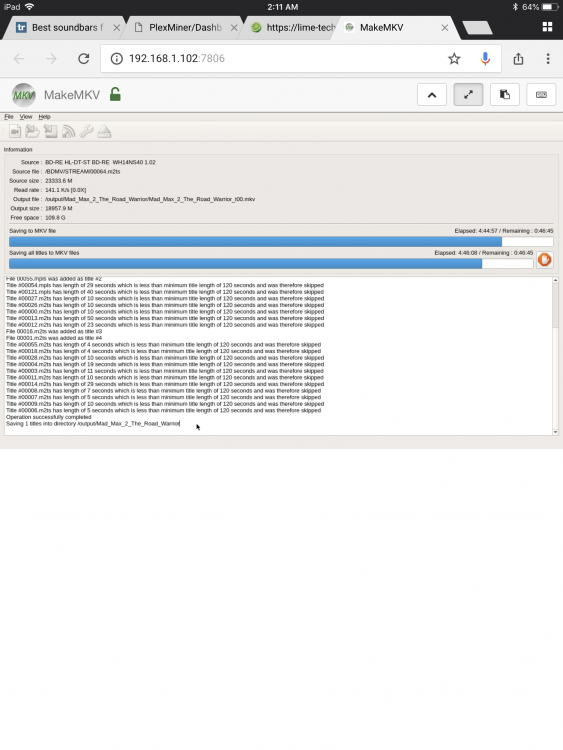
Heyy guys I was wondering if anyone else has had an issue while attempting to rip a Blu-ray while machine is in the middle of a parity check? So I guess my machine decided to do a parity check and for some reason I'm getting super slow rip speeds. For a little bit it will speed up to what seems normal then just drop down to kbps speeds... I left a pic maybe it could help diagnose