





MasterMark
Members
-
Joined
-
Last visited
Everything posted by MasterMark
-
No. I want to bypass firewall on the client side. Like when you connect a public wifi, and their firewall only allow specific ports. Like only 53/udp, 80/tcp and 443/tcp, It is a common strategy for VPN to put the service on these ports to bypass this "fool" firewalls without DPI. I got the idea from aptalca:
-
I'm trying to bypass firewalls. I am not hosting DNS service on Unraid neither on my router (to the WAN side). It should not conflicts with anything. How wireguard bind to a port? Can I set to bind to specific ip-address:port? Or can I disable somehow the dnsmasq service?
-
Hi, I'm trying to set up WireGuard to UDP/53. From the logs I can see this: wireguard: wg0: Could not create IPv4 socket A link change request failed with some changes committed already. Interface wg0 may have been left with an inconsistent configuration, please check. I checked what's listening on port 53 and dnsmasq seems listening on TCP/53 and have a record on UDP but not listening as I can see: sudo lsof -i -P -n | grep :53 avahi-dae 9673 avahi 14u IPv4 29488 0t0 UDP *:5353 avahi-dae 9673 avahi 15u IPv6 29489 0t0 UDP *:5353 dnsmasq 26708 nobody 5u IPv4 76177 0t0 UDP 192.168.122.1:53 dnsmasq 26708 nobody 6u IPv4 76178 0t0 TCP 192.168.122.1:53 (LISTEN) (The 192.168.122.0 is not my network I do not know what is this for.) Is dnsmasq port prevents WireGuard to bind? No docker or VM listening on UDP/53. Any idea? Thanks, Mark
-
I realized this config is a complete failure. On port 80 there is no $ssl_preread_server_name variable so all traffic will be passed to the OpenVPN backend. Therefore my every attempt to redirect other traffic to HTTPS was futile.
-
Thank you very much.
-
Why is the docker does not mind about the port-share parameters? The OpenVPN port-share does exactly what I need without compromising other functionalities. I tried again with nginx with a different approach: I set up stream to listen on 443 and moved all other http session to 4443. Set OpenVPN to listen 9443. The stream section decide to pass to 4443 port or to 9443 port backend based on server name. It works, but it broke nginx access control due to basically this is double reverse proxying and the backend does not known the real IP of the client. Yes, this is solvable, but the solution brakes the OpenVPN session. Also because of proxying all of the redirects on the backend will not work. Here is the stream config: stream { map $ssl_preread_server_name $targetBackend { ~^(?<subdomain>.+).mydomain.com$ tcp_upstream; default openvpn_upstream; } upstream tcp_upstream { # upstream nginx virtual hosts server x.x.x.x:4443; } upstream openvpn_upstream { # openvpn container server x.x.x.x:9443; } server { listen 443 so_keepalive=on; proxy_connect_timeout 300s; proxy_timeout 300s; proxy_pass $targetBackend; ssl_preread on; } } So because this is not working well I decided to take a different approach again. Based on your idea, I moved everything to port TCP/80. This is still not the best solution but keeps my HTTPS settings untouched and working. Because of the stream proxy this still brakes the HTTP -> HTTPS redirections. I have not found a solution for this yet. But this is less painful, then the other option. Still, the OpenVPN port-share is a far better than this nginx black magic. I do not understand docker and containers enough to set it up alone. I can find several tutorials how to set up a bare OpenVPN-AS server, but not in docker and not in this exact docker. Is there a chance to implement the port-share functionality to this container for the dumbs like me? Oh and thanks for the hint to wireguard UDP/53, I might set it up on my router. Thanks, Mark edit: Just to clarify: the OpenVPN-AS listen on 443 port, but the in the docker I mapped 9443 to 443 port inside the container. Same way with port 80 I use a different port for redirect.
-
https://docs.linuxserver.io/images/docker-openvpn-as#application-setup
-
Can you link that? I can't find it. Thanks. If you are referring to the nginx config where stream{} and http{} section separated that is not working. The stream can't listen on port 443 when the http section also listening on port 443 simultaneously.
-
I wish to bypass common stateless firewalls with OpenVPN TCP/443 port. But my server also hosting another services on TCP/443 port. This is where port-share come to save the day, it can redirect non-VPN traffic to different port backend like nginx so I can serve webpages on 443 port.
-
Hi all, Please help, I am trying to set up port-share functionality of OpenVPN server. I tried: adding to container Extra Parameters: -e 'port-share 192.168.200.225 6580' adding into the as.conf file: # port share port_share.enable=true port_share.service=custom port_share.ip_address=192.168.200.225 port_share.port=6580 modifying config-local.json: "vpn.server.port_share.enable": "true", "vpn.server.port_share.ip_address": "192.168.200.225", "vpn.server.port_share.port": "6580", "vpn.server.port_share.service": "custom", None of the above worked. How can I set port-share in the docker? Thanks, Mark
-
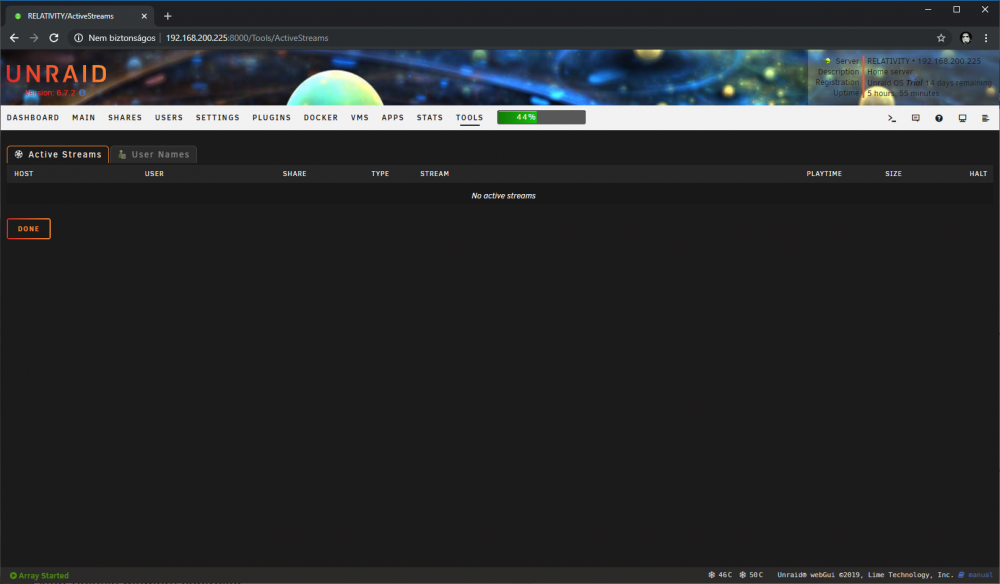
No, I want to see who uses the SMB shares on the server. For example I open a movie with MPC-HC through a mounted SMB share. It showed this before, but now it is only showin No active streams. Windows 10 client mounted SMB shares: PS C:\Windows\system32> Get-SmbConnection ServerName ShareName UserName Credential Dialect NumOpens ---------- --------- -------- ---------- ------- -------- relativity.biomax.local downloads MARK-PC\MasterMark MARK-PC\MasterMark 3.1.1 6 relativity.biomax.local usershare MARK-PC\MasterMark MARK-PC\MasterMark 3.1.1 1 relativity.biomax.local _TorrentWatchFolder MARK-PC\MasterMark MARK-PC\MasterMark 3.1.1 2 Thanks. edit: Correction, it is actually showing the streams, if I open a file from the main unraid array. I have the downloads share on an unassigned device, which is not part of the main array. Before it shows that streams too. Is there a way to swich back manually to list streams from unassigned devices? Thanks again.
-
Hey, Active Streams plugin shows no streams however there are streams. What should I check about this? I'm already tried reinstall the plugin but didn't help.
-
Hi, I'm trying to install macOS, but when Clover boots there are no available macOS install: Config: <disk type='file' device='disk'> <driver name='qemu' type='qcow2' cache='writeback'/> <source file='/mnt/user/domains/HACKINTOSH/clover.qcow2'/> <target dev='hdc' bus='sata'/> <boot order='1'/> <address type='drive' controller='0' bus='0' target='0' unit='2'/> </disk> <disk type='file' device='disk'> <driver name='qemu' type='raw' cache='writeback'/> <source file='/mnt/user/domains/HACKINTOSH/mojave.img'/> <target dev='hdd' bus='sata'/> <address type='drive' controller='0' bus='0' target='0' unit='3'/> </disk> <disk type='file' device='disk'> <driver name='qemu' type='raw' cache='writeback'/> <source file='/mnt/user/domains/HACKINTOSH/vdisk3.img'/> <target dev='hde' bus='sata'/> <address type='drive' controller='0' bus='0' target='0' unit='4'/> </disk> As I see the config is good. Do you have any idea what's wrong? Thanks.

-
*/5 * * * *
-
Oh, I totally forgot nerd tools. Thanks a lot.
-
Hi, I need to use expect for SSH connection, but it is not installed on unRAID by default. I am trying similar code like this: #!/usr/bin/expect -f spawn ssh [email protected] "ls /file" expect "password:" send "mypassword\r" Do anyone have any idea how can I install expect to unRAID? Thanks, Mark



