





MasterMark
Members
-
Joined
-
Last visited
Everything posted by MasterMark
-
Yes, I tried right after setting up. It is now working today again. I was not aware of this delay. Thanks for your help.
-
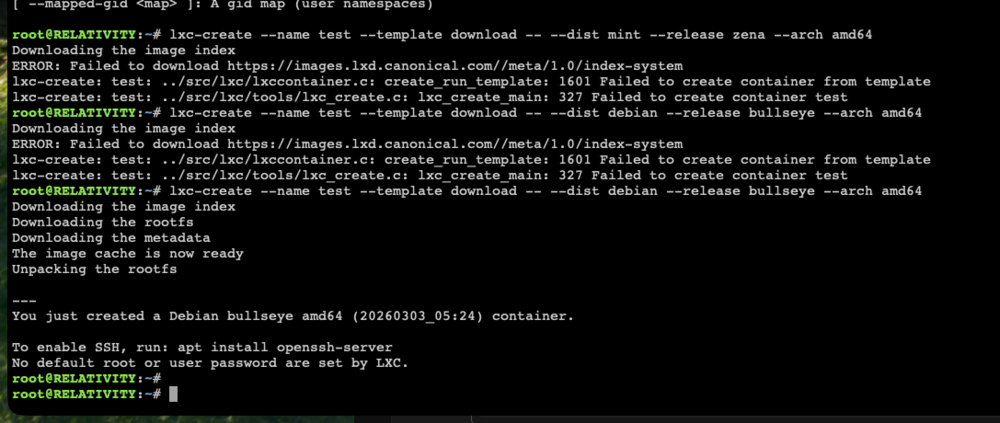
I messed up something. I changed the LXC Container URL to images.lxd.canonical.com. Then tried to create new container but the UI changed and no drop-down select any more. Tried to create with the default debian/bullseye clicking Create button then the site reloads with different URL but nothing happens. I changed back to the original images.linuxcontainers.org. Still not working and the drop-down menu still missing. No anything in the Unraid logs. I tried to check the browser console, but nothing there also. Tried to reinstall plugin. Same as before. I saw the CLI command and changed back to the canonical.com URL, then tried with the original linuxcontainers.org URL as well: Canonical not working, but linuxcontainers working with CLI. From the WebGUI still nothing happens. Now what? How can i recover the original functionality? Also how can I use the canonical images? Thanks, Mark
-
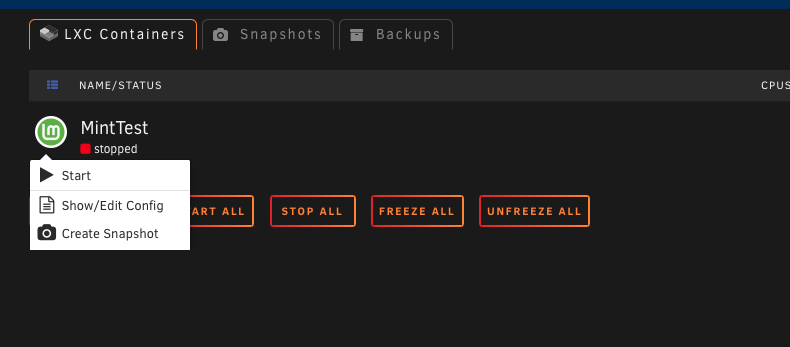
Hi, If I only have one container, there is no backup or any other option. I can't delete it either. What am I missing here? edit: Ok, never mind, I have to scroll down, because the viewport is so small hiding the options. Looks really weird.

-
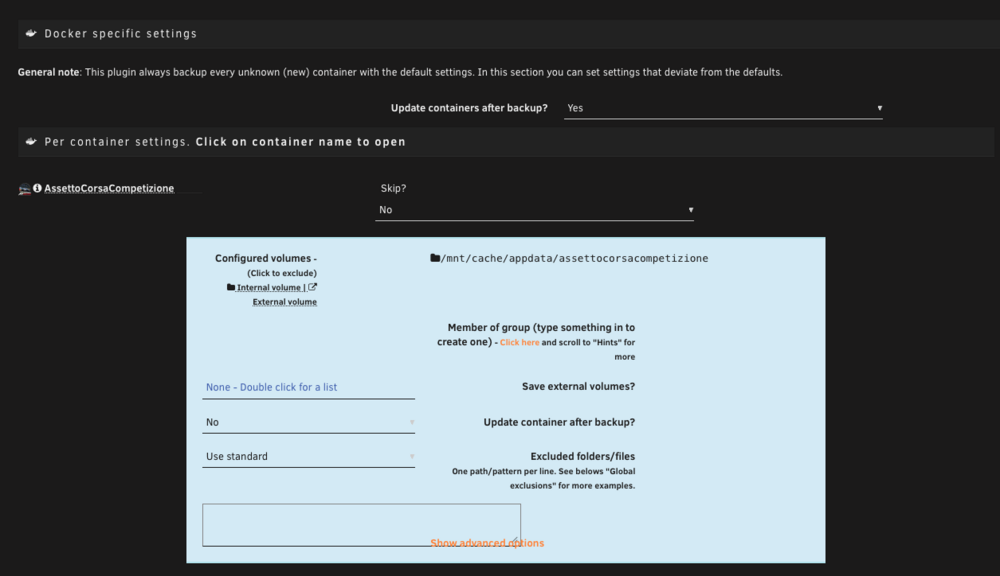
Hi, When I select to update containers after backup globally it not modifies the individual settings for the containers: Update containers after backup? Yes Update container after backup? No Do I have to manually set all of them to Yes? How can I exclude only some of the containers from the update if not? Thanks, Mark
-
Hi, The Active Streams plugin GUI is not working really good with Unraid 7.2.3 version. The columns are too big, and the path string is bleeding through to different columns as well. Any plan to fix this? I love this plugin to see if anyone using the server. But hard to read the values like this. Thanks, Mark
-
That fixed it for me too, but I wonder why we have to do this manually?
-
Thanks, that worked.
-
Hi, I have a very simple python script but if I run it via the user scripts the execution is not in order. subprocess.run running before everything at the start of the script, however it is called later in the script. Do you have idea what is causing this? If I run the script manually in ssh shell it is executing the commands in order. edit: I am not sure right now. Maybe just the output is not in order in the log? The script: #!/usr/bin/python3 import shutil import subprocess print("Starting") letsencryptCert = "/mnt/user/appdata/swag/etc/letsencrypt/live/my.domain/priv-fullchain-bundle.pem" guiCert = "/boot/config/ssl/certs/TOWER_unraid_bundle.pem" print("Copy certificate...") shutil.copyfile(letsencryptCert, guiCert) print("Reload WebGUI...") subprocess.run(["/etc/rc.d/rc.nginx", "reload"]) print("Finished")
-
Oh I see. Thanks.
-
2/5 * * * * Why this custom cron is not working correctly? I would like to run script every 5 minutes, but with an offset. So like 2, 7, 12, 17, 22, etc...
-
nginx: [emerg] open() "/etc/nginx/accesslist.conf" failed (2: No such file or directory) What the heck? Is something changed? The accesslist file was loaded before. include accesslist.conf; This is where the proxy config loading this.
-
Hi, About DocPHT, when I am adding a new section to an already published page, the page is not refreshing. If I restart the container then it loads up the new ones as well. Also when I am changing the sections' order, the change is not display until I restart the container. I assume this is something about the internal ngninx configuration, but I can't figure it out. Can someone please take a look? Thanks, Mark
-
Hi, On the Dashboard the Streams counter stays zero on cache only shares even when there is an active stream. Can this be fixed? The streams counters would be a good indicator when someone using the server. Thanks, Mark
-
Yeah this is what I figured out myself as well. This is why I am trying this with iSCSI. I know It takes half a day with one stream, I already copied once the whole HDD. But I wanted to solve this. Not really for the real world problem, but as a proof of concept. It hard to accept that I am copying between my servers with 900 mbps however four times bandwith should be possible with my setup. Do you have any tutorial for iSCSI multipath? Thanks
-
I am sorry I forgot to mention I have LACP bonding on the 4 NIC on both my servers. Yep, I am mounting the HDD on the main server with iSCSI that is not a problem. If I had more sata I did not placed the old HDD on the other server anyway. Yes, I set up the samba extras config for smb multipath. But didn’t work. Maybe on linux the LACP bonding is the issue, because smb multipath on linux expects multiple IP addresses, but with bonding, the whole group has 1 IP address. Thanks
-
I have two Unraid servers with 4x1 Gigabit NIC. Right now I am migrating to new HDDs as unassigned device. I tried ZFS but that was a complete failure. Very slow in my case (SMR hdd-s). I already copied all my files back to the ZFS pool, but I want to destroy the pool and take a different approach (possible lvm on two hdds, xfs partition as a cache pool). I have no sata in the main server to aditional HDDs, so I fired up my old server and placed the old HDD there. I copied back the new files there. But when I destroy the ZFS pool ans create the cache pool, I have to copy back the files again. About 4 TB. I tried SMB mulitpath, but not working, the connection maxed out at ~900mbps. I thought iSCSI knows the multipath mode “as is”. tl;dr: I want to moves files between two Unraid servers quickly.
-
Hey, Is it possible to set up multipath with iSCSI?
-
Hi, I am trying to connect to another Unraid server where is set up the iSCSI Target plugin. I'm getting this error: Apr 16 09:56:38 SERVER kernel: scsi host12: iSCSI Initiator over TCP/IP Apr 16 09:56:38 SERVER kernel: connection7:0: detected conn error (1020) Apr 16 09:56:38 SERVER iscsid: conn 0 login rejected: initiator failed authorization with target Apr 16 09:56:38 SERVER iscsid: Connection7:0 to [target: iqn.2003-01.org.linux-iscsi......, portal: xxx.xxx.xxx.xxx,3260] through [iface: default] is shutdown. Any idea? What authorization did this mean? Never mind. I needed to add the initiator at the target.
-
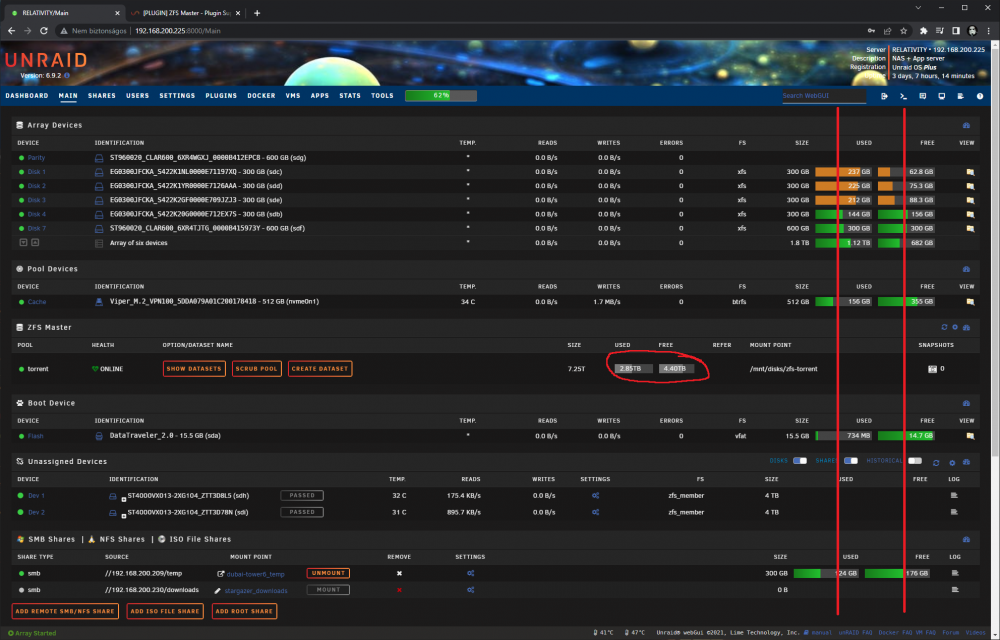
Hi, Thank you for your awesome work. This plugin is very great. One notice: could the plugin please respect the coloring and the alignment of the Main page? At least roughly like the Unassigned Devices plugin. Thanks, Mark
-
Hey, Is it possible for active streams to show all SMB usage? As i can see it is limited to /mnt/user, but i have symlinks there and those ones are excluded. Is there a filter config for this? Thanks, Mark
-
Please please please could you add an option to replace the Dashboard widget from the Hardware section to the Disk array section on the right side? This is bothering my OCD. Thanks
-
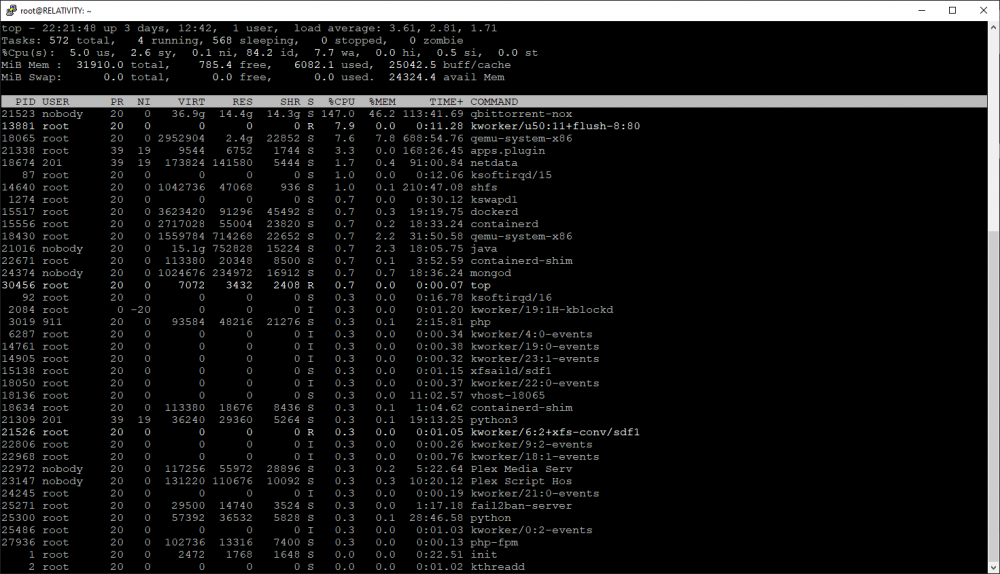
Here are some TOP screenshots: The Web GUI not loading, or when loading the content not showing. (The API not responding.) I even tried to run a different Web GUI: Vuetorrent. I'm running it in NGINX. In that case the webpage is loaded but there is no or slow connection to the docker qbittorrent API. What can I do with this?
.thumb.png.1a324d9f290c072e2d39749de91b9caa.png)
-
Hi, Is there a way to prioritize the webUI inside the docker container? When I start a downloading and it gets really fast the webUI struggling to load the content. Buttons don't working, etc. Thanks, Mark
-
It is not working that way. The tunnel isn't establishing.
-
Hmm, well this should work. Thanks, I am going to try this. edit: Unless it will broke the QR-code and file, because this will contain the original port.




.png.f07dd070313faa1c35d1e78bc4465c4b.png)
