binzhu1070
Members
-
Joined
-
Last visited
-
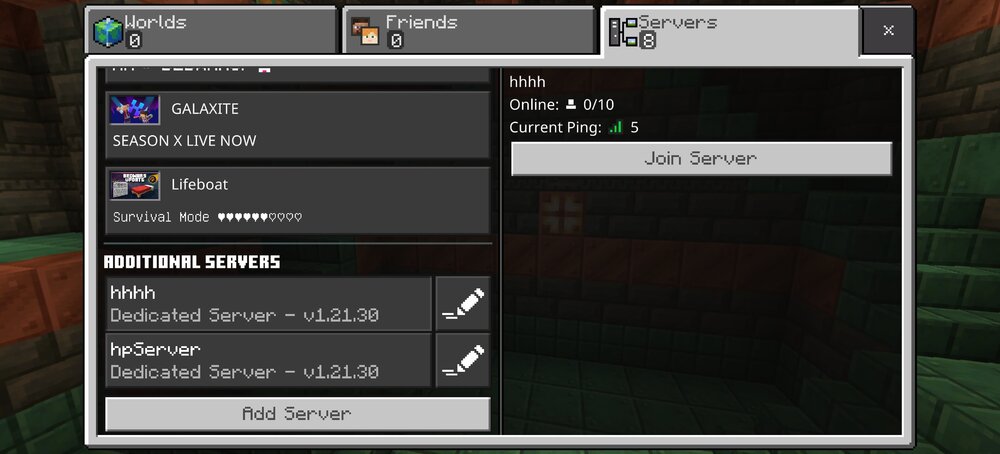
help, I created a bedrock server which seems to start up just fine, but on my android phone, it can see the server and have a online status with ping, but connection to it fails with message Unable to connect to world all the docker setting is default other than the web ui password. I also have a java server from binhex which cannot even ping the server locally but can connect remotely, I asked in the unraid forum and end up giving up, but maybe related? I do use pfsense + unify wifi 6 AP, but really doesn't have much complicate settings, no vlan.

-
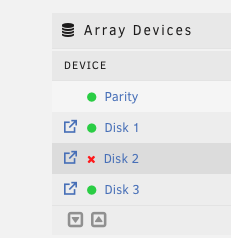
my initial batch of drives when I first started home labbing started to fail one by one, which is terrifying but also cool to finally see how unraid handles it. What I don't seem to understand though, is that if I plug the drive into a windows machine, it seems to be overall working fine after reformatting it. So how does unraid determine when a drive is dead? is there any early signs that I can look for?
-
can someone point to what to look for in the log so that I can try to look myself? this started a while ago but basically if I start all my dockers, the server basically will definitely crash overnight. When it crashes, plugin display won't show signal, can't ssh into it and can't login through web ui, have to restart the server. this diagnostic file are generated right after a reboot of this issue. I am in the process of starting one or two dockers each time to try to eliminate the offender but my hard drive happened to fail the other day which completely threw me off and now i don't remember where I was... tower-diagnostics-20230720-0724.zip
-
omg thank you!, I saw your other post though and I thought I tried this command and didn't work... do you know if this might come up again and we might need to do this again in the future?
-
after recent 6.12 upgrade server has been crashing crazy often. Now the appdata share is completely missing because the cache drive is showing unmountable even though the cache drive icon is still showing green. can someone please help take a look? thanks for your time tower-diagnostics-20230718-2145.zip
-
Hey yeah I just followed this and fixed it! just trying to get back to this thread, and you beat me to it!
-
no it's still not resolved. what's your cpu/mobo combo? I have intell i5 12600t Asrock b660m steel legend.
-
Hey all, I just switched from amd x470 to an intel b660 platform, everything else worked fine, but the wireguard vpn now doesn't activate anymore. I deleted the tunnel and all peers, recreated a new tunnel, the tunnel can activate at this moment. I add a peer, generate keys and click apply, suddenly the tunnel became inactive, clicking on the inactive toggle it goes to active and back to inactive right away, without any error message. Any idea what's the issue here? This is now unraid built in right? so there's no way I can uninstall reinstall plugin or something like that?
-
Got it running nicely with Big Sur and RX 580. Thanks SpaceInvaderOne!! I have two issues that I'm looking for help. 1. rx 580 is connected to 2 display port monitor, only one light up even in system it detect 2, mouse can even move over to the second screen. Any idea how I can go about fixing that? 2. this is not that important to me, but imessage and facetime doesn't work, it keeps logging me out right after logging in. I tried the en0 built-in fix which solves the appstore download but doesn't seem to work with imessage and facetime.
-
question, do I have to host a server? is there a public server that I can just play? if so what's the benefit of hosting private server, like custom control? sorry I don't have a lot of experience hosting custom game servers, but the game does look fun!!
-
Question then, I have ram labeled 3600 c18 I see Mobo official support is 3200, is it ok to run like that or does has to be the default 2133? I see somewhere else mentioning 3200is ok but want to cross check. Also, the MSI memory preset set the ram at c16 when speed at 3200, is that a problem? Do I need to dial it back to c18?
-
Thanks, disabled a bunch of bios settings and downclocked to 3200mhz, seems stable for now, will monitor for a couple days. I think one that I have disabled might have been the culprit, the resizable BAR support, I read somewhere else that unraid doesn't support this.
-
thank you!!, lol so easy
-
Hi Unraiders, so I just pulled the trigger of a new system b450 msi tomahawk max + ryzen 3900 + cosair 32gb 3600mhz c18. Once I followed the proper tutorial to unstub the hardware passthrough, the new server boots up like a champ with all 12 glory cores. All docker works fine, when I start a VM though, it just crashes and unraid goes with it. after unraid reboots, the vm manager even disables vm. I researched a couple topic in the forum and followed these toturials: flash storage config edit: kernel /bzimage append pcie_no_flr=1022:149c,1022:1487 vfio_iommu_type1.allow_unsafe_interrupts=1 initrd=/bzroot disabled WSD unstubbed everything, updated to latest bios disable PCIe ACS override starting VM from scratch using just vnc, downclock memory none of them worked... and it just keeps crashing. Attaching syslog a couple noteable errors: Nov 22 12:02:53 Tower kernel: mce: [Hardware Error]: Machine check events logged Nov 22 12:02:53 Tower kernel: mce: [Hardware Error]: CPU 9: Machine Check: 0 Bank 5: bea0000000000108 Nov 22 12:02:53 Tower kernel: mce: [Hardware Error]: TSC 0 ADDR 7df42f011364 MISC d012000100000000 SYND 4d000000 IPID 500b000000000 Nov 22 12:02:53 Tower kernel: mce: [Hardware Error]: PROCESSOR 2:a20f10 TIME 1637611356 SOCKET 0 APIC 16 microcode a201016 Nov 22 12:02:56 Tower ntpd[2189]: kernel reports TIME_ERROR: 0x41: Clock Unsynchronized any tips on what I can do next to troubleshoot? syslog
-
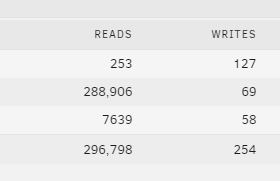
this might be a stupid question, Sometimes this is showing a speed like 50Mbs/s sometimes it shows this I assume accumulative read/write number. How can I control them? speed make more sense to me so I want to always show speed.