





Steviewunda
Members
-
Joined
-
Last visited
Everything posted by Steviewunda
-
Hi - does it make any difference whether disk shares are enabled or not? I have had them enabled, but I have read that I am less likely to screw up when moving data around if I disable disk shares, and work only with user shares. Does Dupeguru care whether disk shares are disabled or not?
-
Solved - I deleted and re-created the 'Movies' share on Tower2. I also changed the Split level to 'Automatically split any directory as required'. I don't know if this was necessary, but the 'Movies' share is now on Disk 4, as I wanted.
-
I have setup Tower2 as a backup for my main Tower server, using rsync to backup user shares from Tower to Tower2. The 'Music' share on Tower2 honours the Disk settings in the Share properties (included Disks=1), but the 'Movies' share does not (included Disks=4). Instead of Disk 4, the 'Movies' share is on Disk 2. Do I need to exclude Disks 1, 2, and 3 as well as including Disk 4 for the 'Movies' share? I thought that including Disk 4 had the same effect as excluding the other disks. I have attached screenshots of share settings, and diagnostics Cheers, Steve tower2-diagnostics-20230122-1431.zip
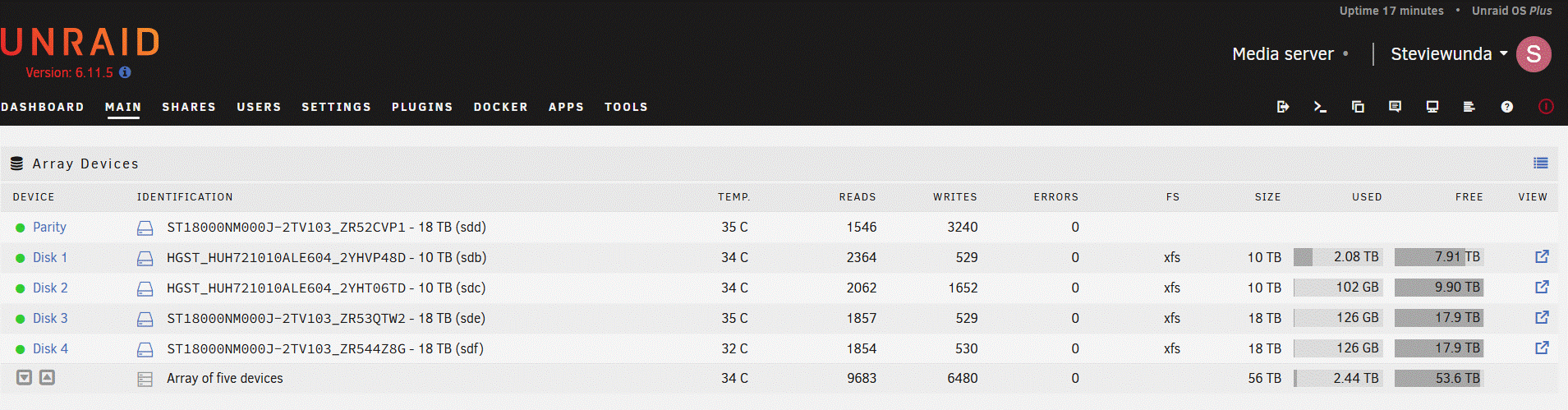
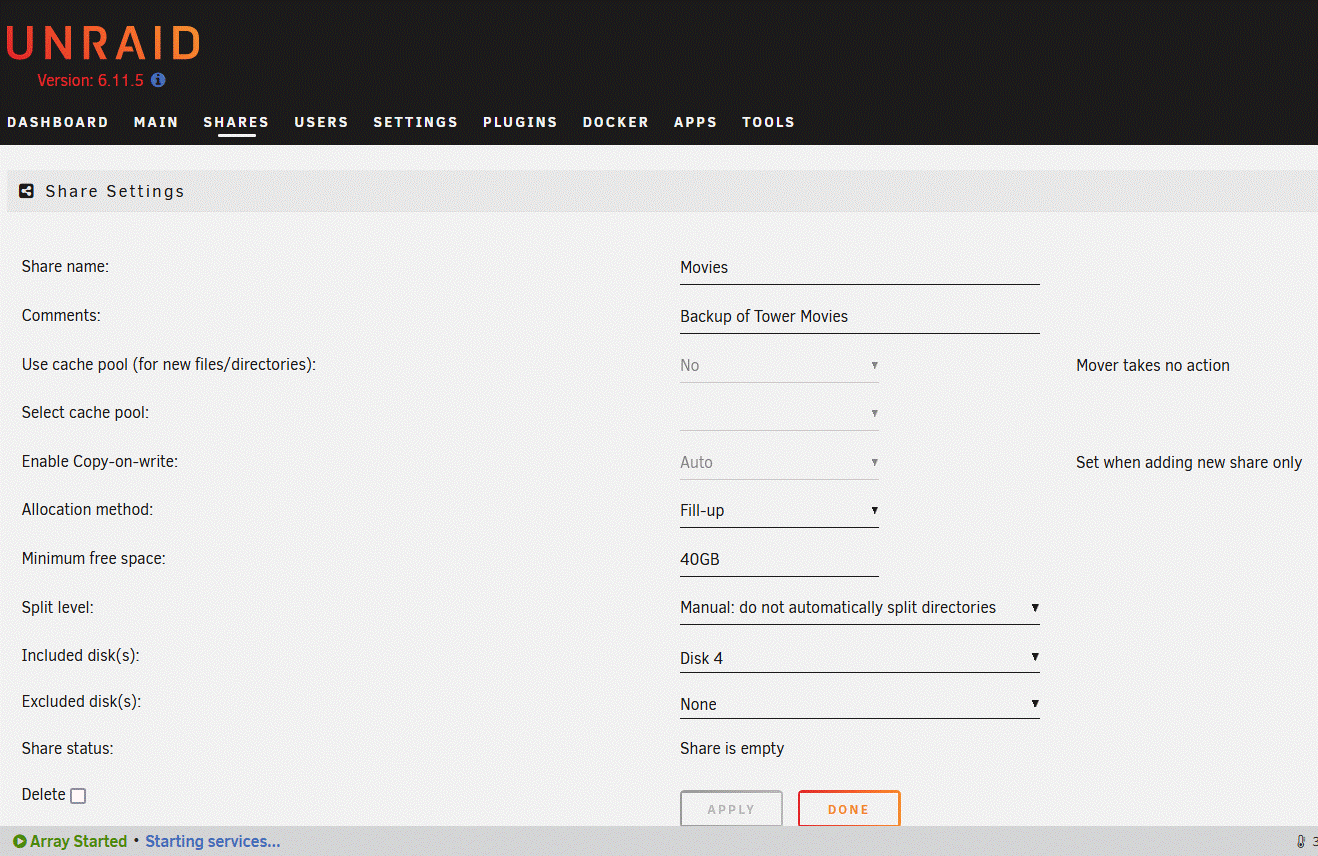
-
Cheers 😉
-
I recently lost data using Unbalance, even after a successful dry run, so I'm a little wary. Can I simply use Krusader or File Manager to copy/move files that remain on the 'old' disk after allocating a different disk to that share?
-
Thanks - how should I move existing data to the share on the newly allocated disk?
-
If I change disk allocation in a share's properties, will Unraid automatically move existing data to the newly allocated disk?
-
I have since updated the firmware on the H240 controller and tried a Windows 10 install (same as Unraid - drives not detected) and an Ubuntu 22.10 install - which DID detect controller and drives, and I was able to format and use the drives in Ubuntu. But I want to use Unraid, so I will sell the SAS drives and replace them with SATA drives - do you know if 20 TB SATA drives would be compatible with the onboard controller in my HP z840? Or the HP H240 controller?
-
Thanks Jorge
-
Hi - I added 3 new 20TB Western Digital SAS drives (Western Digital Ultrastar DC HC650 WSH722020AL4204 20TB 7.2K RPM SAS 12Gb/s 4Kn) to my HP Z840 workstation, but they don't show in Unassigned Devices or Preclear Disks. The original 1TB SAS drive shows OK. The onboard Serial Attached SCSI controller is a Broadcom / LSI SAS2308 PCI-Express Fusion-MPT SAS-2 (rev 05). I have also tried attaching the drives to a HBA-enabled HP H240 SAS controller card with the same results. The log file shows that Unraid sees the drives, but the 20TB WD drives are all listed as "Unsupported ZBC host-managed device". Diagnostics attached. Any advice gratefully received Cheers, Steve tower2-diagnostics-20230104-1736.zip
-
No I followed SpaceinvaderOne's instructions very carefully
-
So 500GB of music files have gone? Fool that I was, I was consolidating my shares to make backup to another Unraid server easier - the successful dry runs convinced me that it was safe to run Unbalance. As always, it pays to backup before making changes. Unfortunately, I could never trust that Unbalance was going to perform correctly again.
-
Thanks - rebooting sorted it, as you said. Cheers!
-
I have suddenly lost all Unraid user shares, and I am unable to connect to mapped drives (in Windows 11) that I can usually connect to. The webgui is still responsive though, and I can browse disk shares via the webgui. Diagnostics attached tower-diagnostics-20221217-2250.zip
-
I ran Docker Safe New Permissions after a dry run of unbalance reported numerous permissions errors. A second dry run of unbalance Gather reported no errors, so I did an actual Move run which should have consolidated 550GB of Music share on disks 1,2,4, and 5 with about 300GB on drive 3. After the run (which reported no errors) there is only about 380GB of music files in the Music share, and a lot of music is missing. When I look at the Music share in Windows File Explorer or Krusader, there are numerous empty or partially empty folders, sometimes containing only the .jpg's, playlists etc but few or no actual music files. Is there any way I can recover them? I have attached the diagnostics file, and the unbalance.log Even if I can't recover them, it would be good to know what went wrong unbalance.log tower-diagnostics-20221214-1530.zip
-
I ran Docker Safe New Permissions after a dry run of unbalance reported numerous permissions errors. A second dry run of unbalance Gather reported no errors, so I did an actual Move run which should have consolidated 550GB of Music share on disks 1,2,4, and 5 with about 300GB on drive 3. After the run (which reported no errors) there is only about 380GB of music files in the Music share, and a lot of music is missing. When I look at the Music share in Windows File Explorer or Krusader, there are numerous empty or partially empty folders, sometimes containing only the .jpg's, playlists etc but few or no actual music files. Is there any way I can recover them? I have attached the diagnostics file, and the unbalance.log Even if I can't recover them, it would be good to know what went wrong tower-diagnostics-20221214-1530.zip unbalance.log
-
Thanks Hoopster !
-
Thanks @Hoopster - does it matter whether I change the share settings for included disks before or after using unbalance?
-
Hi - I want to move all files within a share to one disk to minimize disk spinup when playing media files of the same type. Do I simply change the share settings for "included disk(s)" and Unraid will respect the new share settings and move files appropriately? Is there a better way to do this? Cheers, Steve
-
Thanks Jorge!
-
No, I'll be using new disks
-
Hi - I am setting up a new Unraid server. I have bought another license and created an Unraid 6.11.5 flash drive - all working well. Can I speed up the configuration process by copying some folders from my existing 6.11.5 Unraid server's flash drive? I am thinking mainly of dockers, plugins and shares
-
Thanks - deleting and running scrub with the 'repair corrupted blocks' selected did the trick
-
Hi - I ran scrub to try to fix csum errors on my SSD btrfs cache pool, but scrub reports that the errors cannot be fixed. What should I do about this? diagnostics attached - see errors in syslog at 16:52:53 tower-diagnostics-20221205-2332.zip
-
I reinstalled the plugin, and changed /mnt/cache/appdata to /mnt/user/appdata, and I no longer get 'not deleting' errors. I still get the BTRFS csum failed errors. Do I need to scrub the cache drives?


