





pappaq
Members
-
Joined
-
Last visited
Everything posted by pappaq
-
When the CPU spikes occure, the wa value peaks as well: I'm going to try your suggestion later. Thanks in advance. IF it is the VM what would be the next step? Just to lay out a plan to keep downtimes to a minimum!

-
I did not try that, yet. The light in the flat is controlled by it and I would like to check it, if nobody else is home. In the meantime I've observed, that the high CPU usage is on random cores, not only on the core which are pinned to the VM. May that be an indication against your idea?
-
Hey, my server is currently having the issue of "getting stuck" every few seconds. Three CPU cores go up to 100%, file transfers are stuck and continue after the CPU usage return back to normal. This repeats every few seconds. This has an impact on other services as well but data transfer is impacted the most. top returns high shfs usage on one core. Could someone have a look at my logs and help me? Thanks in advance! dringenet-ms-diagnostics-20230419-1717.zip
-
My USB flashdrive was corrupt once again. Replaced it, restored the drive and the server is back up and running again...3 flashdrives in 4 month. Can be closed.
-
Yesterday I've updated my Appdata Backup addon to version 2.5 and this night it pretty much fucked my whole system. My shares are gone my Dockers won't start. I'm trying to restore the stick from a flash backup but the flash tool is stuck at "syncing filesystem" and a normal copy of everything from the flashdrive backup onto the stick causes the system to not boot up anymore. Could somebody please look at my diagnostics and give me a direction to fix this? dringenet-ms-diagnostics-20230403-1659.zip
-
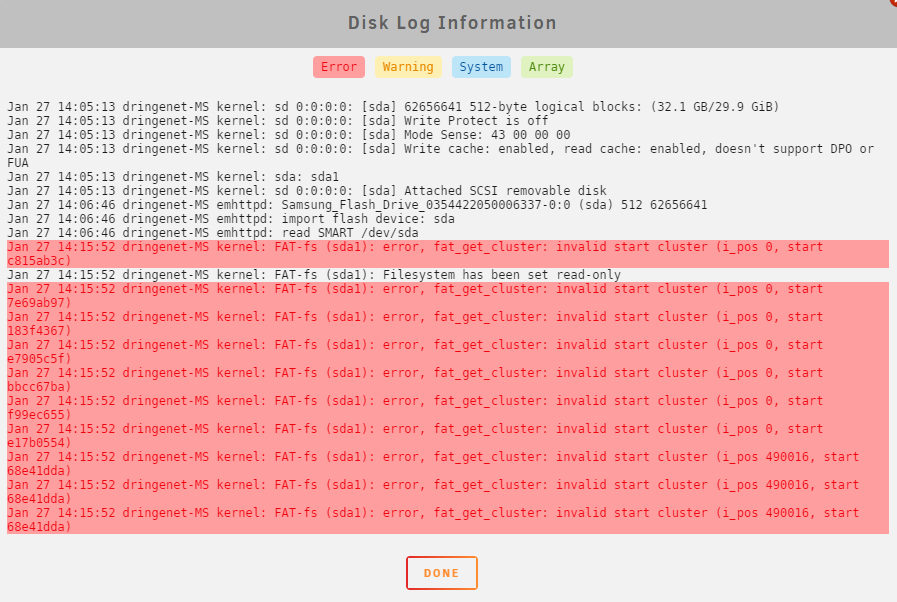
Hey there, I've got struggle with my boot flash drives for over a month now. First my 4+ years old boot flash drive failed in late december 2022. I've replaced it with a dirt cheap one on 30th of december. Unraid changed it to read-only again at the beginning of this week. Then I've searched for a good and hopefully long lasting alternative and bought a Samsung stick, which was recommended in one of spaceinvaders videos. But I get this in the disk log. It's a brand new stick! Does it mean that the new stick was dead on arrival or did I do something wrong in the migration process? Thanks in advance, I've attached the diagnostics. Cheers dringenet-ms-diagnostics-20230127-1426.zip
-
I've got 22 Dockers running and one virtual machine (Home assistant - should not pull so much). I think the H310 pulls about 8W, unfortunatly. The 56-61W are with all drives spun down. So I think I am at the lowest I can get. I'm trying to hold the downtimes as low as I can get, so tinkering much more is not an option. But I am curious what would be possible with a Intel platform and a low power CPU, because the extra power of the 1700 is not really needed. Only the IO of the ATX board is really necessary. Has anybody experience with a Intel platform and a similar setup?
-
Currently I'm trying to bring the powerconsumption of my server down because of the rising prices in electricity. I can't bring my Ryzen 1700 to use more then C1 and C2. I've enabled Global C-state Control = Enabled and Power Supply Idle Control = Low Current Idle in the BIOS and used your tweaks including powertop --auto-tune. My setup: Asus B450 F Strix Ryzen 1700 7x WD 8TB HDD 3x WD 4TB HDD 4x SanDisk SSDs 1x Crucial m.2 1x nvidia GTX1050ti for transcoding 5x Noctua 120mm Fans running in "silent mode" according to the BIOS 1x Dell H310 SAS Controller + 40mm Noctua fan The whole system idles at 56-61W but I would love it to bring this down even further. I am glad for any advice!
-
I've installed an older version through repository tags. Take a look at this. https://hub.docker.com/r/linuxserver/nextcloud/tags?page=1
-
Same problem here. "linuxserver/nextcloud:140" downgrades too far.
-
And I am having the "File not found." error again after rebooting my server. Attached is the last diagnostics from yesterday. I don't want to set up my server again from scratch this time. Does anybody got a clue? dringenet-ms-diagnostics-20220714-2006.zip
-
I've never had this error. BUT today the electricity was gone for five hours and my server was cut from electricity abruptly. Could you guys please take a look at the diagnostics? Thanks dringenet-ms-diagnostics-20220714-2006.zip
-
I've deleted the docker img and VM image and set up everything from scratch. The server ist running now witout a problem for nearly 4 days straight. Looks solved. If it occures again, I will report here.
-
I suspect more and more that it has something to do with the shares. Every time I start working on the shares in the main tab, the error comes up. I will try to reproduce the behavior...
-
I have not had any problems with this so far. It was pretty full about two years ago and I enlarged it. No problems with that since. I am going to reboot again and going to fix the shares.
-
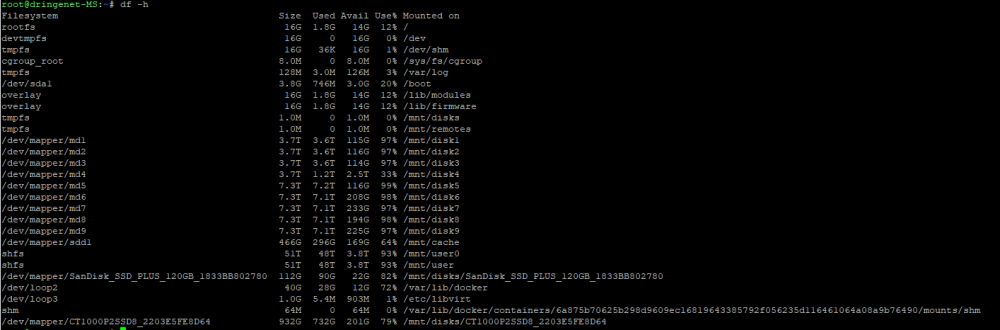
fortunately, the error occured again yesterday, some time after the reboot. There does not seem to be smth. wrong.
-
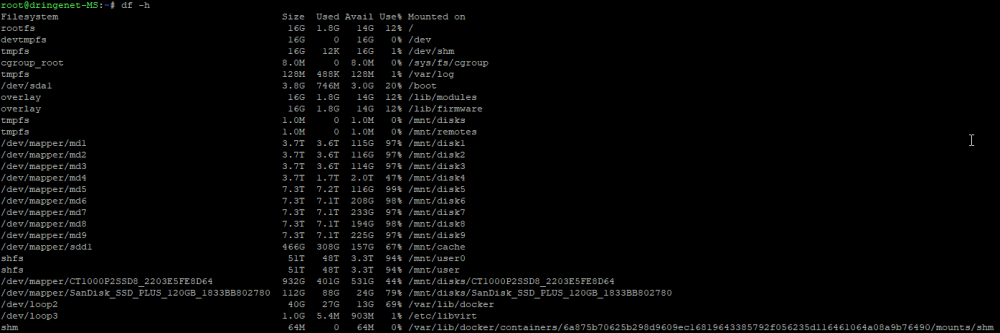
I've rebooted the server before I read your comment...I've taken diagnostics and df -h shows no particular partition filling up over the course of the last 10 minutes. The diagnostics are after the fresh reboot. I don't know if they help. And it seems like the only full drives are the data drives inside the pool, so no problem there? I will have a look at it for the next hours and watch the partitions closely. Thanks. dringenet-ms-diagnostics-20220226-1434.zip
-
The scripts are super basic move scripts which are triggered by cron every few minutes. Worked for month.
-
How should I have known that the command will vanish when the error occures? It normally returns to normal operation after the reboot. Currently I've got no time to test. Furthermore my heating is automated via home assistant running on the server, making downtimes and disabling Dockers and VMs to my last resort. I will try restarting and posting diagnostics then. Maybe you can review it then and tell if there is anything that indicates this kind of behavior.
-
Ok, everytime I try to load the GUI in any browser the following error occures in the syslog: Feb 25 10:39:04 dringenet-MS nginx: 2022/02/25 10:39:04 [error] 23909#23909: *118637 FastCGI sent in stderr: "Primary script unknown" while reading response header from upstream, client: 192.168.1.195, server: , request: "GET /Main HTTP/2.0", upstream: "fastcgi://unix:/var/run/php5-fpm.sock:", host: "cbc341bc4a11f139b471cdbe9e9ff76f4eeef8eb.unraid.net" Feb 25 10:39:05 dringenet-MS nginx: 2022/02/25 10:39:05 [error] 23909#23909: *118637 FastCGI sent in stderr: "Primary script unknown" while reading response header from upstream, client: 192.168.1.195, server: , request: "GET /Main HTTP/2.0", upstream: "fastcgi://unix:/var/run/php5-fpm.sock:", host: "cbc341bc4a11f139b471cdbe9e9ff76f4eeef8eb.unraid.net" Feb 25 10:39:06 dringenet-MS nginx: 2022/02/25 10:39:06 [error] 23909#23909: *118637 FastCGI sent in stderr: "Primary script unknown" while reading response header from upstream, client: 192.168.1.195, server: , request: "GET /Main HTTP/2.0", upstream: "fastcgi://unix:/var/run/php5-fpm.sock:", host: "cbc341bc4a11f139b471cdbe9e9ff76f4eeef8eb.unraid.net" Feb 25 10:39:07 dringenet-MS nginx: 2022/02/25 10:39:07 [error] 23909#23909: *118637 FastCGI sent in stderr: "Primary script unknown" while reading response header from upstream, client: 192.168.1.195, server: , request: "GET /Main HTTP/2.0", upstream: "fastcgi://unix:/var/run/php5-fpm.sock:", host: "cbc341bc4a11f139b471cdbe9e9ff76f4eeef8eb.unraid.net" Feb 25 10:39:07 dringenet-MS nginx: 2022/02/25 10:39:07 [error] 23909#23909: *118637 FastCGI sent in stderr: "Primary script unknown" while reading response header from upstream, client: 192.168.1.195, server: , request: "GET /Main HTTP/2.0", upstream: "fastcgi://unix:/var/run/php5-fpm.sock:", host: "cbc341bc4a11f139b471cdbe9e9ff76f4eeef8eb.unraid.net" Feb 25 10:39:08 dringenet-MS nginx: 2022/02/25 10:39:08 [error] 23909#23909: *118637 FastCGI sent in stderr: "Primary script unknown" while reading response header from upstream, client: 192.168.1.195, server: , request: "GET /Main HTTP/2.0", upstream: "fastcgi://unix:/var/run/php5-fpm.sock:", host: "cbc341bc4a11f139b471cdbe9e9ff76f4eeef8eb.unraid.net" Does anybody got a clue?
-
And we are back to square one. The bug is back. And strangely enough the diagnostics command is gone as soon as the bug occures. I can provide the syslog.txt only...If nobody got a clue I will try to investigate next weekend. After disabling netdata docker the "FastCGI sent in stderr: "Primary script unknown"" is gone and does not spam the logs. But now I see that nothing really indicates smth. strange in the logs that indicates the bug. Soooo I am going to try safemode etc. when I find the time and will report back here. This fucking sucks and will cost so much time...
-
Ok, I've reinstalled the flash drive and copied my config to it. Server back up and running. diagnostics is a command now... I think I have never had a clean installation since I've started using unraid. And I changed the hardware and setups multiple times. If the error occures again I will post the diagnostics. Thank you so much trurl for your support!
-
I thought I had installed a plugin which was configured to make frequent backups...didn't check it for a long time though. Checked the flash drive and found no errors. Made a backup. Trying it again now. Could you guide me to a tutorial to reinstall the flash drive?
-
Is there a way to bring the "diagnostics" command back to life?
-
I have not tried that. Everything works except the GUI. Restarting nginx via etc/rc.d/rc.nginx restart didn't help either... I've got a flash backup from march last year...that would be my last resort. I opened this thread before that, so I guess it does not guarantee to solve the issue, because the current behavior occured before march last year. Is there another way maybe? The server run 120 days after the last reboot without any issues...

