





jaylo123
Members
-
Joined
Everything posted by jaylo123
-
Fair question - firewalld is my response. But I come from EL7/EL8 land, and firewalld replaced iptables there.
-
Thank you. I tried 'localhost' - no dice. I tried adding my container ports to the ADDITIONAL_PORTS section and restarted all containers. No dice. This was my only solution. I just spent 30 hours over 2 days on a work-related issue and I just don't have any time to really fight this right now. My Unraid server sits behind an edge firewall switch and a secondary firewall. Also - why is this container still using iptables?
-
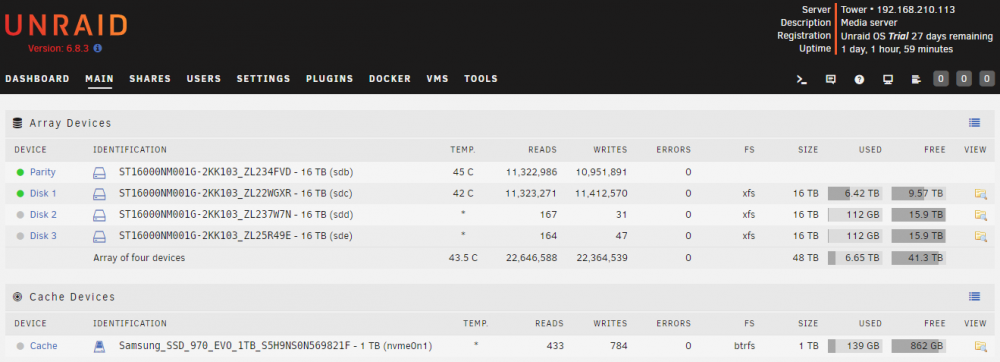
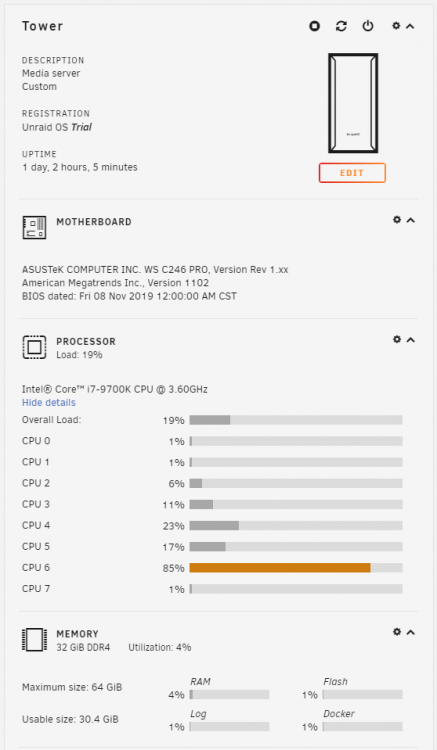
Mostly for Plex streaming, and I have an Nvidia GRID M60 to install so I can also use VMs for some remote Steam gaming, but I'm happy with it! Sorry, didn't know where else to post this, and seems no one else really seems to understand what this means so wanted to share here Definitely overkill, but I wanted to plan ahead and have this last for at least 7+ years. I'm toying with adding another 16TB Seagate Exos drive, but for now it will hold up. Currently doing an rsync from my main system before I transfer the license, which is why the HD temps are a bit higher than normal usage. Will take a few days as my 'old' server (but still current server) is running off of a mix of USB2/3 drives and internal storage. The USB drives used to be my backup targets, but I was running out of space 2 years ago. I know, horrible, horrible setup, but hey, had to do what I had to do! I plan on installing the Nvidia-friendly UnRAID build after I transfer the license so I can utilize one of the GRID GPUs for Plex encoding, and plan on passing the 2nd GPU on the GRID card to a VM for gaming. Anyway, no real point to this post, just wanted to share. The only thing I would suggest to the dev team is to dynamically generate root's SSH keys on a 'firstboot' based on /dev/random or time epoch or something that is unique to each key generation. I was honestly quite surprised that I could passwordlessly SSH between boxes as root without any security checks, and it's not like those private keys are exactly a secret under /root/.ssh. Maybe that's by design.
-
Yea, I mis-read your post. Cheers!
-
A Roku, Apple TV, Firestick, etc, won't have access to NVDEC. Sorry if I misunderstood something?
-
I didn't do any of that. Works fine for me. Like I say, the video is accurate - just stop when you have to open a terminal to the container. I actually followed your post and the video to get it working for me (Nvidia GRID M60 GPU), but stopped when it told me to crack open a terminal window. If you have to open a terminal window to the container, then that's when you would feed the issue upstream to this thread so the container managers can see if it's something they want to support and/or manage. The reason you don't want to muck with it is when an updated version of the container is released, it will likely blow out any customizations or modifications you've made to the container. And that's by design.
-
That video is accurate up until it tells you to go into a terminal and start mucking around on the command line. NVDEC must also be enabled in Plex itself. Good luck!
-
Yes. Thank you!
-
I have this problem for an onboard Intel GPU. I have no intention of passing it through. It is in its own IOMMU group. Would there be any way to just not use this IOMMU group entirely? As others have said, this is the top result when looking for this issue so any help would be appreciated.

