





FlamongOle
Community Developer
-
Joined
-
Last visited
Everything posted by FlamongOle
-
Update 2025.10.19 Commit #480 - BUG: Fixed a bug where benchmark migration would search for 'null' instead of an array. @dariusz.smolarek please try this update
-
Update 2025.10.17 Commit #478 - BUG/FEATURE: Tray Allocations might have faulted in some occasions, adjusted some code to prevent that from happening again. Added selector boxes under "Layout" instead of radio buttons. Added "hide" for the group name text. @dariusz.smolarek please try this one, I haven't been able to reproduce the fault myself, but this should check for some variables that might go into an error.
-
@dariusz.smolarek PHP logs from Tools/PHPsettings might help
-
Update 2025.10.16 Commit #475 - MINOR: Due to recent changes, the old deprecated "tray override" did malfunction. Reverted some minor changes. Try this update @dariusz.smolarek and @MAM59 But anyway, reconfigure "tray override" to something more useful, one day it will be removed entirely. If this doesn't solve it, I can't look into it until weekend.
-
Out of curiosity, do you use the deprecated "tray override" somewhere? It might have been destroyed in this update.
-
Hidden trays are "there" but hidden. If you want them on top, you must configure it accordingly.
-
Out of curiosity, do you use the deprecated "tray override" somwhere? It might have been destroyed in this update.
-
Update 2025.10.15 Commit #473 - MINOR: Math is difficult, corrected wrongly counted number of assignable devices when bypassed trays where used. @aeolos try this update
-
No this is not possible, the widget type of the dashboard are meant only for reference and quick overview.
-
It's already there, just "mouse over" the LED.
-
Update 2025.10.14 Commit #471 - MINOR: Misaligned trays in rare cases. When there's hidden trays, it can be misaligned with the neighbor groups. Adjusted the styles for the dashboards.
-
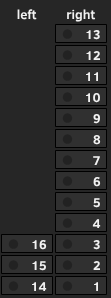
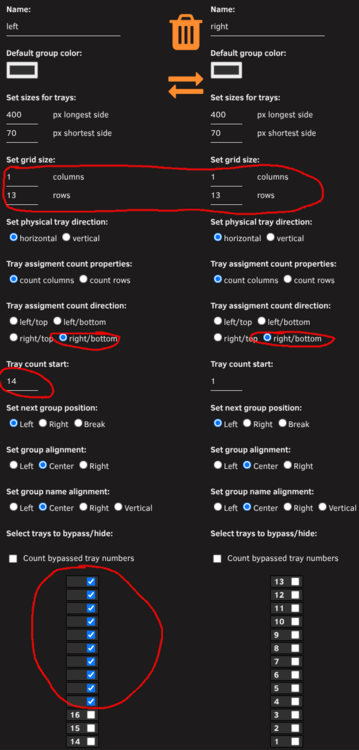
Yes! This is possible, however, I also discovered a slight design bug as well. So update Disk Location to 2025.10.14. You can do this, to get what you want:
-
Sorry for the very late reply.. :P but I don't even see that button anywhere
-
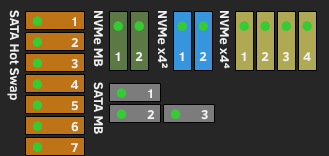
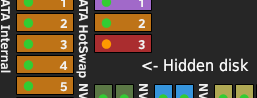
Update 2025.10.05 - compatible with Unraid 7.2+ Commit #463 - IMPROVEMENT: Change from radio to checkboxes in backup section under System. Radio buttons are gone and checkboxes are implemented instead. Cleaned up backup section of the System tab. Commit #460 - MINOR: Made a workaround for devices with multiple addresses is stuck with Dashboard error message. "Ignore multiple LUNs" available under "Configuration" for user with this issue. Commit #459 - MINOR: Temperature warnings -1 degree offset from Unraid defaults. Changed the code to show the same warning thresholds for disk temperatures as Unraid. Commit #458 - MINOR: Hidden trays counted as assignable tray. When trays are hidden from the layout, it will not calculate those trays into the total assignable trays on the Dashboard. Commit #457 - FEATURE: The common adjustment for all groups are gone and migrated to the new configuration and moved per group under "Layout". Possible to choose where the next group will float: left (default), right or break, and to adjust align of the group name and group trays separate from each other: left, center (default), right, text can also be positioned vertical from top-left only. When these are adjusted, the Dashboard will show the changes, and not on the Layout page itself. Commit #456 - MINOR: Fixed devices to show hidden/bypassed trays more correctly in some circumstances. Made the tray allocating to be more logic and will now display numbers on empty trays if these are hidden from the Dashboard layout. Commit #455 - FEATURE: SMART Firmware Version can now be selected to be viewed in the tables. Commit #454 - IMPROVEMENT: Adjust design elements for Unraid 7.2. Various changes in the HTML and CSS code in Unraid 7.2 requires Disk Location to make some adjustments in the code. This update lets you change the floating order of each group individually: e.g. "SATA MB" is forced below by setting "Set next group position" to "break" in the "NVMe x4⁴" group layout configuration. The group names can now also be in vertical orientation, but only on the left side. Update 2025.10.08 Commit #465 - IMPROVEMENT: Minor glitches in the positions when using "break", made yellow and red LED blink. When "break" is selected, the next floating element is shifted. Removed padding from floats and added only padding-bottom when break (float: none) is selected. Made more yellow and red light blink as well, not because they are in standby. Update 2025.10.10 Commit #467 - MINOR: Saving "space" as group name might delete wrong group upon execution. If a space or other wrong characters are written in the group names, this can cause issues where it fails to identify correct group to be deleted, deleting the group before the current. Group names now are required to have a minimum of one letter or number, empty is still supported and will use the Group ID as the name. Update 2025.10.13 Commit #469 - IMPROVEMENT: Added direct IO mode for Benchmark. It's now possible to select to use buffered (default), direct (probably the best for this purpose) or both for benchmarking drives. The benchmark data will be split. The graph will only show what's selected for the run, but the benchmark json file will contain all saved data. Tips! If you're using "break" in the layout, you can add extra disk to hide to add more room between each layout section. Like so: Update 2025.10.14 Commit #471 - MINOR: Misaligned trays in rare cases. When there's hidden trays, it can be misaligned with the neighbor groups. Adjusted the styles for the dashboards. Update 2025.10.15 Commit #473 - MINOR: Math is difficult, corrected wrongly counted number of assignable devices when bypassed trays where used.
-
If it has changed, it should also be displayed as a Warning that needs to be acknowledged. This is either done in the plugin or Unraid interface itself.
-
Update 2025.09.28 Commit #461 - MINOR: Adjusted SMART cronjob to ignore devices with multiple LUNs to be re-added, this should prevent the error message about running SMART+DB at the Dashboard. @Ichthus you can try this, need to run full SMART+DB after this update. @shwa87 new devel build up as well. If you don't mind, could you try to update the plugin, run SMART+DB, then turn off the workaround toggle in configuration to see if it works without it (no errors on dashboard)?
-
You probably suffer from the same issue as above, this will be fixed in next release (when Unraid 7.2 is released).
-
It doesn't really care about the LUN, but the PATH. They are multiple as well. I think I made a typo in previous devel, please try the new one.
-
If you're running the devel build, you can update now. See if it helps, read and follow instructions and please tell me if it resolves the issue or not. This is more of a workaround rather than a fix, but hopefully it won't really cause any other issues. - Commit #460 - MINOR: Made a workaround for devices with multiple addresses is stuck with Dashboard error message. "Ignore multiple LUNs" available under "Configuration" for user with this issue.
-
Looks like it's assigned by X:X:X:0 and X:X:X:1 ye, that would conflict it. It's a function checking the addresses etc. that would block it. I might have to redesign it somehow one day. But right now, this is not supported.
-
What kind of setup do you have? Some had some similar issues where they had multiple SAS cable connected to the same backplane or so. This causes multiple addresses and will confuse the plugin. Haven't made any resolutions to this yet, if affected - remove extra cable(s). Otherwise I must have a debug file.
-
Whenever Unraid 7.2 is released, Disk Location will have an update ready to go (unless something dramatically changes or I'm busy doing something else). However, the bugfixes and features are listed here. These are also available via development build for those who dare (it won't work nicely with Unraid 7.1): https://github.com/olehj/disklocation/milestone/5 More position adjustments are coming: GitHubolehj/disklocationDisk Location is a plugin for Unraid. Contribute to olehj/disklocation development by creating an account on GitHub.
-
Nothing to be sorry for, but there's no good way of implementing this. I try to avoid hard coded colors where possible, if a theme don't match, adjust the background colors until it does ;) I don't know about "menu bar on the left", never tried. But if it's related to "Dashboard", "Information", SMART" etc. tabs, it should follow any default order as it's just part of Unraid, nothing I need to do in my code. There's also changes in design behavior for Unraid 7.2, so things might change soon anyway on how things are displayed. My plugin in ready for 7.2 release as of today (not released), but only focused on desktop view (not tablets or phone - not even sure I will even bother).
-
It's sort of impossible/inconvenient to do so. The text follows defined values by the themes. The background does not because it can't use ready defined "logic" colors. It's a small thing users have to configure themselves.
-
Looks like that would be tray "-1"? Either you have marked that tray as "hidden" or you run with "hide empty contents" which hides the number to assign (I will address this is next release).


