





FlamongOle
Community Developer
-
Joined
-
Last visited
Everything posted by FlamongOle
-
It's been answered here already. Please update to latest version and run Force SMART+DB.
-
Update 2025.05.19 Commit #425 - BUG: Flash devices etc. alerted falsely. Added more SMART checks to prevent this from happening. FORCE SMART+DB update must be done for those affected with this bug.
-
-
You can ignore this error for now, I'll find a way to skip memsticks/Flash next update.
-
Can be several things. If the drive is in use while benchmarking, the values will be lower. But likely this is the actual speed of the SSD, cache is bypassed (which you'll often see higher speeds from). Some SSDs are in fact just slow in read and write, but they still feel faster than spinning drives because of no seek time.
-
Likely how it's connected or that the controller for it does not pass through Smart or something. Usually Flash is never even included in Disk Location as it's mostly just pen drives. I have no plans to implement it either.
-
Update 2025.05.17 Yes I know, one day too early but who cares? 😛 Commit #423 - MINOR: Other irrelevant errors occurred in SMART tab. Rearranged the code. Commit #422 - ENHANCEMENT: Added notification when a major device error occurs. E.g. If the drive loses it's controller, send an alert notification in Unraid about it. @Midas_Tech this version, then a SMART update should hopefully fix it! Happy Norwegian Constitution Day release! 🇳🇴🥳
-
Thanks, I have reordered some code to prevent that. Next release will hopefully fix this and also add notification to dead drives.
-
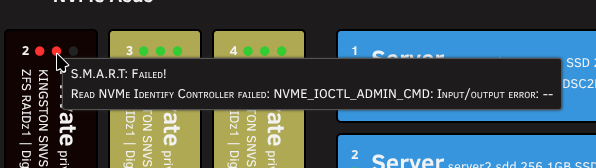
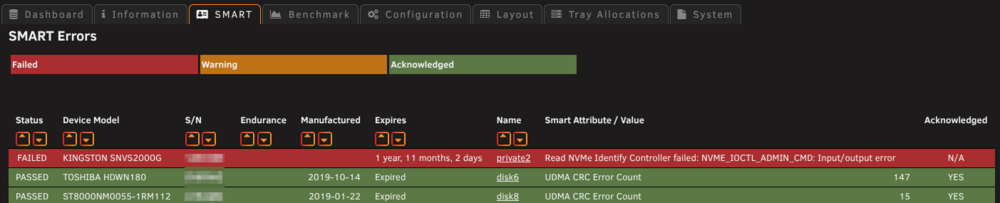
Update 2025.05.16 Commit #420 - IMPROVEMENT: If a controller on a device is dead, plugin tries to find related drive and showing it as SMART FAILED and will also display error log in SMART tab if it exists. SMART tab changed slightly, background colors is related to the status of the drive. SMART tab: Dashboard: Yes, I have that kind of NVMe drive right now
-
Does it have unacknowledged SMART errors detected? Check SMART tab in Disk Location and check if the device show "NO" under "Acknowledged" These warnings have higher priorities than the over-all health status.
-
Update 2025.05.15 Commit #418 - MINOR: Fixed a small glitch where the Unraid icons were shown regardless of settings. Commit #416 - IMPROVEMENT: Change warning to critical if drive is "faulted"
-
Mentioned several times and are pinned as recommended in this forum thread.
-
Ah good, thanks! I couldn't figure out why it wouldn't work as it does indeed look correct Not entirely sure why it would happen. Running just SMART wouldn't change much, but SMART+DB should. All "system" files are deleted before upgrading to make sure all are on the newest version and no conflicting files exists. So it can't run an old cronjob. Just write me again if the error persists in the future, then I'll have another look at it. Thanks for providing me info
-
Did you do a SMART+DB? It must be done to change the value in devices.json.
-
Thanks, I see that the device is not populated in the array but all data otherwise seems fine. I don't understand really what is happening here, the values and all looks good. I would maybe try to reset the "devices" under "System" tab if you haven't already. Maybe something got corrupted there. Then run a SMART+DB again. If it doesn't help, please send me the devices.json file: /boot/config/plugins/disklocation/devices.json Thanks
-
Update 2025.05.01 Commit #414 - MINOR: Empty array error occurs when there's no backup made during auto backup. Creates a new backup if none is found. Should then make auto backups as expected. Commit #413 - MINOR: Wrong Power On Hours might be picked up. In some instances the power_on_time could crash the Dashboard because the value was too high for DateTime.
-
Strange, what if you grep the other number 2760 or so? Just wonder if there's any duplicate power on hours reported
-
Alright, I think that error is irrelevant, but I will fix that sometime anyway. I can't really see what's going on here, so I might need the entire debug file from you: Go to System, click Enable debugging, click SMART+DB, click Disable debugging (no page refresh in-between, as the debug file will just grow rapidly). Then download the file and send to me if you don't mind. Remember, serial numbers and comments etc. are included in the file (send as private message). This error is strange and I can't see why it would not see it.
-
But if you do a SMART+DB now, will it stay, or will it overwrite with 829089714 (or higher) again? And do you find that number somewhere in smartctl? This might reveal it (skipping the two last digits): smartctl /dev/sd(?) -x --all --json | grep "8290897"
-
Which of the drives (json file) is it? Are there any PHP warnings/errors in the PHP log? Can't hurt trying to refresh the temp directory as written earlier, but if it doesn't help, the PHP log might give any clues, otherwise I must get the debugging file later.
-
Do you see any files under /tmp/disklocation ? If there's no files, then there might be a write permission issue (should typically not happen, a reboot might solve that as /tmp is recreated every boot) You can check if the nvme drive was seen by the SMART+DB by typing in the terminal: cat /tmp/disklocation/cron_smart.log then check if it generated a file under smart: ls /tmp/disklocation/smart/ Feel free to open the file and see if it has any real content (serial number and model name is the most important info) You can manually just delete the disklocation temp folder and run "SMART+DB" again in case there's some corruption involved: rm -rf /tmp/disklocation If nothing above help, try to reset the devices under "System", scroll to the bottom, select "devices" and reset. Then do SMART+DB again. Otherwise check for Disk Location contents in the PHP log under Unraid Tools. Debugging data might help me as well, but then you must enable debugging, run SMART+DB, disable debugging, then send the file to me, but this is the last thing you should do.
-
I don't know what is happening here, but is one of your drives reporting over 829089714 hours of power on time in SMART? That is roughly over 94000 years. As far as I know DateTime in PHP supports only year 0000-9999. If you can identify this drive, please give me make and model, if it's on a RAID HW card or anything special involved. Is it passthrough from proxmox or anything like that, or running via some odd backplane. I'm not sure why it power on hours would be this high unless a specific drive shows different data in SMART. You might run cat /boot/config/plugins/disklocation/devices.json To identify it, check for "poweronhours" with an unrealistic high value.
-
I will look into why this happens later, but you can change your config to be more correct anyway: Tray assignment count properties: count rows Tray assignment count direction: left/top
-
Sorry, was maybe a bit unclear. I need the Layout config. You can give me the output of this instead of screenshots: cat /boot/config/plugins/disklocation/groups.json Purchased and warranty is not carried over anymore from the database and should only use the settings from Unraid config itself. There's a command some few pages back where you can receive the dates (if you still have the sqlite file, should be backed up too). Then you can add them either via Disk Location (if "Allow editing of Unraid config" is set to "Yes") or the normal Unraid way. I added the post in the recommended section.
-
That's a bit stoopid isn't it? Which version you at, and how's the config?



