FlamongOle
Community Developer
-
Joined
-
Last visited
Everything posted by FlamongOle
-
Updated alpha2 post, now beta1.
-
Hmmm, check if all settings are cleared in the configuration regarding what to show, then tick of all boxes you want show. It has been/is a bug with some database upgrade, I think. You might wanna try to restore last backup made, then run (force) update all again.
-
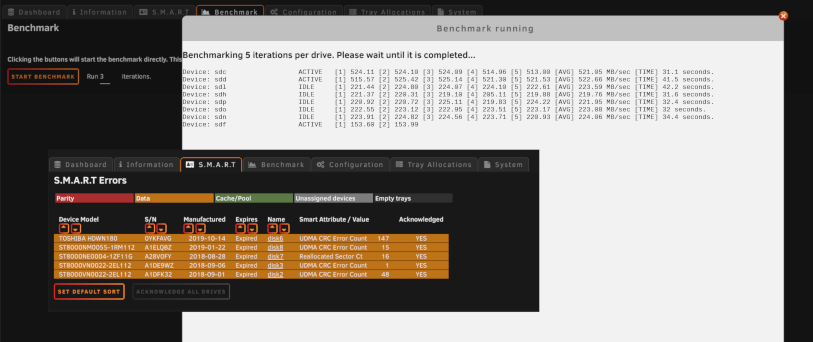
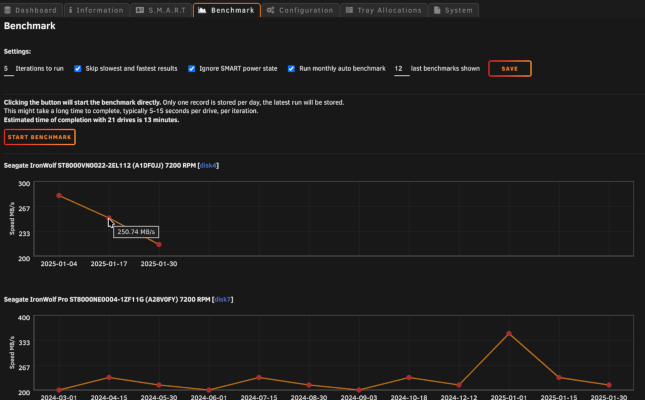
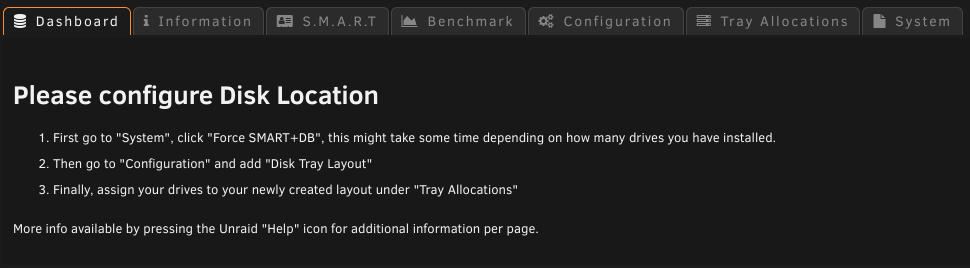
Update 2025.02.02 - Overhaul '25 beta 1 release Common S.M.A.R.T Errors section added with the possibility to run "acknowledge all" - IF configured to allow Disk Location to edit Unraid config files (disabled by default). This will also be the case for device dates (manufactured, purchased, warranty). Benchmark completed, with screenshots. CSV export added. Further bugfixes.. fixed etc. Debug function renewed and accessible from System. This build is available now through "devel" and Overhaul '25 is now 90% complete (this might change). Benchmark running, preview of SMART-tab: New Benchmark (values are expected to be flat, these values are fake): New info screen for new installations:
-
Update 2025.01.30 Commit #358 - MINOR: Fixed an issue where CTRL+F5 was required when changing LEDs.
-
Update 2025.01.27 Commit #349 - MINOR: Some additional minor adjustments for the LEDs. @SShadow Closer to what you might have wanted, but I didn't like the look of 2/3s. Changes: green blink is more calm, ease-in-out, 4s yellow blink is double-blinking and stays on 80%, linear, 3s red blink is panic blinking, linear 0.5s blue blink involves green light, blue on 75%, 3s
-
Update 2025.01.26 Commit #349 - MINOR: A few CSS fixes regarding the LEDs, and some color adjustments. @SuperMario86 the green LED on Standby was a bug, it's now fixed. @Zonediver 1) it was chosen back in the days as "black" did look too artifical. I have now changed it to dark gray. 2) Some like blinking, some don't. It's your own choice anyway, choose either "static" or "dynamic". Dynamic has been bugged for a while, but should be fixed now. Changing of dynamic/static LED requires forced refresh to change (CTRL+F5), this seem to have been fixed with Overhaul '25, but will not be fixed in current release.
-
Update 2025.01.24 - Overhaul '25 alpha release First release to be considered stable with all conversions in place. All core functionality has been done and tested. This release was made for being the most similar to the standard master branch in features in regards of being Overhaul '25. The speed improvements over 2024-edition is about over 2x as fast. Only by manual installation with the development URL: https://raw.githubusercontent.com/olehj/disklocation/devel/disklocation-devel.plg The release will be limited for Unraid 6.12 and later. Earlier versions will need the 2024-edition to be installed.
-
Update 2025.01.23+24 (this is NOT Overhaul '25) Commit #352 - FEATURE: Disk Location plugin time benchmark added, but must be executed manually by entering ?benchmark=1 in the address field. Commit #349 - MINOR: A few CSS fixes regarding the LEDs, used from the Overhaul '25.
-
With the 2025.01.21 release at least. Might see it yourself if you enable PHP logging under Tools, set it to show all info/warnings or check the PHP log on the same page. Not a major issue, as this is disabled by default.
-
Thanks for this plugin @SimonF I was afraid it was abandoned, but luckily it now comes with the IPMI-tool package. You might look into these too, as they fill up the PHP log while debugging myself Just some minor definitions missing, which is typically not visible to regular users (might be more, but these were shown): Warning: Undefined array key "TEMPHDD_FAN1234" in /usr/local/emhttp/plugins/ipmi/include/ipmi_helpers.php on line 356 Warning: Undefined array key "" in /usr/local/emhttp/plugins/ipmi/include/ipmi_helpers.php on line 356 FAN1234 (375 RPM):CPU1 Temp (40 C ), 30, 80, 50.1-100.0%FAN1234 (375 RPM):Not Defined Warning: Undefined array key "TEMPHDD_FANA" in /usr/local/emhttp/plugins/ipmi/include/ipmi_helpers.php on line 356 Warning: Undefined array key "" in /usr/local/emhttp/plugins/ipmi/include/ipmi_helpers.php on line 356 FANA (975 RPM):
-
Overhaul '25 part 3 preview, suddenly! Developer Edition only! SQLite is gone (except for backwards compatibility during conversions). Core baseline is done, but not tested enough yet. Things. https://github.com/olehj/disklocation/milestone/4
-
That will just show you a quick overview with a combined "LED". The green background color might hide the "Green LED", but if you "hover" the left side of the boxes (where the gray LEDs are), you should see some summary of each drive. Otherwise, rest will be seen at the plugin page click the cogwheel or Tools -> Disk Location If you mean you missing drives, have you assigned them after force update?
-
What things? Did you do a "force update all"? It's likely required on a fresh install. Current stable does not update during boot by default. This will be changed after Overhaul '25
-
It would never assign itself automatically. New drives must be assigned manually after force update. Even after Overhaul '25 will that remain a thing, but at least it will update itself during boot, so it's ready to be assigned in the list. There's no secure way of knowing for sure where a disk is inserted, logical paths might even change during reboots. And then if it stays stable, removing a drive and inserting a new one might create a different path. Then if you replace or add more than one, where does each drive go? Then you decide to swap or move HBA/raid card positions, creating a lot of new mess. Implementing something like this would probably just be a guesswork at best. I have been looking into this earlier, trying to find something static, but it just can't be trusted.
-
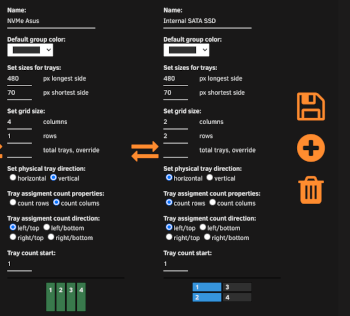
Overhaul '25 part 2 preview! Developer Edition only! Most of the plugin now works, but still not recommended for production use. This overhaul went a bit more extreme than first anticipated, SQLite is mostly gone! Just two more (vital) "functions" to fix before it is "entirely gone*"! *The backup/restore functionality will be backwards compatible with the SQLite database, and it should be automatically backed up during install. During all SQL conversion tests the new system will calculate quite a bit faster, we'll see how the total turns out in the end. Will benchmark it closer to release. Some info from github: 30 changed files with 3,448 additions and 4,237 deletions. Overhaul '25 milestone: https://github.com/olehj/disklocation/milestone/4 Correction from "part 1" post: "With that it will be hourly SMART updates on active drives.", will be every 12th hour instead. Don't want to prevent drives from sleeping. The SMART+DB update will be forced upon boot and installations from now on, like the old days. Pure SMART updates will be written to /tmp (memory). Shiny new button The News: There will be a single "Save" button to rule them all for the "Disk Tray Layout", instead of the annoying single button per group. Colors will be worked on, and a custom group color will be added as well (it's half-way implemented). Some minor and easy reading benchmark will be added, most likely with added history so you can see how it performs over time. It will be as easy as using hdparm, so don't expect anything super-fancy. Update buttons in System will have three levels: SMART (updates only active spinning drives), Force SMART (will wake up sleeping drives and update all), Force SMART+DB (this will do a Force SMART including writing to the database files on the USB drive (or wherever you have installed Unraid). A hell lot of code have been rewritten and lots of bugs fixed (and probably added some too!)
-
And the drive is not listed as "unassigned" in the plugin either? Maybe you need to allocate it to the tray now. All this will be worked on when I get rid of the current database (hopefully)
-
It will only read SMART data and store them in the database. That shouldn't be any problem. It will process smartctl -a and lsscsi -bg, none which should impact anything. At least I never heard of that situation before. Disk Location will never write to the disks themselves unless specifically informed so. But right now, there is nothing that will do it.
-
Have you run "Force Update All"? It might be required. I haven't noticed what you describe here, but would like to know if this will help it. The Overhaul '25 will work differently that a force update all will be executed during boot again, but would like to know if there might be another issue.
-
Just create a 4x6 and leave 1-3 empty? It's hard to satisfy all possible configurations out there. Maybe I'll look into something later, but not a priority atm.
-
Set tray count start to 4
-
Disk Location 2024 edition The Overhaul '25 is in development and will change quite a lot on how it works as from today (at least under the hood), the database will of course be backed up during installation and migrated to the new one once launched. It will be possible to revert at a later point. However, if you don't want to be the first to get into the newest update (or ever?), I have now created a 2024-branch where the current plugin will be possible to install from. CAUTION! This will not be maintained frequently (or maybe not at all?), but will be here as a choice for older Unraid versions or if you are not ready to migrate to the new Disk Location. This has to be installed manually via plugin installer. Install the 2024 edition of the plugin using this URL in Unraid: https://raw.githubusercontent.com/olehj/disklocation/2024-edition/disklocation-2024-edition.plg It is possible the Overhaul '25 will be limited for Unraid version 7 and ongoing too, this is yet to be decided and tested depending on when Overhaul '25 will be launched.
-
Thanks, then I don't look further into this.
-
Did you try to force update all under system tab and also click save on the configuration tab? Is the drive's SMART marked as "Failed" (red) or "None/Off" (gray)? Could you send me your monitor.ini file if these things above does not work out for you?
-
First click "Save" under configuration, and see it that changes anything, otherwise: Can you open command line and check the following output: root@Odin:~# cat /var/local/emhttp/monitor.ini | grep disk2 disk2.199="48" // SMART UDMA CRC error: 48 disk2.ack="true" // Error acknowledged disk2="97" // Utilization replace "disk2" with the disk name of you blinking device. If diskX.ack="true" is NOT displayed there, then that's why your device is still giving warning. I've seen some of my disk did not get "acknowledged", yet they were green. But recent acknowledgements have all been added to the monitor.ini file. Disk Location only care about the diskX.ack="true" and nothing else. The values are irrelevant at this point, and I must check if there's something I have been missing regarding the acknowledging of devices, but I could not see anywhere else this info was stored. I dunno if @Squid (or someone else, dunno who to tag really) know if these acknowledgments are stored somewhere else?
-
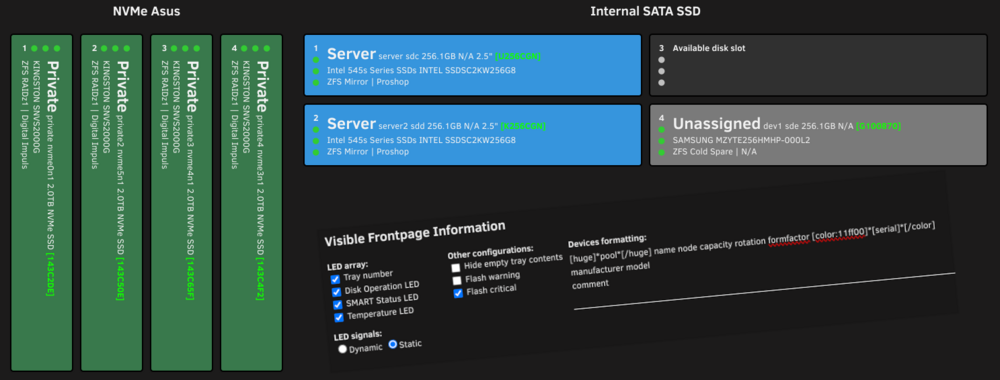
Overhaul '25 part 1 preview! New customization has been implemented, and more are in the works. This is available in the developer build right now, but it should not be used for production. It should mostly work, but it's not finished. Anyhow, a screenshot attached of one of the implementations made today. If you choose to try it out, limit the testing to "Configuration" and "System" tab only. "Information" (works, but limited) and "Tray Allocation" (have not tested yet, likely broken) are not done. Cleanup of the configuration is taking place as well as the database. Soon the SMART updates will happen just in the "memory", so you don't need to worry about USB drive wear-outs. With that it will be hourly SMART updates on active drives. The plugin now uses the "ID" set in Unraid for SMART warnings, instead of relying on duplicate and fragmented data. More to come!