FlamongOle
Community Developer
-
Joined
-
Last visited
Everything posted by FlamongOle
-
I have tried to replicate this issue, but whatever I try, even by refreshing the page during the install converts the SQLite database correctly to JSON. I start from scratch by SQLite file, I pull one and one file away etc. Can't find it with current info. I need PHP log from this, and also likely the content of the JSON files and the Disk Location debug log if possible (can be enabled in the recovery page of Disk Location).
-
Update 2025.02.17c Commit #389 - FEATURE: Added tray layout orientation. Made it possible to modify the dashboard float. Choices: left, right and "stack" (none). @ban at least closer to what you asked, set it to "stack" and you will get the tray layouts stacked on top of each other instead of side by side.
-
Update 2025.02.17b Commit #387 - BUG: LEDs not always in standby. Altered how they are displayed without losing the ZFS state display priority. Also added separate Disk Location Recovery page under Tools -> Disk Utilities.
-
It uses that info for not updating too much at once and limiting execution time of scripts. However, it sort of do pull directly from Unraid, but due to earlier incompatibilities before ZFS was really an official thing, Disk Location had to grab it manually. Earlier it got everything from Unraid (and it still do), but for ZFS devices, it will grab to old way as that was not supported pre-ZFS era. Looks like this is the default now, and this might be overridden by the cached status rather than direct. Added: I have altered the ways the LED's gets their data, and will prioritize different. Disk Location has since its supported ZFS gathered the pool state, and this is displayed as LED's over Unraid's own priority. This is still the case, but it should gather standby LED's more directly by default in next update.
-
Update 2025.02.17 Fixed a bug that could cause page to not load. Also made it possible to use System tab directly outside of Unraid to create a backup and restore database (among some other things): accessible via URL: http(s)://<your server>:<your port>/plugins/disklocation/pages/page_system.php
-
It takes up to 5 minutes before you'll see the standby LED turn on. Things are cached, and that info is not super crucial for anything, I would assume. Wait 5 minutes and see if it changes (also make sure it's actually in standby after checking it). There's a new bugfix coming up that maybe fixes the issue you had first.
-
Update 2025.02.16 Commit #383 - BUG: System tab not loading because of array tried to merge with nothing. the brownie's kicking in, so no more debugging tnoite
-
That's just auto-position, no settings between group elements. Maybe I have a look into it in the future if it's easy enough.
-
Please go to Tools -> PHP Settings. Then enable "all categories", press apply. Go to Disk Location and System tab, then go back to PHP Settings again and look at the log file. Paste me everything related to "disk location" please
-
No worries, we've all been there
-
Update 2025.02.15 Commit #381 - BUG: SMART detected as failed when the drives are OK. I found a problem where the SMART status did not change. Adjusted some variables and defined them differently. Hopefully this is now fixed. Commit #380 - BUG: Unexpected files causes System tab to fail. Added a check for unexpected files and also possibility to delete them via System. Commit #379 - BUG: Disk Tray Layout missing add button has been fixed when a Disk Location is in a clean state.
-
I don't blame anyone I don't know what happened here, but I see when and there was a lot going on at that time. That backup is for some reason just a file, you can safely delete it. However, I will try to bypass unexpected files in the backup folder so the System page does not crash. Delete: rm /boot/config/plugins/disklocation/backup/._20240328-204958 Next version will enable System tab again if faulty files exists, and then it will search for unexpected files which then can be deleted via the plugins System tab. They will be listed.
-
You SHOULD press the Help button.. you must format things manually, this way you can choose what to display where with formatted style too. The dates are now only using date config from Unraid directly. If you stored them via the plugin only, then yes, they are gone. However, they are still in the SQLite file as a backup, so not lost unless you deleted it. You can activate the "Allow editing of Unraid config" under Configuration to be able to store these dates in the plugin itself, so you don't need to go into single drive manually. But the job has to be completed once. You can retrieve it by using terminal: Find and verify your latest backup with file called disklocation.sqlite.gz: ls -r /boot/config/plugins/disklocation/backup/*/*.sqlite.gz | head -n 1 Then copy it to /tmp: cp $(ls -r /boot/config/plugins/disklocation/backup/*/*.sqlite.gz | head -n 1) /tmp/ Extract it: gunzip /tmp/disklocation.sqlite.gz Run this to retrieve your dates: sqlite3 /tmp/disklocation.sqlite "select model_name,smart_serialnumber,manufactured,purchased,installed,removed,warranty,warranty_date from disks;" One liner: cp $(ls -r /boot/config/plugins/disklocation/backup/*/*.sqlite.gz | head -n 1) /tmp/ ; gunzip /tmp/disklocation.sqlite.gz ; sqlite3 /tmp/disklocation.sqlite "select model_name,smart_serialnumber,manufactured,purchased,installed,removed,warranty,warranty_date from disks;"
-
This path is strange: /boot/config/plugins/disklocation/backup/._20240328-204958 Can you do this in terminal and give me the output of this: ls -la /boot/config/plugins/disklocation/backup/
-
Can you go to "System" tab, click enable "debugging", then right away click disable. Download the log that appears, then give it to me? It do consist of serial numbers and comments etc. (everything store din Disk Location). Feel free to send me as private message. Also, can you give me the contents of, in terminal: ls -la /tmp/disklocation/* ls -la /tmp/disklocation/smart/* Won't have time to look at it now, but tomorrow/sunday or so. Thanks
-
No, that should have resolved it. But as others report, doing just a SMART update might work. Can you try that and report back? I don't know why that is the case yet, but it's obviously a bug
-
Normally, this should give you a text telling you to do a "SMART" update, I don't know why this happen yet. I haven't been able to reproduce this issue myself yet. But if you do a SMART update, (not SMART+DB), does it help? I don't know why yet it should make a difference between SMART and SMART+DB as SMART+DB should be SMART and +DB .. sorry for the confusing text hihi
-
Same as above message. It's a glitch creating a manual layout with the one above will make it possible to use it. Restoring a backup should also be sufficient. Worse for new users.
-
Yes, this will indeed fix it. Looks like I have overrun the check for existing locations and gotten rid of the "add" button when there's nothing available. Hopefully will be able to check this tomorrow, or at least during the weekend.
-
Can you please give me the PHP log for the system page problem? Tools -> PHP -> enable log and set logging to "all" or something. Then give me everything related to "disklocation", sounds like a parse/syntax issue somewhere in a specific situation.
-
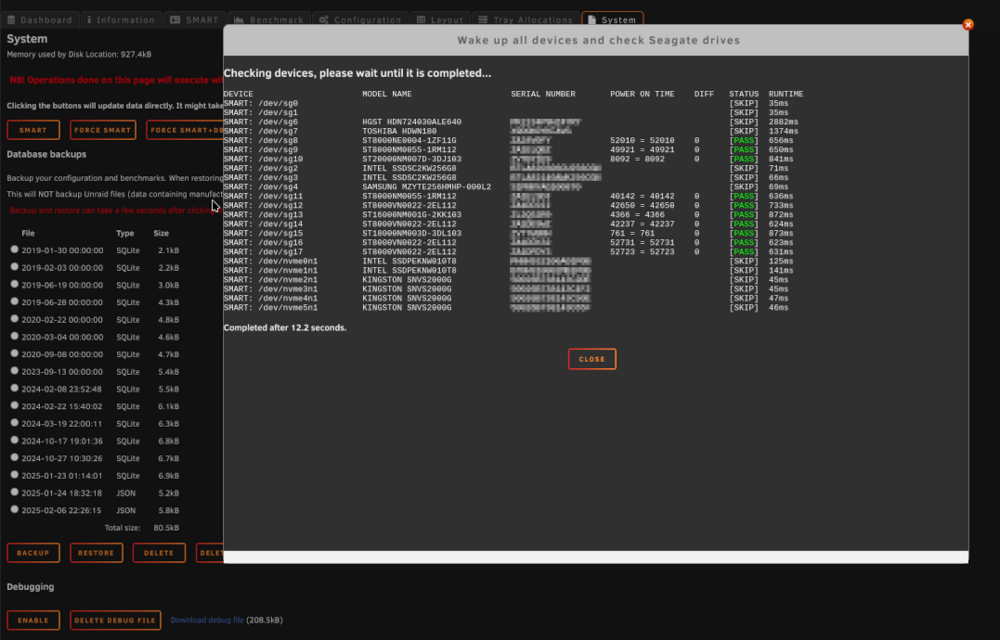
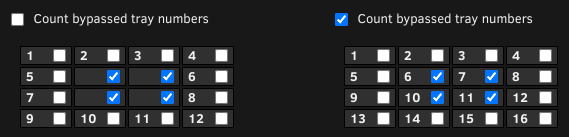
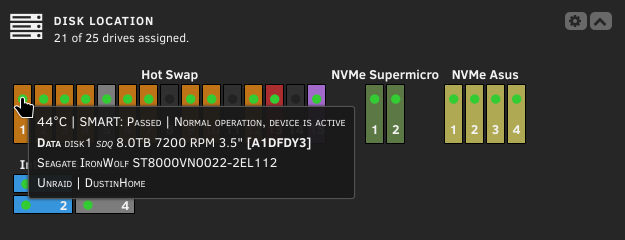
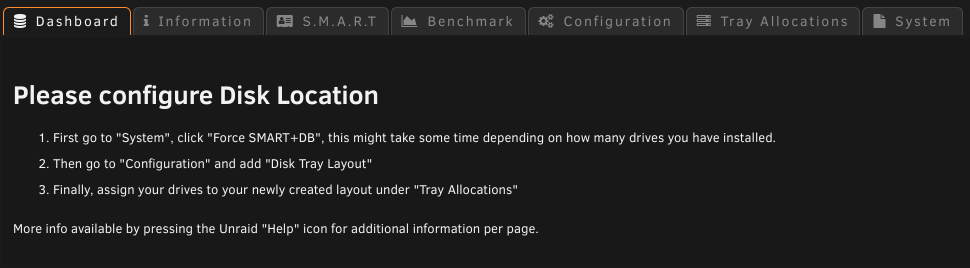
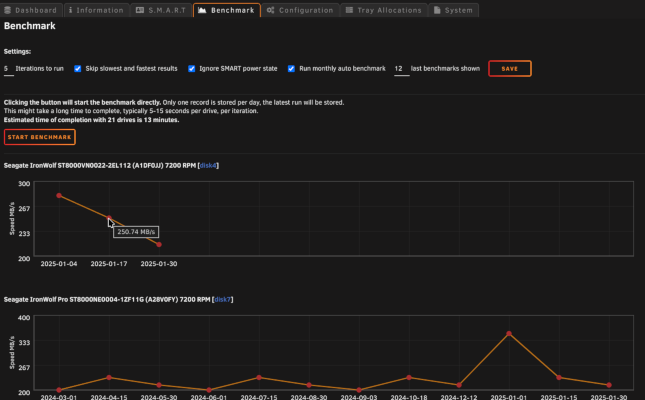
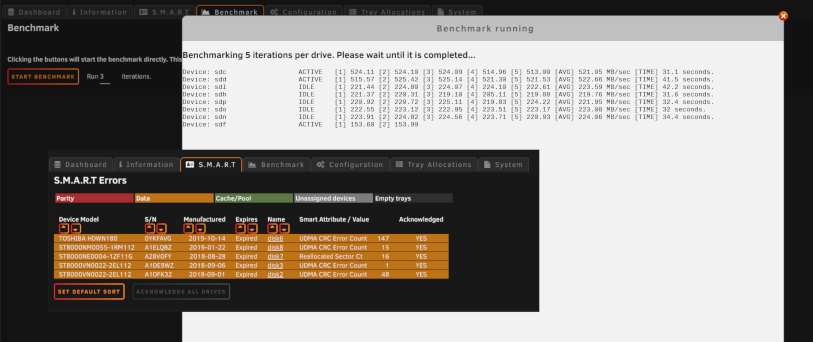
Update 2025.02.14 - Overhaul '25 released! 12490 changes has been made for Overhaul '25, around 300 hours of work. Special thanks to @SShadow, also thanks to @mr2toyou and @PeterHS for testing out the beta and finding some bugs. The plugin loading time has been reduced drastically, and more stuff is now cached to memory instead. Some things might take up to 5 minutes until it's updated because of it, but it's worth it. More stuff is now using Unraid config directly. If "Allow editing of Unraid config" enabled, it's possible to store configuration updates via the plugin directly to Unraid config, like manufacturer, purchase and warranty date in bulk. Also bulk acknowledgment is possible. Some bigger changes: Disk Tray Layout is now in a separate tab, not below the Configuration. SMART info is now in a separate tab, and not included in the "devices", this will also show all errors found for all drives displayed in one table. Benchmark is a new feature, not the most accurate, but it might give an idea of the drive performance over time. This is disabled by default, but can be scheduled to run monthly or by custom configuration you can run it whenever you want. By running the script manually via eg. "User Scripts", disable the "Run monthly auto benchmark" under Benchmark. Clicking the LED in the Unraid Dashboard will take you to the drive tab in Unraid directly, it's also accessible from Information tab if "name" is selected to be displayed. Dashboard layout is shown on "hover" in the Unraid Dashboard same as the Plugin Dashboard, same config apply, except from some formatting not possible on "hover" tooltips. The main ChangeLog: Commit #378 - FEATURE: Added a cleanup function in System. If obsolete files are found, it will show a list of files and a button to delete the files shown. These are only files that are not in use. Commit #372 - FEATURE: Seagate SMART vs FARM LOG check in System tab added for checking fraudulent drives. Commit #369 - IMPROVEMENT: Use syslog to detect SMART read events. Commit #365 - FEATURE: Added selected dashboard info to LED "hover" info on Unraid dashboard. Commit #362 - FEATURE: Created a possibility to hide/bypass trays in a group. Commit #361 - IMPROVEMENT: Performance tweak, cleaned up functions and system to improve loading speed. Commit #360 - IMPROVEMENT: Debug function overhauled and made a bit more useful in some cases. Commit #352 - FEATURE: Disk Location plugin time benchmark added, but must be executed manually by entering ?benchmark=1 in the address field. Value is visible in the "System" tab. Commit #351 - FEATURE: Collect SMART errors in an own separate list. Also added possibility to acknowledge all drives at once, but only if plugin is set to allow Unraid config. Commit #349 - MINOR: A few CSS fixes regarding the LEDs. Mostly changes with the dynamic LEDs. Commit #348 - MINOR: Fixed color codes, make sure "empty" color will reset or delete the color of devices. Added a group color for default color for specific groups. Also changed default colors, must be reset manually after the plugin update for current users. Commit #347 - IMPROVEMENT: SAVE button on all Disk Tray Layouts. Deleted the individual Save button on the Disk Tray Layouts, one button to rule them all.. finally. Commit #346 - IMPROVEMENT: SQLite is removed! It will be automatically converted to multiple json files. This will also prevent sudden database corruptions, obviously. But maybe other type of corruptions? However, the backup/restore will still work on older SQLite database backups, they will be automagically converted. Commit #345 - MINOR: Installation script cleaned up and fixed some bugs. Commit #344 - IMPROVEMENT: Configuration cleanup. All supported dates can be stored in bulk, if Unraid config edit is enabled. Commit #343 - IMPROVEMENT: Removed most SMART from the DB, running it in memory instead. Some data will be stored for History purposes. Commit #342 - FEATURE: Added a customizable plugin dashboard (not to be confused with Unraid dashboard). Formatting of text and positioning possible. Commit #277 - FEATURE: Added a small simple benchmark for read test (hdparm) with SVG graphs. Can be exported as CSV too. Stay on or revert to 2024-edition, manual installation and update only. Should only be used for specific purpose. It is not part of Community Apps and won't be it either: If you want to (for whatever reason) remain on the 2024 edition, follow instruction above and replace the URL to: https://raw.githubusercontent.com/olehj/disklocation/2024-edition/disklocation-2024-edition.plg This version will not be maintained long in the future, but will exists for history purposes and special use cases. Some screenshots of Overhaul '25 (some are taken during development, slight differences might occur): During new configurations, you will now be greeted with a screen telling you what you should do: Hover over LED on the Unraid Dashboard: Disk Location Disk Tray Layout configuration, now possible to select specific trays to exclude. Override is now deprecated (but still works): Benchmark and SMART tab added Benchmark graphs added Seagate check added to check for fraudulent drives Happy valentines day ❤️
-
Overhaul '25 update: 2025.02.14-1006 RC3 - ready for release. Fixed so that default values are displayed in column and sort if the files has been reset. Added a check if the file exists before trying to delete it. Added a touch with new atime to CSS files in use after migration from SQLite to JSON, also added it after restoring old database. This should keep CSS up to date. Also delete the SQLite database when conversion has succeeded, the file is anyway backed up. Otherwise the file will be converted again if "reset all/wipe" is initiated. Thanks again @SShadow for incredible support!
-
Overhaul '25 update: 2025.02.13-2205 RC3 Added a button in System to delete obsolete files and/or folders if found. No button, nothing found, otherwise a list of files and folders are shown. Hopefully the last RC, if nothing else is found during the next 10 hours, Overhaul '25 will be released as planned.
-
Overhaul '25 update: 2025.02.13-1433 RC2 Fixed dashboard to display correct values, wrong variable were used. Added a check to prevent backup from failing if there's no benchmark files available. Fixed an issue with the warning temp, wrong variable used. @SShadow hopefully this will resolve both problems. I have not tested it myself yet, but it was minor fixes.
-
Thanks, the logs will be very useful. I suspected something like this, just didn't know where to look. The front dashboard wasn't updated as I forgot it, should be a quick fix once I get time to fix it. I expect later today.