





FlamongOle
Community Developer
-
Joined
-
Last visited
Everything posted by FlamongOle
-
Update 2025.01.04 - mostly cosmetic Commit #338 - IMPROVEMENT: Made the Dashboard look similar to the rest. Commit #337 - IMPROVEMENT/MINOR: Due to confusion in the forums according to DL's SMART handling, the SMART data handling is modified to follow Unraids "acknowledgements". The manual input is removed and warning variables has been reset to the defaults. This will not be configurable anymore within the plugin. Idea is to let Unraids configuration to be in use as much as possible. This might/will be further improved in later versions as this is relatively a quick fix and it won't use other SMART attributes than 5, 187, 197, 198 for now (it is the default (except for 199) and should satisfy the majority).
-
Things. Custom colors might need to be reset before they actually work, it might be conflicting colors chosen and used based on the new and old color scheme. They should work, make sure you run the newest version too.
-
It is.
-
The unraid layout is not accessible right there as it's not stored in the database. Might implement that in the future.
-
device=path If you would have clicked the "help" button described on page 1 in this forum, you would have seen!
-
INFO 2024.11.12: Disk Location plugin is tested and should be functioning under Unraid 7.0.0-beta4. Plugin has been tested during upgrade from Unraid 6.12.12 -> 6.12.13 -> 7.0.0-beta4 with current Disk Location version 2024.10.28, including migration from older databases and settings. If you have issues with the plugin, it's likely not related to Unraid upgrade. There has been some issues out there with faulty/empty information on the Dashboard/Frontpage of the plugin. Restore from previous backup, then execute "Force update all" from the System tab.
-
Maybe in the future. Connected controller and port number should be described with the "Path"/device. From lsscsi --help: <h:c:t:l> Meaning: <host_num:controller:target:lun> And for NVMe: <'N':ctl_num:cntlid:namespace_id> Table sorting: "device" is the option to show this information. Otherwise it is "Path" under "Visible Frontpage Information"
-
Can't hurt if you can't find the solution by saving the configuration, dunno what's going on there as I can replicate it myself
-
Did you try to restore a backup?
-
No real defaults there either, just choose whatever feels important. Anyway, what's initial set is listed in the code here: https://github.com/olehj/disklocation/blob/master/disklocation/pages/sqlite_tables.php#L52-L86
-
There's no real default here, pick whatever you like. Newest implementations are the icons, which "default" to "Unraid", and LEDs to "dynamic". However, "static" would be more default Unraid system wise.
-
Update 2024.10.28 Commit #334 - BUG: Found the root cause of the blank dashboard issue. A file got symlinked with "null" instead of the actual file (duplicate of #328 and #333). Nothing more than that.
-
I updated the plugin a bit again: Commit #331 - BUG: (Update 1337) Used wrong datatype in the database for a new function, might have caused an issue where you must manually save the config again. I think this might have caused the issue, the other one you refers to there, should have been fixed in the last installer script. You will see a new database will be updated due to faulty datatype.
-
Likely due to old existing corrupted database, restoring previous database under "System" tab should fix it.
-
Update 2024.10.27-1337 Commit #331 - BUG: (Update 1337) Used wrong datatype in the database for a new function, might have caused an issue where you must manually save the config again. Commit #328 - BUG: Added a check for existing cronjobs during installation and removal. Automatic update was likely started the exact time as the database update, and the installer ignored that partly. Also fixed an error where the plugin would be inaccessible if the database are indeed corrupted. Also enabled manual lock file deletion under System tab again, this will only be visible when it exists. Commit #327 - BUG: Backup button disappeared when there were no backups available. Commit #326 - MINOR: Styles for LEDs now restored after reinstallations and upgrades. 2024.10.27 vs 2024.10.27-1145: nothing special, just minor cleanup. Thanks to @Starfiresg1 for providing logs, this helped for debugging! Those with corrupted databases should restore database from backup. You got backup, right? To clear up some other confusions: It should never be required a reboot when installing, removing or reinstalling this plugin - even after failures as this last update. Only hardware changes -might- require it, but often "Force update all" would fix several issues. There's no rollback available, even if you have an older installation file, it will still pull the latest from the master branch on github. I do not package the releases manually. There's just "master" and "devel", at least for now. It's impossible to test all scenarios that might occur and bugs like this will happen, it has happened before, it will happen again. As stated in GPL license, this software comes without any warranty: https://github.com/olehj/disklocation/blob/master/COPYING
-
You can also try to delete the plugin, and then install this manually for testing: https://raw.githubusercontent.com/olehj/disklocation/devel/disklocation-devel.plg There's something fixed, but dunno if it's related. Any feedback appreciated. @elitexero @Gragorg @Gingertosser @TallMan206
-
Hmm, this is strange. I can't see why it does not work as it does here. Can someone go to Tools -> PHP Settings -> select "All categories" and Apply that. Then install the plugin, go to dashboard. Then back to PHP Settings and fetch the log for me. I found out why, this will reappear next update, sorry for that.
-
Update 2024.10.26 Commit #324 - FEATURE: Choose dynamic and static styles for LEDs (minor known bugs: this is not completed entirely, and will reset every update/reinstallations). Commit #323 - FEATURE: Under configuration you can now set to display LEDs in all color coded circular modes instead of Unraid icons. Commit #322 - IMPROVEMENT/MINOR: The "delete all" button and database move/delete requires now an additional checkbox to be performed. Also moved the backup button to a more sensible area. Some SQL syntax tweaks that will hopefully cause less corruption. Commit #321 - MINOR: Sometimes the colors behaved weird when saving custom colors. This happened caused by some variables being loaded after the execution of a function that required the info before.
-
I know there's some bugs with the custom colors, however it should mostly work. You can first try to press "Reset all custom colors", then you must make sure you don't use the same colors as defined under "Common configuration" for custom colors under "Tray allocations". They can also NOT be in "heat map" mode.
-
Might be, I couldn't see anything in the diagnostic about exactly that. Anyway, the Unraid team got 3 different diagnostics from me. But most important is that it now works.
-
It was not used by another pool, it was just unavailable for some reason. It remained on the pool I assigned it too. Anyway, I disabled it now and hope I rather can enable it safer in the future (v7). It's not a crisis and will do for the time being as a cold spare. Thanks anyway for pointing it out. It's a nasty bug regardless.
-
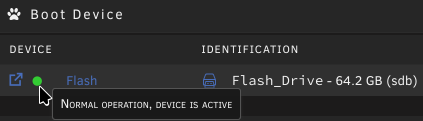
Look at that! So, no spares in ZFS yet. Thanks @JorgeB!
-
Now, that looks more promising. I will try to do that right away as I do have a spare drive in a zfs pool. I even see it as "UNAVAIL" too, so something there happened. I will report back as soon as I can confirm this. Thanks!
-
Unassigned devices is by fact a plugin, even though it's probably "included by standard" by now: /config/plugins/unassigned.devices/ Absolutely everything under /config/plugins/ was removed for one test, including plugins-removed and plugins-error. I have been going through every single file, and there's nothing there that can cause this problem. I even tried one more time now after cleaning up some additional old share configs. It's just doing the same over and over, wiping the flash drive, but only the one UNRAID is on, and only after everything has mounted. Plugins, dockers, VMs can all be ruled out. IPMI is a plugin too, and I don't see how that should by itself call for a "wipefs", makes no sense. Yes, I do use IPMI.
-
No way I'm posting my backup. But again, this is already answered. Please read my initial post. It clearly says I have tried multiple drives and ports. That means that /dev/sdb was not the same between the swaps. About all my points in the first post is a fresh install, just different configs. Without plugins, there's no configuration to be done in the plugin you suggest even. As I said, I removed and purged all of it. This is a system which ran without issue for so long, and suddenly started to act up. It feels weird if this is hardware related at all. But I don't understand why wipefs would run at all, it makes no sense.


