





Griz
Members
-
Joined
-
Last visited
Everything posted by Griz
-
Thanks for the help! Linux 4.14.26-unRAID. Last login: Mon Jun 4 07:23:10 -0400 2018 on /dev/pts/0 from 192.168.1.6. root@Inara:~# ls -al /mnt/cache/appdata/binhex-krusader total 32 drwxrwxr-x 1 nobody users 64 Jun 10 21:14 ./ drwxrwxrwx 1 nobody users 70 Jun 10 21:06 ../ drwxr-xr-x 1 root root 6 Jun 10 21:14 krusader/ -rw-r--r-- 1 root root 162 Jun 10 21:14 perms.txt -rwxrwxr-x 1 nobody users 24712 Jun 10 21:49 supervisord.log* root@Inara:~#
-
In the share settings for " /mnt/cache/appdata", I have security set to "Public". My understanding is that nobody in linux is a built in "user"... Do I need to create an unraid user named "nobody"? What is nobody's password? I'm obviously in way over my head...
-
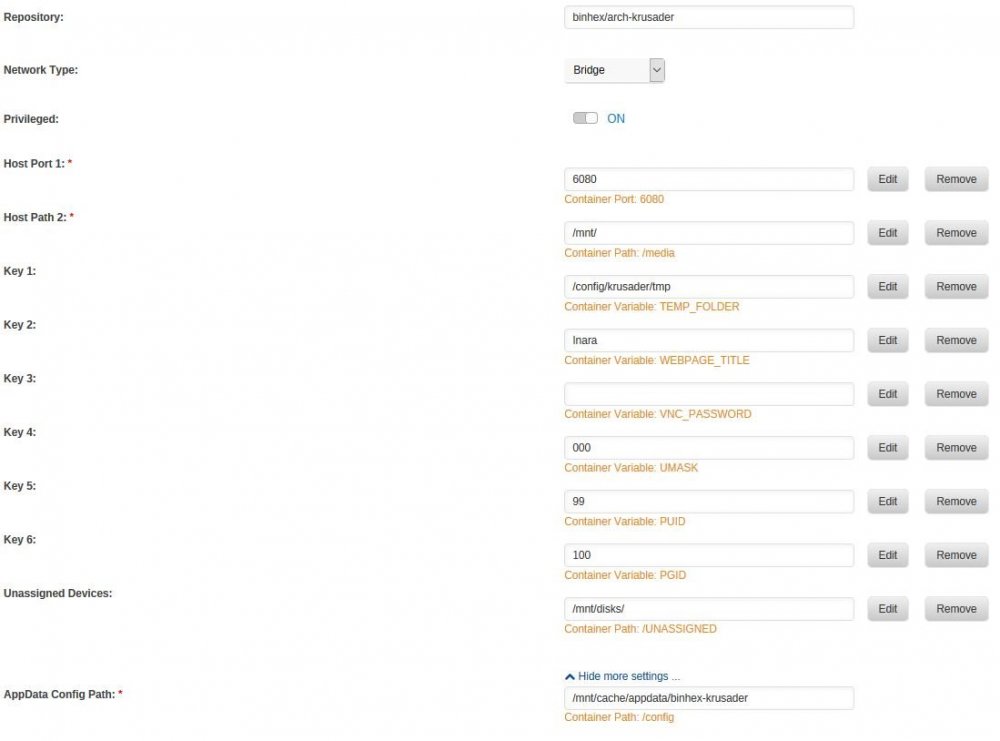
When I start up Krusader after installing, I get a dialog box saying something to the effect of "Unable to write to /home/nobody..... bookmarks won't work until you fix this". What do I need to configure?
-
I use them. Without them, you get pauses when starting media that is on a spun down drive and sometimes a pause or stutter on playing media if another user causes a drive to spin up. The users don't care that the hard drive controller isn't configured optimally or that Windoze sucks, all they know is that they are sitting there watching a spinning icon when the media should be playing. An option to spin up all drives together would be fine, but totally eliminating the feature would be a major degradation of the user experience IMO.
-
theone, THANK YOU for such a great plugin! I have/had a sheet of paper covered with erased text, arrows pointing to where drives moved to when I was too lazy to erase/re-write and scribbled notes in my mostly illegible handwriting. I have been meaning to translate it to an electronic format for years but the thought of transcribing 20+ model numbers and serial numbers made me procrastinate in perpetuity. That's all I really need. I only really care to display UNraid disk number, Model, Serial Number, Capacity and Notes so just adding a <br> between each item would make it more readable and probably not run out of vertical room for me. As-is, it isn't pleasing to the eye but serves the purpose of being able to find my disks and not having to maintain a pen and paper disk map. My other nit-picky suggestion would be to have a printer-friendly output with the boxes outlined instead of filled with the brushed aluminum background. My server is in the basement so I print the layout page to take with me when I go down there to add/remove drives. The current layout prints OK, but wastes toner.

