





rmp5s
Members
-
Joined
-
Last visited
Everything posted by rmp5s
-
I actually figured it out. I noticed that it wasn't just Radarr having a problem...it was Sonarr and even NZBGet, all broken, all of a sudden. That in and of itself made me go "hmmm". I looked in the messages on NZBGet and saw it kept saying it couldn't write a file over and over and over again. One error said the disk may be full. I was like, "no way...I have almost 8TB of free space still..." Then I thought, "wait. Maybe I didn't tell that share to use the new disk when I added it." And I sure didn't. The share it was all writing to couldn't write to the new disk and that new disk was the only disk with any space available. Told the share to use the new disk as well, Bob's your auntie, all is right with the world. 👍
-
I have no idea why, but Radarr decided to stop working a few days ago. In the "System" tab, this is in there: No idea why that changed all of a sudden, but ok fine...when I try to go add a new root folder, I get this: This makes no sense. Nothing that I know of has changed, all the permissions and everything for all the folders are the same ("nobody users" when I ls -l it), I've Googled everything I can think of and it's such a generic error that I can't really find anything useful. I've tried chmod-ing the directory -R 777 too. No change. Anyone have any idea what it's looking for?...what would make it happy? Thank you!!


-
Ended up installing Binhex PlexPass and calling it good. I tried EVERYTHING I could think of to get the old official container back up and running and NOTHING worked. Oh well, I guess.
-
Or maybe I'll install a different Plex container...maybe Binhex? Would that cause problems? I can't think of any...thoughts?
-
Made it through the rest of the steps in the video without a hitch!! Now I get this... I'm done with this. Can I just wipe it all and start over? This is insane...

-
Literally the very last comment on desktop is literally the very first comment on mobile because...reasons...I guess. The hero we don't deserve...kind of embarrassed I didn't try that, honestly. lol #fail Back in business!...until the next damn thing doesn't work, anyway...🤣

-
Yea, I tried it both ways...neither worked.
-
Thought maybe it was saying the permissions of the DB files are the problem so I ran in and gave them a quick 777, ran it again and got this... So. Yea. No idea. I'm lost.

-
Running "/mnt/user/appdata/Plex-Media-Server/Library/Application Support/Plex Media Server/Plug-in Support/Databases/com.plexapp.plugins.library.db" --sqlite "PRAGMA integrity_check" as described here, I get: "bash: /mnt/user/appdata/Plex-Media-Server/Library/Application Support/Plex Media Server/Plug-in Support/Databases/com.plexapp.plugins.library.db: Permission denied"...maybe it IS a permissions issue?...
-
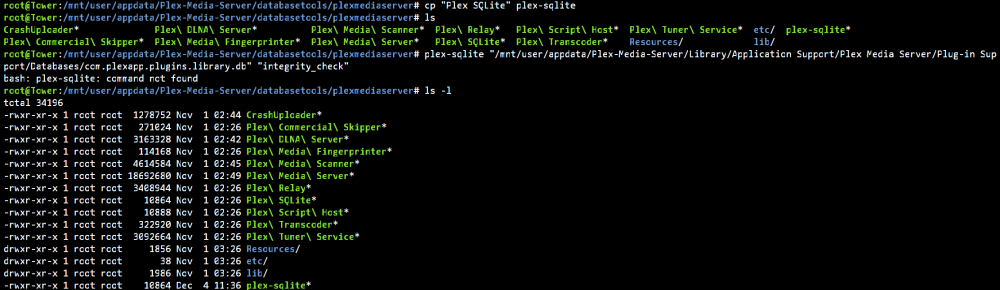
I thought it may be freaking out because of that escape character so I renamed it to plex-sqlite...still nothing. Thought maybe it didn't have executable permissions...nope. Sure does. I'm at a loss...
-
Uuuuuuuuuuuuuuuuuuuuuuuuum... Why can't anything just WORK!? What am I missing here???

-
Had to start the container, start a terminal INTO the container, go to /usr/lib and find what the Plex directory is called. For me, even though the container is called "Plex-Media-Server", the directory is /plexmediaserver...got it! Now to continue through the vid. 👍
-
Where'd you find the "custom Plex SQLite" program? I'm at 4:20 in (giggidy) and I don't have any Plex anything in /usr/lib...

-
Nope! He's the best but I didn't even know that video existed! Will definitely check that out. How would one go about "resetting" other Dockers that have lost their way? I have backups of most of my Dockers so flat out deleting everything wouldn't really be a huge problem. (I don't think...) Is that a thing? Remove container, delete folders? Which folders? This goes back to my previous, "where is all this stuff" post. lol
-
Nice. I'll check those out! Thanks!
-
Gave it a shot. Still no love. I'm out of ideas. Made a new post here if you'd like to check it out.
-
I had a massive system crash a week or two ago that caused TONS of database issues in basically all of my Docker containers. I've since gotten most of them mostly sorted except for two specific problem children...Binhex-Sonarr and Plex. Binhex-Sonarr: I've done every database repair, restore, etc thing I can possibly think of and I STILL get "database disk image is malformed" at the top of the page as soon as I go to the UI. I've tried everything I can think of...are there any ways to fix the DB other than this and restoring from backup? Maybe I'm repairing/restoring the wrong "sonarr.db"? Maybe I have to do something to one of these other things? Maybe a thing somewhere else? I don't know. This is the current directory contents: Maybe I'm missing something. Maybe I'm in the wrong directory altogether. I don't know. And...Plex: Plex refuses to cooperate. Getting another "disk image is malformed" error... The problem with all this isn't that I can't work with SQL...I am relatively familiar with DBs. The problem is that I don't know where all these DBs are! Once I figure out where all this junk is, I can try to fix it. Worst case scenario, I can just delete it and let it rebuild. If I figure out what's broken with Sonarr for instance, I supposed I can just blow it away and restore from a backup. I still have all my data and I'm relatively diligent about backing up most stuff and I know I have pretty recent backups out of Sonarr. (Backing up from within the GUI backs up the DB, right?) I just gotta be able to get in the thing! Anyway...any help greatly appreciated. This has been a real nightmare!! Thanks.



-
Hmm...the only things I have there are the two that are supposed to be copied back from backup...
-
What's the path for those files?
-
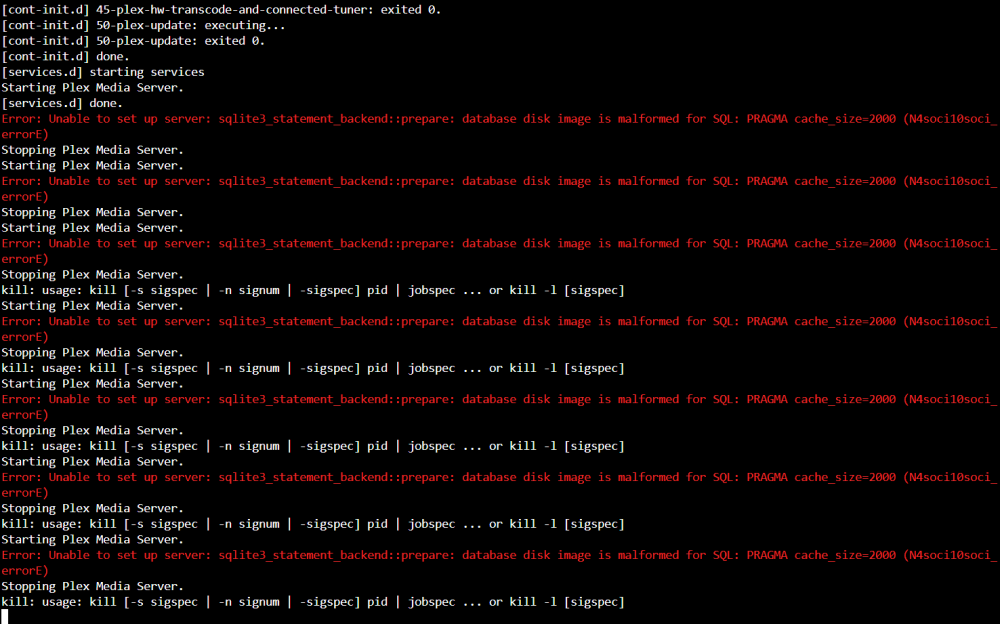
Shares are still there. Which is good. Guess it's not doing that anymore...no idea. My Docker containers are still FUBAR, though. I tried uninstalling and reinstalling Plex and this is what I get... Disk image is malformed for SQL...anyone ever seen that before?
-
Damn. Reinstall all my Docker containers?
-
Came across the "new permissions" tool in the Tools tab...maybe that would be of assistance?
-
Shares seem to be sticking around now...so that's good. 2 remaining issues: - Cache drive is still borked...I'll just format it unless anyone has any other ideas. - There still seems to be some kind of permissions issue...all my Docker containers are broken. They start but, on many of them, I'm not able to open the ui...looking at the logs for them shows all kinds of permissions errors. Is there somewhere I can go to check and change the permissions to get everything back up and running? Also...where did they put the Docker logs in this version? Used to just click the text on the right...now? Dunno. Thanks, everyone!
-
All the shares are still there...could updating have fixed it? lol Here's a new diag. tower-diagnostics-20221115-1713.zip
-
Roger. They're still there at this point. So...we shall see. Thanks, my friend.


