





cam217
Members
-
Joined
-
Last visited
Everything posted by cam217
-
Hi, Thanks. I believe I have tried. I actually modify a bit the xml and then starts again the VM to check if it works. It does not seems to accept it very well when I try to add the graphics card. Here's what works right now in my xml <?xml version='1.0' encoding='UTF-8'?> <domain type='kvm' xmlns:qemu='http://libvirt.org/schemas/domain/qemu/1.0'> <name>Macinabox BigSur</name> <uuid>03a0178a-b9cd-4a0b-b8e8-48d418330bd2</uuid> <description>MacOS Big Sur</description> <metadata> <vmtemplate xmlns="unraid" name="BigSur" icon="BigSur.png" os="osx"/> </metadata> <memory unit='KiB'>25165824</memory> <currentMemory unit='KiB'>25165824</currentMemory> <memoryBacking> <nosharepages/> </memoryBacking> <vcpu placement='static'>18</vcpu> <cputune> <vcpupin vcpu='0' cpuset='1'/> <vcpupin vcpu='1' cpuset='13'/> <vcpupin vcpu='2' cpuset='3'/> <vcpupin vcpu='3' cpuset='15'/> <vcpupin vcpu='4' cpuset='5'/> <vcpupin vcpu='5' cpuset='17'/> <vcpupin vcpu='6' cpuset='6'/> <vcpupin vcpu='7' cpuset='18'/> <vcpupin vcpu='8' cpuset='7'/> <vcpupin vcpu='9' cpuset='19'/> <vcpupin vcpu='10' cpuset='8'/> <vcpupin vcpu='11' cpuset='20'/> <vcpupin vcpu='12' cpuset='9'/> <vcpupin vcpu='13' cpuset='21'/> <vcpupin vcpu='14' cpuset='10'/> <vcpupin vcpu='15' cpuset='22'/> <vcpupin vcpu='16' cpuset='11'/> <vcpupin vcpu='17' cpuset='23'/> </cputune> <os> <type arch='x86_64' machine='pc-q35-5.1'>hvm</type> <loader readonly='yes' type='pflash'>/mnt/user/system/custom_ovmf/Macinabox_CODE-pure-efi.fd</loader> <nvram>/mnt/user/system/custom_ovmf/Macinabox_VARS-pure-efi.fd</nvram> </os> <features> <acpi/> <apic/> </features> <cpu mode='host-passthrough' check='none' migratable='on'/> <clock offset='utc'> <timer name='rtc' tickpolicy='catchup'/> <timer name='pit' tickpolicy='delay'/> <timer name='hpet' present='no'/> </clock> <on_poweroff>destroy</on_poweroff> <on_reboot>restart</on_reboot> <on_crash>restart</on_crash> <devices> <emulator>/usr/local/sbin/qemu</emulator> <disk type='file' device='disk'> <driver name='qemu' type='raw' cache='writeback'/> <source file='/mnt/user/isos/BigSur-opencore.img'/> <target dev='hdc' bus='sata'/> <boot order='1'/> <address type='drive' controller='0' bus='0' target='0' unit='2'/> </disk> <disk type='file' device='disk'> <driver name='qemu' type='raw' cache='writeback'/> <source file='/mnt/user/domains/Macinabox BigSur/macos_disk.img'/> <target dev='hdd' bus='sata'/> <address type='drive' controller='0' bus='0' target='0' unit='4'/> </disk> <controller type='usb' index='0' model='ich9-ehci1'> <address type='pci' domain='0x0000' bus='0x00' slot='0x07' function='0x7'/> </controller> <controller type='usb' index='0' model='ich9-uhci1'> <master startport='0'/> <address type='pci' domain='0x0000' bus='0x00' slot='0x07' function='0x0' multifunction='on'/> </controller> <controller type='usb' index='0' model='ich9-uhci2'> <master startport='2'/> <address type='pci' domain='0x0000' bus='0x00' slot='0x07' function='0x1'/> </controller> <controller type='usb' index='0' model='ich9-uhci3'> <master startport='4'/> <address type='pci' domain='0x0000' bus='0x00' slot='0x07' function='0x2'/> </controller> <controller type='sata' index='0'> <address type='pci' domain='0x0000' bus='0x00' slot='0x1f' function='0x2'/> </controller> <controller type='pci' index='0' model='pcie-root'/> <controller type='pci' index='1' model='pcie-root-port'> <model name='pcie-root-port'/> <target chassis='1' port='0x10'/> <address type='pci' domain='0x0000' bus='0x00' slot='0x02' function='0x0' multifunction='on'/> </controller> <controller type='pci' index='2' model='pcie-root-port'> <model name='pcie-root-port'/> <target chassis='2' port='0x11'/> <address type='pci' domain='0x0000' bus='0x00' slot='0x02' function='0x1'/> </controller> <controller type='pci' index='3' model='pcie-root-port'> <model name='pcie-root-port'/> <target chassis='3' port='0x12'/> <address type='pci' domain='0x0000' bus='0x00' slot='0x02' function='0x2'/> </controller> <controller type='pci' index='4' model='pcie-root-port'> <model name='pcie-root-port'/> <target chassis='4' port='0x13'/> <address type='pci' domain='0x0000' bus='0x00' slot='0x02' function='0x3'/> </controller> <controller type='virtio-serial' index='0'> <address type='pci' domain='0x0000' bus='0x02' slot='0x00' function='0x0'/> </controller> <interface type='bridge'> <mac address='52:54:00:9d:00:66'/> <source bridge='br0'/> <model type='e1000-82545em'/> <address type='pci' domain='0x0000' bus='0x01' slot='0x00' function='0x0'/> </interface> <serial type='pty'> <target type='isa-serial' port='0'> <model name='isa-serial'/> </target> </serial> <console type='pty'> <target type='serial' port='0'/> </console> <channel type='unix'> <target type='virtio' name='org.qemu.guest_agent.0'/> <address type='virtio-serial' controller='0' bus='0' port='1'/> </channel> <input type='tablet' bus='usb'> <address type='usb' bus='0' port='1'/> </input> <input type='mouse' bus='ps2'/> <input type='keyboard' bus='ps2'/> <graphics type='vnc' port='-1' autoport='yes' websocket='-1' listen='0.0.0.0' keymap='en-us'> <listen type='address' address='0.0.0.0'/> </graphics> <video> <model type='qxl' ram='65536' vram='65536' vgamem='16384' heads='1' primary='yes'/> <address type='pci' domain='0x0000' bus='0x00' slot='0x01' function='0x0'/> </video> <memballoon model='virtio'> <address type='pci' domain='0x0000' bus='0x03' slot='0x00' function='0x0'/> </memballoon> </devices> <qemu:commandline> <qemu:arg value='-usb'/> <qemu:arg value='-device'/> <qemu:arg value='usb-kbd,bus=usb-bus.0'/> <qemu:arg value='-device'/> <qemu:arg value='************************'/> <qemu:arg value='-smbios'/> <qemu:arg value='type=2'/> <qemu:arg value='-cpu'/> <qemu:arg value='Penryn,kvm=on,vendor=GenuineIntel,+invtsc,vmware-cpuid-freq=on,+pcid,+ssse3,+sse4.2,+popcnt,+avx,+aes,+xsave,+xsaveopt,check'/> </qemu:commandline> </domain>
-
Hi guys, I assembled a new server recently for CAD and backups. The hardware is: AMD 3900X, 32Gb of RAM, Gigabyte x570 Aorus Master and a quadro P2000. I already got a vbios for the graphic card as I created a windows 10 VM that uses the graphic card passed through and it works well. A client would like me to switch to an other software that runs on macOS so I created a Big Sur VM for that purpose following Ed's tutorial video. The created VM works fine by default but once I add more cores or ram it just fails to start. The default VM has this in the logs and starts successfully: 2021-09-11 14:51:29.452+0000: Domain id=13 is tainted: high-privileges 2021-09-11 14:51:29.452+0000: Domain id=13 is tainted: custom-argv 2021-09-11 14:51:29.452+0000: Domain id=13 is tainted: host-cpu char device redirected to /dev/pts/0 (label charserial0) 2021-09-11T14:51:29.536602Z qemu-system-x86_64: warning: host doesn't support requested feature: CPUID.01H:ECX.pcid [bit 17] 2021-09-11T14:51:29.538455Z qemu-system-x86_64: warning: host doesn't support requested feature: CPUID.01H:ECX.pcid [bit 17] The modified VM with more cores/ram does not start and has the following in the logs: 2021-09-11 15:05:15.443+0000: Domain id=14 is tainted: high-privileges 2021-09-11 15:05:15.443+0000: Domain id=14 is tainted: custom-argv 2021-09-11 15:05:15.443+0000: Domain id=14 is tainted: host-cpu char device redirected to /dev/pts/0 (label charserial0) 2021-09-11T15:05:15.518389Z qemu-system-x86_64: warning: host doesn't support requested feature: CPUID.01H:ECX.pcid [bit 17] 2021-09-11T15:05:15.520125Z qemu-system-x86_64: warning: host doesn't support requested feature: CPUID.01H:ECX.pcid [bit 17] 2021-09-11T15:05:15.521351Z qemu-system-x86_64: warning: host doesn't support requested feature: CPUID.01H:ECX.pcid [bit 17] 2021-09-11T15:05:15.522640Z qemu-system-x86_64: warning: host doesn't support requested feature: CPUID.01H:ECX.pcid [bit 17] 2021-09-11T15:05:15.523874Z qemu-system-x86_64: warning: host doesn't support requested feature: CPUID.01H:ECX.pcid [bit 17] 2021-09-11T15:05:15.525117Z qemu-system-x86_64: warning: host doesn't support requested feature: CPUID.01H:ECX.pcid [bit 17] 2021-09-11T15:05:15.526324Z qemu-system-x86_64: warning: host doesn't support requested feature: CPUID.01H:ECX.pcid [bit 17] 2021-09-11T15:05:15.527554Z qemu-system-x86_64: warning: host doesn't support requested feature: CPUID.01H:ECX.pcid [bit 17] 2021-09-11T15:05:15.528849Z qemu-system-x86_64: warning: host doesn't support requested feature: CPUID.01H:ECX.pcid [bit 17] 2021-09-11T15:05:15.530110Z qemu-system-x86_64: warning: host doesn't support requested feature: CPUID.01H:ECX.pcid [bit 17] 2021-09-11T15:05:15.531380Z qemu-system-x86_64: warning: host doesn't support requested feature: CPUID.01H:ECX.pcid [bit 17] 2021-09-11T15:05:15.532699Z qemu-system-x86_64: warning: host doesn't support requested feature: CPUID.01H:ECX.pcid [bit 17] I don't understand why the default VM starts and not the modified one as it seems to be the same kind of warnings as in the default VM. I followed recommended steps in the video and always ran the script after modifying the VM. I also tried to modify the script with the option REMOVETOPOLOGY set to yes for non-standard hardware but it doesn't help. I can get the VM working again by changing the xml file back to its default settings after the installation (2 CPU cores and 4 Gb of ram) I'm not even trying to add the graphics card yet. Any help would be much appreciated. Thanks
-
I do have the same error but I stopped using diskover because of that elasticsearch error I can't fix and it makes diskover unusable. Elasticsearch worked fine for almost a year and now it stops all the time, it can't work more than 12 hours straight... Diskover is a nice software but I won't spend hours trying to fix elasticsearch as I have better things to do and it is not a gamechanger to me. EDIT: Maybe I should mention that I have it working also on another server that works fine (no elasticsearch issue there yet) and the error is there as well. Sometimes it's better not to worry about errors that does not affect usage.
-
I do understand that you want to scale later on, no problem. Do try simple, make it work and then test out a bit different configuration by small increments so you know what works, what doesn't and what need improvements. Going all in is tempting but you might get loss and annoyed along the way. Been there, done that 😅. The last thing I can advise you to do *again*, look at sapceinvaderone videos. At some point he explains the basic configuration of the files for swag (lest's encrypt at the time) Good luck 🙂
-
Did you keep your jellyfin.subdomain.conf? I'm not an expert on those configuration files but I know mine works and yours looks way different. Plus, as I said, I don't use fixed IP for the jellyfin docker. Did you check if the correct ports are open? Do you forward to the correct IP? Are you dockers on the same custom network so they can talk to each other? Everything I access from outside my network is on that same custom network. I remember it was rather complicated to make it work, so I tried it as simple as possible. Then when it works you can try more fancy stuff. I also know that the swag configuration files have to be correctly configured and some have a bit different configuration than others. This is why there are plenty of samples. The file you posted was nowhere near the sample. Did you try a more stock approach for that file? You could also join the LSIO discord to get help from the source 😉
-
What does swag logs says? What about jellyfin logs? All good? What did you configure into the jellyfin docker in the Advanced networking section? There, I have: Allow remote connections to this server option checked in the Remote Access Settings Enable automatic port mapping option checked in the Remote Access Settings IPv4 checked IP Protocols Check if you need to use the Base URL option in Server Address Settings. I do use it but that depends on your configuration The rest is stock on the jellyfin side. I'll look further and report back here if I think of something else you should check.
-
Do you have any docker that does work from a remote location? Having it working remotely is more complicated than just having it locally. Did you open the jellyfin port in your firewall? From there do you forward to correct docker IP address? Did you configure duckdns (necessary if your ISP changes your public IP)? Do you have a domain? In that case, did you add the CNAME for jellyfin? What does the the swag logs says? As I said, you should look at spaceinvaderone video to check one by one you have the correct configuration each step of the process of this configuration.
-
My setup is working fine with jellyfin docker on a custom network for the communication between my dockers. I should mention I'm using organizr to get to my dockers from outside my local network. The optional fixed IP is left blank in the jellyfin docker configuration. I don't know where you got your jellyfin.subdomain.conf because it very different than the sample. I use the following jellyfin.subdomain.conf: # make sure that your dns has a cname set for jellyfin # if jellyfin is running in bridge mode and the container is named "jellyfin", the below config should work as is # if not, replace the line "set $upstream_app jellyfin;" with "set $upstream_app <containername>;" # or "set $upstream_app <HOSTIP>;" for host mode, HOSTIP being the IP address of jellyfin # in jellyfin settings, under "Advanced/Networking" change the public https port to 443, leave the local ports as is, # and set the "Secure connection mode" to "Handled by reverse proxy" server { listen 443 ssl; listen [::]:443 ssl; server_name jellyfin.*; include /config/nginx/ssl.conf; client_max_body_size 0; location / { include /config/nginx/proxy-confs/organizr-auth.subfolder.conf; auth_request /auth-4; #=User include /config/nginx/proxy.conf; resolver 127.0.0.11 valid=30s; set $upstream_app jellyfin; set $upstream_port 8096; set $upstream_proto http; proxy_pass $upstream_proto://$upstream_app:$upstream_port; proxy_set_header Range $http_range; proxy_set_header If-Range $http_if_range; } location ~ (/jellyfin)?/socket { include /config/nginx/proxy.conf; resolver 127.0.0.11 valid=30s; set $upstream_app jellyfin; set $upstream_port 8096; set $upstream_proto http; proxy_pass $upstream_proto://$upstream_app:$upstream_port; proxy_set_header Upgrade $http_upgrade; proxy_set_header Connection $http_connection; set $app jellyfin; #include /config/nginx/theme-park.conf; } } You also have to setup other stuff like duckdns and the configuration that works with your domain. It is a bit confusing at first but it works great once configured properly. Look at spaceinvaderone videos on youtube, he explains everything through a few videos and his explanations are really clear to understand what you need.
-
Hi guys, For some reason my elasticsearch5 container stops by itself pretty regularly... like once a day. I've found this in the logs: [2021-08-31T22:37:27,197][ERROR][o.e.b.ElasticsearchUncaughtExceptionHandler] [] fatal error in thread [elasticsearch[VcsZS9A][refresh][T#1]], exiting This is definitely a recurring issue with my elasticsearch5 docker. Am I the only who experiences this container stopping regularly with this error in the logs? Thanks EDIT: I should mention it was working fine before
-
Hi all, I've got the same warning in my CA Fix Common Problems. I don't recall doing anything like this (using the /boot/extra to any kind of purposes). I opened a console to see what's there and here it is: root@Tower:/# cd boot/extra/ root@Tower:/boot/extra# ls libbsd.txz I don't know what it's doing here. Should I delete this library, should ignore this warning or should I do something else? Thanks for the insight!
-
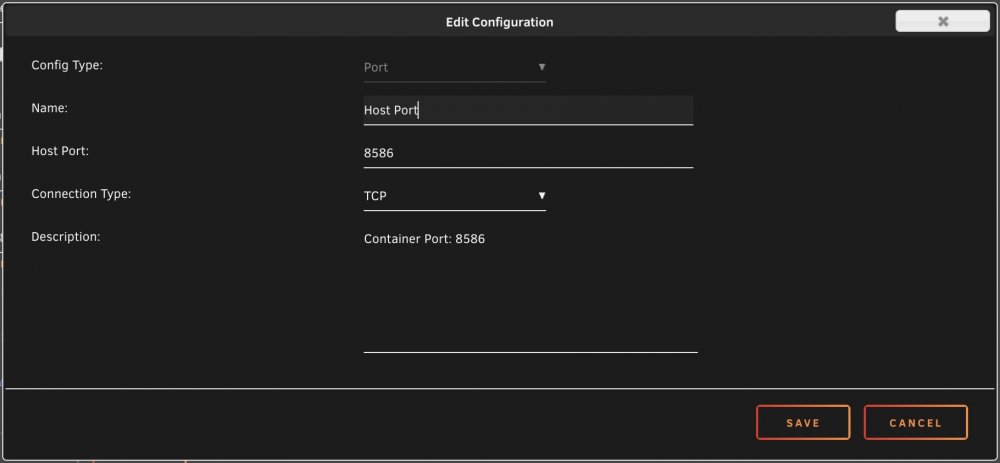
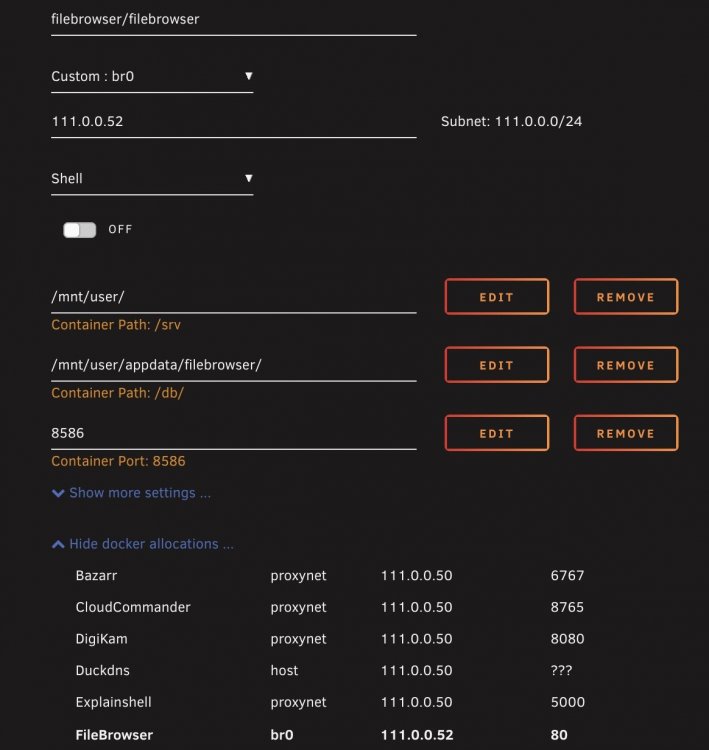
Hi, I installed FileBrowser and created a port variable for it because port 80 is used already by unraid GUI. I couldn't get to the interface for some reason, like the port I added is not used. From there I got the docker an IP and it confirmed that the docker isn't using the port I set. I'm wondering if did it right now... My problem is I will use it with organizr and letsencrypt dockers so I need to put this docker into my custom docker network so organizr can access it. What's wrong here?
-
Hi all, I am currently trying to configure access to my dockers (organizr, sonarr, radarr, jellyfin...) from outside my local network. I installed NginxProxyManager and made some tests. I have no problem connecting to organizr from outside my LAN, login through https works. But unfortunately I can't figure out how to access the dockers from there. I mean when I click on a tab it seems to try to load some content but the page doesn't load (I just have the left tabs and nothing appears next to it). I tried different things from there but I can't get it to work. Here's my conf file as it is now: # ------------------------------------------------------------ # xxx.duckdns.org # ------------------------------------------------------------ server { set $forward_scheme http; set $server "10.0.0.50"; set $port 89; #listen 8080; #listen [::]:8080; listen 4443 ssl http2; listen [::]:4443; server_name xxx.duckdns.org; # Let's Encrypt SSL include conf.d/include/letsencrypt-acme-challenge.conf; include conf.d/include/ssl-ciphers.conf; ssl_certificate /etc/letsencrypt/live/npm-1/fullchain.pem; ssl_certificate_key /etc/letsencrypt/live/npm-1/privkey.pem; # Asset Caching include conf.d/include/assets.conf; # Block Exploits include conf.d/include/block-exploits.conf; access_log /config/log/proxy_host-1.log proxy; ## To utilize the block drop "auth_request /auth-x;" within your location block, where x=OrgV2 group_id #auth_request /auth-0; #=Admin #auth_request /auth-1; #=Co-Admin #auth_request /auth-2; #=Super User #auth_request /auth-3; #=Power User #auth_request /auth-4; #=User #auth_request /auth-999; #=Guest location ~ ^/auth-(.*) { #set $upstream_home_address 10.0.0.50; proxy_set_header Host $host; proxy_set_header X-Forwarded-Scheme $scheme; proxy_set_header X-Forwarded-Proto $scheme; proxy_set_header X-Forwarded-For $remote_addr; proxy_pass http://$server:$port/api/?v1/auth&group=$1; internal; proxy_set_header Content-Length ""; } location / { # Force SSL include conf.d/include/force-ssl.conf; #Timeout if the real server is dead proxy_next_upstream error timeout invalid_header http_500 http_502 http_503; # Advanced Proxy Config send_timeout 5m; proxy_read_timeout 240; proxy_send_timeout 240; proxy_connect_timeout 240; proxy_set_header Upgrade $http_upgrade; proxy_set_header Connection $http_connection; proxy_http_version 1.1; # Proxy include conf.d/include/proxy.conf; } # Bazarr Reverse Proxy - Subtitles # Be sure to set your URL-Base in Bazarr location /bazarr/ { auth_request /auth-0; add_header X-Frame-Options "SAMEORIGIN"; proxy_set_header Host $host; proxy_set_header X-Real-IP $remote_addr; proxy_set_header X-Forwarded-For $proxy_add_x_forwarded_for; proxy_set_header X-Forwarded-Proto $scheme; proxy_set_header Upgrade $http_upgrade; proxy_set_header Connection $http_connection; proxy_pass http://$server:6767/bazarr/series; proxy_http_version 1.1; proxy_redirect off; } # Lidarr Reverse Proxy - Music # Be sure to set your URL-Base in Lidarr location /lidarr { auth_request /auth-0; add_header X-Frame-Options "SAMEORIGIN"; proxy_set_header X-Real-IP $remote_addr; proxy_set_header X-Forwarded-For $proxy_add_x_forwarded_for; proxy_set_header X-Forwarded-Proto $scheme; proxy_pass http://$server:8686/lidarr; proxy_http_version 1.1; proxy_no_cache $cookie_session; location /lidarr/api { auth_request off; proxy_pass http://$server:8686; } } # Custom include /data/nginx/custom/server_proxy[.]conf; } I only make changes to the bazarr and lidarr location blocks for my tests since the organizr page loads great. I did configure the Base_URL for bazarr and lidarr. It seems that it should not be that complicated, I'm trying hard... I think there are still things that should be done in NPM. Also is everyone able to configure everything through the GUI? It seems easier with the conf file. Any idea what is not configured properly? Sorry but I'm new to the reverse proxy thing and my knowledge is limited. Any help is welcome. Thanks EDIT: I should mention that all my dockers works through organizr locally (only organizr loads through NPM but no dockers from there).
-
Well, I was fed up with 3 days of trying stuff only to get the DB back so I started over... I believe it was fucked up because of some symlinks while backup-ing the old cache drive so there was no chance to get anything back easily. I didn't know that while making the BTRFS restore, it asks something (don't remember the question) because of too many symlinks and you can answer "y/n/a". Problem is my linux knowledge is 10 years old and I didn't know about the"a" means "all". At some point it asked a lot and I tried no as I thought symlinks would not be that important (main problem there was the entire disc not just the plex DB). I was probably wrong but I'm still not sure. Thanks anyway for idea. It's all good now 😊
-
Yes, I had a backup. But I didn't configured it as safely as I should have. I don't remember if it had all the same options when I did it but it was configured to keep 1 backup and due to unfortunate circumstances the weekly backup is made on Sunday morning 5AM... The day after my problem with BTRFS. So I tried a few things on Saturday and I left it as it was because I was fed up with the problems... Then you know what happened the next morning 🥺
-
I just wen through it while you posted this. This didn't help, I had error at the second command: sqlite3 com.plexapp.plugins.library.db "DROP index 'index_title_sort_naturalsort'" Error: database disk image is malformed It seems that I am fucked. Is there by any chance something that could help?
-
Hi everyone, I had a corruption of my cache filesystem (BTRFS) yesterday morning, I managed to backup everything in a folder with BTRFS restore command line. Then I formatted my cache drive as XFS (it's apparently more reliable than BTRFS) then I put back backed-up data onto the cache drive. It seems everything is back to normal operation but my plex docker doesn't work properly anymore even though the docker starts fine. The web UI doesn't work, I have a connection refused (ERR_CONNECTION_REFUSED). The log window says "Starting Plex Media Server." over and over again. From logs in the appdata, it seems I have a problem with the SQLite database. I attached a zip file with the appdata plex media server logs. Is the database repairable? Does anybody knows how I can fix this database? Thank you Archive.zip
-
Hi, I created my unraid server in January of this year and it blew me! Really. One thing was missing and some of these user scripts filled the gap! So I wanted to express my gratitude to all who wrote some scripts then shared. Thanks everyone



