Solutions
-
Frank1940's post in SMB Shares: No connection when set to private, Read only when set to secure was marked as the answerOn the that USB-stick, look in the /config directory. Then look at the passwd smbpsswd and shadow files with a text editor. They are standard text files and each is really a table of various parameters. (The separator is a ':' and a bit of googling will find out what each parameter is for.) Make sure all of your users are in all three files. The fact that you had a crash and then things stopped working correctly may mean that there is a problem in one of these files.
As I recall, you can rename (or delete) all three of these files and Unraid will create them on the next reboot. (When in one of these situations, I just add the extension .old to the end of the filename.) Of course, you will have to enter all of the information again.
-
Frank1940's post in Understanding unraid security better - setting up access from Linux PC [SOLVED] was marked as the answerStart with this post and read the next two after it.
https://forums.unraid.net/topic/77442-cannot-connect-to-unraid-shares-from-windows-10/page/10/#findComment-1494016
Now, you are using Linux. How are using networking to the Unraid server--- NFS or SMB/Samba?
If you are using SMB/Samba, you should probably read this post:
https://forums.unraid.net/topic/110580-security-is-not-a-dirty-word-unraid-windows-1011-smb-setup/#findComment-1009109
You might want to download the PDF file as it has a lot of general information in it about how SMB things work in Unraid.
I have a fair amount of knowledge about what goes on with Windows/Unraid SMB but no real experience with Linux/Unraid SMB. I don't think there are any major problems as I have not seen a lot of posts about issues. (But I suspect the Linux SMB world is much more lenient about enforced security than Microsoft is in the Windows world. (What I mean by that is that Linux expects the individual system administrator to set things up so they are sufficiently secure secure for his environment where Microsoft is taking the lead and making SMB as secure as possible wherever it is installed. (They are using one scheme fits all whether is a home network having a server and one client PC or the Pentagon with a few thousand servers and, perhaps, a hundred-thousand clients transferring top secret information via SMB!)
EDIT: You should be able to run the New Permissions tool and it may address your problem. You could tell this by using the
ls -al /mnt/user/{path-to-problem} command to check the owner, group and permissions of the directory and the files inside of that directory
-
Frank1940's post in Installation of Unraid in place - how to transfer 20 TB? was marked as the answerI used rsync to backup 18TB of media data from a working to a backup server. This is the switches that I used for rsync:
rsync -avhPX
You can google for more info on what each switch does. Also be sure that you understand what the trailing slash--- / ---does on the source path and destination path. (It does not make much difference for most Linux commands but it does for rsync!)
P.S.--- The same command will also update the backup with any new or changed files. You may not have need of this right now but keep that factoid in the back of your mind. (The switch is missing that would delete any files in the destination directories that have been removed/deleted from the source directories.)
-
Frank1940's post in Not able to access public SMB share on my unraid server from Windows 11 was marked as the answerFirst, read this:
https://forums.unraid.net/topic/170027-smb-windows-settings-available-through-power-shell-informational-posting/#comment-1441603
And do the Get-SmbClientConfiguration and look at the "Enable" settings. (Most WIN11 computers will have 'EnableInsecureGuestLogons" set to 'False'.)
You can probably fix all of your SMB problems (now and in the future) by setting up SMB as described here:
https://forums.unraid.net/topic/110580-security-is-not-a-dirty-word-unraid-windows-1011-smb-setup/
Once you do this, you will not need Public access. You can set those Shares to "Secure" if you have other computers that do need public read access to files. I realize that there are hacks which will get you around some of these restrictions on Guest access but MS is determined to shut them down. (The corporate world is insisting on these measures to improve security!)
IF you are getting the 'username or password' error message, run the second command in that thread. It show if you have already established a connection to the server. (Windows will only allow a single login onto any server. Second connections typically result in the type of message..)
-
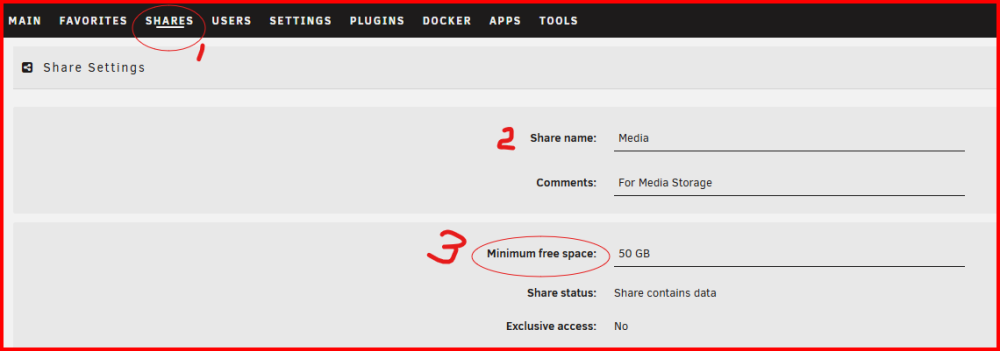
Frank1940's post in Question about Share Setup Value of Minimum free space was marked as the answerYou have a problem which most current Unraid users don't have to think about. (You would have less of a problem IF you had an 80TB array which was made up of five 16TB drives.)
You might want to think about how/why you end up with a 5.2TB image file, what is in that file, how long it needs to be preserved, and how much of it is fluff rather than data that needs to be archived.
-
Frank1940's post in Troubleshooting UDMA CRC errors was marked as the answerLoose routing should be fine. Tying each cable separately with a single tie should be fine. (Excessive obsession with neatness is the problem.) Just leave amble slack as the SATA connector is a friction connection and if there is any tangential force on the cable, vibration (HD spinning!) can cause the connector to work itself loose! (I have always said that the SATA connector design is the poster child for how NOT to design a connector system!)
An other precaution is to double check that all SATA connectors (power and data) are fully seated after you do any maintenance where the cables are disturbed.
-
Frank1940's post in I migrated from Synology to Unraid, but the SMB setup in Unraid is driving me crazy. was marked as the answerLet me give you this resource:
https://www.samba.org/samba/docs/current/man-html/smb.conf.5.html
You might want to look at the map to guest (G) parameter. Here is the current default setting for that parameter:
You can try setting this parameter to 'never' and see if that does what you want.
You can find all of the Samba configuration settings for your Unraid server with the following command:
testparm -v (The list is long so you will have scroll up-and-down on your terminal screen.)
Many times login problems are caused by the fact that Windows permits only one SMB login to each server. And there is no easy way to force a SMB logout from that server without rebooting the Windows client.
(By the way, you might consider that the Windows credential manager is mini password manager for network connections. It always guarantees a server login with the specified credentials for that server.)
-
Frank1940's post in How to have Unraid act as rsync target? was marked as the answerThe slightly more proper terminology is the first path is the source and the second path is the destination (It has always appeared to me that when rsync starts up using a network, that a second instance of it starts on the other end. The two of them figure out which files--- based on the 'switches ---need to be transferred and then the transfer begins.)
I would recommend using full path names and make sure that the path name is correct by using it in the ls -al command as a double check. Be careful, as I recall, a blank destination uses the present working directory (pwd in Linux terms) of the user running rsync to store the files!
I seem to recall that there is a 'switch' that will let you do a 'dry run'...
-
Frank1940's post in Been a long time since I built a unRaid. Am I missing anything? was marked as the answerWhole thread discussing SATA Controllers:
https://forums.unraid.net/topic/102010-recommended-controllers-for-unraid/#comment-941151
-
Frank1940's post in Working with shared folders on Ubuntu was marked as the answerI am not a Linux OS client user/expert but I have helped a lot with Windows SMB problems.
Let me point you to a document about setting SMB/SAMBA for Unraid/Windows.
https://forums.unraid.net/topic/110580-security-is-not-a-dirty-word-unraid-windows-1011-smb-setup/
Your login screen looks a lot like a Windows login screen combined with Windows Credential Manager. Read the document first - a skim is fine as much of the material is specific to Windows but your Linux system will be dealing with the same Samba on your Unraid server. So try this:
Set up a Share Access user on your Unraid server. Be sure you write down that password!!!! Now get to that Ubuntu login screen that is in your screenshot. Select ' 'Registered user' Username should be the one that you used to setup the Share Access user. Domain-- leave WORKGROUP alone. Password is the one you assigned to the Share Access user. (remember writing it down...) If you want to work like Windows Credential Manager, Select 'Remember forever'. Otherwise, you will have to remember that password. Since you are probably in a reasonably secure LAN environment without malicious users, you can use common user names and simple passwords. That is also the reason for the 'Remember forever' choice. But having a Share Access user does allow you to protect sensitive files from other authorized LAN users. Many folks visitors to their home to access their WiFi and which may give access to the server.
Hope this helps...
-
Frank1940's post in Issues backing up to a local back-up server using rsync (endless copying) was marked as the answerRead these articles about trailing slashes in the rsync command:
https://news.ycombinator.com/item?id=25006665
and
https://unix.stackexchange.com/questions/402555/why-add-a-trailing-slash-after-an-rsync-destination
-
Frank1940's post in When is a drive empty? was marked as the answerThat is about the amount of space required for the file structure and its tables by most modern file systems. This space is reserved and allocated at the time when the disk is formatted.
-
Frank1940's post in Unraid Allocation Method was marked as the answerBe a bit careful in looking at the number of read/write operations. This is just a count of the read/write requests sent to each disk. And you are looking at a very short period of time. (I just pulled a disk from one of my servers with 81,000 power-on hours. That is over 9.25 years and the disk was still functioning without any issues!!! It was replaced with a larger disk because I need more storage space.) I have three more disks with over six years on them. I anticipate that they will eventually be replaced because of the need for additional storage space rather than because they failed.
My observation is that Unraid is relatively easy on disks if you spin them down when not reading or writing to them. It only takes about 2.5-4.5 hours to write a TB data--- depending on file size. So a 20TB disk could be completely filled with data in less than five days. Actually, you beat up the parity disk(s) more as they are involved in every write operation for every data disk. Those folks who use unbalance to 'balance things up', subject those HD's to many more unnecessary read/write operations in their desire to 'even things up'. Granted, the read-write speed is greater at the start of the disk than at the end of the disk. The High Water choice attempts to "write as much data as possible to each disk (in order to minimize how often disks need to be spun up), while at the same time, try to keep the same amount of free space on each disk". One problem is that HD capacity has grown so large that the 'High Water' value is now so large that it often takes months to switch to a new disk for writes. When you have all of the data disks full in your array, you will have performed about the same number of writes to each data disk. So your looking at what is happening in a very small slice of that interval may distort your view if you don't consider the larger picture.
One solution is to toggle the Reads/Writes display to show speed rather the number of read/write operations. 🤣
-
Frank1940's post in My bad, blew away array config was marked as the answerRead this section of the Manual:
https://docs.unraid.net/unraid-os/troubleshooting/data-recovery/#lost-array-configuration
-
Frank1940's post in Unable to connect to UNRAID SMB shares with any type of device. was marked as the answerYou can also start here:
https://forums.unraid.net/topic/149487-how-do-i-fix-these-samba-errors/
-
Frank1940's post in can't delete/write to some folders even though I have read/write permission was marked as the answerAt this point of dealing with SMB issues, I am always prone to recommend setting up things using this information in this post:
https://forums.unraid.net/topic/110580-security-is-not-a-dirty-word-unraid-windows-1011-smb-setup/
IT can solve many issues. But since you have access but just can't delete/edit files, lets have a look at the permissions on the directories all the way back up the directory tree using this command:
ls -al /mnt/path/to/affected/share
Drop off one level each time until you get back to this point:
Notice the permissions on the directories at this point. This is the first point where you should find any permissions on a directory that are different from this:
All directories should have permissions of drwxrwxrwx and the group of users (The owner can well be nobody or any other 'Share Access user' as Unraid automatically assigns all Share Access users as members of the users group.)
If you find any other symbols (like, "+" or "t"), they are probably causing a problem. Report back with what you find.
-
Frank1940's post in Not a stupid question but a naive one: How to log out of ver. 6.12.11? was marked as the answerUnraid provides for only one user with root privileges. In fact, root is denied access to the exported shares. I am assuming that you want to control access to your shares. You do that by setting Share Access users under USERS and than setting up the access modes and privileges for each share.
It appears that, since you mentioned Linux, you are concerned about security. If you are using SMB, you should make sure that you turn off 'Public' read-write access for each share by using either 'Secure' or 'Private' as the primary mode. Then set which of your user(s) will have 'read-write', 'read-only' or 'No-access' for that share.
If you are using NFS, I am not quite sure what you have to do. I seem to recall that you have to set things up on the client side as well as the Unraid side...
-
Frank1940's post in Adding SATA drives for dummies... was marked as the answerYou can also get this HBA for external drives:
https://www.ebay.com/itm/163745757552?itmmeta=01HZ320HCS8ZXAY47NV0ZBH37S&hash=item262001f970:g:siQAAOSwvT5dDDYc&itmprp=enc%3AAQAJAAAAwLzNK6WFMk2ZgdnEqrqEA3PgT5grcsY2Qudy3rKQJxCtMPLEEpICK07XkT3ZOMl25ND8SzyYYjjcdpoGjVAcEI8MSpx7yrOcExqoSsWqRmc8RP%2BQMO%2B1HQj2ADfnybOnlu6yRlO03PUo1ms%2BefzEsXWuXlR8s65m2k9%2BvGCNdRsgkUwDnoMHHrrmBhzlUUCy3nwl4NnQlPX4FqPnG3soDMPc0IB3pQT1APab9v6CZtcLhNPXpA6u3Kjg456Eh%2Ffw0A%3D%3D|tkp%3ABk9SR8SWguL4Yw
If you purchase a LSI card for internal drives, I would look for one without the cables. Most of them come with 1M cables and you end up with a cabling mess inside the box. You can find 0.5M cables which will help with the cable dressing issues.
You can also have a look at these types of enclosures. There do not seem to be as many them being marketed as in the past. I, personally, have never used them but I recall that other Unraid have used them successfully. (Be sure to read reviews...)
https://www.amazon.com/ICY-DOCK-FatCage-MB153SP-B-Module/dp/B009HIMZ3G/
-
Frank1940's post in Possible to SMB share the whole /mnt/disks ? was marked as the answerYes. BUT you would have to do it through the SMB Extras configuration in the GUI. The SMB configurations files are at: /etc/samba
From the command line, run testparm and you will see the format and information required to add a new share.
Google will be your friend from this point forward. This is not a task for the faint of heart. I have never attempted to try to do it and so can not give you any info beyond what I have provided. Proceed at your own risk!!!!
-
Frank1940's post in Poor performance SMB copy was marked as the answerWhat is your MTU setting? (It should be 1500!) Jumbo frames often causes problems...
Is the Windows client computer on WiFi? Try a wired connection if so.
If that doesn't help, try rebooting the router and all of the network switches.
-
Frank1940's post in Help Needed: Rebuilding Unraid Server After USB Failure and Partial Data Recovery was marked as the answerAll the bz* files are the Unraid OS files for they are never changed by the User or any other application except for the Update tool. You can find them in any of the the download achieves in the root of the .zip file. The ZIP files for some of the latest versions can be found here:
https://docs.unraid.net/unraid-os/download_list/
Just copy ALL of those bz* files to the root of your boot drive.
-
Frank1940's post in Write Permissions for Windows on SMB share? was marked as the answerThere is a utility to fix the permissions. TOOLS >>> New Permissions Be sure to read the instructions. There are two dropdown lists so be sure you look at both before you start. You should probably use the Shares option and do not select appdata as it will generally screw up all of the Docker containers if you do!
-
Frank1940's post in After replacing the USB, I can no longer connect to the SMB share. was marked as the answerYou have the same set of errors and Samba is not starting.
Jun 29 04:29:56 Unraid smbd[1761]: smbd version 4.17.10 started. Jun 29 04:29:56 Unraid smbd[1761]: Copyright Andrew Tridgell and the Samba Team 1992-2022 Jun 29 04:29:56 Unraid smbd[1761]: [2024/06/29 04:29:56.253801, 0] ../../lib/tdb_wrap/tdb_wrap.c:65(tdb_wrap_log) Jun 29 04:29:56 Unraid smbd[1761]: tdb(/var/lib/samba/private/secrets.tdb): tdb_oob len 376856 beyond eof at 290816 Jun 29 04:29:56 Unraid smbd[1761]: [2024/06/29 04:29:56.253830, 0] ../../lib/tdb_wrap/tdb_wrap.c:65(tdb_wrap_log) Jun 29 04:29:56 Unraid smbd[1761]: tdb(/var/lib/samba/private/secrets.tdb): tdb_transaction_recover: failed to read recovery record Jun 29 04:29:56 Unraid smbd[1761]: [2024/06/29 04:29:56.253851, 0] ../../source3/passdb/secrets.c:67(secrets_init_path) Jun 29 04:29:56 Unraid smbd[1761]: Failed to open /var/lib/samba/private/secrets.tdb Jun 29 04:29:56 Unraid smbd[1762]: [2024/06/29 04:29:56.255517, 0] ../../lib/tdb_wrap/tdb_wrap.c:65(tdb_wrap_log) Jun 29 04:29:56 Unraid smbd[1762]: tdb(/var/lib/samba/private/secrets.tdb): tdb_oob len 376856 beyond eof at 290816 Jun 29 04:29:56 Unraid smbd[1762]: [2024/06/29 04:29:56.255575, 0] ../../lib/tdb_wrap/tdb_wrap.c:65(tdb_wrap_log) Jun 29 04:29:56 Unraid smbd[1762]: tdb(/var/lib/samba/private/secrets.tdb): tdb_transaction_recover: failed to read recovery record Jun 29 04:29:56 Unraid smbd[1762]: [2024/06/29 04:29:56.255610, 0] ../../source3/passdb/secrets.c:67(secrets_init_path) Jun 29 04:29:56 Unraid smbd[1762]: Failed to open /var/lib/samba/private/secrets.tdb Jun 29 04:29:56 Unraid smbd[1762]: [2024/06/29 04:29:56.255627, 0] ../../lib/util/become_daemon.c:119(exit_daemon) Jun 29 04:29:56 Unraid smbd[1762]: exit_daemon: daemon failed to start: smbd can not open secrets.tdb, error code 13
Shutdown the server. Pull the boot drive and plug it into your PC. Then run chkdsk on the flash drive. While you have it in the PC, go to the /config folder and rename (or delete) all four of these files. (add .old as a suffix will accomplish this.)
You will have to setup your root user password and the Share Access users again.
Do a back up of your Flash Drive using these instructions:
https://docs.unraid.net/unraid-os/manual/changing-the-flash-device/#back-up-your-usb-device-using-the-unraid-webgui
This will have the benefit of verifying that these files can be read.
-
Frank1940's post in Parity check everytime I reboot (cleanly) Unraid was marked as the answerDid you do this????
-
Frank1940's post in Help Troubleshooting Slow Transfer Speeds on my 1st NAS was marked as the answerJun 4 02:46:04 AssisServer kernel: r8169 0000:06:00.0 eth0: RTL8168g/8111g, d8:cb:8a:3c:39:60, XID 4c0, IRQ 33 Jun 4 02:46:04 AssisServer kernel: r8169 0000:06:00.0 eth0: jumbo features [frames: 9194 bytes, tx checksumming: ko]
Try it without Jumbo frames--- MTU=1500 (As I recall, this has solve transfer speed problem in the past...)
EDIT: And I just spotted this:
Jun 4 02:46:18 AssisServer kernel: Generic FE-GE Realtek PHY r8169-0-600:00: Downshift occurred from negotiated speed 1Gbps to actual speed 100Mbps, check cabling! Jun 4 02:46:18 AssisServer kernel: r8169 0000:06:00.0 eth0: Link is Up - 100Mbps/Full (downshifted) - flow control rx/tx
Check/replace cable, ports and look for bent pins on connectors.