yayitazale
Members
-
Joined
-
Last visited
Everything posted by yayitazale
-
I don't know if this is normal or the is something wrong please ask on github and keep me in track of the issue.
-
QuestDB is an open-source database designed to make time-series lightning fast and easy. Application Name: QuestDB Application Site: https://questdb.io/ Repository: https://hub.docker.com/r/questdb/questdb/ Github: https://github.com/questdb/questdb Documentation: https://questdb.io/docs/
-
In the next version witch is going to be released soon (currently the latest release is beta 5) the script (and also the container itself) is not going to be needed anymore to create the models: https://deploy-preview-6262--frigate-docs.netlify.app/configuration/object_detectors#generate-models
-
Can you post your configuration of the docker container? It looks you have deleted this from extra parameters: --mount type=tmpfs,target=/tmp/cache,tmpfs-size=1000000000 This the location for video recording segments caching as you can read here: https://docs.frigate.video/frigate/installation#storage
-
Can you post the entire config file and a screenshot of your docker deployment (advanced view)? You can hide the sensitive information.
-
Are you launching the nvidia-smi inside the container or in the unraid terminal?
-
So no idea what is going on... Do you see anything in the logs? I see this issue but I don't know if this is related or not: https://github.com/blakeblackshear/frigate/issues/8503
-
First of all, if you added the gpu-id and the capabilities as env vars, you don't need to add --gpus=all in extra parameters, only the --runtime-nvidia one. You can run this into the container to test your GPUs codec compatibility: ffmpeg -decoders | grep cuvid
-
You are totally right. I have monitored my server from yesterday to today and I have the exact same behavior. There is a open issue here so I have posted a question in the beta discussion witch is the version I'm using. https://github.com/blakeblackshear/frigate/discussions/8366#discussioncomment-7495998 https://github.com/blakeblackshear/frigate/issues/2365 lets see
-
Are you running the container in privileged mode?
-
You have the info here: https://docs.frigate.video/guides/configuring_go2rtc
-
Hi: Your config file doesn't look incorrect. However, you can add a Input Arg to the ffmpeg config. For reolink cameras is recommended yo use the http stream s input to the go2rtc restream and the use the restreamed feed to detection as you can read in the docs. Also, to be sure witch codecs are supported by your GPU, you should run this command inside the container terminal.
-
Did you add the "--runtime=nvidia" extra parameter?
-
No, he is talking about frigate not about whosatmyfeeder please don't mix things.
-
So the error is not about frigate, is that your MQTT server is not starting. You should check the permissions and ownership on unraid of the mapped folder to MQTT docker "/config/data/" path.
-
I just added the template as I'm using it for my fiat 500e, but just for some weeks so I only can help you in the basics.
-
So you should open a issue here, as this is out of my knowledge: https://github.com/wubbl0rz/FiatChamp/issues
-
Do you have the MQTT integrated to the Home Asisstant?
-
You posted the config code without respecting the tabulation son I wasn't able to see that, indeed, you must follow the exact tabulation of the examples: https://docs.frigate.video/configuration/detectors#configuration-parameters You can't have multiple type detectors running at the same time (at least for now). You can only have multiple Coral detectors at the same time: https://docs.frigate.video/configuration/detectors#multiple-usb-corals
-
Not sure but I think this is a normal log output but you can test it with USE_FP16=False
-
Can you test lowering the min_score of the objects?
-
And in the debug page do you see detections in any of the cameras?
-
Is there anything in the logs to give us a clue? Does your frigate docker see the models path?
-
What do you see in the logs?
-
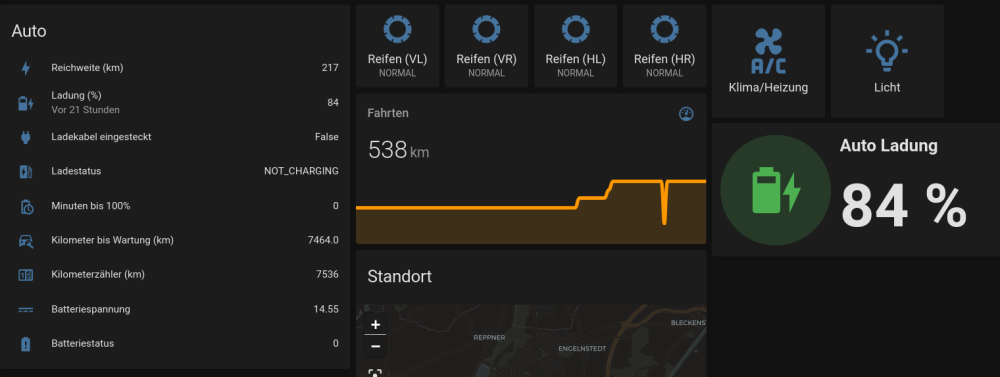
Connect your FIAT, Jeep, Ram, Dodge, AlfaRomeo car 🚗 or truck 🚚 to Home Assistant. Needs a vehicle with enabled uconnect services and valid account. Application Name: FiatChamp Application Site: https://github.com/wubbl0rz/FiatChamp Repository: ghcr.io/wubbl0rz/image-amd64-fiat-champ Github: https://github.com/wubbl0rz/FiatChamp Documentation: https://github.com/wubbl0rz/FiatChamp Prerequisites 📃 Official Home Assistant MQTT Addon (recommended) running or external mqtt broker. Broker must be connected to Home Assistant MQTT integration.