






yayitazale
Members
-
Joined
-
Last visited
Everything posted by yayitazale
-
Does "chmod +x /mnt/user/appdata/trt-models/tensorrt_models.sh" give you some output? Do you have the /mnt/user/appdata/trt-models folder mapped already to frigate and frigate running?
-
Blame/ask for help in the correct place if you have doubts about the container config itself: https://github.com/blakeblackshear/frigate/discussions
-
Please you should read the docs, you should change a lot of thing so I can't tell you every single thing if you don't at least read the documentation that is pretty complete.
-
The line 4 is incorrect, should be: cameras: barn_inside: ffmpeg:
-
I can't help you with such a little info. Please can you post at least the output of the logs? In the config file you have a "@" in the camera stream path, is this correct?
-
From docs: You can just remove the "max_frames:" to avoid multiple events to happen, and you will just have a long one. Also you should filter the events with "stationary: true" in notifications to avoid spamming. You should ask for example here although, as this is only a forum to support the issues regarding the deployment of the app in unraid, not about the app itself.
-
You can read here how to avoid this: https://docs.frigate.video/guides/stationary_objects
-
I can't help you without more info. In the diagnostics I can't see how did you launched de container or the config file of frigate. Please attach a screenshot of the frigate template configuration you are using and the the configuration file (without IPs/passwords)
-
Ok now the error is different. Are you sure you did the chmod +x to the file in /mnt/user/Backup/tensorrt models/ ??
-
Can you try to put the script on the path of first entry "TRT-Models folder path", in the case of the image, "/mnt/user/Backup/TensorRT Models/" ?? I suspect that the second entry is not working but as I tested using the same folder for both I didn't notice it. If this works I would change the template and the steps on the description.
-
Can you show how are you launching the template? I guess is something related with the path itself. Try to use the suggested path /mnt/user/appdata/trt-models/ and try again.
-
If you didn't change the config file path then it should be placed on appdata>frigate>config.yml without using any folder inside the frigate folder itself.
-
You have the answer in the docs https://docs.frigate.video/configuration/detectors#multiple-pciem2-corals
-
Did you read the docs? You should remove all the entries of the template that you are not using.
-
My working config:
-
So I can't help you much more. There are some issues opened in github with same topic, maybe you can ask there (I only maintain the template of unraid): https://github.com/jfarseneau/antennas/issues/97 https://github.com/jfarseneau/antennas/issues/93
-
Restarting the container neither?
-
Not sure, I'm not using this for some time ago.
-
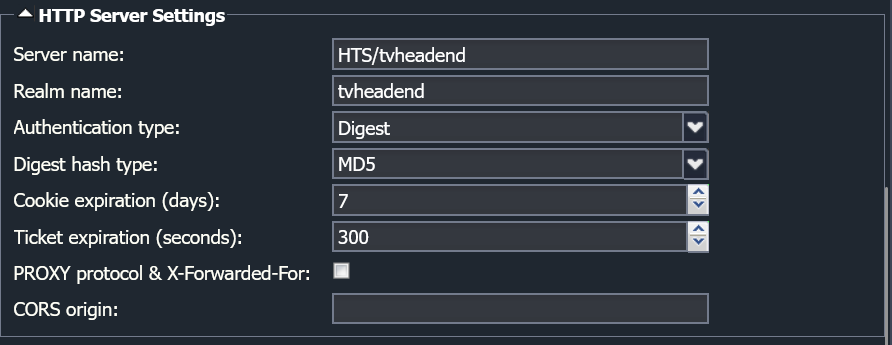
Try to change the auth type of tvheadend to Basic (under Config > General > Base > HTTP server settings) as there is a compatibility issue of some libraries.
-
Can you see the channels from another PC on the same network using that user? PD: I suspect you have to change the auth type to Basic (under Config > General > Base > HTTP server settings) as there is a compatibility issue of some libraries.
-
Do you correctly created a user with streaming rights?
-
The only thing I would change is in the go2rtc, you are trascoding to opus but then in the input arguments of the camera you are asking to aac. Change the transcode to aac or change the input path to opus.
-
It does say to use rtsp. - "ffmpeg:reolink#audio=opus" this should be: - "ffmpeg:koipond#audio=opus" as you have to reference to the input stream.
-
Are you sure the cameras feed starts with http:// instead of in rtsp:// ??
-
Where is the definition for ffmpeg? I don't understand why you are transcoding to OPUS and then recording to AAC. Also this parts look weird: ffmpeg: inputs: - path: rtsp://127.0.0.1:8554/reolink?video=copy&audio=aac input_args: preset-rtsp-restream roles: - record - path: rtsp://127.0.0.1:8554/reolink_sub?video=copy input_args: preset-rtsp-restream roles: - detect You should stick to the docs format doing something like: ffmpeg: inputs: - path: rtsp://127.0.0.1:8554/reolink?video=copy&audio=aac #detection feed roles: - detect input_args: preset-rtsp-restream - path: rtsp://127.0.0.1:8554/reolink_sub?video=copy #record feed roles: - record input_args: preset-rtsp-restream


