






yayitazale
Members
-
Joined
-
Last visited
Everything posted by yayitazale
-
Ok I managed to change the password following your steps from the containers console, and also creating a token to allow remote access following this: https://stackoverflow.com/questions/61125843/how-to-enable-token-authentication-in-jupyter-notebook
-
Hi: I want to use this jupyter docker as a remote server from my VSCODE on my PC. Where I can get the token? I don't see it on the containers logs at startup. Also, I'm not able to change the default password since I don't see the option to open a terminal in an active notebook. Thanks
-
For me looks like a faulty temp. sensor
-
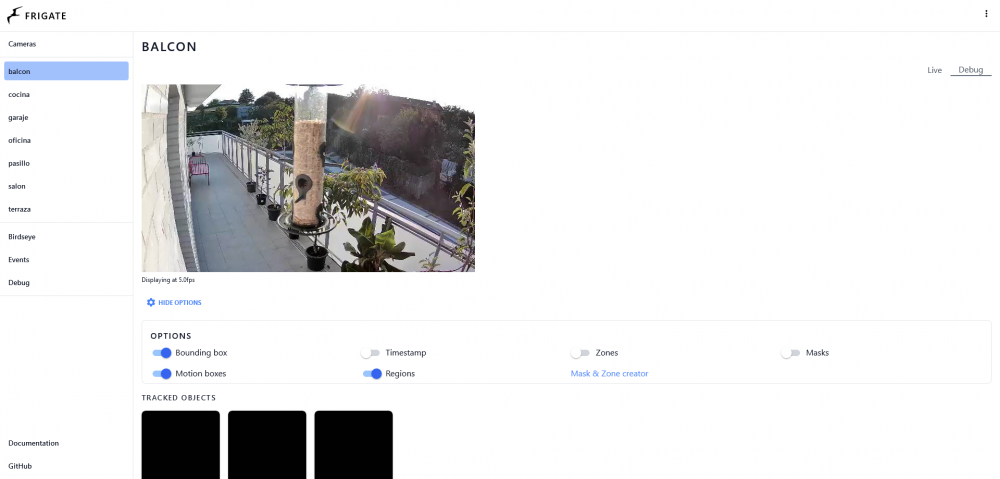
Wow nice spider web... You need to hit the Debug button at top right:
-
Yes you can, but you must passthrough both devices to the container and define both devices in the config file of frigate.
-
Are you running the nvidia version? Did you install the nvidia plugin on unraid? Did you read this?
-
@ich777 any idea? It can be a faulty one?
-
No, there is no dates as this is still on RC1 and there is an active discussion about some possible issues. Once all the issues are fixed they will publish the release, so you can start using frigate v10 as the upgrade is not such a big deal.
-
As you can read, the sentence is wrote referring to the future. The release of the update is still on RC and there is no official date for the publication of the stable release. The actual image is still pointing to the v10 so any changes on the configuration to meet v11 will cause errors. Please wait for the stable release to upgrade.
-
Update is not yet publish, but you will not get available update to nvidia version any longer. When the update is available you will need to uninstall that app and install the new one from CA store. I'm just advertising that this change is coming.
-
IMPORTANT PLEASE UPDATE TO V0.11.x WILL BE A BREAKING CHANGE: From 0.11 release onwards there will be only one unified app, so it will be recommended to uninstall the current app (either the normal or the nvidia version) and reinstall it to meet the needs of the new template. The old apps will no longer receive updates. PLEASE READ THE CHANGELOG TO BE AWARE OF NEEDED UPDATES OF YOUR CONFIG FILE
-
Events are stored under /media/recordings/... As far as I know, frigate uses the same segments to fill both 24/7 and events to reduce redundant storage and drive wear, so: If you have 24/7 recording activated, events are just a database entry and the video you are seeing in the web UI is just a the extract of the main recording from the event start to the end. If you don't have 24/7 recording activated the saved files are exactly the recordings of the events. In any case, if you want to extract the videos of the events I suggest you to use the API to interact with frigate https://docs.frigate.video/integrations/api
-
Ok, thanks for the explanations. Yes, you must respect the hierarchy of the elements. By the way, I'm only the maintainer of the Unraid template, I'm not the developer of the software.
-
I don't see anything wrong. Can you try to use the coral in another computer with one of the example projects https://coral.ai/examples/ We found some corals are factory defective.
-
Can you attach the configuration of the container?
-
Did you configured TPU as detector? https://docs.frigate.video/configuration/detectors
-
It depend of your architecture and configuration. How many cameras are you using? Witch resolution do you have on the feed of each camera? Did you configured hardware acceleration using intel or nvidia GPU? Without this information I can't tell you what is going on. You can see if the TPU is recognized by frigate on the logs at the startup of the container, and if it is recognized and you have object detection, you can track if there is any error on the logs. Anyway, the mayor difference reducing CPU usage can be achieved using hardware acceleration as you can read here: https://docs.frigate.video/hardware
-
@Soulflyzz As you can read here the actual latest tag is pointing to 10.1 so if you are running version 9 in docker, you must have a pending update or you have modified the repository link on the template. https://github.com/blakeblackshear/frigate/issues/3389
-
This is related to config, I'm just the maintainer o the frigate template, please read the docs and and for help on github.
-
Ypu are totally right, I see that tag names changed and now "Latest" is not a valid tag. I will change it ASAP. Sorry for the inconvenience.
-
You don't need to create a config folder, just add the config file in the root folder of appdata/frigate
-
Did you add record config? https://docs.frigate.video/configuration/record The errors maybe are related with ffmpeg configurations, please ask for help on github https://github.com/blakeblackshear/frigate
-
Can you attach or paste your config of the cameras section? Does your camera accept two connections to same rstp endpoint at the same time?
-
Confirmed that with the last update you can go back to digest auth mode.
-
I can't help you, this is related with the project so please ask in github.



