






yayitazale
Members
-
Joined
-
Last visited
Everything posted by yayitazale
-
Did you read the instructions?
-
Just install the frigate Hass integration: https://github.com/blakeblackshear/frigate-hass-integration You can add it from HACS o just install it manually.
-
You only need to map '/dev/bus/usb' as a device and frigate will detect your TPU and only use that device. There is no need to change anything on that line on the template.
-
Same error, I can't see any photo, it is not loading the thumbnails but if I click, I can see the original photo: After recreating the container now is just unusable...
-
Not sure if you can achieve a better performance, I have a similar config and same performance witch I think is normal because of the decoding/encoding activity. Maybe we need to tinker with ffmpeg args ¿Can you open a issue on github?
-
not sure about what is happening, everything loosk right. Maybe try to start from srchatch again, first deleting the entire docker and image and then adding the cameras one at a time...
-
You hace mixed configs for older versions. Delete the entrys of clips and recording paths, change the path of media to /mnt/user/cctv and delete the "Inter GPU mapping" entry and try again.
-
Can you post your config file and your container configuration please?
-
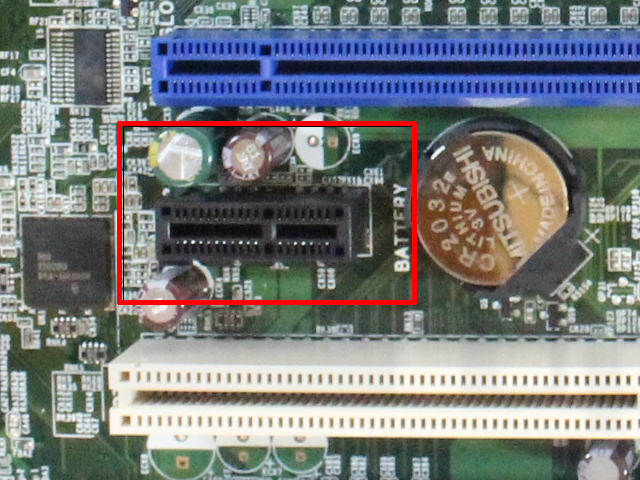
If I'm correct, your motherboard is a VD5HY-0VD5HY so you can use a Mini PCI version connecting it to the Mini PCI Gen2 slot:
-
As I see this has been resolved here:
-
Ok. This forum is for unraid users, please use the official project forum on github. By the way, yes, using frigate with a TPU still uses some CPU for ffmpeg decoding and movement detection.
-
Can you attach your docker settings? Can you see the tpu on unraid under tools>system devices>USB devices? You can find it as a Google Inc. device.
-
I'm not 100% sure but I think that you need to create a user with a password and define the network from you are connecting with that user.
-
https://github.com/blakeblackshear/frigate/issues/1313#issuecomment-872174685
-
The LED is on the translucid part of the coral. I only used it on USB 3 ports. https://coral.ai/docs/accelerator/datasheet/ If you connect it to the PC it is solid blue. You have to follow this steps (I think you only need to install the Windows drivers if you are going to use it natively as frigate docker it already comes with the drivers, but give a try): https://coral.ai/docs/accelerator/get-started/#runtime-on-windows https://coral.ai/docs/accelerator/get-started/#pycoral-on-mac-win
-
Yes it has a Led. Are you using the original usb cable?
-
Not sure about how emby works, but on Plex and on Jellyfin you need to install a pluging in order to connect to the TvH server. Furthermore, in Plex you can't use the native Live TV fuction using the aviable non-oficial plugin for TvH. This docker emulates a HdHomeRun device to allow you to use that fuctionality.
-
I'm almost sure that the high cpu usage is caused by improper configuration of the ffmpeg args. I'm not an ffmpeg expert so if you need help please refer to the github forum of the project. About the detection, you are only filtering the clips to that objects like this: clips: objects: - person - dog - cat - car but actually are not tracking them doing so. You need to add the specific lines on the config to define witch objects you want to track at camera level or at global level as so: objects: track: - person - car - motorcycle Please follow the steps of the docs.
-
Your config looks fine (but you may add ffmpeg output args). Exit 139 code is a segmentation fault so maybe you have a corrupted donwload of the image or some enviromental issue. You can try to delete the image and reinstall the container. Anyway, if the problem persist please ask for help on the github forum of the project as this is beyond my knowledge.
-
Please attach your config file and error output log
-
It can take more than 1 hour....
-
How long have you waiting? it takes a long time till channels are listed
-
Ok as I see you are changing the extra parameters of the container with the ones listed here: The actual template doesn't need to change anything, your issue is caused by the "--rm" parameter that is deleting the container as soon as it stops by a faulty start becouse of the lack of the config file. Delete that and you will not get a orphan container. About the config file, please follow the steps of the github documentation to create your personal one adjusted to your needs: https://blakeblackshear.github.io/frigate/
-
Please Read the instructions before posting. You have to create a config file before starting the container otherwise it will not work.
-
Can you attach your config file and a screenshot of your deployment settings in advanced mode?





