






yayitazale
Members
-
Joined
-
Last visited
Everything posted by yayitazale
-
The resolution has to be defined only for the detect stream as ffmpeg need to know that information to perform the transformation to the resolution that fits the Corals model. This resolution if you are using the builtin model ssd mobilnet 1 is 300*300 https://coral.ai/models/object-detection/ so the way to make your system as efficient as possible is using the low res stream for detecting and high res for recording and rtmp restreaming
-
I don't have unify cameras but with some other brands, they use to have two different streams: one high res and one low res. Check the manual/docs of your camera to see if there is another stream avaiable or any way to select the stream quality on the configuration..
-
Your file is yaml and it has to be yml
-
I have exact same issue but I though It was just me. There is a ongoing issue here https://github.com/blakeblackshear/frigate/issues/2006 I just posted that some unraid users are experiencing this issue.
-
Please use the search box, this have been answered 2 times, the last time just 2 posts upper than yours.
-
You have the answer here https://forums.unraid.net/topic/98064-support-blakeblackshear-frigate/?do=findComment&comment=1043782
-
As far as I read on these closed issues on github, it looks like a MQTT connection problem. Please use the IP instead of the FQDN. https://github.com/blakeblackshear/frigate/issues/2066 https://github.com/blakeblackshear/frigate/issues/2094 If that doesn't works please open an issue on github, this doesn't look like a an error related with Unraid template.
-
Just delete the container and the template image and launch it again with the new template at it will work.
-
Can you attach a screenshot of your container deploy?
-
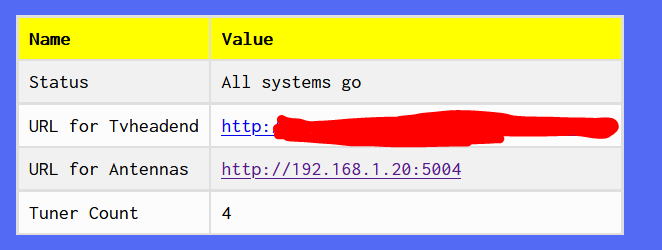
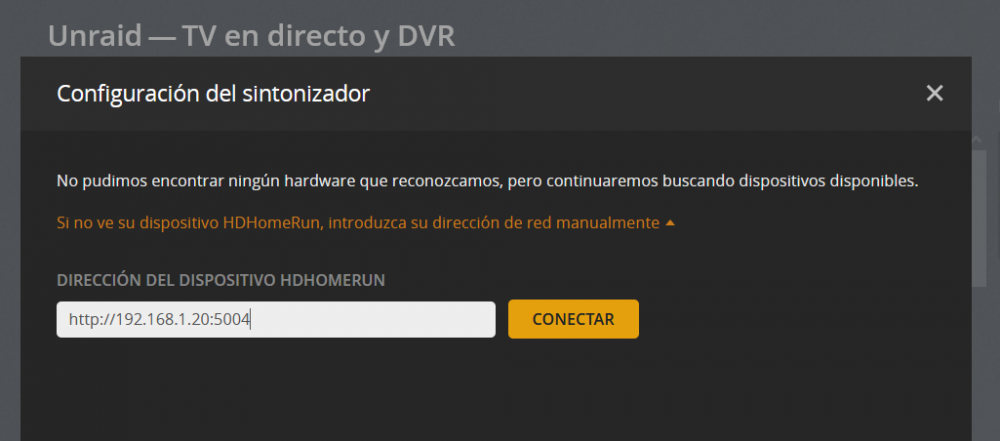
You just need to copy the "URL for Antennas" link into plex manual config and then click connect:
-
Run nvidia-smi on the Unraid console not the containers one.
-
Can you test your Coral doing this on another machine like a raspberry, a Windows or a VM?: https://coral.ai/docs/accelerator/get-started/
-
Pushed the change with: <ExtraParams>--shm-size=5G</ExtraParams>
-
@ich777 any idea?
-
My bad, I deleted that but as I see on the changelog is still needed. I will add it again tomorrow.
-
I'm out for Holidays till tuesday so I can't help you but just for helping a little, the usb coral does not need the drivers so you can uninstall them. Make sure that you are binding the correct paths to the folders and that the container is on privileged mode.
-
I try to change the template as little as possible, but this project is growing and some changes are needed. Unraid does not alert the user about template changes so there is no way to notify the users to delete and reinstall the containers.
-
You are using a old template, the error comes because you have separate folder mappings for clips and recordings media. You have to remove the container and use the new template just installing the app again. The only mapping you need for media is "/media/frigate" This a the same issue reported on github: https://github.com/blakeblackshear/frigate/issues/1936 As you can see on the template the only mapping for media is "/media/frigate": https://github.com/yayitazale/unraid-templates/blob/main/yayitazale/frigate-amd64.xml
-
On your config you have record enables but you are not using it on the roles of any of the cameras
-
This is not needed If you don't have changed the Database from the original location.
-
RC4 tested for 2 hours with no issue. Just needed to change some entrys on config.yml according to the breaking changes explained on RC4: https://github.com/blakeblackshear/frigate/releases/tag/v0.9.0-rc4 Detection is working, recording is working, API is working, Web UI is working, nearly same CPU usage. I will update the templates with the instructions and the minnor changes of the docker commands as soon as the final release is publish.
-
I didn't have time to tinker with RC's yet, I will give a try this week to prepare the modifications needed on the templates.
-
Finger cross is not a tpu failure
-
Did you have more USBs pluged in into the same group of ports? It can be a lack of power, try with another cable and unplugging all the other USB (except the boot usb of unraid of course). There is a closed issue with your same problem on github that you can reopen: https://github.com/blakeblackshear/frigate/issues/325
-
First of all, you don't need to specify the USB, just use the /dev/bus/usb as device and frigate will find the USB. Then, to use CORAL you must start the container as privileged, there is no other way for now. As I see you unselected this option. Select it again and try if it works.





