






yayitazale
Members
-
Joined
-
Last visited
Everything posted by yayitazale
-
Not sure if it is going to work but you can try with one like this: https://www.amazon.com/-/es/Adaptador-RIITOP-tarjeta-lector-compatible/dp/B08FWZXT2N/ref=sr_1_3?keywords=usb+to+m2+adapter&qid=1651043207&sr=8-3 Some time ago @ich777 said this, maybe is useful for you.
-
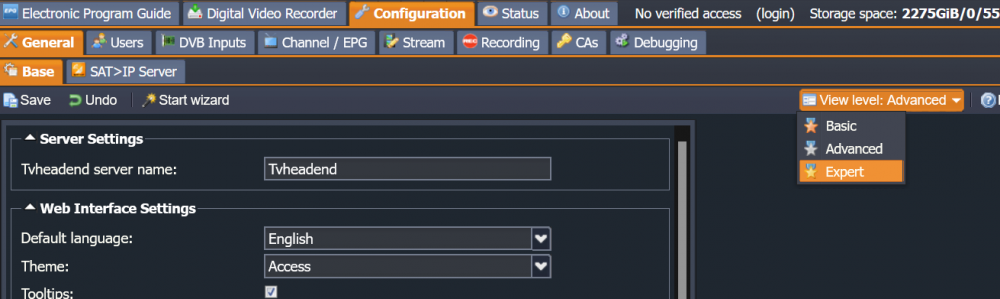
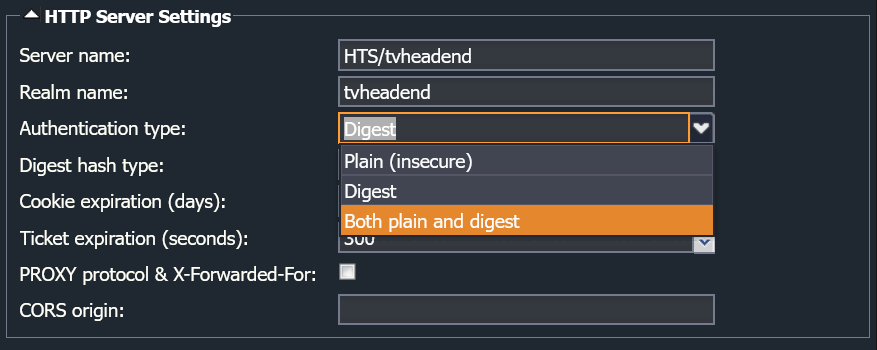
You have to change the auth mode to "Both plain and digest" under Configuration > General > Base switching to expert mode: I opened an issue related to this: https://github.com/jfarseneau/antennas/issues/85
-
Can be a thermal problem. Can you monitor the Corals temperature? @ich777 any idea?
-
Yes, in M.2 devices you only need to install the drivers, but @ich777 can confirm this as I don't own an PCI-M2 device. There have been USB failed devices too, is just a lottery. Can you show device list? Some people made the mistake of binding the device to VFIO-PCI
-
Can you see the coral in the device list of unraid? If you can and your are pointing to it in the frigate container as it looks like you are doing it right, It can be a failed coral. There have been more cases in the past in this forum...
-
Are you using it with another container? Try to unmount it from m.2 slot and mount and install again everything from scratch.
-
If you need help with the config file post it here and we will try to help you.
-
I don't know how did you configured the connection, the user, the muxes... The records are going to happen inside your plex server.
-
There is not, you must follow the instructions of the docs, you can use the example as a template.
-
Not sure but this doesn't happen on reboots, only when you recreate/update your container.
-
USB TPUs sometimens freezes. You need to unplug and plug it again.
-
I can't help you with custom modifications. I don't know how is your custom network configured on docker networks and on your firewall...
-
Changed the links. All the info is here: https://docs.frigate.video And config file example: https://docs.frigate.video/configuration/index/
-
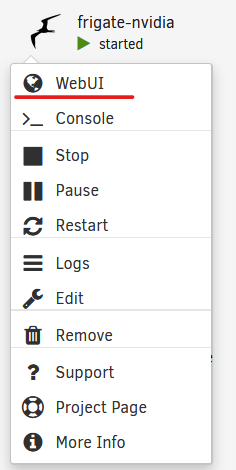
Delete the --rm to avoid the delete of the container when stoped. The dashboard acces is made at port 5000, you can just click on the container and go to "web UI": This is again a problem generated by a incorrect deploy of your cotainer. Remove the --rm argument. The Coral Driver is not doing anything, the communication with the USB coral is done without using that drivers. The error you post is something that happens sometimes wiht USB corals, it gets stuck if you restart the container too often. You just need to unplug it from the USB for ~10sec and plug it again, restart the container and it will be working again.
-
I'm not an expert but you can solve that creating docker networks on each VLAN and using that netwroks instead of regular bridge. https://docs.docker.com/network/ipvlan/
-
Yes
-
For just one or two camera it can be feasable but yes, it eats CPU really quickly. There is almost no stock on the pci and usb TPUs, we all are waiting but the chip shortage is hitting hard.
-
Just delete the record or leave it empty as it is not a mandatory argument.
-
No, as you can read on the docs, GPU is only used for ffmpeg hardware acc. For object detection it uses TensorFlow Lite that runs over CPU or TPU. https://docs.frigate.video/hardware https://docs.frigate.video/configuration/detectors https://docs.frigate.video/configuration/hardware_acceleration
-
Support for Grafana Image Renderer docker container. This is a Grafana remote image renderer that handles rendering panels & dashboards to PNGs using headless chrome. Application Name: Grafana Image Renderer Application Site: https://grafana.com/grafana/plugins/grafana-image-renderer/ Docker Hub: https://hub.docker.com/r/grafana/grafana-image-renderer Github: Documentation: https://grafana.com/grafana/plugins/grafana-image-renderer/ Read Grafana Image Renderer documentation and see usage instructions at projects page. In order to use this as a plugin of your Grafana docker instance you must add this enviromental arguments to that container: - GF_RENDERING_SERVER_URL: http://renderer-ip:8081/render - GF_RENDERING_CALLBACK_URL: http://grafana-ip:3000/ Change the IP (and the ports) to suit your configuration.
-
I have a weird situation, I'm trying to install this: https://hub.docker.com/r/grafana/grafana-image-renderer I search it by "grafana-image-renderer", then hitting the button "Click Here To Get More Results From DockerHub". There are 50 results but any one is the official one... What I'm doing wrong?
-
Not sure how did you define it, but I think you have to config the global option just to include certain disks except the NVR one, and then create a specific share with NVR disk included and all the other disks excluded. https://wiki.unraid.net/Manual/Shares#Included_and_Excluded_disk.28s.29
-
Did you manage to solve the problem @fireplex ?
-
Did you fill out the "NVIDIA_VISIBLE_DEVICES" argument on the docker template? Then, the ffmpeg validation error is because you are mixing arguments on one line with the new ones with line breaks. You should only have one type of separation between args. so it must be something like: ffmpeg: # Optional: global input args (default: shown below) input_args: -avoid_negative_ts make_zero -fflags +genpts+discardcorrupt -rtsp_transport tcp -stimeout 5000000 -use_wallclock_as_timestamps 1 -c:v hevc_cuvid Or: ffmpeg: # Optional: global input args (default: shown below) input_args: - -avoid_negative_ts - make_zero - -fflags +genpts+discardcorrupt - -rtsp_transport tcp - -stimeout 5000000 - -use_wallclock_as_timestamps 1 - -c:v - h264_cuvid Change that and I think it will work. PD: if that doesn't work, you maybe need to change it for something like this as we discuss it here: ffmpeg: # Optional: global input args (default: shown below) hwaccel_args: -c:v hevc_cuvid input_args: -avoid_negative_ts make_zero -fflags +genpts+discardcorrupt -rtsp_transport tcp -stimeout 5000000 -use_wallclock_as_timestamps 1
-
Try to define the port number on the MQTT host like so: mqtt: host: IP address port: port And see if it makes any difference. If the error persists please open a issue o reopen a issue on github.




