






yayitazale
Members
-
Joined
-
Last visited
Everything posted by yayitazale
-
Can be a faulty device... Did you see the TPU in the list of devices on unraid (tools -> System devices)? You have to see something like "Bus 002 Device 002 Port 2-4 ID 18d1:9302 Google Inc" Can you show how are you mapping the device and how did you configured the device on the config file? You can try also in another USB port.
-
Look like your USB stack is crashing. Are you using a external USB hub? Are you using a USB 3.0 port?
-
This is out of my knowledge, please as this looks like something related with configuration of frigate itself and not the container on unraid, open a issue on github. https://github.com/blakeblackshear/frigate/issues
-
Those logs are saying that the service has shut down and it looks like you have some issues with ffmpeg configuration. I can't say why are you seeing the rtmp streams. Is the container still running?
-
I have a similar setup than yours (7 cameras, tpu and hard accel) and I have 20% of cpu usage more or less.
-
There are still a lot of processes going on behind the scenes that cannot be carried out by the GPU. You can test the CPU % difference between using or not the Hard Accel. Obviously you will see a difference but where there really is a substantial difference is in detection.
-
Nice. I only maintain the unraid templates, if you want to give some cheers to the developers you can do it here: https://github.com/blakeblackshear/frigate/discussions/5453
-
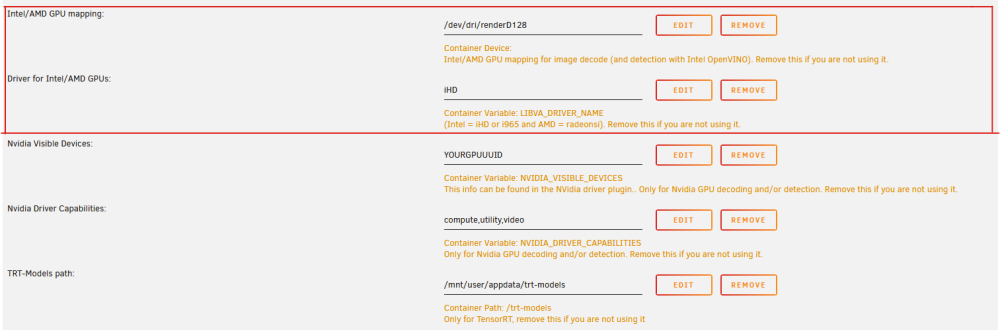
Steps are almost correct but you also need to add the extra parameter "--runtime=nvidia", then fill the Nvidia entries of the template. You can also delete the intel/amd gpu entries if you are also going to use the nvidia card itself for hardware accel (but you can split the load and let the nvidia card only do the detections). Anyway, I just pushed a new version for the template to avoid mistakes on the step 2 of your list so for now on there will be a brach selector to make a easier deployment for regular/nvidia branches. The docs are you refering are only for frigate 11. Frigate 12 betas docs are here: https://deploy-preview-4055--frigate-docs.netlify.app/ (this is also refered on the description of the template).

-
Are you launching the nvidia-smi inside or outside the container? Launch it on unraid's console.
-
So please read the docs first: https://docs.frigate.video/configuration/hardware_acceleration
-
Did you configured the hardware accel. part correctly in the config file?
-
Hi: Did you chnage anything in your architecture, your cameras or so? Your main error is "No route to host" so frigate is not able to connect to your cameras.
-
You can already test the Beta 7 in unraid (it's the CA store with the link to the beta docs in the description) but I think that it still will recieve some changes in the near future until the final stable version is released.
-
1: No, the only thing I can offer you is the post in my personal blog where I explain the installation in unraid but it is in Spanish (you can translate it to English with google): https://firstcommit.dev/2022/01/09/frigate/ To do the installation in unraid you just have to edit the template entries according to your needs. To create the configuration file you should read the documentation on the frigate webpage as it is very complete (there is nothing special to do in that file because you installed it on unraid, it doesn't depend on that but on your hardware and cameras and so on): https://docs.frigate.video/ 2: It is not strictly necessary but yes, depending on the number of cameras and their resolution, you will notice an important impact on your server performance. In the next version of frigate (it is in beta right now) you will be able to use your Intel embedded GPU or an Nvidia graphics card for detection as well as for hardware acceleration of decoding and encoding of the streams (finding stock of TPU cards is tricky right now).
-
Where did you find stock of dual edge tpu? Anyway, make sure you a have a correct thermal dissipation as Dual Edge TPU gets very hot and there is a real fire hazard. I think that the driver will shutdown the tpu before it gets dangerous (correct me @ich777) but just in case...
-
I'm not sure tha this can be done on the config file: environment_vars: LIBVA_DRIVER_NAME: i965 You should edit the template on unraid and add a variable. Furthermore, if you are using the i965 driver, is your intel chip <10th Generation? Because then you have defined this: hwaccel_args: - -hwaccel_output_format - -c:v h264_qsv But for <10th gen you should use (https://docs.frigate.video/configuration/hardware_acceleration#intel-based-cpus-10th-generation-via-quicksync): ffmpeg: hwaccel_args: -hwaccel vaapi -hwaccel_device /dev/dri/renderD128 -hwaccel_output_format yuv420p Beside that, the only thin I can say that ffmpeg can be tricky. Next frigate version witch is actually in beta simplifies the input and output arguments definition with preconfigured presets, that I think can help you a lot in this case.
-
No, please ask on github https://github.com/blakeblackshear/frigate/issues
-
Do you have any error on the logs?
-
You have a 0 day retention policy for records, witch means: "When retain -> days is set to 0, segments will be deleted from the cache if no events are in progress." https://docs.frigate.video/configuration/record#what-if-i-dont-want-247-recordings With your configuration, only events will be saved.
-
Please any question/issue with beta use the github discussion. https://github.com/blakeblackshear/frigate/discussions
-
Sorry, I don't know what happened but it seems that the answer I wrote to you has not been published correctly. What I was saying: Using a higher resolution can help only in cases where the camera plane is very wide and the objects to be identified are far away and/or very small. You can read about this here: https://docs.frigate.video/guides/camera_setup#choosing-a-detect-resolution In any case, you could lower the FPS to 5 to reduce the load of Coral and your CPU/GPU when processing the incoming video. For the trigger values, when you say you have dropped from 0.7 to 0.8 it is not quite correct. That number is the confidence of the model on the identified object. You should start setting lower values (0.3 or 0.5) in the min_score and a value of 0.5 to 0.6 in threshold to see if the number of detections increases. You can track the events or watch the camera on the debugging screen and tinker with the values until you reach a point where the number of false positives is minimal and the number of detections is acceptable. https://docs.frigate.video/guides/false_positives You can accompany this tinkering steps by introducing masks, regions etc. to try to minimize false positives. As for night detection, in my case at least with IR cameras the number of detections is reduced but I get decent results, I think it all depends on the lighting, camera plane and the configuration of the values that I mention. In any case, the purpose of this forum thread is to help with the setup of the docker container on unraid, for questions purely related to the application configuration you can open a discussion or an issue on github. https://github.com/blakeblackshear/frigate/discussions
-
I'll asume that you know what are you doing writting directly to disks istead of using shares under unraid. As you can see there is no space on the media path folder that you are mapping to /media/frigate
-
If you create a new container but using the same mappings for the recors and the config folders, and you also mantain the database in the same path you will not lose anything. In case that you want to roll back from v11 to v10 you should do a database restore because this migration to v11 will modify the structure of the db, so just in case, make a copy of the database.db file.
-
If you going to use the Nvidia GPU with your actual configuration, you can just delete this mapping entry. If you want to switch to integrated GPU instead of your Nvidia GPU, you must change the ffmpeg hwaccel_args acording to what CPU you have following the instructions of the docs.
-
I doesn't require HA, the MQTT is required as is the way to comunicate with the system from an external software on a standar way. Anyway, this is a completely different system logic than shinobi o ZM, the idea is to use it a service from another service. It can be HA, but not only. If you wan't a complete UI like a clasical NVR this is not your software (at least yet)




