






yayitazale
Members
-
Joined
-
Last visited
Everything posted by yayitazale
-
If you refer to this icons then maybe yes but the image you attached is from HA. Anyway, if this is the case, I found this: https://github.com/blakeblackshear/frigate/issues/2098 Comment out the port on your config file.

-
This is not related to the frigate docker, is something with your hass addon. Please refer to that github issue page.
-
This is not related with unraid, you have a "Exception in thread recording_cleanup" and it looks like you have a missing file that it is messing up. There is already a issue opened on github with the same error: https://github.com/blakeblackshear/frigate/issues/2295 Meanwhile this is fixed, you just can delete the frigate.db and all the recorded files and then restart it.
-
Do you have any warning or error on the logs at bootup of frigate? What version are you running? Can you post your retain config?
-
You are right but I'm not sure how this change will this affect actual users
-
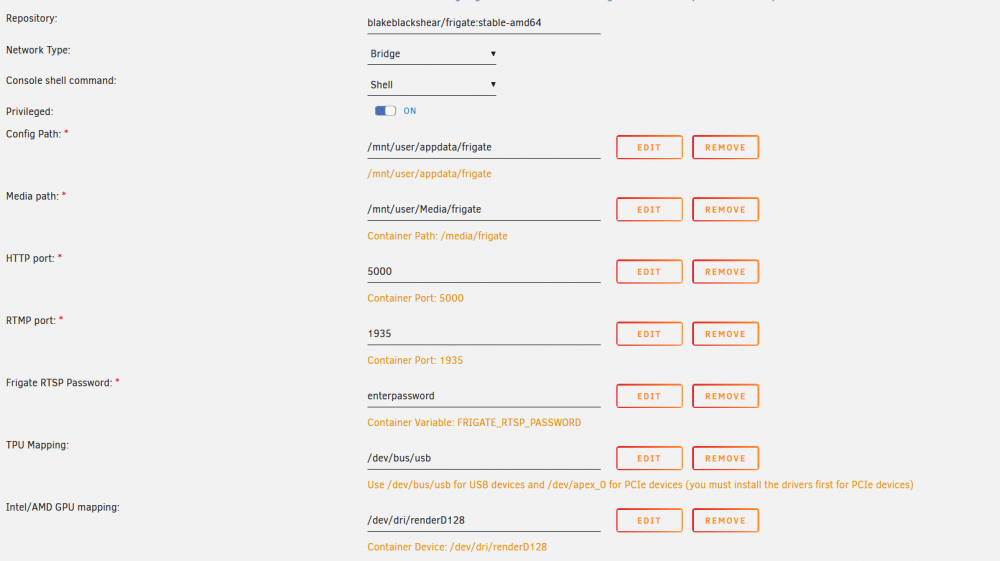
I think you are messing up updating over a older template. Delete the container and recreate it with the new template from the app store: Media folder is OK where it is, you can change it if you are not using it, but I don't like the idea of forcing everybody to have a new share just for this. Media must live on media. The cpu/pgpu devices are not forced.
-
Can you show how are you doing the passthrough of the graphic cards to the container and to the VM?
-
For USB TPUS there is no need to install the drivers. The USB TPU is passed already on the template:

-
Maybe you need to add and enviromental argument: LIBVA_DRIVER_NAME=radeonsi https://docs.frigate.video/configuration/hardware_acceleration#amdati-gpus-radeon-hd-2000-and-newer-gpus-via-libva-mesa-driver
-
Is this supported? https://docs.frigate.video/configuration/hardware_acceleration
-
You will only need to change the ffmpeg parameters according to the documentation (and also the detectors parameters if you change the coral type) as this runs in a docker container.
-
I assumed you understand the docker folder mapping general idea as this is the same on all the unraid "Apps": All the "configuration" folders are stored on "/mnt/user/appdata/..." All the "media" folders if needed are stored on "mnt/user/media/..." In this particular case as you can see when you are creating the container: Container: "/antennas/config" -> Host: "/mnt/user/appdata/antennas"
-
You have to create and place a config file, the APP does not create one. Follow the manual/docs from here: https://docs.frigate.video/
-
Be aware that pointing to an specific usb port will not work if you reboot your Unraid machine as port may change to another number. Thast why the mapping is done to the entire USB driver to let frigate find it whatever the port number is.
-
For USB coral you don't need the Driver pluging, that only works for PCI and M.2 coral cards. It looks you have changed the config file of your frigate. Make sure you have these: detectors: coral: type: edgetpu device: usb And not these: detectors: coral: type: edgetpu device: pci The USB tpu mapping is /dev/bus/usb. /dev/dri/ is mapped for hardware acc. of intel CPUs.
-
If beta is not working go back to stable. Anyway, this looks something regarding to your configuration or docker deployment. I'm running 10 beta 4 for past 2 weeks with no issues at all.
-
Can we see your config entry of the edge? Did you bind the same folder on the container?
-
Ok!
-
There is no issues/errors on that log...
-
The answer is there
-
Do you have the array started an working on unraid? It looks like you have some failure on disk2. Did you change the bind point to the array share or you are writting still directly to the disk?
-
Are you sure you can access to these stream for example through VLC? Anyway, I don't know reolink cameras, you can ask for help on the github as this doesn't look it is related to Unraid config.
-
FFMPEG with no hardware acc can cause this consume of CPU. This is not a config/urnaid error, so open a issue on github maybe someone can help you with your specific hardware.
-
First of all, dual edge coral is not PCI, is M.2. Anyway, this model is not fully supported by the creator of the driver package plugin as you can read here: About the media mounting, I'm not sure why do you want to write directly into the disk 2. This is not best practice, you should use a share instead of the disk: https://wiki.unraid.net/Manual/Shares I'm attaching you a proper config file created using your variables and the original template of the docs. config.yml
-
First of all, can you attach a screenshot of the configuration of the container? Witch model of coral do you have? It is a PCI one? Did you installed the driver from the plugins of unraid? Then, on your config you have a mistake: detectors: coral: type: edgetpu device:pci must be: detectors: coral: type: edgetpu device: pci You have MQTT defined twice. This is wrong: cameras: front_driveway reolink: ffmpeg: Must delete relonik line and end the name of the camera with double colon like this: cameras: front_driveway: ffmpeg: Same there: reolink: garage_driveway ffmpeg: Must be: garage_driveway: ffmpeg: Did you followed the https://docs.frigate.video/guides/getting_started ???? Finally, about FFMPEG, I'm not ffmpeg expert so I can't help you on that, but I think that you are not configuring properly (you are defining input_args only, no hwaccel_args and no output args... I recommend you to start with a minimal config of "hwaccel_args" following the docs https://docs.frigate.video/configuration/hardware_acceleration. There is some info on github for reolink: https://github.com/blakeblackshear/frigate/issues/1974



