






yayitazale
Members
-
Joined
-
Last visited
Everything posted by yayitazale
-
Sorry my mistake, you are right, the filename has to be "config.yml" not "config.yaml". I have edited the template and the post
-
I updated the two templates to map the complete media folder, not just the media/clips and media/recordings
-
I'm sorry to heard that.
-
Yes, map it as /dev/bus/usb/004/002:/dev/bus/usb/004/002 Anyway, note that rebooting the system or disconnecting the USB will cause a change in the mapping, so this is for debugging purposes only. The application should work correctly with the assignment of /dev/bus/usb
-
You can try to map the specific usb to frigate too to be sure that there is no compatibility issues but you almost have the same config as mine, the only difference is that in my case I have a zigbee usb istead of zwave. Are you using the original cable that comes with the coral?
-
Not sure about what is happening, I'm using frigate with usb coral from 1 Year now and I never got that error. Are you mapping any usb Port to another container or VM? Are you using a native 3.0 USB? Maybe is related to a lack of power?
-
This is the configr that I'm using: ffmpeg: # Optional: global ffmpeg args (default: shown below) global_args: -hide_banner -loglevel warning # Optional: global hwaccel args (default: shown below) # NOTE: See hardware acceleration docs for your specific device hwaccel_args: - -hwaccel - qsv - -qsv_device - /dev/dri/renderD128 # Optional: global input args (default: shown below) input_args: -avoid_negative_ts make_zero -fflags +genpts+discardcorrupt -rtsp_transport tcp -stimeout 5000000 -use_wallclock_as_timestamps 1 # Optional: global output args output_args: # Optional: output args for detect streams (default: shown below) detect: -f rawvideo -pix_fmt yuv420p # Optional: output args for record streams (default: shown below) record: -f segment -segment_time 60 -segment_format mp4 -reset_timestamps 1 -strftime 1 -c copy -an # Optional: output args for clips streams (default: shown below) clips: -f segment -segment_time 10 -segment_format mp4 -reset_timestamps 1 -strftime 1 -c copy -an # Optional: output args for rtmp streams (default: shown below) rtmp: -c copy -f flv
-
Delete the container and create a new one from the store using the new template and it will be fixed.
-
Pushed a change to the template, I hope this will fix it
-
Rebooting the server does not make my container disappear, and a crash it just stops it...
-
You have to tinker with these values: https://blakeblackshear.github.io/frigate/configuration/false_positives Night detection is still not as good as daylight. Also, false positives at night are being investigated: https://github.com/blakeblackshear/frigate/issues/67
-
I don't think so but ask to the creator of the app on github.
-
Support for Antennas docker container. HDHomeRun emulator for Plex/Jellyfin/Emby DVR to connect to Tvheadend. Application Name: Antennas Application Site: https://github.com/TheJF/antennas Docker Hub: https://hub.docker.com/r/thejf/antennas Github: https://github.com/TheJF/antennas To be able to stream from Tvheadend, you need to set up an anonymous user in Tvheadend that has streaming rights. You can do this in the users section, by creating a user *: To run this container, first create a config.yml on the config folder with the following lines (changing to the IPs, ports and tuner count of your system): tvheadend_url: http://user:[email protected]:9981 antennas_url: http://X.X.X.X:5004 tuner_count: 4


-
I will check it this weekend
-
Yes, you can use it as standalone service but keep in mind that there is no notification channel implemented aside from mqtt.
-
¿Did you install the Unraid Nvidia plugin? I dind't have time to create a nvidia frigate version but I can try to create it this weekend. Not sure about how complex the hard acc env variable setup will be...
-
Ok, so if you want to avoid using SSD cache you just can add a path to mount the media folder onto a non cache share of unraid. Create a new share on unraid and set the use of cache to "no", like this, including the disks you want to use to store NVR: Be aware that this is going to increase a lot the write/reads on your disk, so I recomend you to use a proper disk to do this job (a WD purple series or so https://amzn.to/3e6UIjC (refered link)). You should config all your shares except the NVR one to not to use this disk and only use it to store NVR) Then go to your hass container and edit it. You need to add a folder path and point the /media/frigate folder of the container to the non cache share, something like this: Apply the change and now all the new media created on the /media/frigate folder on hass will be stored on that folder of unraid, skipping the cache disks.
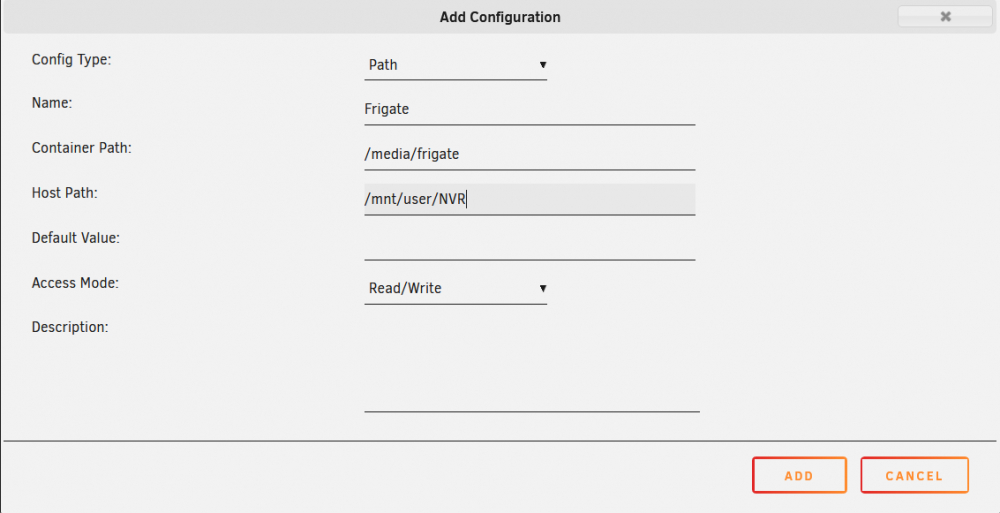
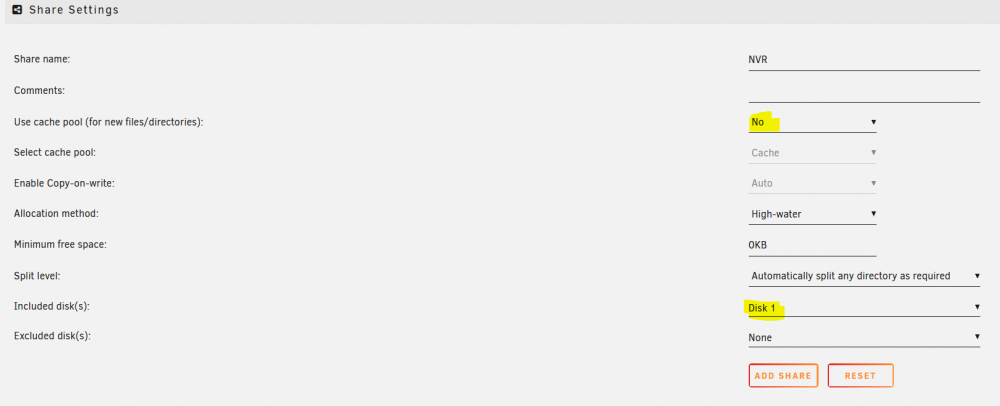
-
Do yo know on whitch folder of hass is storing all the media?
-
I'm not the developer of the app, I'm just mantaining the Template of the container for Unraid. The modified addon is mainteined by another guy so ask him if he is going to maintain it. https://github.com/pdecat
-
I only own a USB coral so I don't need drivers to make it work and I can use it on mobile proyects with a raspi. 🤑🤑🤑
-
As far as I know, the TPU chip inside the all Coral boards is the same, so the driver should be valid for all of the coral PCI-M2 devices. Correct me please... @ich777
-
Your CPU is not supported, the only way to make it work is using the modified version of the hass addon: https://github.com/blakeblackshear/frigate/issues/695 https://github.com/pdecat/frigate-hass-addons
-
The first try is the way but you are trying to match /labelmap.txt with a folder labelmap. The correct way it should be to match a file with a file: container path : /labelmap.txt host path: /mnt/user/appdata/frigate/labelmap/labelmap.txt You can see it on the docs: https://blakeblackshear.github.io/frigate/configuration/objects#customizing-the-labelmap Cheers
-
As far as I'm not the developer of the APP, I'm not sure about any of the questions you have, but I'll try to help. Anyway, you can ask these questions on the Github page. 1. I think currently it doesn't ignore stationary objects because in the end you are passing static frames to TFlite and this can't really know witch of the 2 cars is the one tha't it's moving. To avoid false positives from wind motion you have to adjust the values of the detection as you can read here: https://blakeblackshear.github.io/frigate/configuration/false_positives On next releases maybe this funtionality will be added: https://github.com/blakeblackshear/frigate/issues/375 2. I think zones are not linked to the detected objects for now. 3. Not sure about that 4. There is no way to activate a global detectión, you must specify the objetcs types you want to detec one by one. You can see the boxes on the video stream for debbuging purposes, you need to navigate to http://:5000/api/<camera_name>?bbox=1 https://blakeblackshear.github.io/frigate/usage/api/#apicamera_name
-
1) To use the M.2 coral you need to install the "Coral Accelerator Module Drivers" plugin and then edit this: to this: 2) I already changed this on the template this week, look at the hidden settings and you should see this: If you don't see it, delete your container and add it again from the app store.








