





eds
Members
-
Joined
-
Last visited
Everything posted by eds
-
Perfect! Thanks!
-
Can someone direct me as to how to include a subdomain? I want use the youtube downloader which requires /youtube-dl to be included in the domain name and I am unclear how to add it.
-
Swapping out the Mellaonx card for another one worked! Router has lights. Card has lights and swOS shows the link as active 10G. For those interested - my motherboard sees the device as unknown, but unraid sees the card as Emulex Corporation OneConnect 10Gb NIC. The amazon seller no longer has the one I bought in stock, but this is the make and model. Thanks for your help guys. UPDATE: Looks like the seller I linked to is out of stock, but the card is a HP NC552SFP. I see a lot of them, used, on Ebay.
-
It is selected in Window 7 vm, but does not see the nic as mellanox, but as a virtual adapter. Will do. Also getting a new card to test as well.
-
Done. Thanks for your help. BTW, the screenshot you post looks exactly like mine with the finisar sfp+ transervers installed. unraid-diagnostics-20190322-1059.zip
-
Tried to enable the port but get the following message: Interface Ethernet Port 2 is down. Check cable!
-
The help you have given me is great. Gives me ideas on the next way to go. Thanks. BTW, I get no lights on either the card or the switch when plugged in. Also, I thought of doing the one port at a time thing as well which is my current setup. I do not have it in sft port 1 tho, I have it in port 2 (for cable management purposes). Perhaps I will try moving to sfp port 1 and see if that is any difference. The card is visible on unraid. In fact, I can select it for my windows vm, as it appears available as a network nic. Attached are screen shots of network settings page. What do you need from the diagnostic?
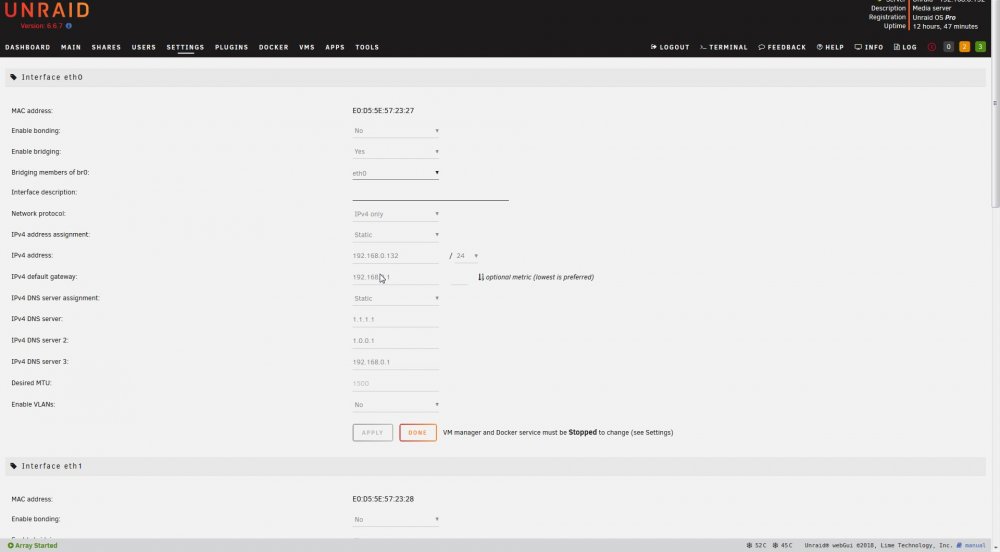
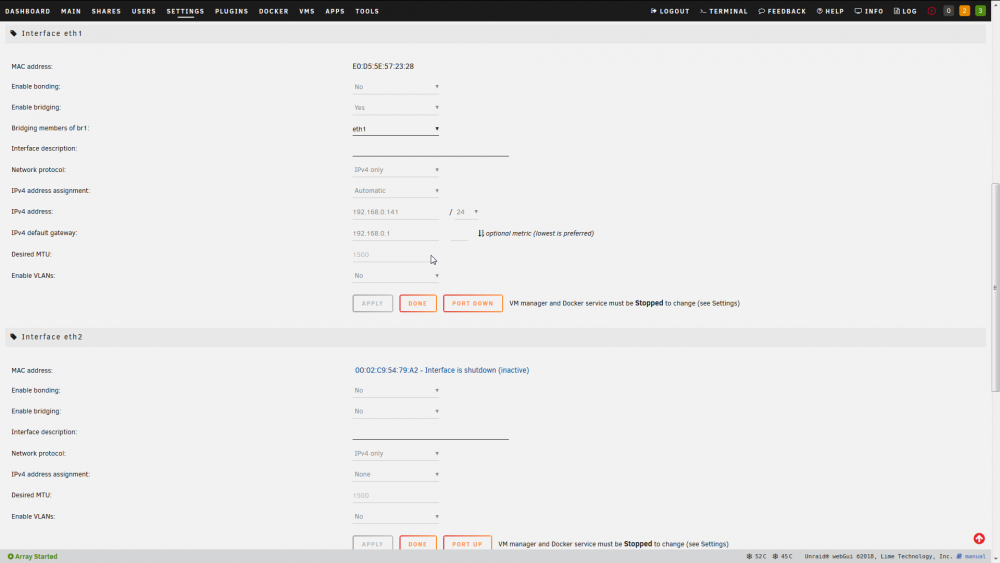
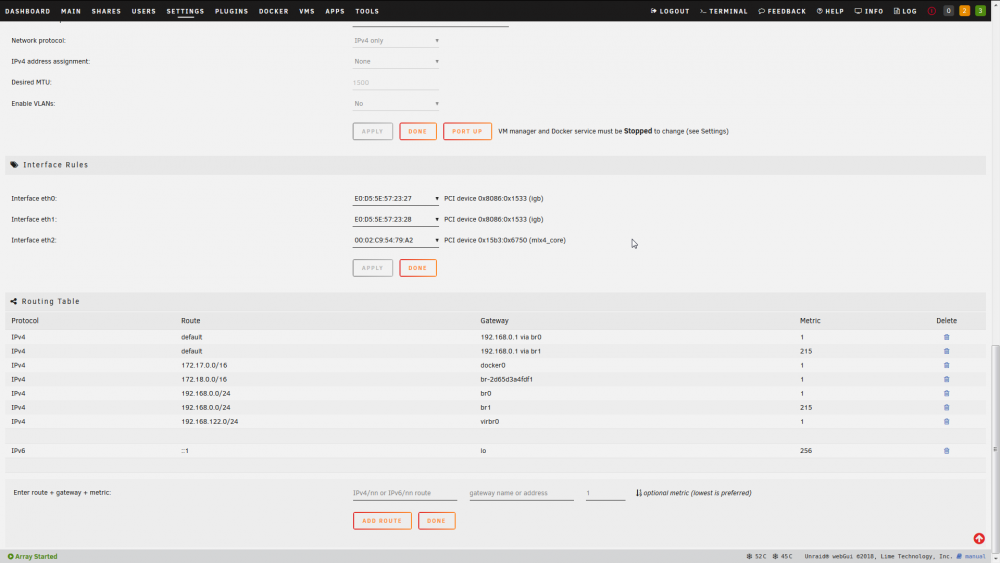
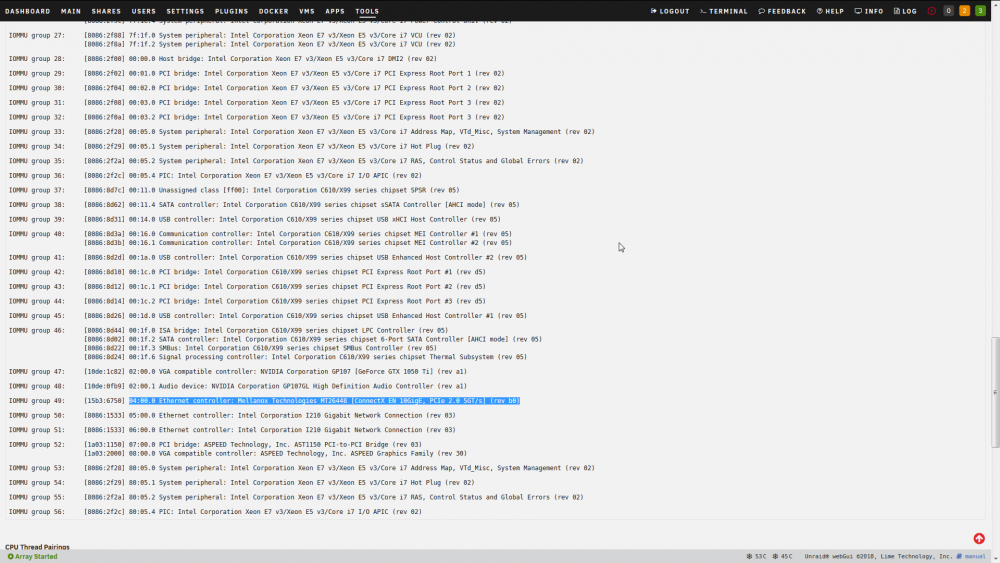
-
Thanks for the input. Will reach out to the seller and see what he has to say. I have a feeling it's the Mellanox card.
-
Its too short for a run to my server. Do you know if the mikrotik brand works with Mellanox card? I was afraid of this. swOS sees the transceiver just fine. Reports the correct brand, part number, serial, tx bias, power and rx power.
-
They're marked as Finisar FTLX8571D3BCL SFP+SR/SW 10Gb/s 850nm Multimode SFP+ Transceiver Grade A I have four of them for the two cables. I could see myself getting one bad one, but four???
-
Hello, I purchased this router and the sfp port does not appear to be seeing my unraid server. I have the following setup: Monoprice LC LC multimode duplex fiber cable Finisar 850nm multimode sfp transceiver In the unraid server I have a Mellanox connect X-2 ethernet nic. Everything looks as if it should work, when the cable is connected I see no lights on the router or on the card. In addition, in swOS the sfp section says “no link”. Is there anything that looks wrong here?
-
I'm not in the Apple environment any more so not sure I can help with this one.
-
Yes. Using maria db. This sounds like either a php issue or permissions issue. What are the error logs saying now?
-
I can't say for sure what your issue is because I used Nginx Proxy Manager to get nextcloud up and running. Perhaps you would have better luck using that? I tried to follow the instructions per spaceinvaderone's video and it did not work for me.
-
Great docker. Great app. Only two gripes. Unless I am missing it, no way to create subfolders. Unless I'm missing it, the only way to view pics is large thumbnail view. I don't see a way to list via a smaller thumbnail view or list view. Am I right?
-
Are you seeing the congratulations page when you check the domain name from outside your lan? If so, then forwarding is good. This one I am not so sure. If you are on a residential plan internet plan, port 80 might be being blocked by the isp (as was the case with me). Check to make sure port 80 is open by going to https://canyouseeme.org/ and checking 80. If it is open and you are forwarding the ddns correctly, letsencrypt should have no problems issuing a crt.
-
When I tried 443 I was getting the unraid dashboard. I decided to use my own custom 448. But for laughs and giggles, I'll try 444.
-
I can access Nextcloud when it has its own ip. It's when Nextcloud network type is bridge mode, I cannot access. Yeah -- I am baffled. Logs for each container tell me nothing. Very weird. Will keep looking around. May have to try another solution. This is the only docker that give me issues when in bridge mode.
-
Yes. I see nothing out of the ordinary. Plus, wouldn't that show up in the log and wouldn't the docker be unable to start if there were a port overlap/conflict?
-
In my experience it means letsencrypt cannot see the docker you are trying to secure from the wan side. Either the ddns setup is not correct or port 80 is being blocked.
-
Hello everyone, I'm kinda at my wits end here. Let me start by saying I have mariadb and nextcloud dockers installed and running. When I have both on their own ip, everything works fine. However I cannot access Nextcloud from outside my lan. So I put both in bridge mode. Now I have lost connectivity to Nextcloud. I click on the webui from the unraid dashboard and it terminates immediately with ERR_CONNECTION_REFUSED. I’ve done everything from deleting the nextcloud docker to starting from scratch and deleting the app folder and the docker image and reinstalling but nothing seems to work. From the logs on both dockers, I cannot see any issue. Not sure what to do. Any help would be much appreciated.
-
Has anyone gotten this to work with Nextcloud? I'm stuck since nextcloud seems to throw errors and cannot connect to my mysql container if on a bridge network. So I have to assign nextcloud its own ip address in order to work. But doing so causes gateway issues for this app.
-
@DJoss Thanks man, I finally got it working! For me, a few things that may help others: 1. This only works if the various containers are in bridge mode (which I think was previously discussed on this board, but I forgot). All my containers had their own ip addresses so I had to change each, stop and restart them. Remember once all containers using this app are in bridge mode, in proxy manager, the ip address is now unraid's ip (with different ports). 2. Also, its worth noting, you DO NOT have to port forward in your router to any of the containers. Only forward ports to this app as required and that's it. So I had to remove all the port forwards and ips for the various containers within my router. 3. My namecheap subdomain set up was right on. Cname subdomains for each app linked to the domain name seems to be work. No need to do a wild card. 4. In the apps, I made sure all containers did not reference ssl anywhere. 5. All destination ips in proxy manager were set to http (so http://unraidip:appport). 6. I knew I was on to something when, looking at the logs, lets encrypt would accurately send an crt. Still could not get my custom cert to work but beggers cannot be choosers. 7. One annoyance -- the proxy app times out when trying to secure an ssl certificate via lets encrypt. So it appears to fail, but when you cancel the function you are able to select the ssl cert. 8. Finally, once lets encrypt had the cert, I set each subdomain to force use the crt and it works. Great app!
-
No. I only see the error I've done some fiddling and got some progress. Putting the ssl issue aside for a moment... I was able to open port 80 on my modem which was surprisingly easy. So i port forwarded port 80 to the docker and I am able to see, from both vpn and my mobile device, the congratulations page of nginx. Nice! Now, I am using namecheap as my ddns (which works great with my asus router so why use duckdns which does not??). This could be where I am getting stuck. I read a few pages back when using your own domain name you need to create a subdomain using a cname record and have host: * and value: yourdomainname.com That wildcard now causes every subdomain to go to the congratulations page (i.e. couchpotato.yourdomainname.com,nzbget.yourdomainname.com, etc ). Is that a good thing? If I create an entry in nginx proxy manager and a cname host: couchpotato value: yourdomainname.com I get a "Bad Gateway" error when it type in couchpotato.yourdomainname.com. Then, i read elsewhere you do not need a cname, but an a record. So I also created an a record with host: couchpotato value: ip address of my router. Finally, I tried removing everything in namecheap except the cname wildcard entry (*.yourdomainname.com) and just adding an entry in proxy manager and that took me to a 502 bad gateway. Which of these is correct? It seems to me the last entry should be correct, but I get a 502 error page. What is that about? Info in ngnix seems straightforward so I cannot imagine there is a problem there. Thanks for your help!
-
This is a great docker and I am just getting started. I can access my server via http without issue. But I'm having issues using my custom ssl. I am getting err ssl version or cipher mismatch when i try to access the server via the secure port. Not sure what the problem is. Entering the ssl and key is simple. However I notice the fields do not change when I enter the location of the certificate and key (by that I mean, the js box does not populate with the location of crt and key such as c://documents/ssl/key.pem). Is that to be expected? When I add ssl it saves with the correct expiration date, but says the provider is "custom". Also, crt and key are pem encoded. Is there an issue with that? Thanks for your help.


