






Marshalleq
Members
-
Joined
-
Last visited
Everything posted by Marshalleq
-
This would be great, particularly having some kind of fan based GUI with naming, there must be a few existing OS versions out there to use. +1.
-
Yep, coming from some other NAS type tools, this end of the spectrum is a bit lacklustre in Unraid. Though I hold hope that it will flourish and be as well implemented as the rest of unraid. +1 from me!
-
2019 and this is still a problem.
-
Thanks.
-
I would think this kind of thing is more elegant that stacking 2 drives in a 5/4"? https://www.ebay.com/itm/163675847557?ssPageName=STRK%3AMEBIDX%3AIT&fromMakeTrack=true though perhaps I misread....
-
I do still tend to go over to the FreeNAS forums and salivate over ZFS from time to time. While poking around I saw this release announcement on Phoronix: ZFS on Linux 0.8 released with Native Encryption, Trim and Device Removal. That would seem to alleviate all of my remaining concerns, depending on how it's implemented. Now that I'm running Threadripper with so much RAM I expect I won't have performance issues and only advantages.
-
OK, I guess I have to live with it. It doesn't seem to impact anything, just looks horrible.
-
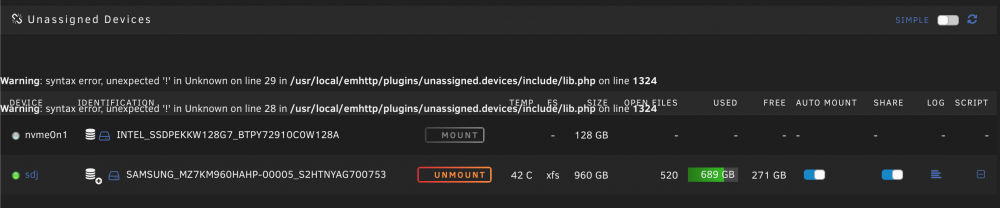
Warning: syntax error, unexpected '!' in Unknown on line 29 in /usr/local/emhttp/plugins/unassigned.devices/include/lib.php on line 1324 as per below. I've been getting this error for a few weeks on the main screen. I think it happened since passing through an NVME drive to Windows, or it could be since passing a dual port network card through to VM's. So, when I start Windows the error (per below screenshot) actually goes away, then when I stop windows it comes back. To this end I assume it's the NVME drive as the NIC is not passed through to that VM. I've been achieving this below as per Xen-pciback.hide which in the release notes they say it 'appears to no longer work' - though I think it does for me. Perhaps this is why the error though? The release notes say: "New vfio-bind method. Since it appears that the xen-pciback/pciback kernel options no longer work, we introduced an alternate method of binding, by ID, selected PCI devices to the vfio-pci driver. This is accomplished by specifying the PCI ID(s) of devices to bind to vfio-pci in the file 'config/vfio-pci.cfg' on the USB flash boot device. This file should contain a single line that defines the devices: BIND=<device> <device> ... Where <device> is a Domain:Bus:Device.Function string, for example, BIND=02:00.0 Multiple device should be separated with spaces." So perhaps I should replace with that? Anyone else come across this? kernel /bzimage append isolcpus=12-15,28-31 xen-pciback.hide=(0b:00.0)(0b:00.1) vfio_iommu_type1.allow_unsafe_interrupts=1 initrd=/bzroot obi-wan-diagnostics-20190522-2134.zip
-
Came here looking for why it takes so long to get to the Tianocore screen. On 6.6.7. So I guess I'm a +1 but nothing educated to base it on yet.
-
Did you ever get this solved? For some time now this is happening to me - though restarting the docker kicks off the move and completes it properly - so it doesn't seem like a configuration problem and it did used to work well on it's own. Hard to know how to resolve this one.
-
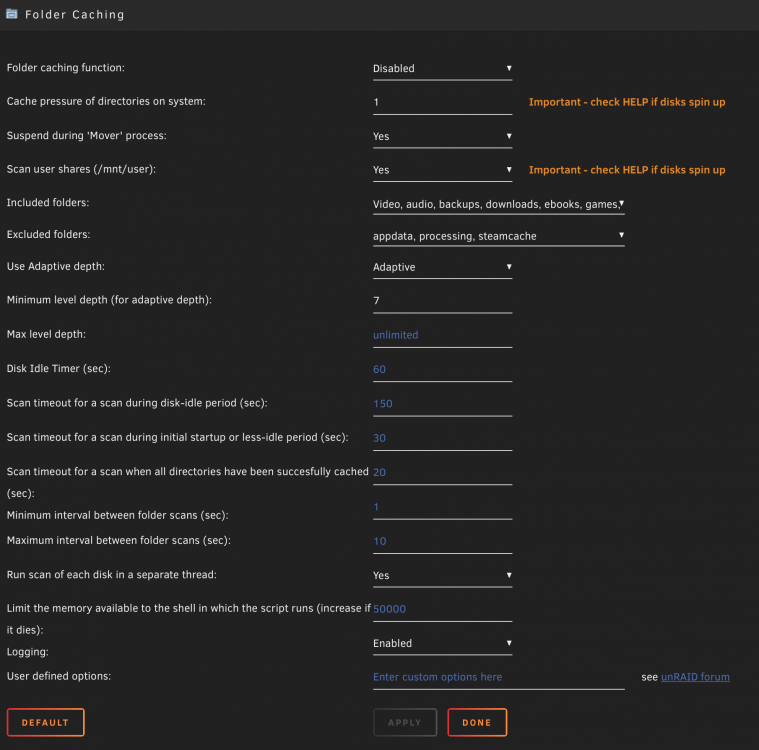
VM Performance Issues with cachedirs enabled. Hi everyone, I'm just looking for a few hints around where to look within the folder caching options to identify what is causing some fairly serious performance issues. I was suspicious this was actually a networking issue at first but it turns out when I turn off the folder caching plugin my performance issues go away. I have a 32 thread thread ripper, 128GB RAM, and various HDD / SDD / NVME. The windows gaming vm on the NVME works flawlessly with this plugin off, but when I turn it on, the screen freezes while playing, sometimes for multiple seconds between 3-5 by which time I've been killed lol. It's taken a long time to figure this out - because it really wasn't obvious. I have a CrashPlan backup system that runs permanently in the background which is why I need to have almost all folders available to this plugin - otherwise CrashPlan starts up the disks all the time to check for changed files. I could of course change this to daily or something - but really that's not a great solution. See below screenshot for my current settings. (I'm running Unraid 6.7.0 RC8). Do I need to increase the shell memory for a large number of files? I have about 48TB of storage. Thanks.
-
I think random number generators are pretty standard in all *nix operating systems. I would guess it's not actually an Unraid specific thing, rather a linux specific thing. Someone else can chime in what they're actually used for, but suspect google will tell you that too. I think crypto stuff like ssh and ssl use it (or similar) for a start but someone may correct me.
-
Obviously I understand how possibly it might be required to reboot Unraid after a network reconfig, even if it is linux. However, what I don't think is right is that all network traffic is lost on a headless system after reconfiguring it to the point that I can't even reboot it without heading off to where the headless system is and pressing the power button. Even with multiple network cards where more than one has not changed, I cannot connect vi a browser, ssh or anything. In fact ping is lost across all interfaces. This isn't specific to this beta, but in my opinion should be fixed. One of two scenarios should happen: 1 - The network interfaces are changed requiring a reboot, but not changes happen until the reboot 2 - The network interfaces are changed not requiring a reboot and all changes happen without the reboot. This should be a piece of cake with linux! Thanks for reading.
-
I'm getting quite a few of these on my system. Page Fault never sounds good to me. Log's attached. Apr 25 15:00:27 Obi-Wan kernel: nvme 0000:09:00.0: AMD-Vi: Event logged [IO_PAGE_FAULT domain=0x0000 address=0x00000000e0d77000 flags=0x0000] Apr 25 15:00:27 Obi-Wan kernel: nvme 0000:09:00.0: AMD-Vi: Event logged [IO_PAGE_FAULT domain=0x0000 address=0x00000000ff73d000 flags=0x0000] Apr 25 15:00:27 Obi-Wan kernel: nvme 0000:09:00.0: AMD-Vi: Event logged [IO_PAGE_FAULT domain=0x0000 address=0x00000000e0d76000 flags=0x0000] Apr 25 15:00:27 Obi-Wan kernel: nvme 0000:09:00.0: AMD-Vi: Event logged [IO_PAGE_FAULT domain=0x0000 address=0x00000000e0d75000 flags=0x0000] Apr 25 15:00:30 Obi-Wan kernel: nvme 0000:09:00.0: AMD-Vi: Event logged [IO_PAGE_FAULT domain=0x0000 address=0x00000000e0d77000 flags=0x0000] Apr 25 15:00:30 Obi-Wan kernel: nvme 0000:09:00.0: AMD-Vi: Event logged [IO_PAGE_FAULT domain=0x0000 address=0x00000000f77c0000 flags=0x0000] Apr 25 15:00:30 Obi-Wan kernel: nvme 0000:09:00.0: AMD-Vi: Event logged [IO_PAGE_FAULT domain=0x0000 address=0x00000000fb780000 flags=0x0000] Apr 25 15:00:30 Obi-Wan kernel: nvme 0000:09:00.0: AMD-Vi: Event logged [IO_PAGE_FAULT domain=0x0000 address=0x00000000fe67f000 flags=0x0000] Apr 25 15:00:30 Obi-Wan kernel: nvme 0000:09:00.0: AMD-Vi: Event logged [IO_PAGE_FAULT domain=0x0000 address=0x00000000f7ef0000 flags=0x0000] Apr 25 15:00:31 Obi-Wan kernel: nvme 0000:09:00.0: AMD-Vi: Event logged [IO_PAGE_FAULT domain=0x0000 address=0x00000000f877f000 flags=0x0000] Apr 25 15:00:31 Obi-Wan kernel: AMD-Vi: Event logged [IO_PAGE_FAULT device=09:00.0 domain=0x0000 address=0x00000000f9000000 flags=0x0000] Apr 25 15:00:32 Obi-Wan kernel: amd_iommu_report_page_fault: 1 callbacks suppressed Apr 25 15:00:32 Obi-Wan kernel: nvme 0000:09:00.0: AMD-Vi: Event logged [IO_PAGE_FAULT domain=0x0000 address=0x00000000fbea8000 flags=0x0000] Apr 25 15:00:33 Obi-Wan kernel: nvme 0000:09:00.0: AMD-Vi: Event logged [IO_PAGE_FAULT domain=0x0000 address=0x00000000fe676000 flags=0x0000] Apr 25 15:00:33 Obi-Wan kernel: nvme 0000:09:00.0: AMD-Vi: Event logged [IO_PAGE_FAULT domain=0x0000 address=0x00000000fe650000 flags=0x0000] Apr 25 15:00:33 Obi-Wan kernel: nvme 0000:09:00.0: AMD-Vi: Event logged [IO_PAGE_FAULT domain=0x0000 address=0x00000000fecb9000 flags=0x0000] Apr 25 15:00:33 Obi-Wan root: /etc/libvirt: 921.7 MiB (966504448 bytes) trimmed on /dev/loop3 Apr 25 15:00:33 Obi-Wan root: /var/lib/docker: 79.3 GiB (85107757056 bytes) trimmed on /dev/loop2 Apr 25 15:00:33 Obi-Wan root: /mnt/disks/SAMSUNG_MZ7KM960HAHP-00005_S2HTNYAG700753: 739.3 GiB (793801342976 bytes) trimmed on /dev/sdj1 Apr 25 15:00:33 Obi-Wan root: /mnt/cache: 118.6 GiB (127382278144 bytes) trimmed on /dev/nvme0n1p1 obi-wan-diagnostics-20190423-0509.zip
-
I've only just plugged this card back in, though I am now on a different computer. My setup is displaying peculiar behaviour as follows: Onboard NIC Eth0: Cable plugged in - ping works Dual Port NIC Eth1: Cable plugged in - ping works Dual Port NIC Eth2: Cable unplugged - ping works If I swap the port the cable is in: Onboard NIC Eth0: Cable Plugged in - ping works Dual Port NIC Eth1: Cable unplugged in - no rely from ping Dual Port NIC Eth2: Cable plugged in - no reply from ping Anyone have any bright ideas why an unplugged port responds to a ping? I don't think this is a hardware issue - seems more like a driver issue? I assume having the onboard ethernet mixed in this IOMMU Group would only matter if I wanted to pass it through to something, that this wouldn't be causing the interface to go up and down as it has been. IOMMU group 15:[1022:43ba] 01:00.0 USB controller: Advanced Micro Devices, Inc. [AMD] X399 Series Chipset USB 3.1 xHCI Controller (rev 02) [1022:43b6] 01:00.1 SATA controller: Advanced Micro Devices, Inc. [AMD] X399 Series Chipset SATA Controller (rev 02) [1022:43b1] 01:00.2 PCI bridge: Advanced Micro Devices, Inc. [AMD] X399 Series Chipset PCIe Bridge (rev 02) [1022:43b4] 02:00.0 PCI bridge: Advanced Micro Devices, Inc. [AMD] 300 Series Chipset PCIe Port (rev 02) [1022:43b4] 02:01.0 PCI bridge: Advanced Micro Devices, Inc. [AMD] 300 Series Chipset PCIe Port (rev 02) [1022:43b4] 02:02.0 PCI bridge: Advanced Micro Devices, Inc. [AMD] 300 Series Chipset PCIe Port (rev 02) [1022:43b4] 02:03.0 PCI bridge: Advanced Micro Devices, Inc. [AMD] 300 Series Chipset PCIe Port (rev 02) [1022:43b4] 02:04.0 PCI bridge: Advanced Micro Devices, Inc. [AMD] 300 Series Chipset PCIe Port (rev 02) [1022:43b4] 02:09.0 PCI bridge: Advanced Micro Devices, Inc. [AMD] 300 Series Chipset PCIe Port (rev 02) [8086:1539] 05:00.0 Ethernet controller: Intel Corporation I211 Gigabit Network Connection (rev 03) [1b21:2142] 08:00.0 USB controller: ASMedia Technology Inc. ASM2142 USB 3.1 Host Controller IOMMU group 18:[8086:105e] 0b:00.0 Ethernet controller: Intel Corporation 82571EB/82571GB Gigabit Ethernet Controller D0/D1 (copper applications) (rev 06) IOMMU group 19:[8086:105e] 0b:00.1 Ethernet controller: Intel Corporation 82571EB/82571GB Gigabit Ethernet Controller D0/D1 (copper applications) (rev 06) Many thanks for any advice.
-
When I start a windows VM (or seemingly any other VM), I get a lot of these errors (hundreds maybe thousands in a row) and the Tianocore bios takes ages to start up. Once it does, these errors seem to stop. Apr 24 20:05:26 Obi-Wan kernel: pcieport 0000:40:03.1: AER: Multiple Corrected error received: 0000:00:00.0 Apr 24 20:05:26 Obi-Wan kernel: pcieport 0000:40:03.1: PCIe Bus Error: severity=Corrected, type=Data Link Layer, (Transmitter ID) Apr 24 20:05:26 Obi-Wan kernel: pcieport 0000:40:03.1: device [1022:1453] error status/mask=000011c0/00006000 Apr 24 20:05:26 Obi-Wan kernel: pcieport 0000:40:03.1: [ 6] BadTLP Apr 24 20:05:26 Obi-Wan kernel: pcieport 0000:40:03.1: [ 7] BadDLLP Apr 24 20:05:26 Obi-Wan kernel: pcieport 0000:40:03.1: [ 8] Rollover Apr 24 20:05:26 Obi-Wan kernel: pcieport 0000:40:03.1: [12] Timeout Apr 24 20:05:26 Obi-Wan kernel: pcieport 0000:40:03.1: AER: Multiple Corrected error received: 0000:00:00.0 Apr 24 20:05:26 Obi-Wan kernel: pcieport 0000:40:03.1: PCIe Bus Error: severity=Corrected, type=Data Link Layer, (Receiver ID) Apr 24 20:05:26 Obi-Wan kernel: pcieport 0000:40:03.1: device [1022:1453] error status/mask=000000c0/00006000 Apr 24 20:05:26 Obi-Wan kernel: pcieport 0000:40:03.1: [ 6] BadTLP Apr 24 20:05:26 Obi-Wan kernel: pcieport 0000:40:03.1: [ 7] BadDLLP Apr 24 20:05:26 Obi-Wan kernel: vfio_ecap_init: 0000:41:00.0 hiding ecap 0x19@0x900 Looking up what the PCI device is 000:40:03:1 is as follows: IOMMU group 26:[1022:1453] 40:03.1 PCI bridge: Advanced Micro Devices, Inc. [AMD] Family 17h (Models 00h-0fh) PCIe GPP Bridge I'm wondering if this is part of why my gaming VM is having issues, but otherwise generally can anyone comment on if this is normal or not? Thanks.
-
Apr 23 16:34:01 Obi-Wan kernel: mdcmd (248): spindown 0 Apr 23 16:34:03 Obi-Wan kernel: mdcmd (249): spindown 6 Apr 23 16:36:34 Obi-Wan kernel: igb 0000:05:00.0 eth0: igb: eth0 NIC Link is Down Apr 23 16:36:34 Obi-Wan kernel: br0: port 1(eth0) entered disabled state Apr 23 16:36:36 Obi-Wan kernel: igb 0000:05:00.0 eth0: igb: eth0 NIC Link is Up 1000 Mbps Full Duplex, Flow Control: RX Apr 23 16:36:36 Obi-Wan kernel: br0: port 1(eth0) entered blocking state Apr 23 16:36:36 Obi-Wan kernel: br0: port 1(eth0) entered forwarding state I just got another one while typing this (am just doing a live tail on the syslog) - this one appears to be more about docker I think being a bridge. I am actually now unsure if these are normal ie part of just a docker restart or if the interface is actually restarting for the whole system? Apr 23 17:03:10 Obi-Wan kernel: igb 0000:05:00.0 eth0: igb: eth0 NIC Link is Down Apr 23 17:03:10 Obi-Wan kernel: br0: port 1(eth0) entered disabled state Apr 23 17:03:12 Obi-Wan kernel: igb 0000:05:00.0 eth0: igb: eth0 NIC Link is Up 1000 Mbps Full Duplex, Flow Control: RX Apr 23 17:03:13 Obi-Wan ntpd[2659]: Deleting interface #58 br0, 192.168.43.10#123, interface stats: received=12, sent=12, dropped=0, active_time=5880 secs Apr 23 17:03:13 Obi-Wan ntpd[2659]: 192.168.43.3 local addr 192.168.43.10 -> <null> Apr 23 17:03:13 Obi-Wan ntpd[2659]: Deleting interface #59 br0, fe80::24d8:79ff:fe01:a2fc%9#123, interface stats: received=0, sent=0, dropped=0, active_time=5880 secs Apr 23 17:03:13 Obi-Wan kernel: br0: port 1(eth0) entered blocking state Apr 23 17:03:13 Obi-Wan kernel: br0: port 1(eth0) entered forwarding state Apr 23 17:03:15 Obi-Wan ntpd[2659]: Listen normally on 60 br0 192.168.43.10:123 Apr 23 17:03:15 Obi-Wan ntpd[2659]: Listen normally on 61 br0 [fe80::24d8:79ff:fe01:a2fc%9]:123 Apr 23 17:03:15 Obi-Wan ntpd[2659]: new interface(s) found: waking up resolver Diagnostics attached. obi-wan-diagnostics-20190423-0509.zip
-
Does anyone else work? Would be nice to see how much memory CrashPlan is using - that app is a serious memory hog! Bl**dy Java!
-
I still have to add the code to get anything but x1 in rc5. Am I missing something?
-
It works for a while in the beginning no problems but at some point in time it will just switch off and I either have to restart the game or the whole VM (can't remember which). Moving it back to USB 2 EHCI makes the problem go away. As an aside, just switching to USB kills the VM and makes it unrecoverable to the point I have to create a new VM container and point it at the image, then it all works again. So kind of two bug reports I suppose. obi-wan-diagnostics-20190303-0251.zip And also noticing the VM screen at times takes a long time to load and doesn't have the correct status of VM's listed. Using Safari as a browser. Let me know if you want me to split all these out.
-
If fix common problems is going to constantly tell me that I must select RW/Slave mode in all my file access paths in docker, why isn't it just set like this as default? Seems obvious and probably very easy to implement. What am I missing? When should I not use a slave mode access?
-
I have an APC1500 tower model, which is exhibiting same symptoms. It works on USB mode minus the aforementioned fields. I 'assume' by poking around that if lsusb reports my device like this: Bus 005 Device 002: ID 051d:0002 American Power Conversion Uninterruptible Power Supply then the device string is like this: /dev/usb/hiddev2 But don't know the format in Unraid yet (just had a quick poke for anything in /dev that looks like usb). However with this, no other settings than USB work. Interestingly something I did has broken the option that worked which looks like it will require a restart to resolve which might have been throwing off my results. **Can anyone chime in at least with 'yes, that's where Unraid lists it's usb devices'?**
-
I've just installed RC4 again (having downgraded to isolate an issue (seems to have been memory). This patch definitely improves my Gaming VM performance on Windows 10. I found there to be some weird lag between the VM GPU / Mouse Keyboard which was making it nearly impossible to game. Seems to have gone away now, which is great.
-
OK thanks. Makes me think I should have got cheaper RAM, but more like 64GB. Oh well.
-
I assume I could also up the memory voltage. But anyway, will try it at slower speed for a while just to see if it makes a difference.



