





MrYoshii
Members
-
Joined
-
Last visited
Everything posted by MrYoshii
-
Hello currently I have the problem that my drives just do not stay in standby. They go off automatically but do not stay for long. I have reinstalled Unraid. Currently I have only 1 VM on the cache. Plugins: Community Applications Dynamix System Temperature GPU Statistics Nerd Tools Nvidia Driver Does anyone else have an idea what can be wrong with it? homeserver-diagnostics-20220822-1858.zip
-
Hi, I need to manually set the graphics card fans to 100% and after some time I want to set them back to auto. I found this: https://forums.developer.nvidia.com/t/how-to-set-fanspeed-in-linux-from-terminal/72705/3 but it doesn't work for me because I don't want to have an active X session. If anyone could help me with this I would be very grateful.
-
Hi I am trying to connect local to unraid and start and stop a docker container via HASS with an automation. My problem is that the login does not work. If I connect with ssh via hass manual: ssh root@ip docker start xxxx it works without problems. But when I execute the same command via automation, it doesn't work. LOG: error: PAM: Authentication failure for root from 192.168.1.110 Failed keyboard-interactive/pam for root from 192.168.1.110 port 52708 ssh2 Postponed keyboard-interactive for root from 192.168.1.110 port 52708 ssh2 What could be the reason for that?
-
I also have a gtx 1050ti and an Adaptec 72405 SAS/SATA controller installed. I have already run memtest for 8h+ and also parity sync and rebulds run without problems. It's really strange.
-
Ok that was also my thought the question is only which hardware... Or how can I find out which one is broken.
-
It crashed again. At the time, I happened to have the dasboard open on the second monitor and saw that the cpu load was 100%. When I wanted to check what was causing this and wanted to connect via ssh, this was no longer possible. Shortly afterwards the system was offline. syslog
-
Unfortunately, the system froze again after 18 days. Do you have any ideas?
-
I have commented out modprobe i915 in the go file now the server runs for 5 days without problems. If there are problems again I'll get back to you.
-
Hello my system seems to freeze regularly and then requires a manual restart. No more action possible, even the numpad led does not turn on anymore. I have already switched on syslog mirroring. The last shuttodwn was around 15:45. Do you have any other ideas? Memtest for 24h without error. homeserver01-diagnostics-20220128-1617.zip
-
ok but how can it come to long io waiting times here? A RAM disk should be mega fast. Does anyone else have an idea? Greetings Yoshii
-
Could this be a usb stick that is too slow?
-
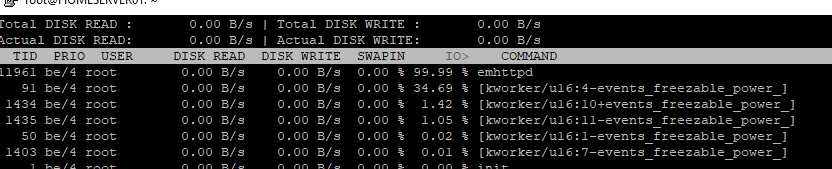
Yes, this should be normal as I am running a storj node. But I just saw that my 2nd 1gbit/s lan card is not recognised either. And the problem also occurs when the array is stopped. Here is also a snip from iotop.
-
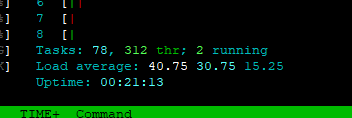
Docker is still running. But i can stop it if its still to noisy. Also the load is extreme ^^ homeserver01-diagnostics-20220111-1740.zip
-
yes its the same in safe mode.
-
Hello, for some time now I have noticed that my web interface has become slower. But now it is extreme. When I open the dashboard, no icons, CPU load and HDDs are displayed for a few seconds. During this time I can't establish an ssh connection with Putty. Connection timeout. After a few seconds everything works. This does not only occur during a parity check but always. Also the creation of the diag takes 20 sec. I have already checked the USB stick for bad blocks. Do you have any idea what could be the reason for this? Greetings Yoshii homeserver01-diagnostics-20220111-1448.zip
-
it can be that simple. thanks for your input
-
homeserver01-diagnostics-20220110-1734.zip
-
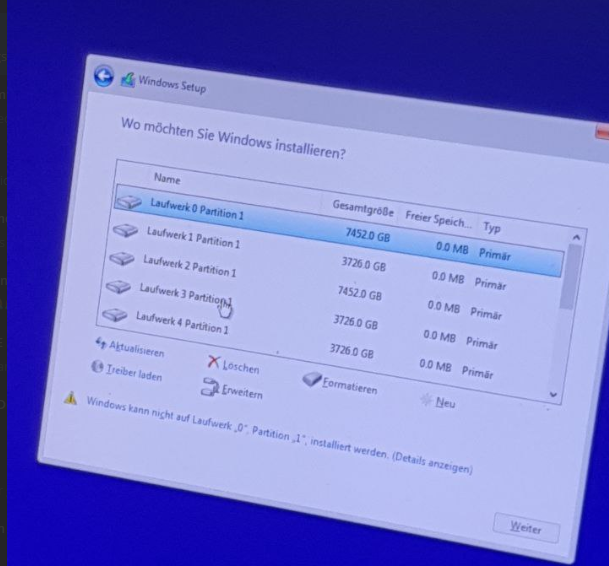
I have now done a BIOS update on the raid controller. It is still not recognized by unraid. Now no more error message in the log and under system devices he is also no longer inside. Have now made a windows 10 bootsick to test. All hard drives are displayed in the installation menu. Does there possibly still have someone an idea? Greetings Yoshii
-
Yes but it works in bios. All hard drives are recognized.
-
Hello I have an ASR-72405 card and it is not detected correctly in Unraid. It is displayed under Tools -> System devices but the hard drives are not displayed. in the log it says something about: Jan 10 15:25:16 HOMESERVER01 kernel: aacraid: aac_fib_send: adapter blinkLED 0xff. Actually everything works in the bios. Hopefully someone can help me. Greetings Yoshii homeserver01-diagnostics-20220110-1528.zip
-
ok no i tryed it in a other pc with ubuntu. no errors in syslog i used testdisk to restore the partition and xfs_repair to restore the drive now i got the data back ^^ but i dont understand why on my unraid server it is not working.. i tryed diverent sata controllers and cabels edit: i redid the wireing on all drives. now its working again
-
but why is unraid not reporting a bad disk? the smart locks also good.
-
i have changed cables on that wd red drive an switch sata ports but still getting the same error. The error on the cache drive is now gone.
-
i checkt the cabels still same thing i generated a new diagnostics homeserver01-diagnostics-20210930-1800.zip
-
why do you think ther is a problem?

