




-
Unraid OS version 6.11.5 available
Haven't checked in for a few point releases but I thought I should say that 6.11, 6.11.1, 6.11.3, 6.11.4 and 6.11.5 all upgraded between each other, in that order, just fine.
-
Tip: How to disable beeps on most UPS devices (including my APC Back-UPS 750 ES) - using only UnRAID itself
Asking for help in my own thread here as my Back-UPS ES 750 has recently started ignoring any commands to disable it's alarm. Thanks to a power outage last night, I know first hand the alarm is enabled and actually makes a sound. Have tried: Repeatedly trying my own method above (console output). I then test by pulling the plug from the wall, alarm sounds. Installing Powerchute Home and disabling it in there, ignored as above. Doing what seems to be a factory reset on the UPS (a brain deading) - Disconnect all connections, including loads and wall power, disconnecting the battery, pressing the power button for 10 seconds to clear any power remaining, then reconnect everything. Still ignores attempts to set alarms to disabled. Any one got any ideas?
-
[Support] Djoss - CrashPlan PRO (aka CrashPlan for Small Business)
I think it's worth mentioning annecdotal, but credible, reports that once you get above 10TB, they have been known to contact you to require you reduce your backup size. Also, noting their speed limits, you may find that you practically never get a complete initial backup. Despite the increased cost, you may want to consider using Backblaze B2. If you can reduce your 80TB backup, I recommend you do. For example, if that's literally everything you have, perhaps backup only irreplacable data such as photos and documents.
-
hpka started following Isolate cores to VM/Dockers only when they are running , Help: Mail backup , PCI Slots in Unraid - Relevant uses in 2021 considering it's PCI, not PCIe and 6 others
-
Help: Mail backup
Given Google are getting stricter on their storage, I could also do with a way to backup emails. I've bodged together Thunderbird + AutoarchiveReloaded plugin but it doesn't seem graceful on massive inboxes.
-
Black screen on Ubuntu 20.04 VM with GPU passthrough
I'm in the same boat, testing with Mint and a 1650
-
[Support] Djoss - CrashPlan PRO (aka CrashPlan for Small Business)
This link was in the same email, with practical details.
-
[Support] Linuxserver.io - Nextcloud
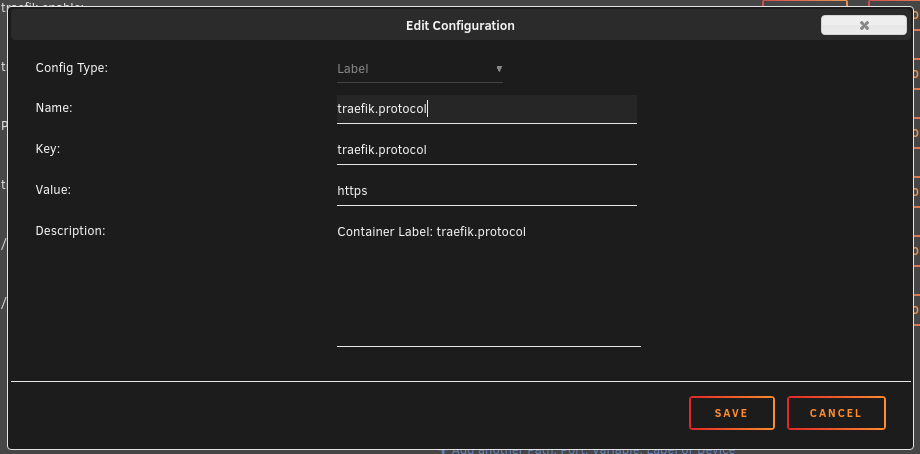
This is just a tip because I spent so blinking long figuring this out. Traefik v1 Users (and indeed all Traefik/Reverse Proxy users) - an additional label is required. Source article which helped me figure it out. The important label you must add, which you would not usually add, is: "traefik.protocol=https" Unraid style screenshot attached.
-
Unraid OS version 6.8.1 available
A few days in: No issues with upgrade or in the days since. I had no issues with 6.8.0 either.
-
[Support] Paperless Docker
Sort of adjacent question: What scanners are people using with Paperless and, importantly, which are the least nonsense to use day to day. I'd like something that I can carelessly throw paper into and press one button to scan and upload if I can. Home budget. I do see the recomendations in the Paperless docs and in the OP, but there is a slight dating issue now. That said, if those are still the reliable working options, I'd happily consider it.
-
[Support] Paperless Docker
I'd have said scanbot until they went either pay per month or absurdly expensive. Tiny Scanner is popular but not used it.
-
[Support] Djoss - CrashPlan PRO (aka CrashPlan for Small Business)
Log into Gui, it will be apparent
-
[Support] Djoss - CrashPlan PRO (aka CrashPlan for Small Business)
By any chance is your CP doing deep maintainance (that can take days)? Log in to the UI to check. Mine unexpectedly started doing it recently.
-
Unraid OS version 6.8 available
Downloaded & installed last night (when my kid woke us up for a feed) and hit restart this morning. Upgrade from 6.7.2 went flawlessly and without issue. Using a Lenovo TS430 with the included lsi 9240-8i, mixture of WD, Seagate and HGST drives and a GTX 1650... and an ADATA full size usb flash drive but I've forgotten the model.
-
How much RAM do you have installed in your unRAID server?
24gb... because it came with 8gb and I added 16gb
-
Tip: How to disable beeps on most UPS devices (including my APC Back-UPS 750 ES) - using only UnRAID itself
Earlier today I found a cracking Facebook Marketplace detail for a lightly used APC Uninteruptable Power Supply unit, an APC Back-UPS 750 ES specifically. Thing is, my UnRAID Server (a Lenovo TS430) is in our bedroom at the moment. If the power goes off in the night for a bit, I don't want the UPS beeping away to wake me up just to tell me it's working and asking if I'm proud of it. Looking around, APC say that you have to install their PowerChute software to disable alarms... didn't fancy that. UnRAID uses apcupsd for it's UPS support. A bit of careful Googling and I found my answer... Full credit to masxio for showing us how to do this: https://masxio.wordpress.com/2012/11/18/how_to_disable_beep_alarm_from_apc_ups/ Step by step with added UnRAID steps: STOP the APC UPS Daemon (Settings > UPS Settings > "Start APC UPS Daemon" should be set to No > Apply). If you're getting fatal errors later in the process, this may well be your problem, example below. Get a terminal session going on your unraid server (you can use the web based one on the dashboard or start an SSH session, whatever you wish) sudo apctest The main menu will be displayed, press 6 (to edit alarm settings) Once the alarm menu is displayed, press D (to disable them) If you want to verify the change, repeat step 4 and check the status displayed, then use Q to get back to the main menu. When back at the main menu, press Q (to quit) You're done, close the terminal. START the APC UPS Daemon (Settings > UPS Settings > "Start APC UPS Daemon" should be set to Yes > Apply) I'd recommend you test to see if your UPS actually bleeps - pull the power out of the wall is one way. Here's a copy of my terminal session, including my first attempt to run apctest before I stopped the APC UPS Daemon: Linux 4.19.56-Unraid. root@Tower:~# sudo apctest 2019-10-15 11:15:59 apctest 3.14.14 (31 May 2016) slackware Checking configuration ... sharenet.type = Network & ShareUPS Disabled cable.type = USB Cable mode.type = USB UPS Driver apctest FATAL ERROR in apctest.c at line 313 Unable to create UPS lock file. If apcupsd or apctest is already running, please stop it and run this program again. apctest error termination completed root@Tower:~# sudo apctest 2019-10-15 11:16:18 apctest 3.14.14 (31 May 2016) slackware Checking configuration ... sharenet.type = Network & ShareUPS Disabled cable.type = USB Cable mode.type = USB UPS Driver Setting up the port ... Doing prep_device() ... You are using a USB cable type, so I'm entering USB test mode Hello, this is the apcupsd Cable Test program. This part of apctest is for testing USB UPSes. Getting UPS capabilities...SUCCESS Please select the function you want to perform. 1) Test kill UPS power 2) Perform self-test 3) Read last self-test result 4) View/Change battery date 5) View manufacturing date 6) View/Change alarm behavior 7) View/Change sensitivity 8) View/Change low transfer voltage 9) View/Change high transfer voltage 10) Perform battery calibration 11) Test alarm 12) View/Change self-test interval Q) Quit Select function number: 6 Current alarm setting: ENABLED Press... E to Enable alarms D to Disable alarms Q to Quit with no changes Your choice: Select function: D New alarm setting: DISABLED 1) Test kill UPS power 2) Perform self-test 3) Read last self-test result 4) View/Change battery date 5) View manufacturing date 6) View/Change alarm behavior 7) View/Change sensitivity 8) View/Change low transfer voltage 9) View/Change high transfer voltage 10) Perform battery calibration 11) Test alarm 12) View/Change self-test interval Q) Quit Select function number: q 2019-10-15 11:17:38 End apctest. root@Tower:~# Hope this helps someone slience their UPS with a minimum of fuss.
hpka
Members
-
Joined
-
Last visited
