






MothyTim
Members
-
Joined
-
Last visited
Everything posted by MothyTim
-
I guess not then! ☹️
-
Hi I have one of these in my server: Magewell Pro Capture HDMI One-channel HD capture card – 11040 I was wondering if it's possible to install a driver so that I can use it in an OBS docker container? Thanks, Tim
-
Hi, so unRAID crashed this moring! Looks like there were call traces, hopefully someone with more knowledge than me can help with the problem? Cheers, Tim syslog-10.19.64.2.log tower-diagnostics-20231024-1537.zip
-
Ok, so it looks like it was Plex downloads! One user was downloading some films to their tablet to watch while away on holiday! They haven't appeared in conversions, so were direct downloads, any ideas as to why they would use so much RAM? Someone is watching a film at the moment, it's 4K and happily transcoding down to 720p using QSV and the RAM is around 52%! So I'm puzzled?
-
Hi, weird happening, suddenly the GUI was unresponsive, RAM was at 98% and lots of red notifications saying Undefined muliple times but not what is undefined!! I thought I'd have to reboot, but just as suddenly it came back! Plex only direct playing music so not that and it continued playing without stopping. I downloaded diagnostics, hopefully someone can tell me whats going on? I can see errors, but don't know if they are relavant? Thanks Tim tower-diagnostics-20231001-1617.zip
-
Ok thanks, it would be helpful to know what it is then? 😀
-
Fix common problems is reporting macvlan call traces found error!! Thought this had been fixed?? tower-diagnostics-20230924-1647.zip
-
Hi, all the disks stay spun up when Time Machine is running even though it's set to only use disk 3! Its been like this for quite a while now, I've tried wiping and starting a new backup and also tried changing the filesystem from xfs to zfs. Neither worked! It's MacOS High Sierra I'm backing up from. Anyone had the same? Or is a bug? One thing I noticed is that whenever Time Machine writes to drive 3 there are corosponding reads on all the other drives! (see screen recording) Cheers, Tim Screen recording 2023-09-09 17.29.42.webm tower-diagnostics-20230922-1748.zip
-
Ok, will do! Thanks for your help again! 😊
-
Thanks, I didn't notice that the scrub button and changed to clear! Hopefully sorted!
-
Ok thanks, had to delete a few more and now showing this: root@Tower:~# zpool status -v pool: cache state: ONLINE status: One or more devices has experienced an unrecoverable error. An attempt was made to correct the error. Applications are unaffected. action: Determine if the device needs to be replaced, and clear the errors using 'zpool clear' or replace the device with 'zpool replace'. see: https://openzfs.github.io/openzfs-docs/msg/ZFS-8000-9P scan: scrub repaired 0B in 00:07:13 with 0 errors on Thu Sep 21 13:19:59 2023 config: NAME STATE READ WRITE CKSUM cache ONLINE 0 0 0 nvme0n1p1 ONLINE 0 0 14 errors: No known data errors
-
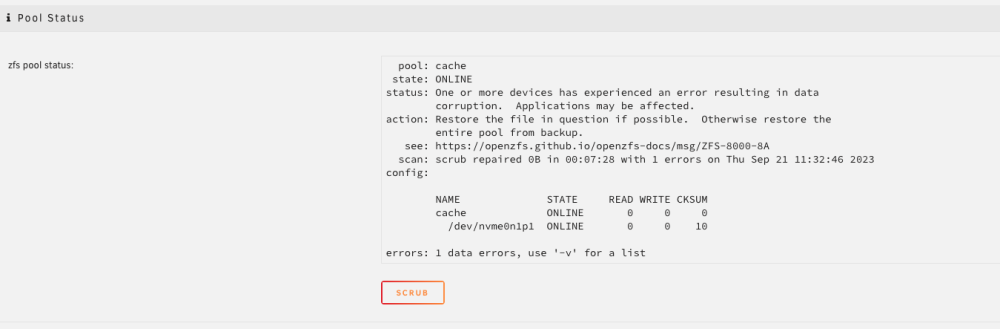
root@Tower:~# zpool status -v pool: cache state: ONLINE status: One or more devices has experienced an error resulting in data corruption. Applications may be affected. action: Restore the file in question if possible. Otherwise restore the entire pool from backup. see: https://openzfs.github.io/openzfs-docs/msg/ZFS-8000-8A scan: scrub repaired 0B in 00:07:28 with 1 errors on Thu Sep 21 11:32:46 2023 config: NAME STATE READ WRITE CKSUM cache ONLINE 0 0 0 nvme0n1p1 ONLINE 0 0 10 errors: Permanent errors have been detected in the following files: cache/appdata/PlexMediaServer@autosnap_2023-09-09_17:53:23_monthly:/Library/Application Support/Plex Media Server/Metadata/Albums/0/c62f8ccf8d6023d6747c86b7f947f883f2a0b48.bundle/Contents/_combined/posters/tv.plex.agents.music_213012c4ffcc15bbdd153a923e0e350b17c4a40f pool: disk3 state: ONLINE config: NAME STATE READ WRITE CKSUM disk3 ONLINE 0 0 0 md3p1 ONLINE 0 0 0 errors: No known data errors
-
Previous thread for info!
-
Ok, so sent back here after posting in ZFS Master! He suggested I scrub the pool, which I have done but still seeing this on the cache drive page?
-
Ok, thanks, I'll try that!
-
Hi, after loads of issues changing to zfs I finally got to the stage of being able to run @SpaceInvaderOne's create datasets script and that ran without errors! So I set up his snapshot and replications script and every time it runs it fails to replicate the Plex dataset! It also would fail if I copied using unRAID file manager and also running the appdata.backup plugin, so I restored from an older backup and that fixed file manager copying and backing up in the appdata.backup plugin, but it still fails with zfs replication! Not sure what to try next? Thanks Tim tower-diagnostics-20230920-1440.zip log 2.txt
-
Oh yes possibly! I'm using SpaceInvaderOne's script and that probably leverages the plugin? Can I move it or do I need to re-post?
-
Hi, after loads of issues changing to zfs I finally got to be able to run @SpaceInvaderOne's create datasets script and that ran without errors! So I set up this script and every time it fails to replicate the Plex dataset! It also would fail if I copied using unRAID file manager and appdata.backup plugin, so I restored from an older backup and that fixed copying and backing up in the plugin, but still fails with zfs replication! Not sure what to try next? Thanks Tim log 2.txt tower-diagnostics-20230920-1440.zip
-
Ok after much testing, the server has a pcie usb card, so I tried plugging stick into that and it booted but with 169 ip address so couldn't connect! I remembered that the usb card was bound to vfio, so shutdown pulled the stick plugged it into my mac and found the vfio config deleted the bindings and put it back in server booted up and it works! Had to re-plug coral device and ups to the card as well to get them working! So far so good, it seems something has happened to the motherboard usb!! Thanks for your help
-
Yes it was fine! I had rebooted a couple of times last week when changing cache and an array drive over to zfs!
-
Hi, yes one of them was a stock install of 6.12.4, I was looking for 6.9.2 to try that as a previous poster hade said but can't find it anymore to download?
-
It boots Ubuntu ok from a live USB SSD stick, so USB should be ok! So whats unRAIID's problem? I've now tried a clean install with same error!!
-
Yes, I always have? It's a separate pcie card.
-
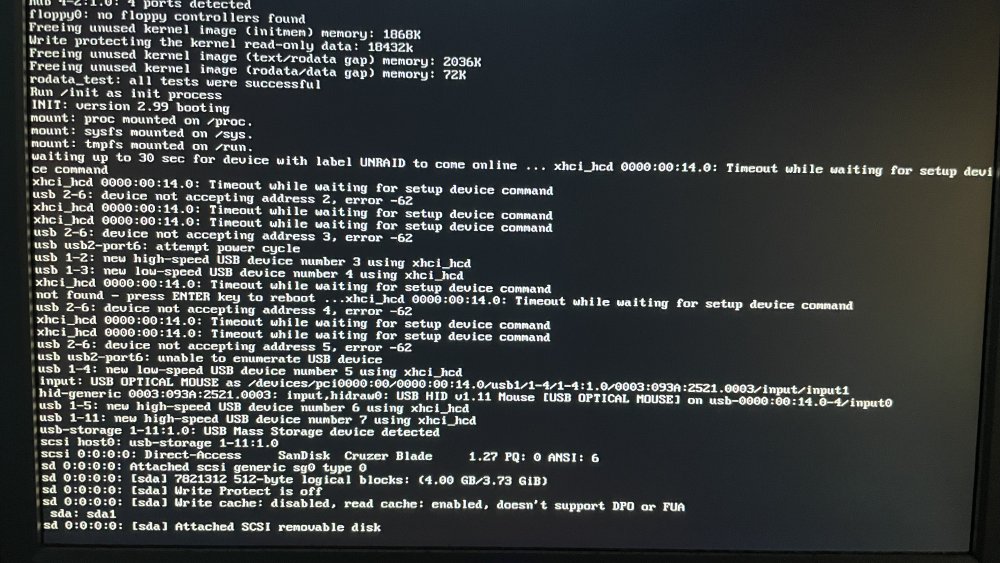
Hi, I suddenly have this exact issue! A VM caused unRAID to crash (AGAIN!!!) and now it won't boot!! I've tried 4 different sticks (1 Intenseo blue USB2, 2 Sandisk Cruzer Blades USB2 and 1 Kingston Datatraveller USB3) no idea what caused this, it's not happened before and not sure what to try next? ☹️ now stuck without a server!
-
Hi all, Time Machine has decided that it needs to start a new backup, it's been running fine for a couple of years so has probably become too fragmented! The only issue I've noticed lately is that whenever Time Machine was running all disks would stay spun up, even though the TM share is set to disk 3 only! Annoyingly I didn't manage to work out why! So first question is, is it a good idea to reformat disk 3 in the array as zfs so I use the extra features? And will this maybe fix the spinning up all disks issue? Or better to make a separate single disk pool? If separate pool then zfs or stick to xfs? What is everone elsedoing these days for Time Machine? Thanks Tim



