






MothyTim
Members
-
Joined
-
Last visited
Everything posted by MothyTim
-
Ok might have another go, but on my system the docker image fills up to 100% and then other containers start crashing!! Which is why I removed it in the end! I even increased the size of my docker image to 30GB!
-
Hi, did you work this out? Might fix my docker image filling up whenever anyone downloads a file problem! I might reinstall the app if so, as I removed it because it was unusable!!
-
Hi, I have been trying to setup olbat cups as some others here have suggested and can get it working but cannot work out how to make my setup persist a reboot! I've tried mapping /etc/cups to appdata/cups/config but this causes the container to fail to start, my limited knowledge of docker says that appdata is overwriting the container when I want it the other way round yes? Also need the HP plugin to persist as my Laserjet CP1025 color needs the propriatry plugin! If I run hp-plugin in the container console and accept the license then it works until reboot! My docker run command: root@localhost:# /usr/local/emhttp/plugins/dynamix.docker.manager/scripts/docker run -d --name='cupsd' --net='host' --privileged=true -e TZ="Europe/London" -e HOST_OS="Unraid" -e 'TCP_PORT_631'='631' -v '/var/run/dbus/':'/var/run/dbus/':'rw' -v '/dev/':'/dev/':'rw' -v '/mnt/user/appdata/cupsd/logs':'/var/log/':'rw' 'olbat/cupsd' Hopefully someone with better docker knowledge can see where I'm going wrong? Cheers, Tim
-
I’d like to be able to upload from IOS but really don’t want to try as it crashes other dockers that I need to run! my problem is universal as it doesn’t seem to matter what is used to download with!
-
So I've now setup Redis and still the docker image fills up whenever anyone downloads a file!!!!!! I daren't try to upload! Can't believe Nextcloud has reached version 17 with this bad a bug in it!
-
I have this problem no matter where files are uploaded/downloaded from iOS or browsers!
-
I have had the same problem since I installed Nextcloud over six months ago and have asked a few times and not got any answers so I don't think anyone knows! I did get one answer over on Nextclouds forum and they seemed to think it was a bug! A bad one in my opinion, makes it unusable for me and effects downloads or uploads to the server the same! I can't have a system that crashes all my docckers when someone downloads a file! So I leave it off until I find a solution! If you find one please post here and I'll do likewise! Cheers, Tim
-
Hi, I think I must have made a mistake in my config! All seems to work ok, but I have an issue when downloading large files from server (haven’t tried uploading to the server yet) all my large files are in folders on my array drives and accessed using external storage. When downloading my docker image fills up to 100% causing my other containers to freeze and sometimes crash! Is there a cache dir that I should have mapped to elsewhere? Cheers, Tim
-
Hi, you seem to have a slightly different problem to mine, rebooting the machine fixed the errors I was getting, or enabled the files to be read correctly! Not sure why rebooting the dockers didn’t do that! I’ve asked a couple of times and others have too about the docker image filling up and have never had an answer, so I guess no one knows! Odd behaviour though!
-
Now just the weird issue of my docker image filling up to 100% when someone downloads files, they are always large sound files, sometimes over 1GB each and they might download a folder up to 30GB or more. The files are on an array share that is excessed through Nextcloud using External Storage mapped to the share! Do I need to set-up memory caching? Cheers, Tim
-
umm now even more confused because its working!!! And the warning has gone! I did reboot the server earlier, so maybe that did it!? Thanks anyway for all you help! Cheers, Tim
-
Ok, well now I'm confused, because I haven't added anything except the line that seems to break it!? I deleted it as per instructions and it re-created itself, I then added add_header Strict-Transport-Security "max-age=15768000; includeSubDomains; preload;"; to try and fix the warning message?
-
Hi, sorry thats a red herring! It must of added .txt when I saved it to my desktop to then copy to here! Its not there on the server.
-
Hi, yes the Nextcloud container is on the same custom network as Letsencrypt container.
-
Nextcloud version 17.01 default.txtnextcloud.subdomain.confconfig.php
-
Letsencrypt docker.
-
Yes did that?
-
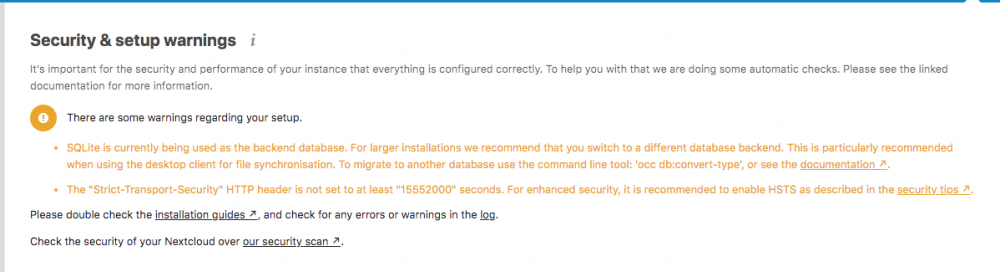
Hi, I have an issue with warnings and I'm stuck with one of them, I read back a few pages and found the fixes and ran some database comands all good. Added trusted proxies to config.php and deleted default file. rebooted and had the following warnings. So I edited the default file to add: add_header Strict-Transport-Security "max-age=15768000; includeSubDomains; preload;"; And then the webpage won't load, I get 502 bad gateway? My default file: default.txt Hopefully I done something daft? Also I still have a big problem when people download files from the server with the docker image growing to 100%! It kills some of my other dockers! Cheers, Tim
-
Thanks Squid, that fixed it! Well in CA anyway! I’ll post re dock in Unraid section! cheers, Tim
-
Doesn’t have any effect for me, portrait or landscape neither scrolls
-
Yes hadn’t noticed that! But only Docker tab with me, the VM tab scrolls ok!
-
Hi I’ve noticed that CA won’t scroll on ipad! Everything else works fine in the Unraid gui it’s just CA that seems to have this problem, makes it unusable! Has anyone else come across this problem? cheers Tim
-
Hi, hope someone can help! I’ve noticed that whenever anyone downloads a file from Nextcloud my docker image fills up to 100% and then drops back to normal! Is there a buffer somewhere that needs configuration? I’ve looked everywhere I can think of! This is downloading not uploading which is why I find it strange! It’s always from an Unraid share that I have configured through external storage. cheers, Tim
-
This is the config I've ended up with after much eperimentation! Devices show up and I'm able to add them and manage them! Cheers, Tim # make sure that your dns has a cname set for unms and that your unms container is not using a base url server { listen 443 ssl; listen [::]:443 ssl; server_name unms.YOURDOMAIN.com; include /config/nginx/ssl.conf; client_max_body_size 0; # enable for ldap auth, fill in ldap details in ldap.conf #include /config/nginx/ldap.conf; location / { # enable the next two lines for http auth #auth_basic "Restricted"; #auth_basic_user_file /config/nginx/.htpasswd; # enable the next two lines for ldap auth #auth_request /auth; #error_page 401 =200 /login; include /config/nginx/proxy.conf; resolver 127.0.0.11 valid=30s; set $upstream_unms unms; proxy_pass https://$upstream_unms:443; proxy_cache off; proxy_store off; proxy_buffering off; proxy_set_header Host $http_host; proxy_set_header Upgrade $http_upgrade; proxy_set_header Connection "Upgrade"; proxy_set_header X-Real-IP $remote_addr; proxy_set_header X-Forwarded-For $proxy_add_x_forwarded_for; proxy_set_header X-Forwarded-Proto $scheme; proxy_set_header Referer ""; client_max_body_size 0; } }
-
Hi, no longer seems to be an issue for me! I think my docker was growing because I couldn't connect any devices! Maybe it didn't like sitting there with nothing connected? I had another go at getting Letsencrypt reverse proxy to work and was finally successfull, since then the docker hasn't been growing! Cheers, Tim


