





JDK
Members
-
Joined
-
Last visited
Everything posted by JDK
-
Yeah all this was part of the troubleshooting phase. Voltage is hard to say whether i ever got that right or not because there are no specific parameters to hit. The point really was that none of this should be necessary just like it isn't with Intel, or many other linux distros running on AMD. I get there is nuance, edge cases, etc. and a smarter more motivated nerd than myself might have gotten to the bottom of things, but i couldnt justify the additional time that was needed for my specific AMD platform.
-
So whats the deal with AMD support for unraid? Back in 2021 i decided that my older Xeon setup sourced from ebay was no longer up to snuff. it was very reliable, but it was starting to show its age and a real power hog. I treated myself to a brand new AMD system built around the 24T 5900X which would give me modern hardware for the services i want to run reliably and perform well, as well have room to space for my hobby homelab. Everything went smooth and it was great. In March/April of 2025 i started seeing random crashes and reboots on a regular basis. it started slow like maybe once a week with complete reboots i would log in and see that its doing unexpected parity check. then in the following days i noticed services would be unavailable and i wouldnt be able to terminal in because the server is frozen. the logs never showed anything of value (i'd tail syslog to cache drive so it wouldnt be lost on reboot). 2-3wks went by where the server was down more than up, mostly because i have a demanding full time job and this shit is supposed to be a hobby for me, not a second job... I started reading how so many people had issues with AMD, but then also so many had no problems, including myself for the last several years. So I memtested ram for days, eventually replaced ram, motherboards, flash drives, hard drives (lol, i know, desperate), everything...except the CPU. i wasnt prepared to spend money to just replace for the same 4yr old CPU especially if there was any truth to an AMD curse. I did test the CPU (and the original build components) on a windows install and no problems whatsoever. but, nothing helped my unraid install. i was about to take the whole clusterfuck out back behind the barn when as if by magic things started staying up. one hour became a day became a week and before you knew it i was months removed from the nightmare. Then this past Thursday i notice ads while browsing and wouldnt you know it the server is down. instant flashbacks, but okay, this isnt server grade hardware so isolated problems every few months are acceptable i guess. Except it immediately showed those same symptoms from before. it would stay up for 10-15mins before crashing or randomly rebooting. sometimes getting stuck during the linux boot process. By Saturday morning i still couldnt resolve it and fed up i decided to pay my way out of the headache and just bought intel parts. by noon on Saturday i had it up and running on the intel parts as if nothing had ever happened. i realize the irony that this was the same experience i had when migrating from Xeon to the AMD system so i guess time will tell, but i have not seen anywhere near the amount of problems reported for people running unraid on intel systems. so whats going on, am i just unlucky and jaded or is there some unspoken truth to unraid not playing as well with AMD as Intel? love to hear some thoughts here. The AMD system i am currently writing this post from, but with a windows install. if all goes well here for the next few days i will simply sell these parts with a disclaimer in order to try recoup some of the migration cost.
-
I wasn't able to come back to this right away... I deleted /boot/config/rsyslog.cfg and rebooted, but issue still shows on fix common problems. /boot/config/rsyslog.cfg was recreated but is now a blank file vs having the obvious settings before. what is responsible for writing the content of /etc/rsyslog.conf because i would guess that is the problem.
-
thanks will try that and report back. im 88% through preclearing a new disk.
-
i have done that, and possibly every other combination possible on the form. result is the same. it looks like the config i posted above is some sort of a default template...is there some area where this might be configured?
-
it is, yes. i just connected via ssh to pull a tail on that log. root@SERVER:~# tail -f /boot/logs/syslog.log Apr 9 08:13:06 SERVER root: Fix Common Problems: Warning: unraid.patch.plg Not Compatible with Unraid version 7.1.0-beta.1 Apr 9 08:13:08 SERVER sshd-session[141710]: Connection from 192.168.0.100 port 50543 on 192.168.0.5 port 22 rdomain "" Apr 9 08:13:08 SERVER sshd-session[141710]: Postponed keyboard-interactive for root from 192.168.0.100 port 50543 ssh2 [preauth] Apr 9 08:13:12 SERVER sshd-session[141710]: Postponed keyboard-interactive/pam for root from 192.168.0.100 port 50543 ssh2 [preauth] Apr 9 08:13:12 SERVER sshd-session[141710]: Accepted keyboard-interactive/pam for root from 192.168.0.100 port 50543 ssh2 Apr 9 08:13:12 SERVER sshd-session[141710]: pam_unix(sshd:session): session opened for user root(uid=0) by (uid=0) Apr 9 08:13:12 SERVER sshd-session[141710]: User child is on pid 142329 Apr 9 08:13:12 SERVER sshd-session[142329]: Starting session: shell on pts/1 for root from 192.168.0.100 port 50543 id 0 Apr 9 08:13:12 SERVER root: Fix Common Problems: Warning: Syslog mirrored to flash Apr 9 08:13:12 SERVER emhttpd: read SMART /dev/sdi
-
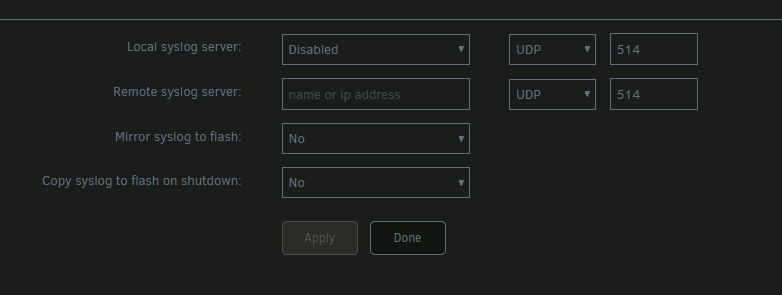
Now that i have my server running stable again, i am coming back to this and cannot figure this out. i have syslog server completely disabled at this point, but still fix common problems reports that syslog is being mirrored to flash. here's what rsyslog.conf looks like after i save the above config. # /etc/rsyslog.conf Configuration file for rsyslog. # # For more information see # /usr/doc/rsyslog-@VERSION@/html/rsyslog_conf.html $template flash, "/boot/logs/syslog.log" ################# #### MODULES #### ################# $ModLoad imuxsock # provides support for local system logging $ModLoad imklog # provides kernel logging support (previously done by rklogd) # limetech - we don't need no stinkin' MARKS #$ModLoad immark # provides --MARK-- message capability # ######### Receiving Messages from Remote Hosts ########## # TCP Syslog Server: # provides TCP syslog reception and GSS-API (if compiled to support it) #$ModLoad imtcp # load module #$InputTCPServerRun 514 # start up TCP listener at port 514 # UDP Syslog Server: # limetech - let's enable this #$ModLoad imudp # provides UDP syslog reception $UDPServerAddress 127.0.0.1 # localhost only $UDPServerRun 514 # start a UDP syslog server at standard port 514 ########################### #### GLOBAL DIRECTIVES #### ########################### # # Use traditional timestamp format. # To enable high precision timestamps, comment out the following line. # $ActionFileDefaultTemplate RSYSLOG_TraditionalFileFormat # # Use traditional Slackware console log level # $klogConsoleLogLevel 3 # # Set the default permissions for all log files. # $FileOwner root $FileGroup root $FileCreateMode 0640 $DirCreateMode 0755 $Umask 0022 # # Include all config files in /etc/rsyslog.d/ $RuleSet local $RuleSet RSYSLOG_DefaultRuleset $RuleSet RSYSLOG_DefaultRuleset $RuleSet RSYSLOG_DefaultRuleset $RuleSet RSYSLOG_DefaultRuleset $RuleSet RSYSLOG_DefaultRuleset $RuleSet RSYSLOG_DefaultRuleset $RuleSet RSYSLOG_DefaultRuleset $RuleSet RSYSLOG_DefaultRuleset # limetech - ok # $IncludeConfig /etc/rsyslog.d/*.conf ############### #### RULES #### ############### # limetech - everything goes to syslog. $RuleSet RSYSLOG_DefaultRuleset *.debug -/var/log/syslog # Uncomment this to see kernel messages on the console. #kern.* /dev/console # Log anything 'info' or higher, but lower than 'warn'. # Exclude authpriv, cron, mail, and news. These are logged elsewhere. #*.info;*.!warn;\ # authpriv.none;cron.none;mail.none;news.none -/var/log/messages # Log anything 'warn' or higher. # Exclude authpriv, cron, mail, and news. These are logged elsewhere. #*.warn;\ # authpriv.none;cron.none;mail.none;news.none -/var/log/syslog # Debugging information is logged here. #*.=debug -/var/log/debug # Private authentication message logging: #authpriv.* -/var/log/secure # Cron related logs: #cron.* -/var/log/cron # Mail related logs: #mail.* -/var/log/maillog # Emergency level messages go to all users: *.emerg :omusrmsg:* # This log is for news and uucp errors: #uucp,news.crit -/var/log/spooler # Uncomment these if you'd like INN to keep logs on everything. # You won't need this if you don't run INN (the InterNetNews daemon). #news.=crit -/var/log/news/news.crit #news.=err -/var/log/news/news.err #news.notice -/var/log/news/news.notice # ########## Remote Logging (we use TCP for reliable delivery) ########## # An on-disk queue is created for this action. If the remote host is # down, messages are spooled to disk and sent when it is up again. #$WorkDirectory /rsyslog/spool # where to place spool files #$ActionQueueFileName uniqName # unique name prefix for spool files #$ActionQueueMaxDiskSpace 1g # 1gb space limit (use as much as possible) #$ActionQueueSaveOnShutdown on # save messages to disk on shutdown #$ActionQueueType LinkedList # run asynchronously #$ActionResumeRetryCount -1 # infinite retries if host is down # remote host is: name/ip:port, e.g. 192.168.0.1:514, port optional #*.* @localhost:514 $DefaultRuleset local $DefaultRuleset RSYSLOG_DefaultRuleset $DefaultRuleset RSYSLOG_DefaultRuleset $DefaultRuleset RSYSLOG_DefaultRuleset $DefaultRuleset RSYSLOG_DefaultRuleset $DefaultRuleset RSYSLOG_DefaultRuleset $DefaultRuleset RSYSLOG_DefaultRuleset $DefaultRuleset RSYSLOG_DefaultRuleset $DefaultRuleset RSYSLOG_DefaultRuleset $DefaultRuleset RSYSLOG_DefaultRuleset *.* ?flash

-
thanks i feel like i resolved my issue now by adding a voltage offset. i had c-states disabled from the very beginning.
-
did you end up resolving your issue and if so did it involve any voltage adjustments? i have the same CPU suffering random crashes (confirmed is due to CPU).
-
back in business, baby! thanks you guys are great. disk mounts and im able to browse content. server-diagnostics-20250403-1828.zip
-
Thank you. Here's the output from that. the result states "File system corruption detected." with the button reading "Fix" now. i want to click it but going to make sure i ask so i dont lose anything. diagnostics below. Phase 1 - find and verify superblock... Phase 2 - using internal log - zero log... ALERT: The filesystem has valuable metadata changes in a log which is being ignored because the -n option was used. Expect spurious inconsistencies which may be resolved by first mounting the filesystem to replay the log. - scan filesystem freespace and inode maps... sb_fdblocks 251623534, counted 239557133 - found root inode chunk Phase 3 - for each AG... - scan (but don't clear) agi unlinked lists... - process known inodes and perform inode discovery... - agno = 0 Bad mtime nsec 2111207260 on inode 128, would reset to zero - agno = 1 - agno = 2 - agno = 3 - process newly discovered inodes... Phase 4 - check for duplicate blocks... - setting up duplicate extent list... - check for inodes claiming duplicate blocks... - agno = 0 - agno = 1 Bad mtime nsec 2111207260 on inode 128, would reset to zero - agno = 2 - agno = 3 No modify flag set, skipping phase 5 Phase 6 - check inode connectivity... - traversing filesystem ... - traversal finished ... - moving disconnected inodes to lost+found ... Phase 7 - verify link counts... No modify flag set, skipping filesystem flush and exiting. server-diagnostics-20250403-1817.zip
-
been struggling the last few days troubleshooting random crashes. with all the power cycles and troubleshooting i guess at some point i started the array without disk4 in it. so the next time i included it in the array and started it would try to rebuild the disk, but before that could happen the server would crash. i eventually moved the disks and flash over to other set of hardware and was able to complete the rebuild there, but now showing the disk as Unmountable: wrong or no file system. if i do format this disk will it rebuild from parity still after, or is the data on it lost now?
-
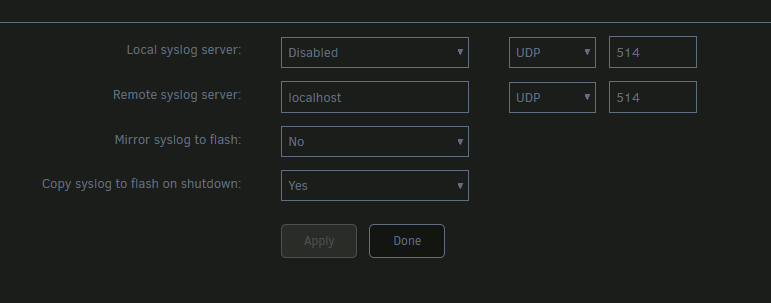
i settled on this running as user script on array startup. definitely getting better logs this way so went ahead and upgraded back to 7.0.1 and now just to wait and see. #!/bin/bash FILENAME="/mnt/user/syslog/syslog-$(date +%s)_tail.log" tail -f -n +1 /var/log/syslog > $FILENAME i went back to these settings on syslog server until i can figure out the crashing which is a primary concern for me.
-
yeah it exists and is writeable. i would have expected syslog to have a ton more information... while no idea why, syslog server is probably just messed up on my side for some reason. in the meantime i resorted to a more brutish tactic of just copying the syslog every few minutes via user scripts. a constant tail would probably be better so i will mess with that a bit still. FILENAME="/mnt/user/syslog/syslog-$(date +%s).log" cp /var/log/syslog $FILENAME server died again sine my previous post. i cannot tell what time, because even the mirror to flash didnt provide anything different form the sparse log i had in the share i set up. with that, im probably going to upgrade back to 7.0.1 if it happens again as it would be evidence that its not the version causing issues. i did run a full pass of memtest, but that came back clean.
-
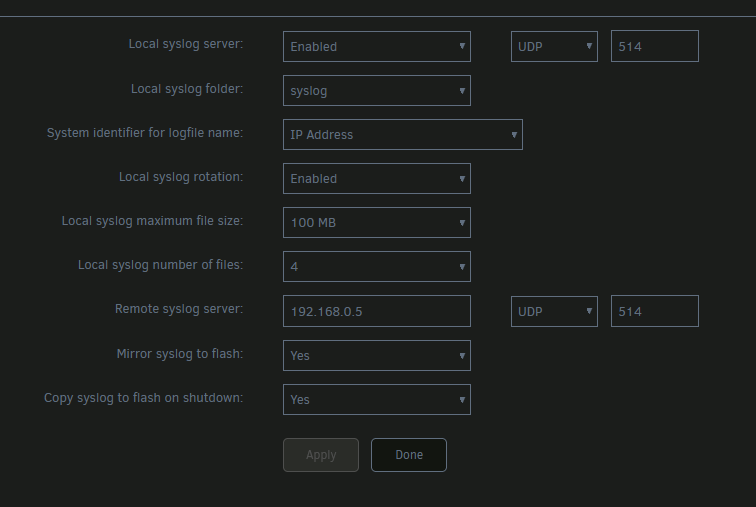
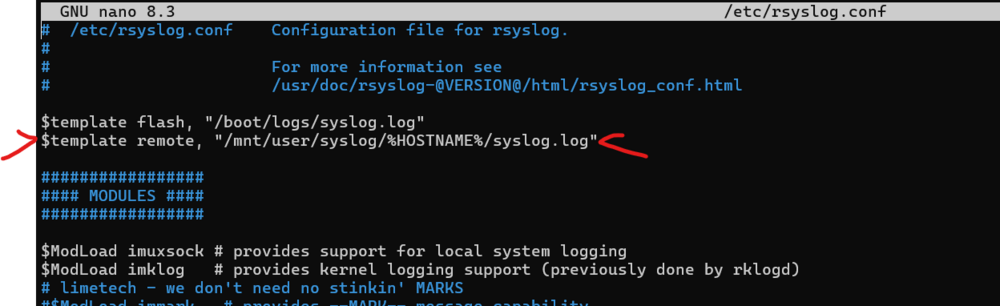
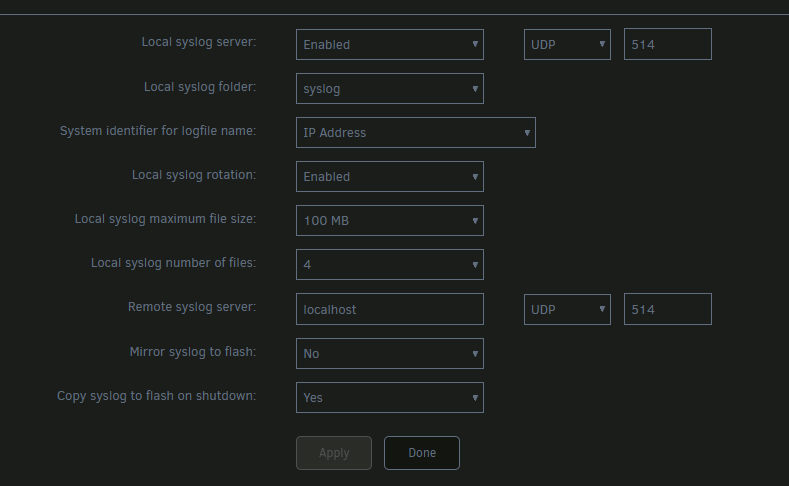
it doesn't behave differently. here are the changes (set IP and also enabled mirror to flash) i made and checked immediately after save. root@SERVER:~# rsyslogd -N1 rsyslogd: version 8.2102.0, config validation run (level 1), master config /etc/rsyslog.conf rsyslogd: Could not find template 1 'remote' - action disabled [v8.2102.0 try https://www.rsyslog.com/e/3003 ] rsyslogd: error during parsing file /etc/rsyslog.conf, on or before line 132: errors occured in file '/etc/rsyslog.conf' around line 132 [v8.2102.0 try https://www.rsyslog.com/e/2207 ] i have to go and add the template for remote manually and restart the process. once i have this in place, it does log to the share, but seemingly nowhere near all the events that get mirrored to flash. so i will leave flash mirroring on for now so i have a chance to catch the issue when the server crashes again. PS. this is clearly not an issue in 7.0.1; i rolled back to 7.0.0 and still have the same experience. server crash issue also not resolved by rollback as i had another crash this morning.
-
i have been struggling a bit recently with 7.0.1 becoming unresponsive every couple of days and then forcing a hard reset. i went to set up syslog server to make sure i can review a copy of the logs between restarts, but really struggled to get this to work. i eventually had to venture into /etc/rsyslog.conf and make edits to add the templates for flash and remote. after doing that the first time i went back to syslog server settings (via unraid UI) and touched/saved settings, and then it would overwrite /etc/rsyslog.conf with broken configuration. well, once i got it working i left it as is so i can try get a glimpse of what's tormenting my 7.0.1 install and while i got the logs, there was nothing of value toward solving the issue so i downgraded to 7.0.0 for now. i tested the webui again and it looks like the same issue persists. here's the output from rsyslogd -N1. root@SERVER:~# rsyslogd -N1 rsyslogd: version 8.2102.0, config validation run (level 1), master config /etc/rsyslog.conf rsyslogd: Could not find template 1 'remote' - action disabled [v8.2102.0 try https://www.rsyslog.com/e/3003 ] rsyslogd: error during parsing file /etc/rsyslog.conf, on or before line 130: errors occured in file '/etc/rsyslog.conf' around line 130 [v8.2102.0 try https://www.rsyslog.com/e/2207 ] i know how to fix it manually at this point but wanted to see if this is this a known issue or something that i have going on with my server somehow?
-
just found some dockers not responding and realized cache drive full. uninstalling mover tuning helped me out, thank you.
-
my dude! thanks for the quick reply. that did do the trick, and i can now wipe the nervous sweat off my brow and move on - thank you!
-
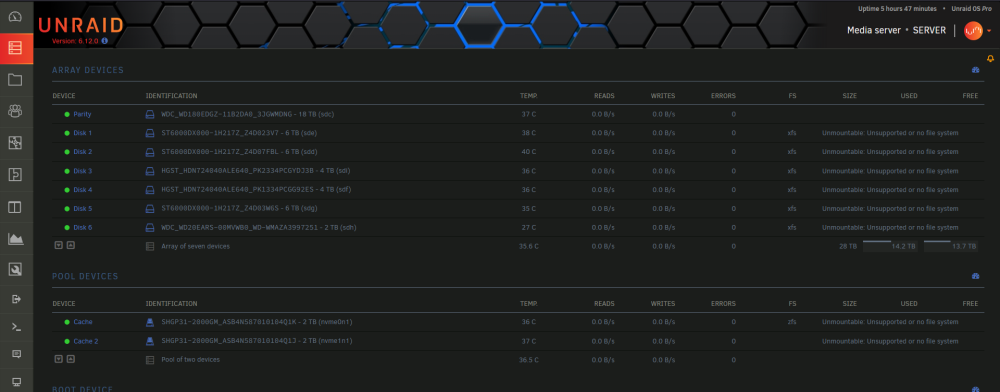
So I'm a bit stuck here, still at the start of troubleshooting and investigating this but in attempt to minimize how long I stay down for, I'm posting so long to see if anyone has a quick solution. I upgraded to 6.12.0 this morning and no issues there; things were running fine after upgrade. I then decided to convert my cache pool to zfs per this guide from Space Invader. Again no issues following this, but when it got time to format the cache pool after the array startup, it now looks like it wants to format my array disks as well! Has anyone run into this? server-diagnostics-20230617-1519.zip
-
were you able to get renaming to work? from the worker logs i dont even see an attempt to call the External Post-processor Script.
-
Updating to 4.7.6.0 fixed my image extract issue. At the time i tried, the binhex image hadn't updated to 4.7.6.0 yet, so i just switched to the official docker image. I simply had to point it to the previous appdata location and it fired right up.
-
I've had this issue now for a while, but only on certain video files, not all. take a look at this thread here: https://emby.media/community/index.php?/topic/110537-image-extraction-error/&do=findComment&comment=1169206 I was able to get things working again by going to binhex/arch-emby:4.6.7.0-3-01. I also just noticed from post above that binhex/arch-emby:4.6.7.0-4-02 works, so i tried that and can confirm this works for me as well.
-
You should be able to use one of the other elastic dockers and just specify the tag. for example i remember using FoxxMD's image. if you just look at the template you'll see where to change it to "elasticsearch:5.6.16". thats how i had v1.5 running before. I won't get to try installing v1.5 for a couple of days, but ill update here with my progress once i do get back to it.
-
Awesome, thanks. ill give this a poke tomorrow to see if i can get v1.5 back up. v2 was really simple actually and fewer steps since it no longer seems to require Redis or a specific version of Elastic (i have it running against 7.10.2). That said there is now so much confusing information because so many struggled getting v1.5 up in the first place that there are a loads of loose bits of info that can throw you off course when v2 really doesnt need it. If it helps you, these are the exact steps i followed while installing v2: Install CA User Scripts Create a new script named vm.max_map_count Contents of script as follows: #!/bin/bash sysctl -w vm.max_map_count=262144 Set script schedule to At Startup of Array. Add the docker container. Install Elasticsearch container from CA (for me, 7.10.2 works just fine using d8sychain's release) Install diskover container from CA configure all your variables, do not start the container upon creation. if you did, no problem, just power it down. i had to manually edit the config file (/appdata/diskover/diskover-web.conf.d/Constants.php) to set the ES_HOST variable. it does not seem to update from the docker template, resulting in failed connection to ES. start the container The diskover Application Setup documentation mentions the issue "The application doesn't start an index by default.", so i had to manually create the first index using below. docker exec -u abc -d diskover python3 /app/diskover/diskover.py -i diskover-my_index_name /data you can exclude the "-i diskover-my_index_name" and it will create an index using this pattern "diskover-data-211128210916". the index may take a while to crawl. you can see its progress here: http://server:9200/_cat/indices?v where 9200 is your ES port. optional: go back to CA User Scripts and create a new script using the command from previous step. i may have missed something in the config, but the v2 container is not creating indices automatically like the v1.5 container did. For me it took a few minutes for the first index to become accessible and i could actually use the diskover app. one thing to note is that you need to be careful to not delete the index you have selected in diskover ("Save selection" option). i did this and the app broke completely, not defaulting to one of the other indices. the only way i could fix this was to recreate the index using the command from step #4...at least the error gives you the name of the missing index.
-
So i had been using this container for a couple of years at least, then a few weeks (maybe months now?) ago it broke with some error in the logs that i didn't get to figure out at the time. Fast forward to this week and i finally get back to fixing this container on my server and see that we are now on v2. That seems to bring with it the fact that most of the great features are now locked behind pay editions. The v1.5 tags are still available, and i realize now that the initial issue that broke my container was likely due to an update because i can pull one of the more recent v1.5 tags and the same error is there, but going back a few versions (~JUN 2021) and no error. But the template is no longer available..does anyone have v1.5 still running and mins posting a screenshot of the template so i can see which variables to set up again?


