





coldjim
Members
-
Joined
-
Last visited
Everything posted by coldjim
-
Sorry to bring up old post. But how did you figure it was the HA Plugin doing this? Having the same issue with the disks not spinning now
-
Hi, I only seem to get USD and USX as currency options in my account settings. I can't find anywhere else to add GBP. Can someone help me with this? Thanks
-
Hi, For the life of me, i can't get wireguard to work with PIA either with Deluge or Qbitorrent. Everything should be correct and it works perfect with openvpn but the speeds are slow. It works with VPN off also. The problem is the UI goes to 'This Site Can't Be Reached', even though in the logs it looks like the UI should be started. Any chance someone could point me in the right direction with this? I've configured the wg0 to the closet region but still no luck. [info] france.privacy.network [info] slovenia.privacy.network [info] mexico.privacy.network [info] ro.privacy.network [info] au-australia-so.privacy.network [info] nl-netherlands-so.privacy.network [info] bo-bolivia-pf.privacy.network [info] nigeria.privacy.network [info] fi-2.privacy.network [info] liechtenstein.privacy.network [info] ae.privacy.network 2025-01-23 12:47:15,627 DEBG 'start-script' stdout output: [info] Successfully assigned and bound incoming port '31894' 2025-01-23 12:47:15,925 DEBG 'watchdog-script' stdout output: [info] Deluge listening interface IP 0.0.0.0 and VPN provider IP 10.39.250.204 different, marking for reconfigure 2025-01-23 12:47:15,930 DEBG 'watchdog-script' stdout output: [info] Deluge not running 2025-01-23 12:47:15,935 DEBG 'watchdog-script' stdout output: [info] Deluge Web UI not running 2025-01-23 12:47:15,939 DEBG 'watchdog-script' stdout output: [info] Privoxy not running 2025-01-23 12:47:15,940 DEBG 'watchdog-script' stdout output: [info] Deluge incoming port 6890 and VPN incoming port 31894 different, marking for reconfigure 2025-01-23 12:47:15,942 DEBG 'watchdog-script' stdout output: [info] Attempting to start Deluge... [info] Removing deluge pid file (if it exists)... 2025-01-23 12:47:16,397 DEBG 'watchdog-script' stdout output: [info] Deluge key 'listen_interface' currently has a value of '10.20.254.102' [info] Deluge key 'listen_interface' will have a new value '10.39.250.204' [info] Writing changes to Deluge config file '/config/core.conf'... 2025-01-23 12:47:16,699 DEBG 'watchdog-script' stdout output: [info] Deluge key 'outgoing_interface' currently has a value of 'wg0' [info] Deluge key 'outgoing_interface' will have a new value 'wg0' [info] Writing changes to Deluge config file '/config/core.conf'... 2025-01-23 12:47:16,992 DEBG 'watchdog-script' stdout output: [info] Deluge key 'default_daemon' currently has a value of '2648ae8965e349d6ae20ad931f3fddff' [info] Deluge key 'default_daemon' will have a new value '2648ae8965e349d6ae20ad931f3fddff' [info] Writing changes to Deluge config file '/config/web.conf'... 2025-01-23 12:47:17,049 DEBG 'watchdog-script' stdout output: [info] Deluge process started [info] Waiting for Deluge process to start listening on port 58846... 2025-01-23 12:47:17,588 DEBG 'watchdog-script' stdout output: [info] Deluge process listening on port 58846 2025-01-23 12:47:20,249 DEBG 'watchdog-script' stdout output: Setting "random_port" to: False Configuration value successfully updated. 2025-01-23 12:47:20,249 DEBG 'watchdog-script' stderr output: <Deferred at 0x14a58a2c4190 current result: None> 2025-01-23 12:47:22,948 DEBG 'watchdog-script' stdout output: Setting "listen_ports" to: (31894, 31894) Configuration value successfully updated. 2025-01-23 12:47:22,948 DEBG 'watchdog-script' stderr output: <Deferred at 0x14bf8b9bc190 current result: None> 2025-01-23 12:47:25,648 DEBG 'watchdog-script' stderr output: <Deferred at 0x1501e48ac190 current result: None> 2025-01-23 12:47:25,737 DEBG 'watchdog-script' stdout output: [info] No torrents with state 'Error' found 2025-01-23 12:47:25,738 DEBG 'watchdog-script' stdout output: [info] Starting Deluge Web UI... [info] Deluge Web UI started 2025-01-23 12:47:25,740 DEBG 'watchdog-script' stdout output: [info] Attempting to start Privoxy... 2025-01-23 12:47:26,751 DEBG 'watchdog-script' stdout output: [info] Privoxy process started [info] Waiting for Privoxy process to start listening on port 8118... 2025-01-23 12:47:26,757 DEBG 'watchdog-script' stdout output: [info] Privoxy process listening on port 8118
-
Thank you for your help! I finally got it working again, had to increase the the number to 4000000. Its running great now!
-
Thank you! I have increased the number from 524288, to 720000 but i'm still stopping. Is there a limit to the inotify number? what are the downsides to keep increasing this?
-
Here they are: tower-diagnostics-20240813-1428.zip
-
Hi, until recently file activity worked great, however no everytime I start up the plugin it goes into a 'stopped' state straight away. I have searched the thread and found a suggestion to turn off unassigned devices and cache & pool disks, which I have, but still no luck. Any advice on this? Thanks
-
Hi, I have an issue that is driving me mad at the moment. This morning, unraid was working fine, but then it crashed and now all of it sudden I can't use the Webgui. It will let me access the GUI to log in but once I start the array the GUI stops working, however I can still SSH into the machine. Also Dockers seem to work even though the Webgui is down. I have disabled the VM manager (have 2 virtual machines on there), and I have disabled the dockers, but still no luck. I have seen some posts about nginx (i have a novice, so i dont know what this really does), but when i try to run commands for this such as start or stop, i get "no such file or directory: /etc/rc.d/rc.nginx". Don't know if this will help? I have attached my diagnostics below. Any help I'd really appreciate Thanks tower-diagnostics-20231015-1041.zip
-
Sorry for the very basic question, but how do i get moonlight/sunshine up and running as a host on this? I have very basic linux knowledge
-
I have it working with OpenVPN now, but Wireguard isn't working still.
-
Ok thanks for looking. I have deleted my post with supervisord log and changed the password now. Thanks for letting me know, didn't realise it was in there. I will keep digging
-
yes it is, trying to do this all from home at the moment on the same lan
-
ye it works when i turn the vpn settings off, but i wanted to use wireguard and PIA
-
Hi, Im really struggling to get Qbittorrent to work with PIA and Wireguard. The webUI doesn't load at all. I'm very new to PIA and wireguard but trying to learn. Everything should be set up. I've changed the webport to 8585 but then recreated an additional port following binhexs instructions. I've also added --privileged=true to the container. I'm at a loss here. I'd appreciate the help if possible
-
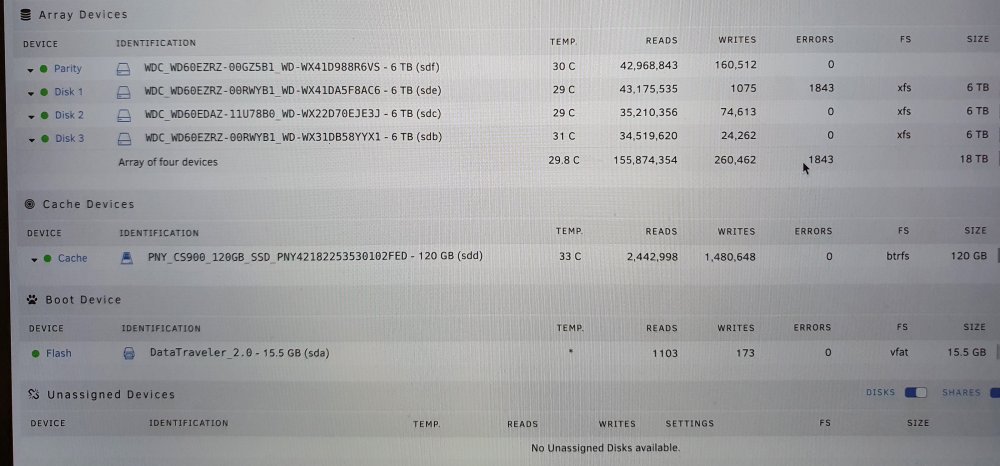
From the diagnostics, can you see if disk1 is healthy? (AC6) Could i not try do a new config put them all back to how they should, minus the parity, and see if i can read from them all? My data should be still intact on a new config, correct? If this works, I could use the new drive I bought as the parity?
-
I think i've really screwed up now.... Here is my diagnostics attached. I have also attached how many unraid server looked BEFORE anything happened. I have since tried to add a new drive as a data drive (to the one that failed) which is Disk1 (AC6). But this was before i realised the parity had the bent back pin. Everything has all gone wrong at once I don't know how i'll get back into a normal state from this tower-diagnostics-20211125-1512.zip
-
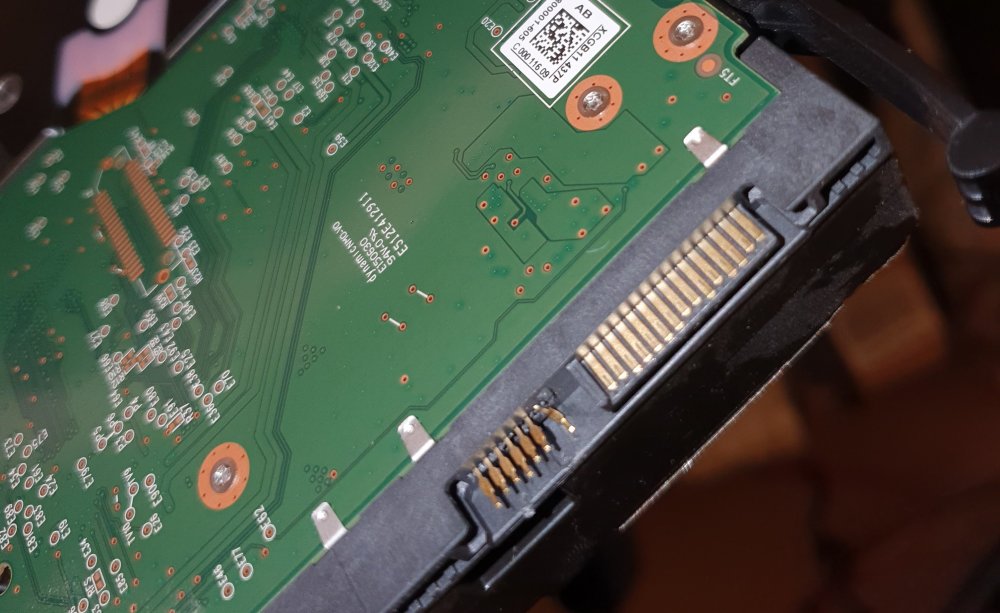
The error on the data drive keeps throwing up read errors, thats the issue I keep having so I can't get the data off. I have attached an image of the bent pin. The plastic case came off and exposed the pins, and one of them has bent back. Its due to having clip on sata cables and I must of mistakenly pulled it at some point then tried to put it back on without knowing the pins were exposed.
-
I tried to change sata cables and ports but it kept giving me bad sectors/errors. I think the drive was bad. I can't now as my server is completely down. I have a bent pin on the sata connector of the parity drive and the data drive I think its now bad. Unless I power it up without the parity and do a diagnostics then? Just not sure how to go about this without losing data. I have lost a partity and data drive by the sounds of it. I have two other data drives that should be ok in the machine.
-
Hi, I'm really not sure what to do here or how much I have lost but basically a data drive was acting up so I have come to replace it, but now i've noticed that the Parity drive sata port pins have been damaged (due to the clip on sata cables) and one of the sata pins is bent. That means I have lost a data drive and the parity disk at the same time. What are my options here? Really needed the data from these drives.
-
Hey, I built, what I think was, a NAS Killer 3.0 a few years ago (from serverbuilds.net). It has worked great for a long time but now I think it's finally time to upgrade this. Theres a few problems and things/features I would like to upgrade in my next build. The main use for my server is Plex. For my own use locally and for a few users streaming. I also use it as a back up drive for general use and as a Time Machine for my macbook. Other uses I would like is to run up a couple VM's, but I haven't got around to this yet. The current set up is: Intel S5500BC Motherboard 2 x Intel l5630 CPUs 12gb RAM Corsair CX550M PSU 4 x 6TB (including Parity drive) Western Digital hard drives Antec Three Hundred Two tower The problems I currently have with this build are: * If the tower happens to shut down, it is a nightmare to get back on! It has to be rebooted several times/get really lucky for it to come back on. Once its booted, its fine and stays up. * Unraid can't be upgraded past 6.7.2, as it crashes every few days if you go past this point. Its stable on 6.7.2, I have tried many times to upgrade but the server stays up for a few days then crashes. * Some of the RAM slots are broken on the CPU, so can't put any more RAM into the machine These are the main problems with my build. They seem to all point towards the motherboard, but I'm not sure what I'd replace it with at this point. However the features I would like in my next build would be: * Smaller, quieter case/build. The Antec Three hundred just takes up too much room, and is quite loud so you can't really be in the same room as it. I'd also like it so I can easily pop out drives and replace them, its not that easy in this case. * Be able to stream 4K video. I currently download 4K videos for myself to play locally and they work great, however the people that stream from me can't play the videos so I have to delete my 4K version to replace it with a 1080 version for them to stream. I would like to just be able to stream these 4k files (even on direct play, it seems to stutter). These are the main two, but I'd also like to solve my problems of not being able to update Unraid, and it booting up first time! If there is any advice, then I would really appreciate it, there are so many options! Thanks
-
Thanks for this, i am having unpacking issues also. Do i have to delete the old NZBget, before i use this method to get the old one?? Thanks

