





adgilcan
Members
-
Joined
-
Last visited
Everything posted by adgilcan
-
Thanks for your help on this. It appeared to be the PLEX_CLAIM change which had tripped me up plus something(s) else. Despite being fully updated it simply wouldn’t work, so I deleted all but the appdata, including the template and started again. Now it works fine.
-
Well I have logged out of both the app and the plex.tv site, changed the password and logged back in again. That has not enabled access to my server. That is what I mean by "it doesn't seem to be that". I have googled "What if Your Plex Account Requires a Password Reset?" and I came up with: Docker For Docker installations, you’ll need to generate a claim token (via https://www.plex.tv/claim) for your Plex account and then set that as the value of the PLEX_CLAIM parameter of the Docker configuration. Refer to the Plex Media Server Docker documentation for more details. However, as I said, I cannot find the PLEX_CLAI(M parameter in the docker config. I can't give you information I don't have. I posted the docker log and got a somewhat unhelpful response. I don't know what other information you need. You did ask for the admin panel log. Where would I find that? Thanks
-
No, it doesn't seem to be that but I do have a "Plex Claim" token to be pasted into the PLEX_CLAIM parameter. The problem is I cannot see that option Any ideas?
-
Ahh, that could be it. I am in the process of rebooting but will check that out and report back. Thanks! D
-
I'm not sure what you mean by "claiming my server yet". As i mentioned, My server was working perfectly (and has been for about 10 years) but does not anymore. I have a Movies share on my server which should be accessible by Plex but somehow plex does not recognise the docker container PlexMediaServer
-
Any ideas as to why my server should have gone from working perfectly a few months ago to now not recognising the docker container and giving this error?

-
Thanks. However I’m more worried by the fact that I can’t access my Plex movies because of some problem. Do you have a solution for that?
-
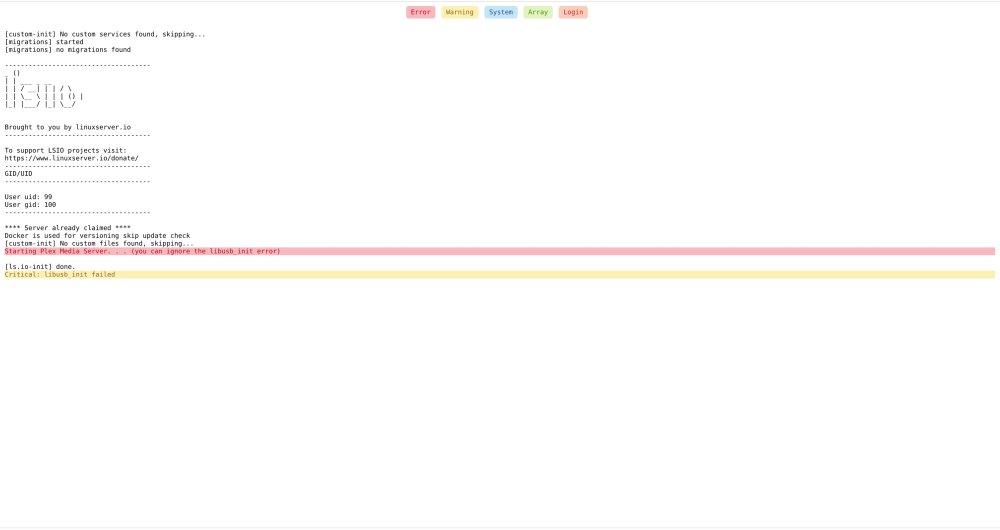
My PlexMediaServer seems to have developed a fault. I haven't used it for about 5 months and I am getting the attached message whenever I try to open my media on it. I am running v6.9.2 of UnRaid. Any ideas? Thanks

-
Brilliant! Thanks for the help Crilith I had a corrupted copy of BigSur and couldn't get to reinstall it. Luckily I had kept the original install media but this is a great fix. Thank you
-
Brilliant, that did the job. Thank you! Was that in SpaceInvader's video? If so I missed it. Thanks again D
-
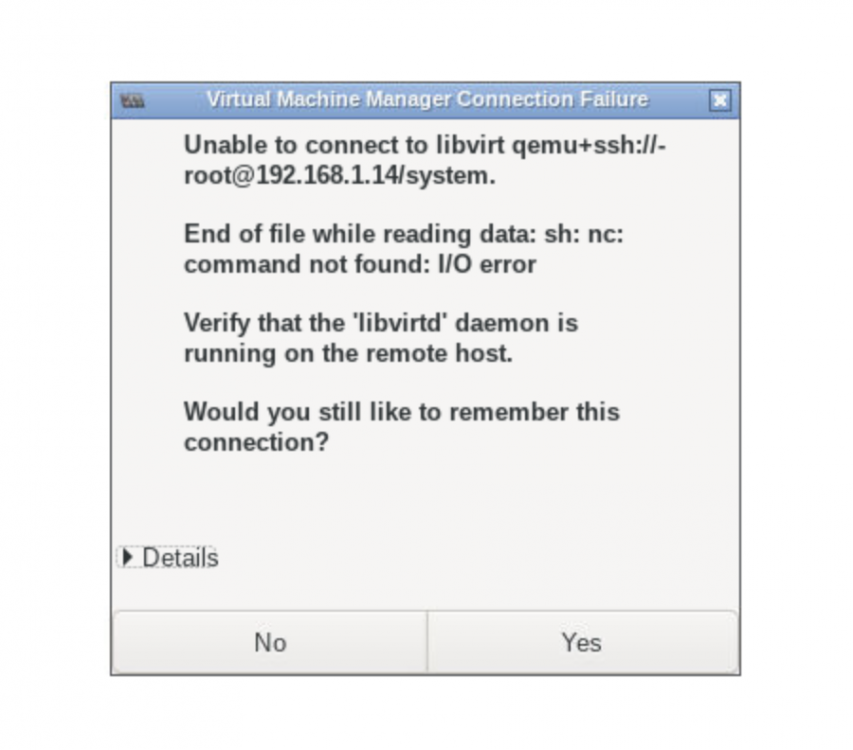
Trying to use virtmanager and following the instructions in the video but I'm unable to connect. This is the error message I get:
-
I am trying to install Macinabox Big Sur, too. The problem I am getting is that when I have downloaded opencore configurator and mounted the QUEMU hard disk media EFI, there are no files to copy to the desktop. Where could they have got to? I'm seriously looking forward to not having to replace the custom XML everytime I tweek a setting on a VM. Thanks so much for your great work Spaceinvaderone!
-
Thanks chatterbox I'll give it a go but hopefully some of our developers will be able to offer a better/ safer way to do it. Thanks for the info, though D 👍
-
I have a very similar problem in that I have a Naim NDX music streamer which requires any servers to be UPnP. I am very wary of UPnP due to the security issues but would like some advice on if there is a safe and high quality way of serving music to the Naim streamer using either plex or another plugin (such as Asset UPnP?). Could I bump this up for consideration by our expert senior members, please? D
-
Hi Thanks for a wonderful plugin. Absolutely great. Could you help me with lowering the fan speed threshold on the motherboard BMC, please? I have an X10 board. The config tab is blank so I'm unable to scroll down to the fans as you suggest above. Am I doing something wrong or is there a command to type in? So many thanks D
-
All worked well apart from a couple of curiosities: 1). The data transfer rates from disk to disk were painfully slow at around 30Mb/s to 80Mb/s. Strangely, even though I was doing it through Krusader, it seemed to slow down even further when my laptop was off and it took well over 12 hours to transfer 1.5Tb 2). All replacement disks had been formatted in Unassigned Devices but when they were assigned to the array and data transfer attempted, one of them kept throwing up the error "Not enough space......" And then became an unmountable drive. The others were fine. I got around it by putting it back as an UD, reformatting it and transferring the data as two UDs, then resetting the array, reassigning it to the array and doing a new parity build. Long-winded and SLOW (took a couple of days of data transfer etc) but all done now. Thanks for your help D
-
Thank you itimpi, that is a great explanation. I am in the process of transferring data but will do as you suggest afterwards. Thanks again D
-
Again, I know this is an old thread but may I ask for some pre-emptive confirmation? I am replacing three of my old drives that are showing signs of impending failure. They are all original disks formatted in reiserfs. I would like to migrate to xfs format. I have precleared three new WD red 3TB disks The first disk replacement I tried was one precleared but unformatted 3Tb drive. I stopped the machine and swapped the disks, then started up again and selected the new HDD in place of the old drive. Parity sync and rebuild took place fine but the format is still reiserfs despite the default now being xfs. I have now mounted the other two drives as unassigned disks and formatted them as xfs. My question is: when I swap them into the array as replacements for the two reiserf drives, will the format remain xfs, or will it revert to the original drive format? If I were to transfer all data onto the new drives whilst they are still mounted as Unassigned drives, would this make a difference when I swap them in? I am thinking that I might have to reformat the new reiserfs drive in situ and then rebuild again? Can anyone shed any light on the logic here? Many thanks, indeed D
-
Ed You are so right - and I knew that too. Don't know why it slipped my mind! Thanks again. All is up and running well now. Apart from my Nvidia GPU passthrough on Catalina . Did you do a video which is relevant to this and Macinabox? Cheers D
-
Hi I successfully installed Nextcloud in a docker container but then due to other issues completely deleted the appdata share. Now that I come to reinstall Nextcloud I cannot either create the admin account using my original username or add it afterwards as a user. The error I get when trying to add it as a the initial admin account is that "Username is invalid because files already exist for this user" (see attached file) but that user does not appear on any list and, therefore cannot be deleted. If I try to add the username using the web GUI, I get the error "An error occured during the request. Unable to proceed. Bad request". The Mariadb has also been deleted, reinstalled and a new database created. It seems that the original username is stored somewhere even though it is not visible. Are you able to help me delete it so that it can be used again? Many thanks D Files already exist for this user.rtf
-
Thanks so much I'll try that and get back to you. Cheers 🤗
-
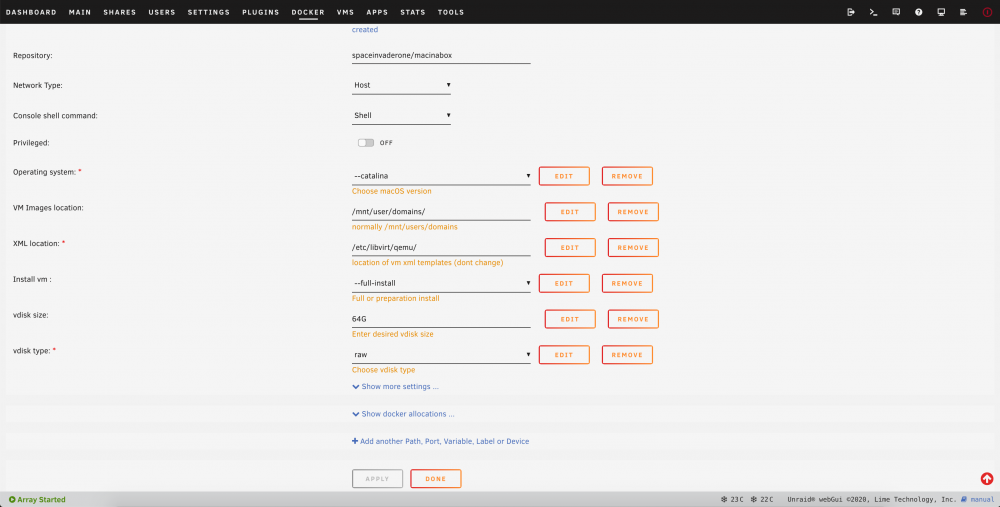
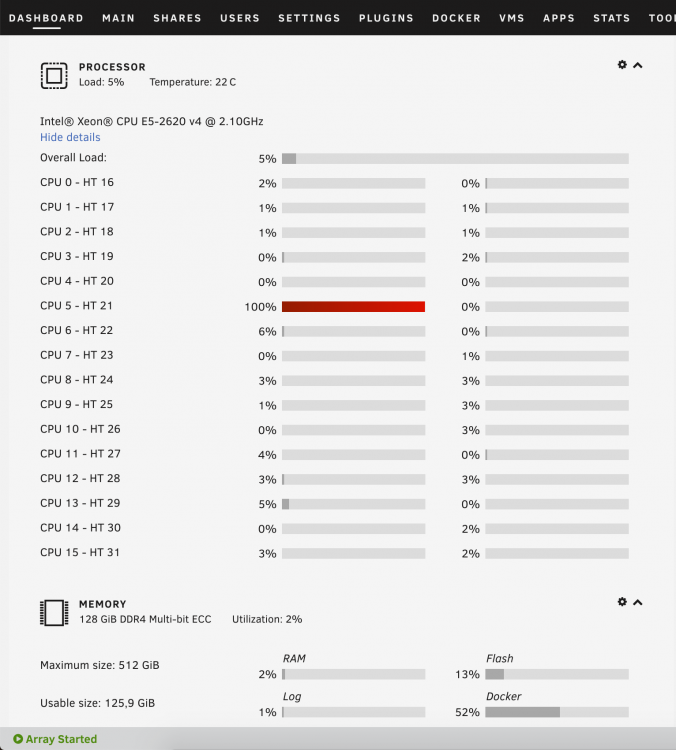
I have tried and failed to get Macinabox to work for me on either Mojave or Catalina. The Macinabox docker is configured like this: I get a (supposedly) successful install of macinabox VM: Macinabox Catalina install Log.rtf using a VM config of: Macinabox Catalina VM XML.rtf However, when I start the VM it loads the clover screen but when I press Enter to install it hangs with a blank screen. I have a 500Mb/s internet connection and have left it overnight in case it was downloading anything. Apart from the blank (black) screen, the first thread of the CPU runs non stop at 100%, (see screenshot below) so I'm guessing something isn't right. The current config shows me using 2 cores of the CPU and 4Gb RAM. I have tried with 4 cores (not the first one reserved for UnRAID) and 8Gb RAM. I have tried all sorts of machine types. Any of the i440fx machines produce an error about pci-root but all of the Q35 variants allow the clover screen to load but hang thereafter. I'm stumped. I'm running a new Supermicro motherboard with dual core Xeon CPUs and 128Gb RAM: Any help would be VERY much appreciated! I've managed to get a Windows 10 VM working perfectly - thanks again to Spaceinvaderone for his great videos! Sorry for the long post! PS Try as I might I couldn't find the OSKey to obscure. Has this been removed, or does it only come up after successful installation of the OS? Many thanks D
-
Thanks Gary I tend to agree! Thanks very much D
-
I have a Supermicro C2SEA motherboard (as recommended by Limetech back in 2011). There was a BIOS update released in 2012. Are you suggesting that I should upgrade to this BIOS anyway, or only if I encounter problems with the latest UnRaid versions? Thanks so much


