Everything posted by frodr
-
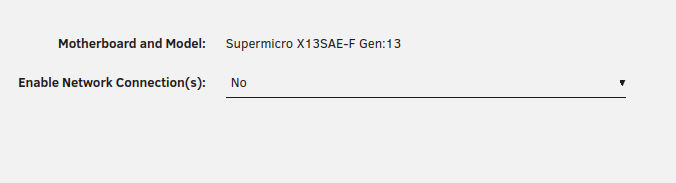
I was able to get it running, when I set "Enable Network Connection(s) to No. Last time I had it running, it was always Yes.
-
I used to have this plugin running. But now its Connection fault. DOuble and triple check ip/user/pass. Done bmc reset, reinstalled plugin. Can't get to connect. Don't see anything in system log. // Frode kjell-diagnostics-20260820-1436.zip
-
"If you don't see the idiot in the room, its you,"This time, me. I moved my PC til the same same VLAN as the server, but had a an override in Unify setup that kept it on the original VLAN. I removed that, and now I get container GUI.
-
After PIA changed IP's servers and new conf files is installed, no GUI on the containers on wg0/wg1. Hand shake and ping is ok, no error in container logs. I used to run user script to handle return traffic. I have added another WiFI point on the same VLAN as the server run on. So, no need for this user script. I also tried an tunnel with Mullvad VPN, same issue. Grateful for help. // Frode kjell-diagnostics-20260729-2257.zip
-
When applying number of VF on iGPU, I get this error; Error: Failed to change VF configuration: Failed writing to /sys/bus/pci/devices/0000:00:02.0/sriov_numvfs: file_put_contents(): Write of 1 bytes failed with errno=2 No such file or directory Claude says that iGPU and XE drivers crashes and suggests adding to syslinux: "append initrd=/bzroot intel_iommu=on iommu=pt i915.enable_guc=3 modprobe.blacklist=xe" I have not yet tried that. What is the correct way to fix this? Cheers, // f kjell-diagnostics-20260611-0638.zip
-
I downloaded new config files thru PIA-WG-Config-Generator, it handskakes and pings, but not connection for connected containers. I had Ed support on it last time it didn`t works, then handshaking was not working. This time handshaking is working. Do I need any port forwarding? Happy for feedback. // Frode kjell-diagnostics-20260312-1415.zip
-
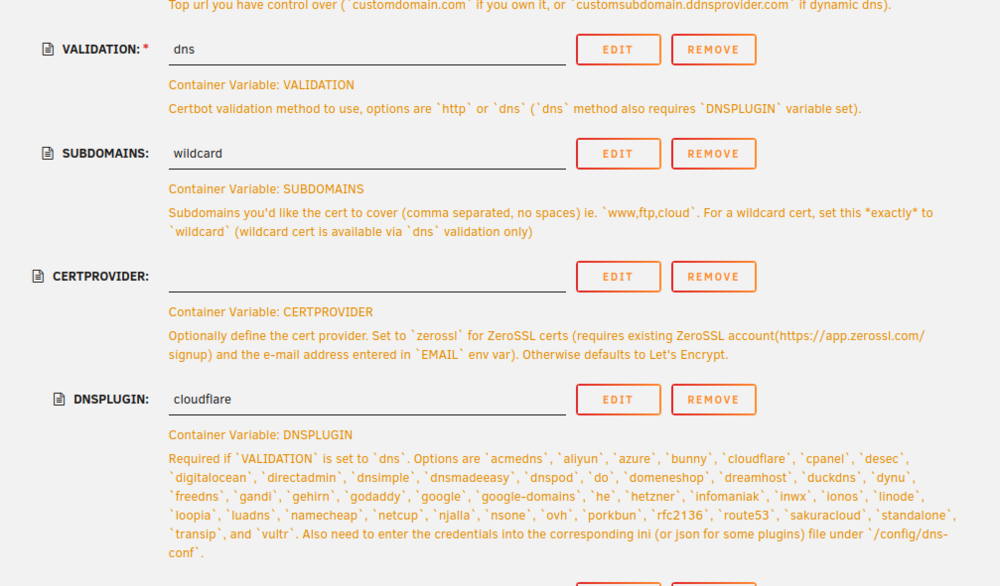
I am removing the dns admin from Cloudflare to original registrar. The SWAG setup is as SpaceinvadeOne setup video. My registrar do not have a dns plugin. But I like to keep dns admin at the registrar. How can/should I go about to set the up. I tried changing validation to http and remove the line "dns plugin". The LetsEncrypt insist on port 80.
-
Hi, I want to run isolated firefox browsers, and added a custom docker network to run a firefox container. It works, but is quite sluggish, especially when first time loading a home page. The server includes a AdGuard Home/Unbound dns setup. The firefox container passed traffic thru Docker DNS (127.0.0.X) which is the suspected reason why browsing is sluggish. Forcing --dns 10.10.50.60 in Extra parameters brakes the container. Running macvlan in the server. Any recommendation how to setup? //F
-
trying to delete this one. Moved it to the Docker Container part. //F
-
It isn´t a risk of loosing my pool, unless I screw up. “What´s the point of troubleshooting if you never make any trouble……" But something strange happened during transcoding since available space read 0T. Any my not so qualified friend said I had a “ZFS-collapse” and should delete files to get below 80%. I guess keeping zpools under 80% usage is a good advice.
-
So …./filmer is empty, but shapshots at about 23TiB? Would I be able to rollback with only 10TB available? This one below is correct?
-
Outputs.rtf
-
It was showing 0T after 1-2 hours in the Unmanic transcoding. After deleting about 30T, it now reads only 10T available. In…./filmer there is 0 files, still: root@kjell:~# zfs get -Hp used lageret/media/filmer lageret/media/filmer used 25095390259344 - Yes, rebooted several times.
-
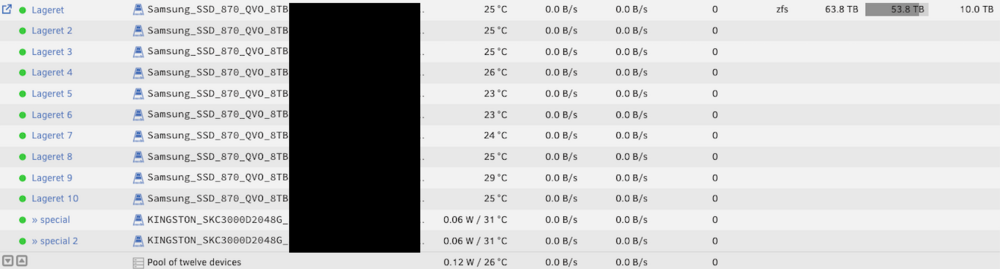
This is an urgent one for me. In the server “kjell”, it is a ZFS pool of 10 x Samsung_SSD_870_QVO_8TB, plus special. The media library holds 95% of used space. And when the desbribed issue occurred, about 52T of 64T was occupied. I was running a transcoding job in Unmanic on this server, and another Unmanic job on the other server (helmaxx) on a different media share on the first server. At the same time I was trying to setup a second GPU on the second server (helmaxx), controlled from Unmanic on the first server (kjell) with help from Unmanic Discord forum. The second GPU Unmanic container started to report receiving jobs, but only one or two workers actually did any work. After a while, first server (kjell) reported 0T available. Troubleshoot was done with my good!?? help Chat, which reported ZFS “collapse”. Chat recommended to delete files to usage below 80%, and ZFS should be ok again. Several attempts, and I risk loosing the pool altogether. I deleted a lot of files, and see strange 0 files in …../filmer and at the same time 25T usage. It is a way to solve this? That would be something….. // frodr root@kjell:~# zfs get -Hp used lageret/media/filmer lageret/media/filmer used 25095390259344 - root@kjell:~# zfs get -Hp logicalused lageret/media/filmer lageret/media/filmer logicalused 25215583430656 - root@kjell:~# zfs get -Hp used lageret/media/serier lageret/media/serier used 20942021724592 - root@kjell:~# zfs get -Hp logicalused lageret/media/serier lageret/media/serier logicalused 20999065692160 - root@kjell:~# ls -lh /mnt/lageret/media/filmer total 0 NAME SIZE ALLOC FREE CKPOINT EXPANDSZ FRAG CAP DEDUP HEALTH ALTROOT lageret 74.6T 61.2T 13.4T - - 0% 82% 1.00x ONLINE - raidz1-0 36.4T 30.5T 5.83T - - 0% 84.0% - ONLINE sda1 7.28T - - - - - - - ONLINE sdb1 7.28T - - - - - - - ONLINE sdc1 7.28T - - - - - - - ONLINE sdd1 7.28T - - - - - - - ONLINE sde1 7.28T - - - - - - - ONLINE raidz1-1 36.4T 30.6T 5.76T - - 0% 84.2% - ONLINE sdf1 7.28T - - - - - - - ONLINE sdg1 7.28T - - - - - - - ONLINE sdh1 7.28T - - - - - - - ONLINE sdi1 7.28T - - - - - - - ONLINE sdj1 7.28T - - - - - - - ONLINE special - - - - - - - - - mirror-2 1.86T 34.2G 1.83T - - 14% 1.79% - ONLINE nvme4n1p1 1.86T - - - - - - - ONLINE nvme5n1p1 1.86T - - - - - - - ONLINE kjell-diagnostics-20251204-1657.zip
-
That worked. Thanks!
-
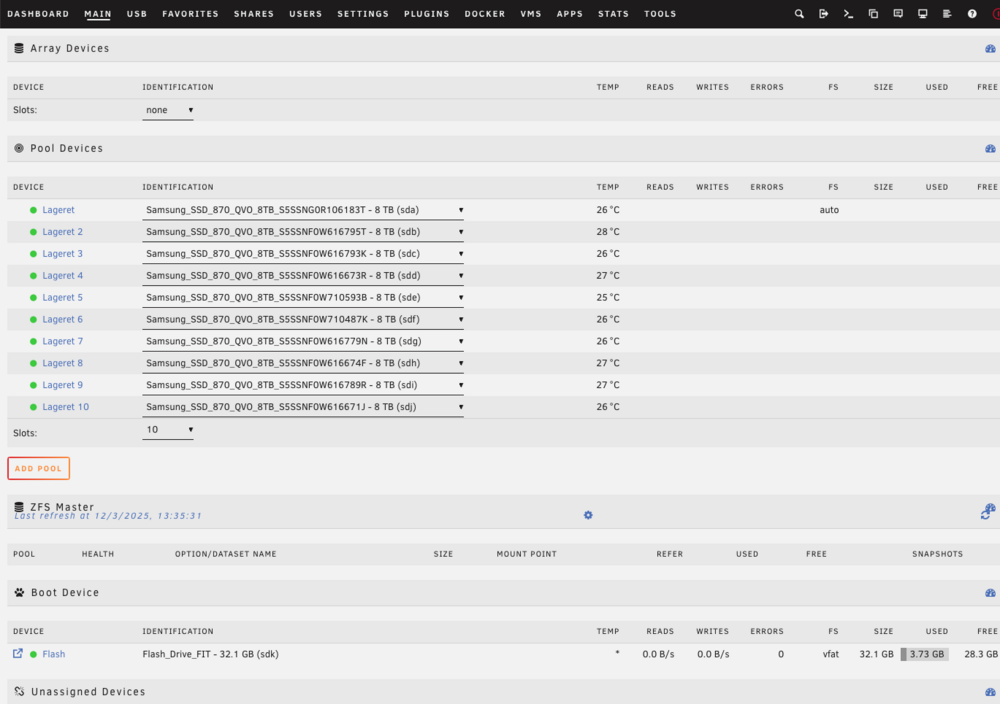
Here: root@kjell:~# zpool import pool: lageret id: 9939463854067277326 state: ONLINE action: The pool can be imported using its name or numeric identifier. config: lageret ONLINE raidz1-0 ONLINE sda1 ONLINE sdb1 ONLINE sdc1 ONLINE sdd1 ONLINE sde1 ONLINE raidz1-1 ONLINE sdf1 ONLINE sdg1 ONLINE sdh1 ONLINE sdi1 ONLINE sdj1 ONLINE special mirror-2 ONLINE nvme4n1p1 ONLINE nvme5n1p1 ONLINE pool: cache id: 8881486878953382648 state: ONLINE action: The pool can be imported using its name or numeric identifier. config: cache ONLINE mirror-0 ONLINE nvme1n1p1 ONLINE nvme2n1p1 ONLINE pool: tempssd id: 15879685755596865968 state: ONLINE status: Some supported features are not enabled on the pool. (Note that they may be intentionally disabled if the 'compatibility' property is set.) action: The pool can be imported using its name or numeric identifier, though some features will not be available without an explicit 'zpool upgrade'. config: tempssd ONLINE nvme0n1p1 ONLINE
-
Can I restart this thread? I wanted to remove the cache drive from a Zpool. Following this guide, did not work. I was not aloud to start the Array after unassigning the cache drive. Then I ran New config, made a pool with the same name as before, and added the drives leaving file system set to auto (without slots for the subpool drives). After starting the Array, the pool drives were not imported. Only option to reformat the drives. I´m in trouble on this. Any way to fix this? I hope….
-
What do supporting native ZFS mean for practical usage? I learned that Unraid OS needed full control over the hdd, not just a partition. Is that that case still? I have 8 x Exos 2x18 dual actuator in a TrueNas server. To make use of both actuators, the hdd must be partition in two parts. Each partition acts separately in ZFS mirror.
-
Update worked fine. Approxximately responsivness on Iphone….
-
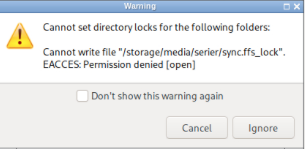
Thanks, changing permissions fixed it.
-
Hi, How can this be fixed? // Frode
-
In the source, Unraid server, it is dual 25G nics and target, Truenas Scale, it is 4 x 10G nics, setup as 2 bonds LACP. Ran iferp, let ChatGPT do the summary, see below. Iperf server to server is fine, allthough a lot of retries source to target, but non for target to source. Testing pool to pool, I found one wrong drive in the TN server, I had mixed up Exos 2x18 with a X18. The correct hdd is in the server, currently resilvering. Summary from ChatGPU of some iperf run: ACP is finally up. Both slaves show Aggregator ID: 1 and no churn. Your 8-stream test hits ~19.8 Gb/s, which confirms the 2×10G LAG is working. But client → NAS (forward) still shows lots of TCP retransmits (single stream ~25k; multi-stream huge), while reverse is perfect (0 retrans @ 9.9 Gb/s). That means the remaining issue is on the client→switch→NAS receive path. Single stream: ~9.9 Gbit/s each way — exactly what you’d expect when one TCP flow hashes to one 10 Gb link in the LACP bundle. 8 streams (client → TN): ~19.8 Gbit/s aggregate — that’s both 10 Gb links working in parallel. ✔️ Reverse: still ~9.9 Gbit/s for a single stream — normal.
-
What ChatGPT said about the run: What your results say (TL;DR) You’re getting ~4.8–6.5 Gbit/s aggregate, fluctuating per second. Each client flow sits around ~0.9–1.7 Gbit/s. Retransmits are huge (e.g., 800k–900k total in 60s). That screams packet loss / queue drops / sub-optimal TCP tuning, not a raw link limit. So the bottleneck is likely loss/queues/offloads/MTU (or hash pinning if traffic isn’t really hitting all links). Let’s quickly isolate and then tune.
-
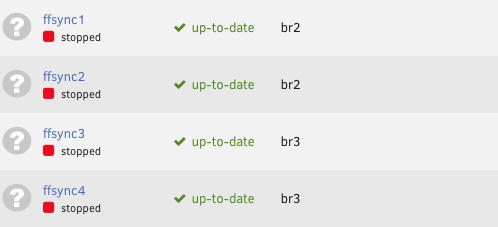
I´m getting about 1.5 GB/s when running 4 x ffsync containers simultaneously, about half of what I would like to see.
-
According to ChatGPT: Source: Taking ZFS overhead and RAIDZ math into account: 👉 ~4.5–5.0 GB/s sustained read is realistic from lageret (with bursts higher if ARC/L2ARC is actively serving) Destination: Your xxxx pool, with 8 mirrored vdevs from 8 Exos 2×18 dual-actuator disks, should sustain: 👉 ~3.2–3.6 GB/s real-world write speed 👉 Up to ~4.0 GB/s in ideal conditions The Unraid server has E810 nic / 2 x 25Gb, to switch 2 x 25Gb to source Truenas 4 x 10Gb nics, I´m aiming at 3 GB/s, running 4 simultaneously Freefilesync containers, I have worn out a ChatGPT serverpark, so its time to call in the experts on how to set up best possible. A key question is: “How to get the FFsync containers to utilize a specific nic? Currently enabled bridge mode for eth2/eth3, wonder if custom network type is the way to go?