





mr-hexen
Members
-
Joined
-
Last visited
Everything posted by mr-hexen
-
You need the .crt file too, which you can only obtain from their website..
-
Not this case here as i have the same siphon version and it's working fine.
-
Did the same and those missing VA messages are gone (acutally says found now). Hardware transcoding now working w/o the privileged flag.s
-
Did you chown the unRAID folder or from within docker exec /bin/bash?
-
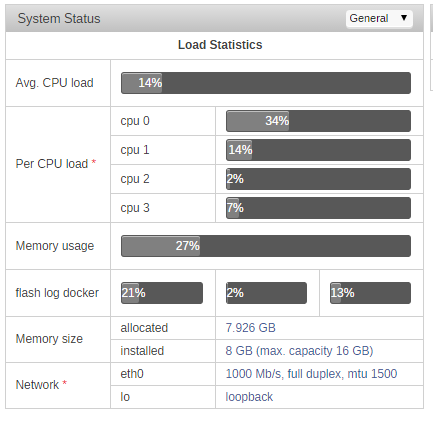
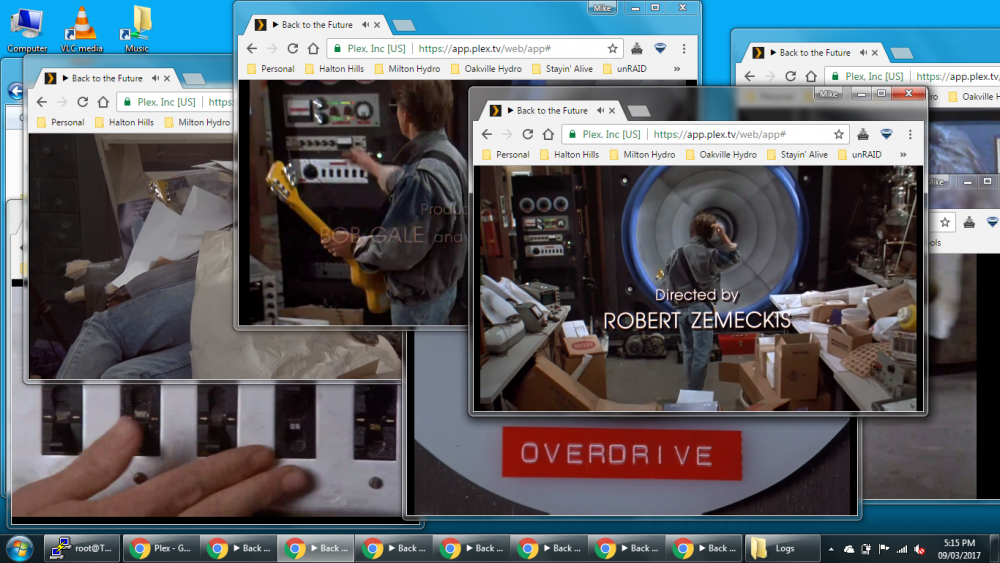
It's definitely working. This is while transcoding Jurassic World REMUX to 4mbps 720p... and yesterday transcoding 7 streams of BTTF at once (source was 8-10mbps).
-
Did you do the 'go' file edits too? I'm wondering because I couldnt get it to work w/o priviledged...i5-4460 here. This is from putty to the host: root@Tower:~# ls -la /dev/dri/ total 0 drwxr-xr-x 2 root root 100 Mar 9 16:14 ./ drwxr-xr-x 16 root root 4000 Mar 10 20:09 ../ crwxrwxrwx 1 root video 226, 0 Mar 9 16:14 card0 crwxrwxrwx 1 root video 226, 64 Mar 9 16:14 controlD64 crwxrwxrwx 1 root video 226, 128 Mar 9 16:14 renderD128 This is exec'd into the docker: root@Tower:~# docker exec -it PlexMediaServer /bin/bash root@Tower:/# ls -la /dev/dri total 0 drwxr-xr-x 2 root root 100 Mar 10 20:20 . drwxr-xr-x 14 root root 3840 Mar 10 20:20 .. crwxrwxrwx 1 root 18 226, 0 Mar 10 20:20 card0 crwxrwxrwx 1 root 18 226, 64 Mar 10 20:20 controlD64 crwxrwxrwx 1 root 18 226, 128 Mar 10 20:20 renderD128 Not sure if those perms are right Plex logs say "renderD128" not found...
-
It only started working for me when I added the privileged setting. Otherwise it always software encoded. I'm wondering if the container is using my HD5450 (passed to a VM) to encode or the iGPU?
-
@binhex great catch.
-
Ya nothing is jumping out from the logs for me either...do you have any special characters or spaces in your username / password? Verify the username / password on the pia website too. The log's saying using previous IP, never seen that message before.
-
Show a screen shot of your docker config for the deluge docker.. wipe out the username / pass.
-
Credit goes to: https://forums.lime-technology.com/topic/53388-enabling-i915-for-host/?do=findComment&comment=530722 I had to change some things around in the plex config to get it to work. Not sure if these changes apply to just the LSIO docker or all docker variants. Changes highlighted for reference. Must be on unRAID 6.3.x or higher as they added the i915 to the kernel in the RC phases. Add to "/boot/config/go" (very first lines): modprobe i915 chmod 777 /dev/dri/* Then to the Plex docker config: Change to mode to Privileged. Extra Parameters: "--device=/dev/dri:/dev/dri" Version: "#.#.#.####-xxxxxxx" (need plexpass) Reboot system open Plex > settings > SERVER > transcoder, "Show Advanced" > check off "Use hardware acceleration when available (Experimental)" Start a stream, force transcoding by lowering bitrate. Open a new plex window, click Status > Now Playing and click the (i) on the stream. If you see (hw) in the video line you've enabled it successfully.
-
Nope, i moved away from SickRage a year or two ago and never looked back. I think this was the era where their updates / development was stale..Sonarr has been ROCK solid and a pleasure.
-
This was fixed in Sonarr on Mar 7, 2017: 2.0.0.4645 - Mar 7 2017 Installed Fixed Deluge 1.3.14 API support due to changed json-rpc checks. (hotfix) Fixed DownloadStation client stuck in infinite loop in some cases. Fixed DownloadStation client failing if non-bt/nzb downloads exist. Fixed NZBGet delete:scan treated as failure
-
Anyone on 6.3.x w/ PlexPass really needs to set up the HW iGPU transcoding. I just got it working via this docker and my i5-4460 and was able to stream 7 transcoded streams at once and only had ~20% CPU usage doing it.
-
If this included a server restart before hand its probably the ipmangle issue.
-
Lan range is set in the docker edit window in the unraid webgui.
-
Just look four posts up, or click here: https://lime-technology.com/forum/index.php?topic=42149.msg537330#msg537330
-
Did you add the right port? Do you have the VPN turned on? Did you set the Lange_range variable properly? I've got siphon working just fine with delugeVPN.
-
Or one of these:
-
Read the log, pay attention to the line starting with [crit] Sent from my SM-G900F using Tapatalk
-
If anyone is owed anything, it's binhex who made this awsome container.
-
The IP address is 192.168.0.2, and it says the same under eth0 when I run that command. There is this warning in the log, I'm not sure if this is the issue, what it is or how to fix it: [warn] iptable_mangle module not supported, you will not be able to connect to ruTorrent or Privoxy outside of your LAN [info] Please attempt to load the module by executing the following on your host:- '/sbin/modprobe iptable_mangle' OK, so the LAN_NETWORK entry is your problem. From your supervisor log This should be 192.168.0.0/24
-
The IP address is 192.168.0.2, and it says the same under eth0 when I run that command. There is this warning in the log, I'm not sure if this is the issue, what it is or how to fix it: [warn] iptable_mangle module not supported, you will not be able to connect to ruTorrent or Privoxy outside of your LAN [info] Please attempt to load the module by executing the following on your host:- '/sbin/modprobe iptable_mangle' You can try, but I've assumed these attempts to connect are from within the same network?
-
Are you sure you've set the subnet access correctly? what is the IP address of your unRAID server? run this command from a command line prompt: ifconfig Either 'br0' or 'eth0' will have your unRAID ip address.
-
Didnt know you had that in the FAQ, FYI, the "code" is missing a quotation at the start of the second echo command.



