





mr-hexen
Members
-
Joined
-
Last visited
Everything posted by mr-hexen
-
ok so to be clear:- - originally the certs and ovpn file used when connecting to port 1194 are of a standard strength, no compromise has been made to pia, but pia then decided to release a stronger set of certs and encryption used (see next item). -a couple of days ago pia released stronger certs and better encryption which uses the new port number of 1198 (pia's default recommended connection type) - this is what is currently baked into the image - pia also have an even stronger set of certs and encryption level running on port 1197 - this is what i propose i include in the image, BUT this wont be the default, it will be toggled via another env var. as far are speeds are concerned i would assume the higher the encryption level the higher the load on the cpu and thus potentially the slower the dl/ul speeds, i have yet to do any testing but that would be my guess as to what people will experience, i would be interested in anybody doing some speeds tests for default and then the stronger encryption to see what real world results are like. disclaimer - i am not a security expert and thus encryption algorithms are not my forte, so please excuse misuse of some technical phrases above. Ok thanks for the clarification.
-
I need to use TCP not UDP otherwise there are serious performance issues w/ my ISP... how should I got about this? I've change VPN_PORT to 443 and VPN_PROTOCOL to TCP and its not working.
-
@binhex, are you saying that the new "current" certs are of a higher encryption that could slow down speeds? If so, I vote for choice too
-
"Advanced View"
-
That or your quality profiles are not set correctly. You can click on the download in the "wanted" section and click on "mark as finished"
-
CP will use unrar in post processing downloads.
-
If you think it's perms related I believe linuxserver.io places an empty file in the appdata folder to tell it that's its done the perms thing already. Delete that file and it should reprocess all perms(FYI, this might take A WHILE).
-
Thanks, I also used that "check my ip" torrent and it shows a PIA IP when my router WAN port shows my ISP's IP so we're all good. Man its nice to finally being able to use my 100mbps connection to its full potential, privately, lol. Thanks again for all your efforts!!!
-
I think i fixed my Deluge PIA speed issues!!! I discovered a UDP issue with my ISP and changed the openvpn.ovpn file to TCP instead of UDP. proto tcp remote [insert pia server] 443 immediately saw a ubuntu torrent go to 8.0MB/s!! Binhex, how can I confirm privacy still, do you suspect this would cause any ip leaks?
-
Maybe it's easier to just get a larger cache drive and set sonarr and cp to copy mod instead of move or link lol.
-
There's a setting the removes torrents when a share ratio is met, make sure that's not checked. If CouchPotato or Sonarr are the programs adding torrents, make sure they are set to not remove the torrents as well.
-
Share Ratio Limit: When it's seeded 200% of the download size it will stop. Share Time Ratio: It will seed for 7x the duration it took to download Seed Time (m): It will seed for this many minutes, 180. You might want to do some further research on deluge and how those settings interact with each other. I'd hazard a guess that it will stop seeding when one of those thresholds is reached, which is likely the Ratio Limit or Time in your case.
-
Check your settings for seed time and seed ratio. Deluge is "stopping" the seed because it's reached 100%.
-
binhex, could you edit Q5 of the FAQ to indicate you only need to enable VM's in unRAID not actually create one in order to load iptables_mangle?
-
CP has a Proxy setting, but you have to enable advanced view first.
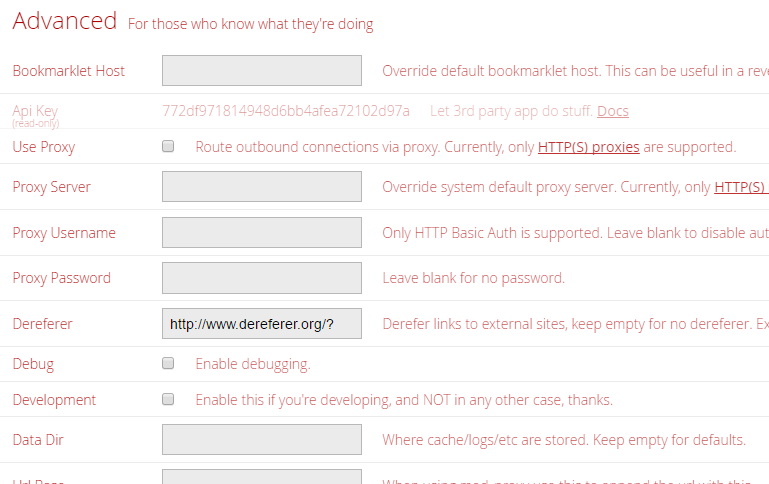
-
Check page 1. First post. Q7.
-
Which version of Plex are you running? See this post on plex.tv forums: https://forums.plex.tv/discussion/194777/0-9-14-2-broke-everything/p4
-
You dont need to symlink, just map /transcode to /tmp from unRAID. Then assign your transcode directory to /transcode.
-
You're just not understanding how volume mappings works... /data (inside deluge) and /mnt/cache/Cache/Torrents is in unRAID. What you've mapped to inside deluge is /data (it becomes linked to /mnt/cache/Cache/Torrents/ So what you want to do is set your download folders to: /data/-AutoDownload and /data/-Complete Deluge is saying permission denied because you've got it mapped to /mnt/Cache/Torrents and as far as Deluge is concerned, that doesn't exist.
-
That's because deluge see's them as /data, remember you forwarded /mnt/cache/Cache/Torrents to /data
-
Did you tell Plex to use the new transcode directory in advanced settings (from within Plex)?
-
You haven't selected PIA as your VPN_PROV: VPN_PROV="pia|airvpn|custom" Also, i dont think newyorkcity.private... supports port forwarding.
-
in the docker config for deluge, open advanced settings and see if you have the user/group set differently?
-
Delete all the credentials related to unRAID in windows.
-
Which files cant you move... the ones handled by sickrage or the ones you dump in the watch folder, or both?

