





mr-hexen
Members
-
Joined
-
Last visited
Everything posted by mr-hexen
-
You probably haven't configured the LAN_NETWORK variable. Change the view to "Advanced" and at it there. Make the variable match your IP range, i,e, 192.168.1.0 and add "/24" to the end, final result should be something like: 192.168.1.0/24 the last number should be ".0" and the rest need to match your server IP. If your server is 10.1.10.123 then the variable should be set to 10.1.10.0/24
-
Unless controller bottleneck is limiting the speed in the outer tracks.
-
I wonder if it can be loaded via the Go file somehow... modprobe iptable_mangle?
-
Small update to this. I've since installed a VM that auto-starts on boot (Plex Media Player). I expected this issue to resolve since I am actively using a VM, but no. I now have to restart the delugeVPN docker after unRAID boots to get the webui up. Essentially, just step 3, each and every reboot. Yes I think it's a race condition, basically docker is starting before KVM and thus iptable mangle support isn't there. Only way around this is a very ugly hack to do a restart of that particular docker after x mins via cron on boot Sent from my SM-G900F using Tapatalk Have you heard if LT is making a fix for 6.1.9?
-
Small update to this. I've since installed a VM that auto-starts on boot (Plex Media Player). I expected this issue to resolve since I am actively using a VM, but no. I now have to restart the delugeVPN docker after unRAID boots to get the webui up. Essentially, just step 3, each and every reboot.
-
...or a SSD! I'm fortunate that the Plex VM i'm running doesnt need much disk i/o so my cache drive (2.5" 1TB SSHD) is sufficient.
-
Success! i5-4460 and HD5450 installed. I passed that and a USB IR receiver through to the Plex Media Player VM (using the img file for PMP). Everything is working, even HD Audio (bit streaming DTS-HD right now). My plan is to leave the VM running at all times so it's quick and easy to use plex, let's see how it recovers from being unused for a few hours.
-
That's normal so that if the tunnel is dropped and reconnected deluge is configured with the new IP and port.
-
If you're using a plugin then Plex will have direct access to unRAID's folders. Map the transcode temp directory to /tmp
-
This can be corrected in the Go file so it "appears" to be persistent on reboot.
-
Upgrade Step 1 complete. I have upgraded my cache drive from a 250GB laptop 2.5" drive to a more performance oriented 1TB SSHD 2.5" drive. While not a SSD, that upgrade will come at a later time if needed. Once my i5 arrives I will install it and the HD5450, then on to Plex media Player VM.
-
PIA works
-
Agree ... however, "used" is far less important than what CPU it is. An older generation should certainly be worth less; but if it's a current generation CPU it's not going to functionally any different than a new one. The only thing you're losing relative to a new one is the warranty ... clearly it will expire before a new one would. Yes, but when someone (not on this forum) expects no less than $280 for a used i5-4690k, that's nuts. http://www.newegg.ca/Product/Product.aspx?Item=N82E16819117372, they are $299 right now. I offered $240 cash, 80% retail value. I've made my peace with it and I'm moving on with a i5-4460 for $239 NEW. /rant
-
I don't know why, and it really irks me that people constantly want 95% retail for a USED CPU. I mean, really, it's used! Anyways, I bit the bullet and purchased a new i5-4460 for $239 CAD, which is the best price i've seen around. These are normally listed for $250 CAD so I figured it was time to take the plunge. I plan to install an AMD 5450 passive GPU and try a Plex Media Server VM. Wish me luck.
-
OK, then I'm not sure why the docker variable is being removed...
-
That link is old and might not reflect current status. I know it's old because the second screenshot shows "Allow higher bitrate over 3G". This option was removed from recent plex server versions as it is considered obsolete now. The age of the link may or may not validate your position, but I think something more recent must be found / communicated before we take it as fact.
-
You would have to run chown with the -R flag for recursive likely. (might be -r, can't recal).
-
Transcoding to RAM is no longer supported in Plex as the transcode directory will no longer be configurable. This thread should be locked going forward and the OP updated accordingly.
-
Just make sure that if you use Sonarr or couchpotato that you map /data to /mnt/user/Downloads as well so it can perform proper paths to Deluge.
-
I'm in the area of Toronto, Canada. ISP is Rogers and the plan I'm on is 100d/10u
-
Nothing unfortunately..it could be either the ISP (Rogers in my case), the VPN server (PIA), or the links connecting them slowing it all down. Ultimately, it's not a deal breaker for me. 1.5-2.0MB/s is still hardly anything to be unhappy with, but damnit my connection should go 12.5 MBs like it does w/o VPN. I'm really just going to chalk it up to the price I'm willing to pay for privacy. BTW, binhex, thanks for the dockers!
-
Interesting.. I'm reading a thread on DSLr and it seems to point to a possible OpenVPN issue... I'm trying the PIA client on windows w/ deluge now.
-
I turned off VPN in deluge and take a look at this! I think my ISP is throttling VPN connections.
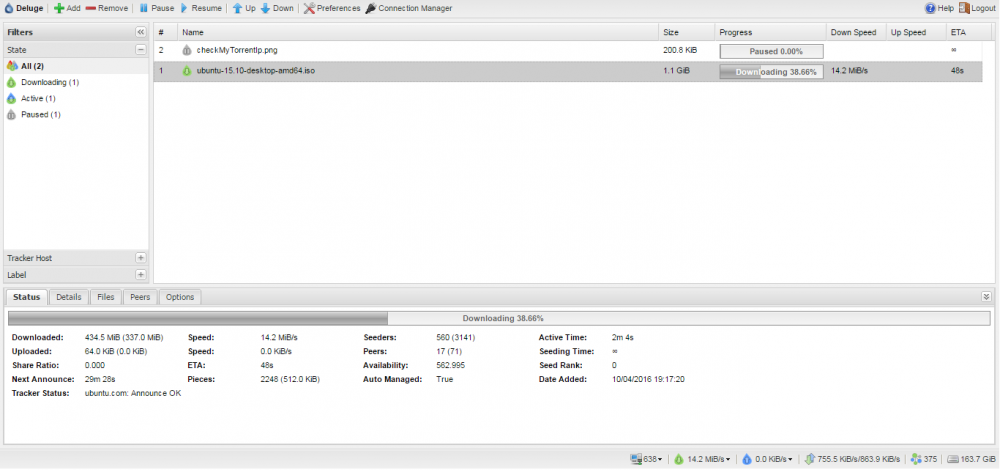
-
Can you post your encryption and bandwidth settings page from deluge?
-
Which PIA server are you using? I just tried your settings (unlimited connections, I always use unlimited speed) and I had no better results downloading ubuntu 15.10.

