





Skipdog
Members
-
Joined
-
Last visited
Everything posted by Skipdog
-
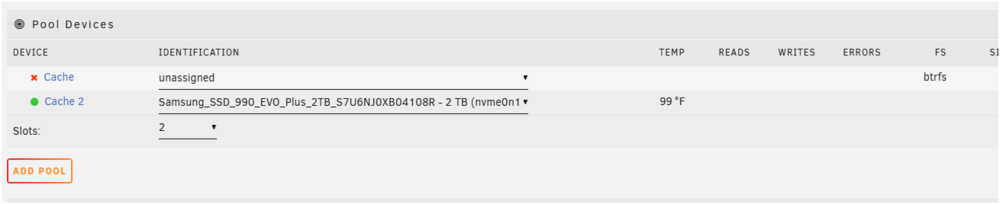
Summary: I had replaced the guts of the system with a new motherboard/cpu and added a shiny new 2TB NVME drive. I added another slot to Cache Pool and added the NVME to slot 2. Everything synced and was happy. I had decided to try to remove the old cache pool drive (2.5 SSD) and was able to remove it. Of course now I was in a weird state of a half working RAID1 pool. I was doing more maintenance on the server and rebooted a couple times. After the last reboot the array fails to start with "Wrong Pool State - cache too many wrong or missing devices" Cache2 correctly identifies the NVME 2TB drive and its green color. Cache1 is unassigned. I've tried removing cache2 and then I've tried to mount it in order to back up the data and that doesn't work. At this point I know how to fix it destructively, but i'd like to get appdata off the cache drive. Is there anyway to recover the data? I've got old backups on the array that I could use so its not the end of the world. Diags attached. Skipdog unraid-diagnostics-20250122-1401.zip
-
Hi JorgeB, Yes IPMI works great. I went ahead and updated BIOS to 2.0 which i think reset BIOS completely. I went in and played with the legacy USB support settings. Legacy USB was already enabled and when I disable it -- it won't boot UNRAID USB. Not a huge deal- it seems like the X11SDV-4C-TLN2F has issues with USB lower power devices like keyboards/mice and UNRAID. Oh, and yes I did try back of motherboard USB, and i plugged in front USB cable and tried those. They all do the same thing. I appreciate your help! Skip
-
Ah- just figured the slow boot issue was indeed tied to the network interfaces being port up but down. Bootup times are now restored and good! This does leave the USB issue which isn't critical at all. I do see that UNRAID is seeing the low speed keyboard connected. Skip edit: Bus 001 Device 003 Port 1-2 ID 04f2:1125 Chicony Electronics Co., Ltd Asus Keyboard
-
UNRAID Version: 6.12.6 Hi there. I upgraded my Supermicro CS836 X9 based system to a Supermicro MBD-X11SDV-4C-TLN2F-O Xeon D-2123IT. A few problems i'm troubleshooting: 1) UNRAID boot stalls at "Triggering udev events: /sbin/udevadm trigger --action=change" for a long period of time. If I wait long enough it seems to boot and operate OK. I tried a new clean UNRAID USB and it boots up immediately and doesn't get stuck at this point. Do I need to do something in UNRAID to rediscover the new hardware/drivers? I also notice that when it finally does bootup IPv4 Address says "not set" but the webgui does work with the static IP that is assigned. 2) The USB port on the back of the MBD-X11SDV used for keyboard doesn't seem to work once UNRAID is booting/booted. Could this be related to the hardware change and #1? Seems maybe driver related? I dont think i want to rebuild the licensed USB key but open to suggestions to fix. Thanks, Skip
-
UNRAID V. 6.12.6 Supermicro X9DRH with E5-2670 and about 12 drives in array with a cache disk. Installed new container HOOBS and couldn't get homekit to connect to network set in bridge mode. Changed it to custom bridge and immediately fixed the homekit connection issue. However overnight system locked up hard. System locks up if turned on for a period of time. Disabling the custom bridge did seem to allow the system to run normally. Docker setting is Maclan so I will try ipvlan but i'm hesitant to do this being all my other functions are completely normal. Attaching diag. Skip diagnostics-20231203-1416.zip
-
UNRAID Ver: 6.9.1 PreClear ver: 2021.01.03 Server type: Supermicro CS836, LSI SAS2308 controller Noticed in the fix notes for 2020:12-22 Fix: script failing during drive zeroing I've purchased several brand new external WD 8TB drives. Each of the drives runs through pre-reads just fine. Then toward the very end of zeroing it reports a failure. I've tried different slots and the behavior is the same. I've pulled the drive out of the server and put it back into the original enclosure to run pre-clear on another system. Should I generate a full diag next time or attach the pre-clear log. I am wondering if i'm hitting the bug behavior or just a hardware type issue causing the pre-clear bug. Skip edit: attached diag- but syslog looks like it is missing data tower-diagnostics-20210316-1218.zip
-
Walter- Epic fail on my part! Thank you! I had thought it installed all of the tools by default! Skip
-
Apologies i did search for a solution! I've installed and reinstalled the nerd pack but when I attempt to execute iperf3 it doesn't seem to find it. Looked in various directories. What rookie mistake am I making? Skip
-
Hi there. I am trying to use Krusader to copy between local UNRAID volume and an SMB network connection. The SMB connects fine. When I go to copy files/directories I get the error "The file or folder smb://[email protected]/backup/folder/subfolder/.@_thumb does not exist. Any ideas what it is unhappy about? Skip
-
If I change to Bridge mode, the docker won't be able to proxy for my "host" dockers correct? That is what I am trying to deal with is connectivity. I've got SONARR/RADARR/SAB in host network mode. When I ran in bridge I could no longer connect. Would the solution be to run everything in bridge?
-
Thank you Djoss for the project - it is really nice. So i'm trying to place the docker on the host network, but i'm running into an issue where the Tautulli docker is already on 8181. Is there a way to force Nginx Proxy Manager to use an alternate container port? It doesn't seem like there is unless i'm totally missing it during the installation. Clicking edit on the various lines shows it seems to be hard coded 8181. Skip
-
Thank you! I think the botched install the first time did not include the user/password configuration. Removing the directory fully and installing again fixed the issue. Many thanks! Skip
-
Sorry for noob question- Just deployed this docker. Using BR0 with static IP address and i'm able to hit the website. Trying to use the default login/password I get the no relevant user found. What could I be doing wrong? I've tried to deploy container twice. Skip

