nraygun
Members
-
Joined
-
Last visited
Everything posted by nraygun
-
I connected a laptop and the server to a switch and used a bootable Linux image on the laptop with a static IP. Same problem. I also tried a live image of Ubuntu with Firefox on a separate laptop to access the server and I still get the issue. Doesn't this rule out the PC?
-
Confirming that my server also blanks out the header of the page while updating a container. The only thing it shows when in this mode is the custom header graphic I have for this server, but the other stuff in the header is missing but comes back when the container update completes.
-
Well, wait a minute. It took a really long time, but the container seemed to install even though I didn't get a completion message. I'm running the Krusader container now. If I go into that containers config via Edit, and change something, I get the same thing that happens on my main server. It shows Update container, but not the intermediate steps, then shows all of the steps all at once when it's done. Maybe that's just how it works in 7.x.x? I also noticed something else - the banner at the top of the screen disappears while it's updating the container. Here's what it looks like while updating the container. Note that the page has no header. Here is what it looks like before hitting Apply. It has the header(Unraid 7.2.3, server name, etc.):


-
I tried to create a new Unraid instance using my server by creating a new thumb drive with a trial key and another thumb drive as the array. I can't get a docker container to install for testing(Linuxserver's Brave container). I see this in the logs as it tries to install the container: Unable to find image 'lscr.io/linuxserver/brave:latest' locally I also tried binhex/arch-krusader and I get the same results. Not sure I want to now troubleshoot another server. Any other suggestions or does this test tell you anything?
-
Yikes! It'll take me a bit to gather that stuff up. Thanks.
-
I also tried Edge in a clean Windows 11 VM. I don't think it's a browser issue.
-
It doesn't launch another window so there's nothing to alt-tab to. But thanks for the suggestion.
-
I tried Brave with the shield down and Firefox with no plugins and I still get the symptom. On my iPhone, it doesn't seem to switch to the view with the status and goes from the screen with the Apply button straight to the done screen. Weird.
-
Any ideas @JorgeB ?
-
Gotcha. Thanks!
-
I see where @Torvald Utne is coming from since I never got a clear answer in my original question either. In Unraid, does "shutdown" perform a safe, graceful shutdown of Unraid? 5/21/2025 asked by me, "Does "shutdown" perform a graceful shutdown? Stop containers, stop parity check if running, and such." 1/24/2026 asked by @Torvald Utne , "poweroff is a standard linux command. Does using it SAFELY shut down the array, stop dockers and VMs and such before powering off?"
-
I restarted the container and now MaxMind works. Must have been a down server or something. :-)
-
Just updated to Swag 5.2.2-ls433 and I see these errors in the logs: [mod-init] Adding linuxserver/mods:swag-maxmind to container [mod-init] linuxserver/mods:swag-maxmind digest could not be fetched from lscr.io, checking local cache [mod-init] (ERROR) OFFLINE: linuxserver/mods:swag-maxmind not found in modcache, skipping [mod-init] Adding linuxserver/mods:swag-dashboard to container [mod-init] linuxserver/mods:swag-dashboard digest could not be fetched from lscr.io, checking local cache [mod-init] (ERROR) OFFLINE: linuxserver/mods:swag-dashboard not found in modcache, skipping The container seems to run anyway as do the services that are proxied. What's up with these errors?
-
I went into Safe Mode, started the array, then edited one of the containers(DuckDNS). I just put a space in the Overview field, then deleted it just to have some sort of change to cause the Apply button to activate. I get the same problem. It shows only "Update Container" , then shows the rest after the update is completed. It used to show the interim steps previously(Stopping container, Removing container, Command execution).
-
I haven't tried safe mode yet since I'm waiting for a container to have an update available. To update the container, I'm going into the config and changing the Repository field.
-
Sorry for the long delay. I tried Firefox and still got the same results. It's only when I update the template with a new container version that this happens.
-
Shout out to Unraid support for turning around my license key so fast - it took 8 minutes to get the license key link in an email! The replacement drive seems to work and so far has survived two boots with no problems.
-
I didn't have any occassion to reboot the server while on 7.2.0 so I don't know if it was happening before. I do know that I had this same problem earlier this year(~May 2025) and changed out the USB drive then. I'm going to replace the USB drive yet again just in case.
-
Last time, this happened with the drive in a USB 2.0 port on the back of the server. I have an industrial USB drive I'm going to try.
-
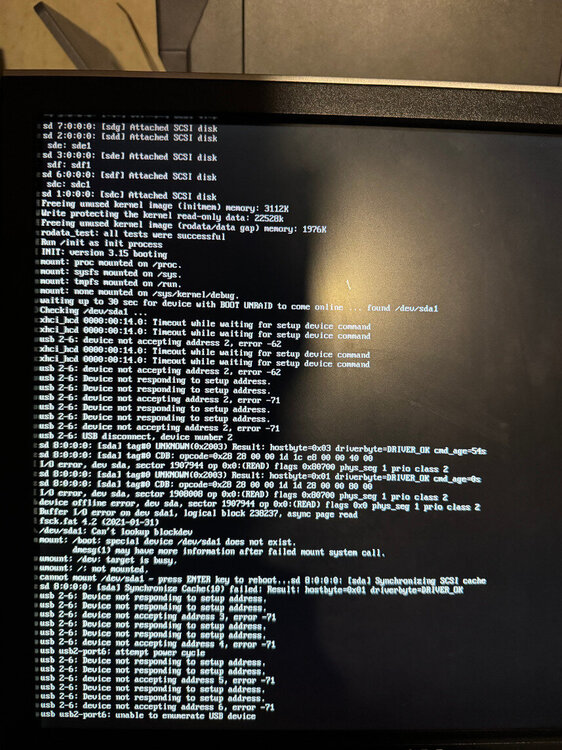
It did it again. :-( I just tested shutting down and rebooting without moving the drive and it failed to boot. I then booted my Ventoy drive and it came right up. I did this a few times to make sure the port worked, which it did. I then put the USB 3.0 boot drive into into this port on the back of the server and got the same sort of error reported initially. I then rebooted yet again and it booted through and came up, again, like nothing happened. I even put something in the log via logger to show when I rebooted. Nothing out of the ordinary appearing in the syslog. Maybe I burned up another thumb drive? I'm going to get a USB 2.0 drive if I can find a good recommendation and try to restore my backup to it.
-
Thanks @Frank1940 I removed the adapter and plugged the drive directly into the USB ports. Some also didn’t work but I wound up using a front port. Plus, I had replaced this adapter previously figuring it was the problem. I really think this motherboard had USB problems in general but can’t get consistent behavior.
-
Yeah, that's what I had. But now I have it plugged into a front USB port. I'm thinking there's something wrong with the motherboard's USB ports in general. I've had numerous issues with them. But I can't confirm it, because then it starts working again.
-
I don't see anything in the syslog that shows any problem with the thumb drive. I can see it downloading 7.2.2 and its MD5. I see the shutdown request, stopping containers, and then a restart of the system right at the entry, "rc.rsyslogd: Syslog server daemon... Started." and then normal startup stuff. Looks like it wasn't even aware of the multiple times I tried to boot from the USB drive.
-
Thanks @JorgeB ! The drive is only 7 months old. I tried other ports then finally got it to work on a port on the front of the machine. It was originally on a USB motherboard header connector. Is there a way to confirm the drive is fine now that it's working? That is, confirm there are no missing/corrupt files?
-
I upgraded my system to 7.2.2 from 7.2.0. I did my usual checklist of updates and backups and then dove it. Upon the first boot of the system, I got the screen attached. I saw in this screen mention of pressing enter to reboot which I did. Then it wouldn't recognize the thumb drive(booted to BIOS). I moved the drive out of the USB motherboard header to a regular USB front port. Still no go. I checked the drive on my main Linux PC. Seemed OK. I tried a port on the back of the PC. No go. Then tried another front port. It finally came up! Whew! (having a victory beer as I type this, was sweating there for a minute) I seem to have had problems with USB since I got this new hardware almost exactly a year ago. It's an ASRock Z790 PRO RS and the thumb drive currently is Samsung Bar Plus 3.1 64GB drive. It's definitely more problematic than the Dell R710 I had previously. I was able to grab the logs directory off of the USB drive after it had booted to the error state. Can anyone tell me what's going on here? Bad USB ports on my motherboard? USB 3.1(vs 2.0) weirdness? PS - Going from 7.1.4 to 7.2.0 went smoothly.