





nraygun
Members
-
Joined
-
Last visited
Everything posted by nraygun
-
Well, I changed the transcode directory to use the array and turned on some of the features that rely on transcoding(like Intro Skip). I got another OOM this morning. I think the transcoding is just eating up memory. So I'll turn these features off again and monitor.
-
Good news - no OOM this morning! I turned off a few features of Plex including ‘Generate intro video markers’, 'Generate credits video markers', 'Generate voice activity data', 'Analyze audio tracks for loudness'. I might put the transcode directory on a HDD and turn these features back on in the future. Will monitor for a few more days, but now my logs look normal.
-
I still get OOM messages in the log due to the Plex Transcoder. I turned off a few more features(volume leveling) and saw that it was processing a movie when I logged in this morning. I'll give it 8GB too and see what happens. The overall system memory seems to be much lower than we started, so that's good.
-
Thanks for taking a look. I'm going to turn off a feature that some say may be the problem: Generate intro video markers I also updated Plex. Fingers crossed...
-
I think the backup script completed yesterday(~6.5 hours) and then ran again overnight. The memory display on the dashboard looks good, but I still got a OOM in the syslog. Looks like the Plex transcoder did it again(Killed process 1347824 (Plex Transcoder)). I'm not even sure what or why it's transcoding at almost 3 in the morning. Here's the output of the command @JorgeB requested along with a fresh diagnostic. I think the /root sizes look OK to me now. root@flores:~# du -xhd2 /root 2>/dev/null | sort -h | tail -20 4.0K /root/.config/sakura 32K /root/.config/borg 36K /root/.config 150M /root 150M /root/.cache 150M /root/.cache/borg flores-diagnostics-20261020-0955.zip
-
I think I might have found the problem. I don't think the backup destination was set to automount. Plus, I had upgraded borg to 1.4.5. So I formatted the backup drive, set it to automount, recreated the borg repositories, and I'm now running a backup using my script. So far, so good. It'll take a while to complete plus it'll run overnight. It might not finish by the time cron calls the backup again but it'll skip it if it's running already. I didn't know that Unraid uses RAM if it doesn't find a disk in a script. Kinda weird. I'd expect it to error out. I'll check back in a few days to confirm all is well. Thanks again for the help!
-
Thanks for the quick response @JorgeB ! I'll take a look at my backup script, but in the meantime, here is the info you requested: root@flores:~# df -h / Filesystem Size Used Avail Use% Mounted on rootfs 16G 16G 442M 98% / root@flores:~# du -xhd1 / 2>/dev/null | sort -h | tail -15 0 /home 0 /mnt 0 /opt 14M /bin 17M /etc 21M /tmp 25M /sbin 48M /lib64 53M /lib 577M /var 15G /root 16G / root@flores:~# find / -xdev -type f -size +500M 2>/dev/null root@flores:~#
-
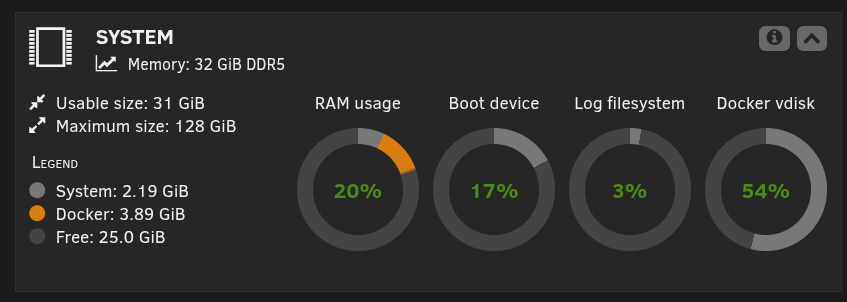
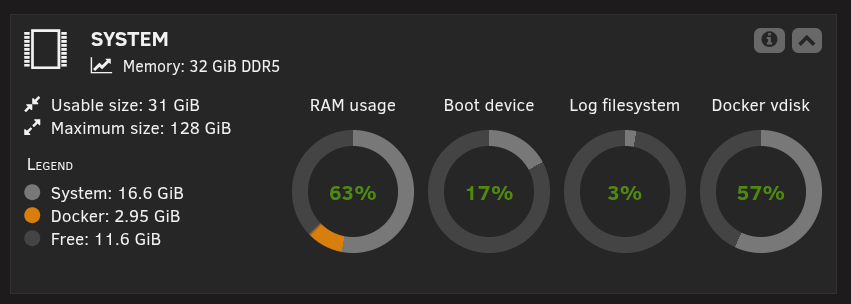
I recently started seeing out of memory conditions every night in my syslog since October 6, 2026. Using 7.3.2 while I wait to be comfortable enough to go to 7.3.3. It seems to be a different process each time but mostly Plex transcode. I have 32GB of RAM and a fairly modest(compared to others here) set of containers(Nextcloud, Immich, Arrs, a few others but nothing crazy). I rebuilt my Plex database index per some suggestions. I also added the parameters to limit RAM usage(Extra Parameters = --device=/dev/dri --mount type=tmpfs,destination=/tmp,tmpfs-size=4000000000 --no-healthcheck --memory=4g). Here is the memory usage right after a reboot: And then in the morning: And then I see another OOM condition in the logs in the morning. Any suggestions? flores-diagnostics-20261019-0844.zip
-
There's a ticket open but I've not seen any progress to solve it. https://product.unraid.net/p/container-update-screen-sometimes-not-updating-until-the-operation-is-over?b=unraid-os-bugs
-
I have the lifetime license that I bought 6 years ago so I think I'm good license-wise. I'll take it to 7.3.1 soon from 7.2.7.
-
I'm a little confused. I went to 7.2.7 because of some CVEs and it seemed that 7.2.7 was newer than 7.3.0. Is 7.3.1 now the newest with all of the cumulative patches/updates for the flurry of recent CVEs?
-
Thanks, I went ahead and loaded the non-libtorrentv1 container and all seems well. Looks like it's using libtorrent 2.0.12.0.
-
I went to binhex/arch-qbittorrentvpn:latest and it seems fine. It went from 4.6.3 to 5.2.0 with no problems. :-)
-
Do we still have to use arch-qbittorrentvpn:libtorrentv1 these days? I don't even remember what was fixed by using the libtorrentv1 version. My Qbittorrent container shows it using version 4.6.3. If I don't need to use the libtorrentv1 version, can I just go to the latest without changing my appdata? Then again, if it's not broken, don't fix it?
-
FWIW, 7.2.4 has the same problem for me on my main server.
-
Thanks for posting the bug report @Kilrah !
-
Thanks @Adam Lamore and @Kilrah for reporting the same issue too. Guess I'm not the only one!
-
Does anyone have any other ideas? I see this symptom with a fresh trial key and on 3 different systems.
-
No. This test server only has 1 container.
-
It's happening on 3 different systems at this point. My production server, a test laptop, and a SFF PC. The laptop and SFF PC are new installations.
-
Here's the same operation on 6.12.15. Notice the logo doesn't disappear and I get a progress as it updates the container. The process takes a little longer because the test server is just an old SFF PC with 8GB. Peek 2026-02-07 16-10.mp4
-
Here's a video of the issue. I wiggle the mouse in the area where the logo and status disappear. They both reappear when the task completes. Also, I downgraded my test server to 6.12.15 and it does NOT do this! It appears to show each step as it moves along and nothing in the UI disappears. Peek 2026-02-07 11-00.mp4
-
On the test server I'm using whatever the default is. On my production server I'm using the black color theme.
-
It must be me doing something wrong then. For it to have the same problem with a new license key and different hardware, and no other reports of the issue, it's gotta be me. Or maybe I'm not describing the problem well enough? When I add a container, it does show the interim steps but the Unraid logo and version disappear. When it completes, the Unraid logo and version comes back. It does these in sequence: Shows "Add container" Pulling image (Unraid logo and version disappears at this point) Command execution, shows completed then I get the view container log and done buttons Unlike an update that goes from Update Container(Unraid logo disappears) to the buttons showing a moment later and no interim steps shown. I'm at a loss.
-
Now I'm thinking this is just the way it works these days. I ran my trial key on a laptop and chose GUI mode so I can try a container update right on the server. This is as vanilla and fresh as I can get and it has the same problem. I know it's done updating the container when the Unraid logo and the rest of the banner comes back.


