





nraygun
Members
-
Joined
-
Last visited
Everything posted by nraygun
-
On the otherhand, will there be any advantages to go to the version that has the libtorrentv2 lib? Tempted to leave well enough alone even when 7 comes out.
-
Well, I got this R710 5 years ago and it's had a good run. This is the first time this has happened in this manner. Not bad for a system made 15 years ago. I was planning on upgrading my server hardware anyway (Intel i5). I guess it's time. Thanks for all the help!
-
I found out how to get to the web interface for iDRAC. Forgot I even had this available! I've been using a janky Java DRAC app to get to the boot screens. I looked around and don't see anything in any of the logs for this event. PSUs are good, System Event log shows stuff I've done(removed drive, open chassis, etc.). All of the "Platform Events" are set to "No Action" including the "Watchdog Critical Assert Filter". I'm at a loss!
-
Is there a way to find out if this happened like in a log somewhere?
-
See syslog attached from yesterday into today. My R710 has two power supplies(and I have a 3rd spare). I don't see any macvlan call traces. What's this "watchdog" @JorgeB? Also, no VMs were running at the time. syslog20240708.txt
-
On a Dell R710 that's been reliable with 6.12.8. Diags attached and syslog server setup. Woke up this morning to a parity check running and had been runnning for 6 hours. Nothing in the syslog shows any reason. I have macvlan setup and it's not been a problem. No mention of it going on the UPS and no other indication of what lead up to what appears to be a reboot. Any ideas? Is it macvlan? server-diagnostics-20240708-0935.zip
-
Once unRaid 7 comes out, we can revert to using the regular Qbittorrent with libtorrentv2 since the kernel is going to 6.8.12, right? Seems like there was a kernel fix for this a while back: https://github.com/arvidn/libtorrent/issues/6952
-
Oh wait, found this: https://github.com/linuxserver/docker-mods/issues/853 And in that thread, someone posted this: "Alpine's libmaxmind package was only fixed in 3.20. The issue will persist until SWAG is rebased on alpine 3.20, which will be soon" So, I guess I'll wait before messing around with the script since the version I have now shows Alpine at 3.19.1 (2.11.0-ls307).
-
The MaxMind geoip docker mod doesn't seem to work anymore. It doesn't run from the cron job that's setup in crontabs nor does it run if I run the script directly at /etc/periodic/weekly/libmaxminddb I get an error that says "tar: short read". For the cron, I might have to add another docker mod. I can look into that. As for the libmaxminddb script, I received a notice from Maxmind saying they were changing some URLs starting May 1st 2024. I think the URL that's formed in the libmaxminddb script is wrong. My shell scripting Kung Fu is not that good these days but I'll give it a go. Anyone else having this problem? Is there an updated libmaxxminddb out there somewhere?
-
Thanks. I get those "Netty Epoll Server IO" errors too but I don't think my server crashes. I can't find any threads where the Netty errors are being addressed. I'm stuck on 1.20.6 waiting for an update.
-
Do you see anything like this in the console? [07:13:26] [Netty Epoll Server IO #23/ERROR]
-
Okee Dokee! Thank you so much!
-
Thanks @JorgeB. I wasn't running the iDRAC Java app at the time. And running it now doesn't cause the entries in the syslog. And I had checked the iDRAC logs and didn't see anything there. Maybe iDRAC on the server lost its mind for a minute?
-
I'm not sure how to confirm this. I've never seen this type of message before.
-
While I was out of town, I saw these entries in the syslog: May 7 22:37:30 server kernel: usb 5-2: USB disconnect, device number 2 May 7 22:37:30 server acpid: input device has been disconnected, fd 5 May 7 22:38:02 server kernel: usb 5-2: new full-speed USB device number 3 using uhci_hcd May 7 22:38:02 server kernel: input: Avocent USB Composite Device-0 as /devices/pci0000:00/0000:00:1d.0/usb5/5-2/5-2:1.0/0003:0624:0248.0004/input/input7 May 7 22:38:02 server kernel: hid-generic 0003:0624:0248.0004: input,hidraw0: USB HID v1.00 Keyboard [Avocent USB Composite Device-0] on usb-0000:00:1d.0-2/input0 May 7 22:38:02 server kernel: input: Avocent USB Composite Device-0 as /devices/pci0000:00/0000:00:1d.0/usb5/5-2/5-2:1.1/0003:0624:0248.0005/input/input8 May 7 22:38:02 server kernel: hid-generic 0003:0624:0248.0005: input,hidraw1: USB HID v1.00 Mouse [Avocent USB Composite Device-0] on usb-0000:00:1d.0-2/input1 I checked the iDRAC logs and don't see anything there. There was no VM running at the time. A handful of containers were running. Did someone access my server while I was away? flores-diagnostics-20240522-1125.zip
-
Anyone have any ideas on this set of errors?
-
Yep, fair enough. Will be moot when I go to 6.12.10 anyway. Thanks for taking a look.
-
Any further thoughts on this @Squid?
-
Errors still happen on 1.20.6. :-(
-
I see the container updated to 1.20.6 today. Continuing to monitor.
-
Found this on Discord that says it's OK to go to 27.1.4 then to 28.0.4. https://discord.com/channels/354974912613449730/1006323310742736987/threads/1234788327677235261
-
Gotcha. Thanks!!!
-
Nope, that isn't me. Seems like the server works. I can join it from my client. Guess I'll just wait to see what happens. Thanks for that Reddit thread.
-
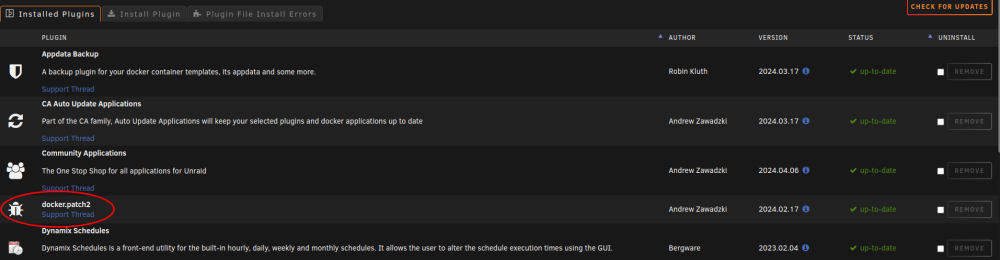
Yep. I just rebooted again and the Docker Patch shows up in the Installed Plugins list.
-
Thanks @alturismo! Yes, I was aware that I pinned a specific version(27.1.0-ls271). I saw somewhere that is a best practice to tag a specific version versus "latest" that could continually change and perhaps introduce breakage. And I understand that NC doesnt like jumping over major releases(27->28->29 is OK but 27->29 is not). I wanted to go to the latest version of 27, but I see that the Linuxserver container for NC only goes to the version I tagged and hasn't been updated past that version of 27 since December. And then later you say the tagging on NC's GitHub may be different. So I guess for the Linuxserver NC container, the latest 27 is 27.1.4 which I will go to when I have some time(in case something goes off the rails). I'm just concerned that NC themselves recommend going to 27.1.9(from a few days ago) and the only version I can go up to with this container is 27.1.4(from Dec 2023).

