





nraygun
Members
-
Joined
-
Last visited
Everything posted by nraygun
-
Anyone have any ideas on the emhttp errors?
-
Just a small update. I see that the errors '"/usr/local/emhttp/url("/plugins/index.html" is not found' started this past Saturday. I have things setup such that plugins/docker containers get updated on Saturdays. Also, the error only shows in syslog upon loading a new instance of my browser. Once I'm in a browser, and reload the Dashboard, I don't get the error.
-
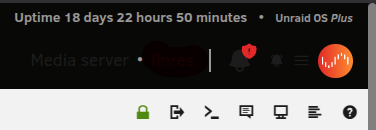
I got the text and icons back! I had to change the Header custom text color to white (ffffff) in Display Settings. Now I just need to figure out why I get those errors.
-
Oh no! The developer left! Bummer. :-( It was a great plugin. I'll try uninstalling it and see if it makes those emhttp errors go away.
-
My theme was black for the longest time and recently changed it to white because of the text/icon display issue. And when I upgraded to 6.12.13 in October, I had removed 3 plugins: docker.patch, docker.patch2, and unbalanced. Actually, now that I think about it, is it complaining because the FolderView plugin is not compatible with 6.x?
-
Bingo! Thanks, @itimpi! That did the trick. At first I tried setting the min and max protocol in the smb.conf file on my desktop machine and that didn't work. Turning on Netbios made the shares come back. I didn't even have to reboot. Did the update to 6.12.15 turn this off? Plus, why would it work on a fresh boot?
-
I might give that feature in UD a try, but it just happened again and I see this in the syslog of my desktop: 2025-02-19T12:19:45.911119-06:00 mxlinux gvfsd[3890]: smbXcli_negprot_smb1_done: No compatible protocol selected by server. Did 6.12.15 get rid of the SMB1 protocol?
-
Well, I'm not entirely sure how I set it up. Doh! I don't see any shares in the Unassigned Devices plugin. I also don't see anything extra in the SMB Extras field in Settings/SMB per the SpaceInvaderOne video. Not even sure how this is working. For a minute there I thought I could recreate the issue, but now I can't. I think if I give it some time it might come back. It was also doing this on my laptop running the same OS as my desktop(MX Linux 23.5).
-
I'm on Unraid 6.12.15(recently upgraded to this) and MX Linux 23.5 with Thunar 4.20.1. Right this minute, I can't access my root share with either the hostname or the IP. It just shows a blank screen. It happens every so often. However, while in this state, I can access individual shares with smb://server.local/pictures, for example. If I reboot, it'll work again and show my shares when I enter smb://server.local in the address bar. What is causing this? flores-diagnostics-20250219-0945.zip
-
Thanks @bmartino1! I dont think I'm having problems with the stuff you pointed out. And I already have the Unraid Patch Plugin. My main concern are the Dashboard errors like these: Feb 18 18:33:24 server nginx: 2025/02/18 18:33:24 [error] 32372#32372: *2973157 "/usr/local/emhttp/url("/plugins/index.html" is not found (2: No such file or directory) while sending to client, client: 192.168.0.55, server: , request: "GET /url(%22/plugins/ HTTP/1.1", host: "server.local", referrer: "http://server.local/Dashboard" And the dark icon/text in the upper right corner. Any ideas on these two symptoms?
-
The only plugin that has something out of the ordinary is FolderView. I'm not on Unraid 7.0.0 yet so I would expect it to have problems. There is no 3rd tab in the Plugins tab for me. Diags attached. Thanks! server-diagnostics-20250218-2057.zip
-
Everything in the Dashboard seems to be working for the most part but I've been seeing errors like this in the log: Feb 18 18:33:24 server nginx: 2025/02/18 18:33:24 [error] 32372#32372: *2973157 "/usr/local/emhttp/url("/plugins/index.html" is not found (2: No such file or directory) while sending to client, client: 192.168.0.55, server: , request: "GET /url(%22/plugins/ HTTP/1.1", host: "server.local", referrer: "http://server.local/Dashboard" Is there something going on here? Also, some of the text and icons in the upper right corner of the dashboard are very dark and almost unreadable.
-
Okee dokee. Thanks @JorgeB! Not sure what happened, but all seems to be well.
-
Thanks, but I'm on 6.12.13.
-
Note that its all OK now but I had gotten that message during the first boot or two of the new server with the drives moved over from my old server. Are you saying the logs show all is OK? Is it possible it took a boot or two for the system to find the cache pool?
-
Thanks @JorgeB! Here's one: * Share appdata references non existent pool cache It seems OK now, but I'm concerned something is wrong. There were also 8 others.
-
Bumpty bump, do the bumpty bump.
-
On version 6.12.13. I got an email from FCP of the form ""Non existent pool cache" for a handful of shares(not all of them) after I moved the SSD cache drive's SATA port on the motherboard. Everything seems to be working. I've rebooted again since the message first appeared and I didn't get it again. Mover seems to be working from the cache to the array. I just created a file on a share with the Cache->Array setting. Also, most of the shares have a green dot except for the ones that are on the cache. Am I good to go or is there a problem? Logs attached. server-diagnostics-20250110-2303.zip
-
@JorgeB I'm on 6.12.13. Is this still a known problem? My parity check finished today with no errors but with a "Cancelled" description.
-
I think I got it! I think the original USB drive I had in the R710 might have been corrupted for a while but I never noticed it. Also, when I put together the new server hardware, I used a wireless dongle for the keyboard and mouse. I think there might be RF interference going on. I reflashed another USB drive and put it in a port away from the USB dongle and it seems to work now. Odd thing though, it renamed the server to "Tower" from what I had originally. It went into a parity check but I cancelled it. I have one scheduled to run on 1/1/2025 anyway. Seems like all is well at the moment with the USB drive plugged into an adapter on the motherboard. I'll keep an eye on it.
-
They said it would be easy... I moved my drives to a new server today and couldn't get it to boot to the USB drive. The HDD's were also not recognized but I fixed that(shucked drives, the 3.3V thing). I tried everything with the USB drive and then finally restored a backup I had made before I moved the drives over. That didn't work either. I got errors when I ran the make_bootable_linux like these: INFO: Installing Syslinux bootloader on /dev/sdb1 Hidden (2048) does not match sectors (62) Hidden (2048) does not match sectors (62) Hidden (2048) does not match sectors (62) Hidden (2048) does not match sectors (62) So, I grabbed another USB stick, restored the backup, then did the Replace Key. I got an error during that process too! I then put the Plus.key file into the Config directory. It came up for a bit, then I got a "Fatal Flash Drive Error"! Any ideas? Is it possible I just have two bad USB drives(they are Sandisk)? tower-diagnostics-20241227-1609.zip
-
I use a specific version in my container config. For example, I'm on nextcloud:27.1.4-ls289 right now and I'll be going to 28 next week(probably previous-28.0.10-ls12). I've read that it's a good practice to use a specific tag for stability otherwise, you might wake up one morning with a borked system. For less important stuff, like Plex, I just use the general tag to keep on the latest. Before I upgrade, I usually go to the last version of the current release(in this case, 27.1.4-ls289), then go to the next major release. Don't skip major releases(27->28 is OK, 27->29 no bueno). I'm also going with an n-2 strategy, again for stability.
-
I think I got it! I had to change my account ID from my email address to a series of numbers. Seems to work by executing the script now.
-
I updated to ls316(released today) and the problem with libmaxmind still exists. I'm now at Alpine 3.20 according to the release notes for this container. I still get the same "tar: invalid tar magic" when I run "/etc/periodic/weekly/libmaxminddb ". Any ideas?
-
Is everyone still getting this error in the logs? [Netty Epoll Server IO #XX/ERROR] Where XX is a two digit number that changes. I've had my server off for months waiting for an update. I'm currently at v1.21.


