





nraygun
Members
-
Joined
-
Last visited
Everything posted by nraygun
-
This error has stopped. Not sure why. I guess it's OK. If anyone know anything further about this error, please let me know.
-
Any ideas on the iptables issue?
-
I see this in the syslog "exit status 1 from user root /usr/local/sbin/mover". I tried enabling logging and running mover again and it just says start/finished with no issue. Is exit status 1 normal for mover?
-
I tried the commands in that comment. No go. I then updated the version of the container to ls255. Still no go. I then deleted the files manually. Seems like it took a bit for Nextcloud to detect the files were gone. But I think I got it. Thanks!!! I kind of expected this to be fixed in a new release. Maybe that's still in process.
-
Went ahead and changed the ownership of the appdata for Nextcloud and it seems to have worked! The error went away in the "Security & setup warnings" area. Yay! Thank you! Now I just need to wait for the other fixes to the container for the invalid files thing.
-
Yikes. I'm a little cautious of running something with a -R option. (plus, I think you meant nextcloud not nextclouod) I've never had to do this before. But then again, I was updating Nextcloud manually at the command prompt before they included updates in the container. Before I do such things, has something changed with the container where I have to do this?
-
PUID = 99 PGID = 100 Should the PGID be 1000? I haven't touched these settings since I first setup the container years ago.
-
Yep, still got it. In addition, I see this in the logs. Not sure if it's related: Console has to be executed with the user that owns the file config/config.php Current user id: 99 Owner id of config.php: 1000 Console has to be executed with the user that owns the file config/config.php Current user id: 99 Owner id of config.php: 1000
-
Thanks @iXNyNe. The newly created crontab directory contains a single file called root that is exactly the same as the old one. Any other ideas?
-
I see this in the Background jobs page: Last job execution ran 8 days ago. Something seems wrong. Is this also something that will get addressed when they issue the next update? I'm on 27.0.0-ls252 at the moment.
-
Thanks @mikl. I had changed the environment variable WEBGUI_PORT, and it did change the port in the container. But it was not accessible. It was only when I changed it in the app itself, not via any config, that it worked. I have since given up on this method. It also wreaked havoc on my VMs. I just put everything back to the way it was. I wasn't getting macvlan errors as of late. It was just in preparation for going to 6.12.
-
Is this anything to be concerned about? I see it in the syslog. The .45 address is my desktop PC. Everything seems to work (using Swag with Nextcloud). Jul 6 09:27:47 server nginx: 2023/07/06 09:27:47 [error] 6177#6177: *927621 recv() failed (104: Connection reset by peer) while proxying upgraded connection, client: 192.168.0.45, server: , request: "GET //wsproxy/5701/ HTTP/1.1", upstream: "http://127.0.0.1:5701/", host: "server.local"
-
Oh FFS! Still trying to understand the whole qbittorrent thing, but I fired up a VM for a routine thing I do on the first of the month and it didn't work. 😞 The VMs were using "virbr0" which I guess is not there anymore since br0 is not available. I was able to change one VM to use br1 and it worked, but some of the other VMs don't have the "Network Source:" option. I tried copying the XML from the working VM but got a duplicate MAC address situation, I think. What sort of things do I have to do with the VMs with this dedicated Docker network? I'm starting to doubt the value of using this dedicated network.
-
Here's my WebGUI value. I get this same behavior with DelugeVPN. It seems like it's stuck on having things route through privoxy for the webgui port until I change it to something else in the app. And I noticed I can change the container port by going to "bridge" mode, saving, then going back to "br1". Then I have to change the gui port in qbittorrent. For example, the container port is now 8585 instead of 8081 and it still works. Maybe there's a problem when switching network types?

-
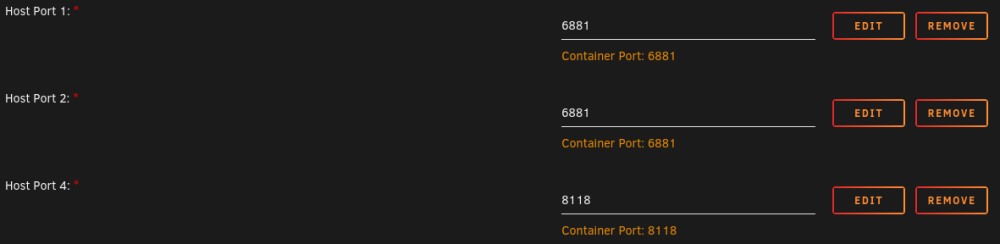
Can someone help explain what's going on here? My container on a dedicated bridge on eth1 shows these mappings. Note 8080. 6881 and 8118 look fine to me and make sense. In the config, there is no 8080. It shows this: Shouldn't the port mappings show 8081 or 8585? Why is 8080 shown in port mapping? Where is it getting 8081 from?


-
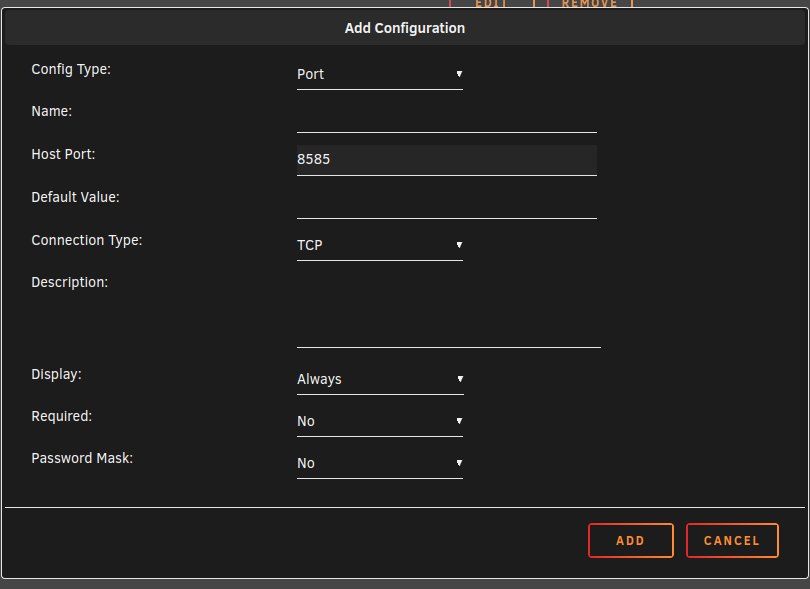
I guess the deal is there is no container port when on a custom network. Things are weird when using this new br1 I created on eth1. I noticed when I changed the WEBGUI_PORT to 8585, it does show up this way in the app - I just can't get to it without going through the proxy. The only thing that seems to work is leaving WEBGUI_PORT at 8080, configure Firefox to use the proxy, and then go into the app with 192.168.0.6:8080 and changing to 8585 in the app. If I do it any other way, I can't get to the ui without going through the proxy. I also see that my Host Port 3 is set to 8585 with the container port set to 8081 but 8081 doesnt show up in the port mappings.
-
Well, I tried that and there is no container port field when I click add. If I edit one of the existing ports, it shows a container port. I might just leave well enough alone.
-
Got qbittorrentvpn working after a long night. Had to change the webgui port. I had to turn on the proxy in a browser, then go to the webgui and change it in the app. One odd thing, even though I changed the webgui port to 8585, unRaid's port mapping still shows 8080. But hey, it works.
-
I got it! But it's weird. I had to change the webgui port to 8585 in the container settings and in the app itself. unRaid's port mapping still shows 8080, but it's actually 8585. I also found that some of the arr's cant resolve hostnames even though they are on the same custom network. So I put static IPs for everything.
-
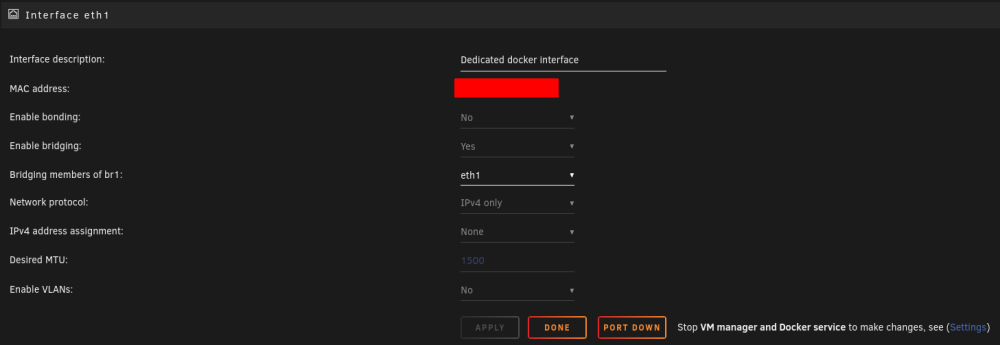
I think I got it! I had to turn off bridging on eth0 and change a few ports here and there. Everything seems to work except for qbittorrentvpn - I can't get to the webgui nor can the -arr's get to it. I can get to webgui of other containers just fine, just not this one. Nextcloud+Mariadb+Swag works fine on the new br1 too. If anyone has any suggestions, I'd appreciate it. I'll go pursue this in the binhex-qbittorrentvpn forum.
-
I changed my docker network to use a dedicated port on my server and now I can't get to the webgui of qbittorrentvpn. Here's what I did: https://forums.unraid.net/topic/137048-guide-how-to-solve-macvlan-and-ipvlan-issues-with-containers-on-a-custom-network/ The container now has an IP on the host's network. I can ping it, but it doesnt bring up the gui nor can the other arr's access it. If I put it back to bridge, it works fine. When on bridge, it got an ip of 172.17.0.2. When on the br1 bridge, it gets an IP of 192.168.0.10.
-
Can anyone help me? I think I'm missing something here but can't figure it out.


-
I see that there are folks having problems with a bot or something hitting Minecraft servers. One solution is to block a particular IP which I think I did in my router and it seems to have worked. I tried to use iptables inside of the container but I get an error as follows(that IP is the troublemaker): iptables -A INPUT -s 162.33.178.237 -j DROP iptables v1.8.9 (legacy): can't initialize iptables table filter: Permission denied (you must be root) Perhaps iptables or your kernel needs to be upgraded. Am I doing something wrong or is iptables not fully implemented in the container? I was also getting screen problems and using the command from the FAQ didn't work. Is there an updated command? I tried this: docker exec -u nobody -it binhex-minecraftserver /usr/bin/minecraftd console And it didn't work. Is there an updated command?
-
Uncle. I've tried to get this to work on my system but I think I'm missing something. While I was not getting macvlan issues, I figured I'd configure it this way on a separate network in anticipation of going to 6.12.x. Plus my R710 has 4 network ports - may as well use 'em. I configured my system as outlined in the original post. When I change my Swag container to use br1, I can't get to the webui. It seems with the old configuration using a custom docker network, it gives the container a different IP on a different network(172.18.0.3 443/80) that maps to the hosts network(192.168.0.100 1443/180). With proxynet custom docker network: 172.18.0.3:443/TCP <-> 192.168.0.100:1443 172.18.0.3:80/TCP <-> 192.168.0.100:180 With br1 configured as in this post: 192.168.0.2:443/TCP <-> 192.168.0.2:443 192.168.0.2:80/TCP <-> 192.168.0.2:80 Relative noob here. Hope someone can steer me in the right direction.
-
This month's parity check reported the correct information. My last one's reporting error must have been a fluke due to the scenario under which the parity check ran.




