





nraygun
Members
-
Joined
-
Last visited
Everything posted by nraygun
-
Thanks @TimTheSettler! So it's basically a weekly restart of the apcupsd daemon and no cause for concern, right?
-
@ConnerVTDid you ever find anything out about this log entry?
-
Any ideas why the parity completion message was wrong?
-
Wait a minute, it's showing the duration of the last parity operation. I had removed a virtually unused 500GB drive from the array and rebuilt the parity. That took the time as shown in the summary email. New question: Why did the parity check display the results of the prior parity operation? PS - Is my speed OK?
-
I have my system setup to run a parity check on the first of the month. It ran as scheduled and I got a confirmation email that it started on "May 1, 2023, 12:01 AM". It finished on "May 1, 2023, 6:59 PM". The summary email upon completion says, "Duration: 1 day, 4 hours, 32 minutes, 12 seconds. Average speed: 97.3 MB/s" Why does it say it took over a day when the start/stop emails say it took just under 19 hours?
-
I tried changing the mode without reconfiguring anything and not only did the containers not resolve host names, but my host server also does not resolve host names. I put it back, then tried to setup a second physical NIC but the interface would not show up in the containers. So I put everything back and have been running OK since. For a while there, the macvlan errors were happening pretty often.
-
Sorry to hear that. I'm still waiting to hear from someone if this whole thing is a bug or if this ipvlan stuff is the permanent fix. I was unable to implement the dual NIC thing and simply changing to ipvlan rendered my system pretty much inoperable. However, for the last week or so, it's been up with no sign of macvlan errors in the syslog. (knock on wood)
-
Thanks, but at this point I'm at a loss for what to do. This is above my pay grade! I just don't understand how setting up another ethernet port (I have 4 NICs on my R710) can still use macvlan and still work. Seems to have something to do with MAC addresses. Haven't had a warning/crash since the last reboot last night using macvlan. And when I get syslog entries on a possible macvlan issue, my server continues to operate. I'll see how it goes. Does anyone lknow what the overall plan is for this issue? Is this separate NIC thing a workaround or a permanent fix? Thought I saw somewhere that the macvlan issue was deemed a bug of some sort.
-
Thanks @JorgeB! As I mentioned in other posts, I had to go back to macvlan. I'll consider this one closed.
-
I get similar entries in my log but the system continues to run. Does your server crash? Here's what I get: Apr 22 22:57:49 flores kernel: WARNING: CPU: 23 PID: 3924 at net/netfilter/nf_conntrack_core.c:1208 __nf_conntrack_confirm+0xa5/0x2cb [nf_conntrack] Apr 22 22:57:49 flores kernel: Modules linked in: macvlan vhost_net tun vhost tap kvm_intel kvm xt_mark xt_CHECKSUM ipt_REJECT nf_reject_ipv4 ip6table_mangle ip6table_nat iptable_mangle vhost_iotlb xt_nat xt_tcpudp veth ipvlan xt_conntrack nf_conntrack_netlink nfnetlink xfrm_user xfrm_algo xt_addrtype br_netfilter xfs nfsd auth_rpcgss oid_registry lockd grace sunrpc md_mod tcp_diag inet_diag ipmi_devintf iptable_nat xt_MASQUERADE nf_nat nf_conntrack nf_defrag_ipv6 nf_defrag_ipv4 wireguard curve25519_x86_64 libcurve25519_generic libchacha20poly1305 chacha_x86_64 poly1305_x86_64 ip6_udp_tunnel udp_tunnel libchacha ip6table_filter ip6_tables iptable_filter ip_tables x_tables bridge stp llc bnx2 mgag200 drm_shmem_helper i2c_algo_bit drm_kms_helper drm sr_mod cdrom ipmi_ssif backlight intel_powerclamp coretemp crct10dif_pclmul crc32_pclmul crc32c_intel ghash_clmulni_intel aesni_intel crypto_simd cryptd intel_cstate intel_uncore mpt3sas i2c_core input_leds ahci syscopyarea led_class joydev sysfillrect ata_piix Apr 22 22:57:49 flores kernel: sysimgblt libahci fb_sys_fops raid_class scsi_transport_sas wmi ipmi_si acpi_power_meter button acpi_cpufreq unix [last unloaded: kvm] Apr 22 22:57:49 flores kernel: CPU: 23 PID: 3924 Comm: kworker/23:1 Tainted: G W I 5.19.17-Unraid #2 Apr 22 22:57:49 flores kernel: Hardware name: Dell Inc. PowerEdge R710/0YDJK3, BIOS 6.6.0 05/22/2018 Apr 22 22:57:49 flores kernel: Workqueue: events macvlan_process_broadcast [macvlan] Apr 22 22:57:49 flores kernel: RIP: 0010:__nf_conntrack_confirm+0xa5/0x2cb [nf_conntrack]
-
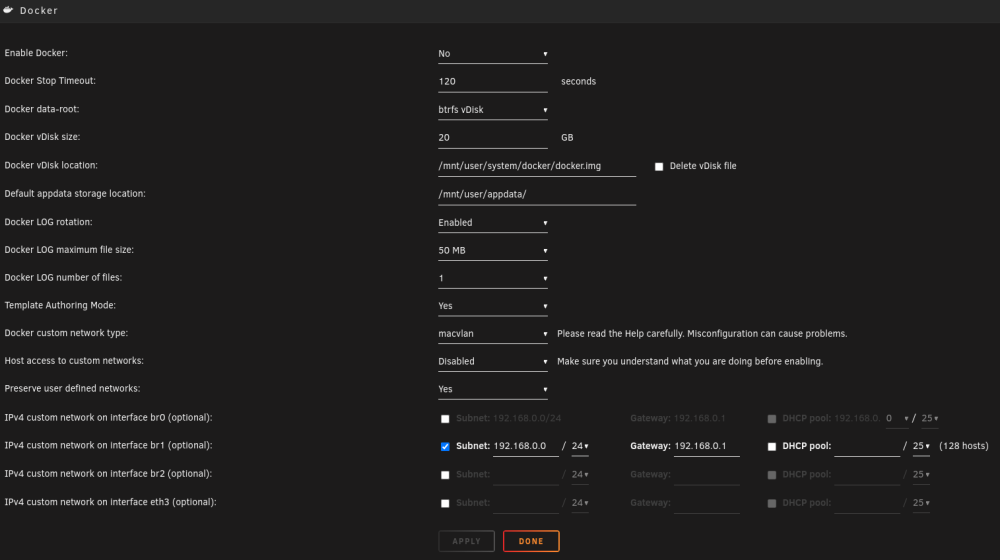
I'm on 6.11.5. and the br1 did not show up in the Docker containers as an option. I think it's still using whatever networks I had configured originally so I'll just leave it alone until someone provides suggestions on how to make br1 show up.
-
Nope. Using ipvlan renders my server inoperable. My server can't ping hosts and my DuckDNS no longer updates. Going back to macvlan restored all operation. While I get what appears to be crashes, my server stays operational. There's this post for setting up a separate network on a separated NIC that I might look into: https://forums.unraid.net/topic/137048-guide-how-to-solve-macvlan-and-ipvlan-issues-with-containers-on-a-custom-network/ But as far as the crashes from libtorrent, I think I'm good using the old qbittorrent container with libtorrent 1.x.
-
I've had no problems prior to going to 6.11.5. I recently shrank my array to remove a 500GB drive and started seeing the macvlan message in FCP. I tried changing the custom network type to ipvlan as suggested in a few posts, but then that almost renders my server inoperable. My host can't ping host names(www.google.com, www.microsoft.com, etc.). And the Apps area doesn't update its contents(probably because it can't resolve host names). Also, my DuckDNS container won't update and I can't ping hosts inside of that either. Putting the custom network back to macvlan restores operation of my host and the DuckDNS container(updates and pings hosts). Even though I get what appears to be some sort of crash in the logs, things are operational. Containers work, GUI is fine, shares are fine, etc. Should I just stay with macvlan and leave well enough alone?
-
Got this entry in the syslog: kernel: BUG: Bad page cache in process php-fpm81 pfn:fd010f Later in the log it looks like a crash of some sort. I don't notice anything out of the ordinary in the GUI, shares, or docker containers. I recently shrank my array by removing a 500GB drive that wasn't used much, rebuilt the parity, and switched to ipvlan for the customer network for Docker. Should I worry? flores-diagnostics-20230422-1009.zip
-
Parity done, changed to ipvlan, rebooted - all good I think. There's an entry about a kernel bug that I'll post in a different thread, but I think the macvlan crash should be OK now.
-
I had tried that and it caused my DuckDNS container to stop working. Putting it back to macvlan restored operation. Maybe once the parity is done building, I'll try it again with a reboot.
-
Had a crash - sort of. I removed one of my drives from the array using a method from SpaceInvader One. That went fine. At some point during this process, I got what appears to be a crash: CPU: 22 PID: 18564 Comm: kworker/22:0 Tainted: G I 5.19.17-Unraid #2 Workqueue: events macvlan_process_broadcast [macvlan] Everything seems fine and I didn't notice this crash until I looked in the logs. I've seen mention of this type of crash in other threads. It's rebuilding the parity since I removed a drive. Once this is done, I'll reboot one more time and monitor.
-
I tried changing to ipvlan and it broke DuckDNS. Putting it back restored operation. Not sure why. It's not on a custom network, just Host. Guess I'll leave it alone unless someone else has some guidance. Seems that the plugin should flag macvlan as a warning versus an error.
-
I got this macvlan error too and not sure if it's a simple matter of changing that option in the Docker settings area. Did you have to recreate the vlan after making this setting change so it uses ipvlan instead of macvlan?
-
Hey @trwolff04 - All good here, how about you? No crashes (although my machine didn't crash much - maybe a few times) But qbittorrent is up and stable. And the UI is good too.
-
Yep, same here. Now we wait! (I'll go update the other post to let them know I went to qbittorrent 4.3.9-2-01)
-
@trwolff04 Did you just recently go to this version in an effort to resolve the server crashes or have you been getting server crashes even with this version of qbittorrent? I just went ahead and got qbittorrent operational. Wasn't too bad. Testing it now.
-
I found another thread that might imply the Deluge problems I'm having and a few server crashes are related. https://forums.unraid.net/bug-reports/stable-releases/crashes-since-updating-to-v611x-for-qbittorrent-and-deluge-users-r2153/page/8/?tab=comments
-
I didn't see any recommendations for binhex/arch-delugevpn users so I asked for help in the thread JorgeB provided.
-
Thanks @JorgeB! My server is not, thankfully, crashing as much as others are reporting. I guess what we're seeing here is maybe my delugevpn errors and server crashes are related. I'll have to look through this thread for the version of binhex/arch-delugevpn that uses libtorrent 1.x. Not sure I want to switch out the whole bittorrent VPN container for another one. That'll be my last resort. I'm a relative noob on this stuff.

